sketchucation logo sketchucation
    • Login
    Oops, your profile's looking a bit empty! To help us tailor your experience, please fill in key details like your SketchUp version, skill level, operating system, and more. Update and save your info on your profile page today!
    Mac User? | Join the Rayscaper Beta for Mac Learn More

    [Plugin][$] Vertex Tools

    Scheduled Pinned Locked Moved Plugins
    667 Posts 92 Posters 655.9k Views 92 Watching
    Loading More Posts
    • Oldest to Newest
    • Newest to Oldest
    • Most Votes
    Reply
    • Reply as topic
    Log in to reply
    This topic has been deleted. Only users with topic management privileges can see it.
    • O
      optimaforever
      last edited by

      you're welcome;
      it's the least I can do for my favourite dev πŸ˜„

      1 Reply Last reply
      Reply Quote 0
      • thomthomT
        thomthom
        last edited by

        That's mighty kind of you to say. πŸ˜„

        I've logged both the feature request for the gizmo alignment and the quick-select issue.

        Thomas Thomassen β€” SketchUp Monkey & Coding addict
        List of my plugins and link to the CookieWare fund

        1 Reply Last reply
        Reply Quote 0
        • E
          Emily75
          last edited by

          Hello, I've just bought Vertex Tools. Everything seems to work fine, i'm on Sketchup PRO 2018 on Mac OSX, except one point :

          I'm unable to precisely control the distance or proportion using the vertex Gizmo. I can't access to the VCB to control that. (actually I just can control the soft selection radius).

          How can I do ? Thanks

          1 Reply Last reply
          Reply Quote 0
          • O
            optimaforever
            last edited by

            So far I don't think you can do it that way.
            With Select Mode and the gizmo you can move freely some vertices but it can be precise if you use Sketchup's own length snapping (1mm, 1cm, 1m and so on; just choose a value that is pertinent in your model).
            With Move mode, choose a vertex, a direction (vector),and type the desired length in the VCB.

            1 Reply Last reply
            Reply Quote 0
            • thomthomT
              thomthom
              last edited by

              There appear to have been a regression in V1.2. I have it logged. But no fix as of yet.

              Thomas Thomassen β€” SketchUp Monkey & Coding addict
              List of my plugins and link to the CookieWare fund

              1 Reply Last reply
              Reply Quote 0
              • O
                optimaforever
                last edited by

                Thomas, you mean it was possible earlier?

                1 Reply Last reply
                Reply Quote 0
                • thomthomT
                  thomthom
                  last edited by

                  You know what, I'm a little unsure to be honest. I might be confusing it with the non-gizmo Move tool...

                  Thomas Thomassen β€” SketchUp Monkey & Coding addict
                  List of my plugins and link to the CookieWare fund

                  1 Reply Last reply
                  Reply Quote 0
                  • HieruH
                    Hieru
                    last edited by

                    I'm fairly certain it was a feature a while back, but was then lost in an update.

                    I've mentioned it before and seem to recall you saying that it was on your to-do list for Version 2, but I could be wrong.

                    www.davidhier.co.uk

                    1 Reply Last reply
                    Reply Quote 0
                    • thomthomT
                      thomthom
                      last edited by

                      Yea - that sounds familiar. The work on SUbD made me forget some of the details of existing Vertex Tools issues. Seeing how VT2 is taking longer to complete, I may have to do a bug patch to v1.2.

                      Thomas Thomassen β€” SketchUp Monkey & Coding addict
                      List of my plugins and link to the CookieWare fund

                      1 Reply Last reply
                      Reply Quote 0
                      • N
                        numerobis
                        last edited by

                        As i said earlier i would prefer a simple edge constraint toggle like in max instead of having to align the gizmo first every time i want to move a vertex along an edge...

                        1 Reply Last reply
                        Reply Quote 0
                        • M
                          MichaelSiggers
                          last edited by

                          Hi @thomthom

                          This is a genius plugin!

                          Purchased a couple of days ago and I love it.

                          Only thing is, I second the comment about being able to type in a distance when moving a selection with the Gizmo.

                          Brilliant work though. Thankyou.

                          Kind regards

                          Mike

                          1 Reply Last reply
                          Reply Quote 0
                          • thomthomT
                            thomthom
                            last edited by

                            Version 1.2.11

                            Improvements

                            • Added Serbian translations.
                            • Added Albanian translations.
                            • Updated Spanish translations.

                            Fixes

                            • Fixed Gizmo VCB adjustments not working.

                            Thomas Thomassen β€” SketchUp Monkey & Coding addict
                            List of my plugins and link to the CookieWare fund

                            1 Reply Last reply
                            Reply Quote 0
                            • M
                              MichaelSiggers
                              last edited by

                              Thank you Thomas πŸ˜„ πŸ˜„ πŸ˜„ πŸ˜„ πŸ˜„ πŸ˜„

                              Mike

                              1 Reply Last reply
                              Reply Quote 0
                              • O
                                optimaforever
                                last edited by

                                Great!
                                To be sure:

                                1. select vertices
                                2. use VT's select mode (gizmo) and begin moving the vertices along red, green or blue axis.
                                3. WHILE keeping left mouse button down, type desired value in VCB. type enter.
                                4. the vertices gets moved along axis
                                5. RELEASE left mouse button.

                                Once you release the LMB, VCB awaits for soft select radius value, so it doesn't work like the move tool of Sketchup, where you can change your mind afterwards and tweak the move value.

                                Is it correct?

                                PS I realized that this behaviour works also for scale and rotate. Type value in VCB while keeping LMB pressed down. Once you press enter, the vertices gets modified according to the value.
                                It's just tricky for cases where I need to press Shift with my left hand while keeping the LMB pressed down. I noticed that you can release Shift after you began the scale movement and type a value in the VCB but you can't move the mouse otherwise the Shift indication gets lost.

                                1 Reply Last reply
                                Reply Quote 0
                                • thomthomT
                                  thomthom
                                  last edited by

                                  @optimaforever said:

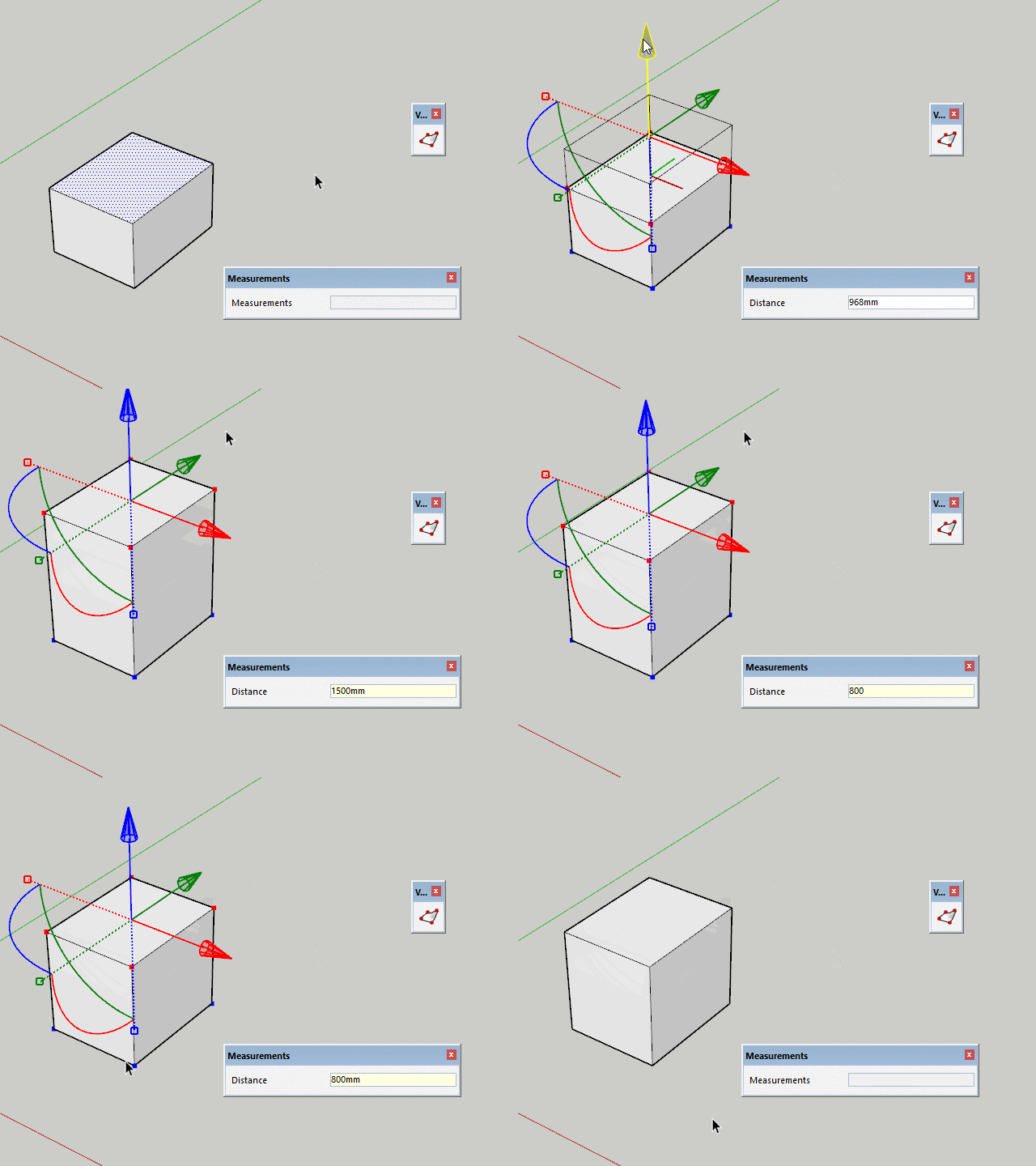
                                  Once you release the LMB, VCB awaits for soft select radius value, so it doesn't work like the move tool of Sketchup, where you can change your mind afterwards and tweak the move value.

                                  With 1.2.11 you should be able to adjust after releasing LMB.
                                  2018-02-04_10h42_19.gif

                                  Thomas Thomassen β€” SketchUp Monkey & Coding addict
                                  List of my plugins and link to the CookieWare fund

                                  1 Reply Last reply
                                  Reply Quote 0
                                  • O
                                    optimaforever
                                    last edited by

                                    Thanks Thomas.
                                    It works indeed as you said.
                                    However I think I have a problem with the latest VT as it hangs SU at launch.
                                    And second, when I try to Ctrl+move an edge AND type a value in the VCB afterwards, it bugs.

                                    1 Reply Last reply
                                    Reply Quote 0
                                    • Bob JamesB
                                      Bob James
                                      last edited by

                                      Should I assume that "Make Planar to a custom plane" won't happen until V2?

                                      i7-4930K 3.4Ghz, 2x GTX780 6GB, 32GB DDR3-1600 ECC, OCZ Vertex 4 500GB, WD Black 3TB, 32TB NAS, 4x 27" Monitors, SpaceMouse Pro, X-keys XK-60

                                      1 Reply Last reply
                                      Reply Quote 0
                                      • thomthomT
                                        thomthom
                                        last edited by

                                        @optimaforever said:

                                        However I think I have a problem with the latest VT as it hangs SU at launch.

                                        SU freeze? Permanently? I see no reason for any change in startup. Minimal code was touched...

                                        @optimaforever said:

                                        And second, when I try to Ctrl+move an edge AND type a value in the VCB afterwards, it bugs.

                                        Is this a new bug?

                                        Thomas Thomassen β€” SketchUp Monkey & Coding addict
                                        List of my plugins and link to the CookieWare fund

                                        1 Reply Last reply
                                        Reply Quote 0
                                        • O
                                          optimaforever
                                          last edited by

                                          I don't know if this is a new bug but it happens right after typing the value in the VCB. Your bug window appears and I have already sent the bug message to you.

                                          1 Reply Last reply
                                          Reply Quote 0
                                          • thomthomT
                                            thomthom
                                            last edited by

                                            I'm able to reproduce. I think I have a fix, but I need to test if it breaks other stuff.

                                            Thomas Thomassen β€” SketchUp Monkey & Coding addict
                                            List of my plugins and link to the CookieWare fund

                                            1 Reply Last reply
                                            Reply Quote 0

                                            Hello! It looks like you're interested in this conversation, but you don't have an account yet.

                                            Getting fed up of having to scroll through the same posts each visit? When you register for an account, you'll always come back to exactly where you were before, and choose to be notified of new replies (either via email, or push notification). You'll also be able to save bookmarks and upvote posts to show your appreciation to other community members.

                                            With your input, this post could be even better πŸ’—

                                            Register Login
                                            • 1
                                            • 2
                                            • 5
                                            • 6
                                            • 7
                                            • 8
                                            • 9
                                            • 33
                                            • 34
                                            • 7 / 34
                                            • First post
                                              Last post
                                            Buy SketchPlus
                                            Buy SUbD
                                            Buy WrapR
                                            Buy eBook
                                            Buy Modelur
                                            Buy Vertex Tools
                                            Buy SketchCuisine
                                            Buy FormFonts

                                            Advertisement