sketchucation logo sketchucation
    • 登入
    Oops, your profile's looking a bit empty! To help us tailor your experience, please fill in key details like your SketchUp version, skill level, operating system, and more. Update and save your info on your profile page today!
    🔌 Smart Spline | Fluid way to handle splines for furniture design and complex structures. Download

    [Plugin][$] Vertex Tools

    已排程 已置頂 已鎖定 已移動 Plugins
    667 貼文 92 Posters 434.0k 瀏覽 92 Watching
    正在載入更多貼文
    • 從舊到新
    • 從新到舊
    • 最多點贊
    回覆
    • 在新貼文中回覆
    登入後回覆
    此主題已被刪除。只有擁有主題管理權限的使用者可以查看。
    • panixiaP 離線
      panixia
      最後由 編輯

      can't wait 😄

      1 條回覆 最後回覆 回覆 引用 0
      • pbacotP 離線
        pbacot
        最後由 編輯

        Powerful and excellent tool! Fun too! My main problem with vertex tools, you can't pick a point and use inferences with the Gizmo. I often default to the simple point move tool to do that. Am I missing something?

        MacOSX MojaveSketchUp Pro v19 Twilight v2 Thea v3 PowerCADD

        1 條回覆 最後回覆 回覆 引用 0
        • pbacotP 離線
          pbacot
          最後由 編輯

          @thomthom said:

          @xiombarg said:

          I'm working on a curvey looking spaceship that normally I would never use Sketchup to create, but with VT (along with Artisan for the subdividing), Sketchup is now a capable option. I'll try and post it up when it gets closer to being done.

          Got some work in progress screenshots? I'd love to see what you're working on.

          Early progress shots especially.

          MacOSX MojaveSketchUp Pro v19 Twilight v2 Thea v3 PowerCADD

          1 條回覆 最後回覆 回覆 引用 0
          • thomthomT 離線
            thomthom
            最後由 編輯

            @pbacot said:

            Powerful and excellent tool! Fun too! My main problem with vertex tools, you can't pick a point and use inferences with the Gizmo. I often default to the simple point move tool to do that. Am I missing something?

            How would you expect inference to work with the Gizmo?
            Are you manipulating single or multiple vertices with the Gizmo?

            Thomas Thomassen — SketchUp Monkey & Coding addict
            List of my plugins and link to the CookieWare fund

            1 條回覆 最後回覆 回覆 引用 0
            • pbacotP 離線
              pbacot
              最後由 編輯

              I mean I when I move it, after picking the direction, I want to be able to pick a point (most likely at the center of the selection) then move it relative to (inference) another point on the model, sort of a target point. Often it's not for exact lineup but for some frame of reference for the move. (Sometimes I do move single points with it. Maybe there's no point using it for that?)

              MacOSX MojaveSketchUp Pro v19 Twilight v2 Thea v3 PowerCADD

              1 條回覆 最後回覆 回覆 引用 0
              • panixiaP 離線
                panixia
                最後由 編輯

                @pbacot said:

                I often default to the simple point move tool to do that. Am I missing something?

                maybe you are missing that if you activate the move tool with soft selection turned on, it does exactly what you are asking for 👍
                or pheraps i did'nt 100% understand your point..

                1 條回覆 最後回覆 回覆 引用 0
                • sicksickisckS 離線
                  sicksickisck
                  最後由 編輯

                  my works with vertex tool [and tgi3d and fredo monster tools 🤣 👊 ]
                  https://www.artstation.com/artwork/staff-001-modules-concept-artof-ancient-space
                  some progress..
                  https://www.artstation.com/artwork/infiltrator_art2
                  vertex tool is very very useful tool,, so far, for me 🎉

                  1 條回覆 最後回覆 回覆 引用 0
                  • thomthomT 離線
                    thomthom
                    最後由 編輯

                    @sicksickisck said:

                    my works with vertex tool [and tgi3d and fredo monster tools 🤣 👊 ]
                    https://www.artstation.com/artwork/staff-001-modules-concept-artof-ancient-space
                    some progress..
                    https://www.artstation.com/artwork/infiltrator_art2
                    vertex tool is very very useful tool,, so far, for me 🎉

                    That looks amazing! Loving the Infiltrator!

                    Thomas Thomassen — SketchUp Monkey & Coding addict
                    List of my plugins and link to the CookieWare fund

                    1 條回覆 最後回覆 回覆 引用 0
                    • panixiaP 離線
                      panixia
                      最後由 編輯

                      impressive.

                      1 條回覆 最後回覆 回覆 引用 0
                      • B 離線
                        bsfranza
                        最後由 編輯

                        hi there,

                        just wantet to state a feature request for vertex tools 😃

                        how about the option to merge vertices to a designated spot/selected vertice? that would really help!

                        thanks

                        1 條回覆 最後回覆 回覆 引用 0
                        • panixiaP 離線
                          panixia
                          最後由 編輯

                          i'm pretty much sure Thom WILL add it in the next version. along with some other really cool features.. 😛

                          1 條回覆 最後回覆 回覆 引用 0
                          • thomthomT 離線
                            thomthom
                            最後由 編輯

                            Indeed - future release of Vertex Tools will have such a feature. 😄

                            Thomas Thomassen — SketchUp Monkey & Coding addict
                            List of my plugins and link to the CookieWare fund

                            1 條回覆 最後回覆 回覆 引用 0
                            • B 離線
                              bsfranza
                              最後由 編輯

                              😃 nice to hear - now i wish you for the next year the time to implement and release - may the sales be with you!

                              1 條回覆 最後回覆 回覆 引用 0
                              • Bob JamesB 離線
                                Bob James
                                最後由 編輯

                                @thomthom said:

                                Indeed - future release of Vertex Tools will have such a feature. 😄

                                Are you using human or geological frame of time? 😎 😆

                                i7-4930K 3.4Ghz, 2x GTX780 6GB, 32GB DDR3-1600 ECC, OCZ Vertex 4 500GB, WD Black 3TB, 32TB NAS, 4x 27" Monitors, SpaceMouse Pro, X-keys XK-60

                                1 條回覆 最後回覆 回覆 引用 0
                                • C 離線
                                  cuttingedge
                                  最後由 編輯

                                  Thomas, can we chamfer a vertex? or vertices at the same time with some given parameters as in max?

                                  1 條回覆 最後回覆 回覆 引用 0
                                  • thomthomT 離線
                                    thomthom
                                    最後由 編輯

                                    @cuttingedge said:

                                    Thomas, can we chamfer a vertex? or vertices at the same time with some given parameters as in max?

                                    At the moment no - but I'm working on version 2.

                                    However, it's been a while since I used Max - do you have some visuals of what this feature looks like? GIF?

                                    Thomas Thomassen — SketchUp Monkey & Coding addict
                                    List of my plugins and link to the CookieWare fund

                                    1 條回覆 最後回覆 回覆 引用 0
                                    • R 離線
                                      rv1974
                                      最後由 編輯

                                      thomthom, please add edge extrude (with option for negative values).
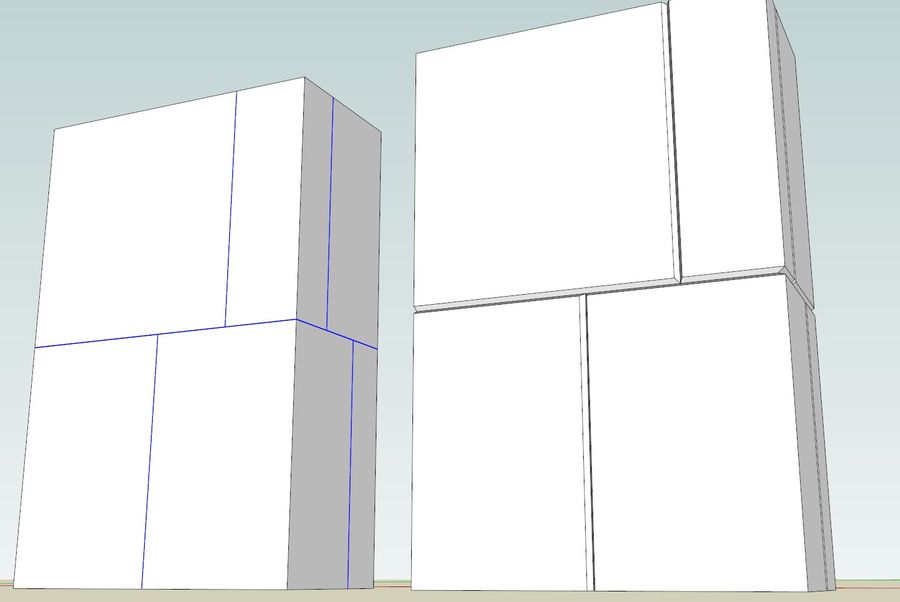

                                      Capture.JPG

                                      1 條回覆 最後回覆 回覆 引用 0
                                      • R 離線
                                        rv1974
                                        最後由 編輯

                                        http://www.polyboost.com/features_modelling.htm
                                        Here you've got endless source for inspiration. They were bought out by AD and became 'graphite tools' inside 3ds Max. The amount of work is huge so I guess you should cooperate with Fredo and found start-up for porting Polyboost set to SU 😄

                                        1 條回覆 最後回覆 回覆 引用 0
                                        • C 離線
                                          cuttingedge
                                          最後由 編輯

                                          @thomthom said:

                                          This is a screen shot of two of the other things to do with vertex-

                                          Chamfer (or offset if no value to chamfer) and Extrude.
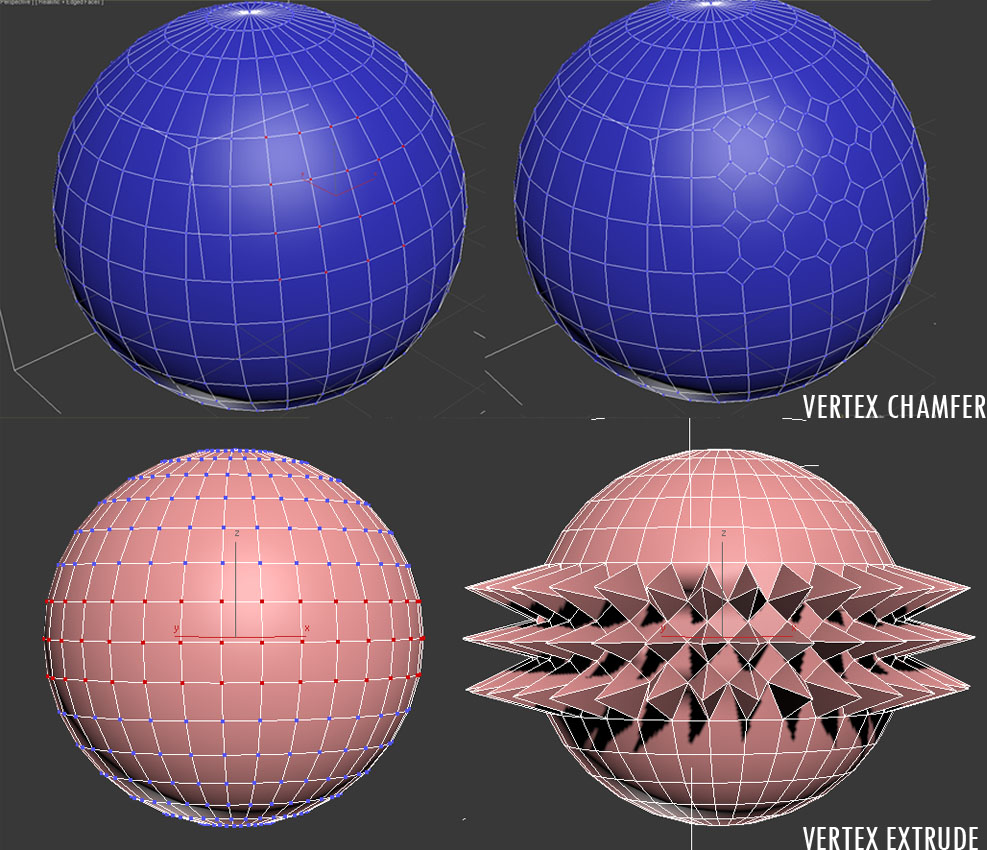
                                          vertex edit

                                          Not for any particular model in mind at the moment but I just like the ability to control vertices with some common parameters to play with. By playing around sometimes inspiration comes!

                                          I dont know if this is something in your immediate plans.

                                          Do you plan to include inset?. I dont know if it falls under the category of vertex though.

                                          .

                                          1 條回覆 最後回覆 回覆 引用 0
                                          • HieruH 離線
                                            Hieru
                                            最後由 編輯

                                            Am I right in thinking that you should be able to enter a relative value when extruding?

                                            Just trying to figure out if I'm misremembering this function or if another plugin is causing a conflict.

                                            www.davidhier.co.uk

                                            1 條回覆 最後回覆 回覆 引用 0
                                            • 1
                                            • 2
                                            • 16
                                            • 17
                                            • 18
                                            • 19
                                            • 20
                                            • 33
                                            • 34
                                            • 18 / 34
                                            • 第一個貼文
                                              最後的貼文
                                            Buy SketchPlus
                                            Buy SUbD
                                            Buy WrapR
                                            Buy eBook
                                            Buy Modelur
                                            Buy Vertex Tools
                                            Buy SketchCuisine
                                            Buy FormFonts

                                            Advertisement



