sketchucation logo sketchucation
    • Login
    Oops, your profile's looking a bit empty! To help us tailor your experience, please fill in key details like your SketchUp version, skill level, operating system, and more. Update and save your info on your profile page today!
    Mac User? | Join the Rayscaper Beta for Mac Learn More

    [Request] - Component's options report

    Scheduled Pinned Locked Moved Plugins
    27 Posts 8 Posters 6.3k Views 8 Watching
    Loading More Posts
    • Oldest to Newest
    • Newest to Oldest
    • Most Votes
    Reply
    • Reply as topic
    Log in to reply
    This topic has been deleted. Only users with topic management privileges can see it.
    • D
      dedmin
      last edited by

      Two more - nothings works.
      http://rhin.crai.archi.fr/rubylibrarydepot/plugin_details.php?id=551
      http://rhin.crai.archi.fr/rubylibrarydepot/plugin_details.php?id=487

      1 Reply Last reply
      Reply Quote 0
      • D
        dedmin
        last edited by

        Up.

        1 Reply Last reply
        Reply Quote 0
        • D
          dedmin
          last edited by

          So, nobody knows a way to use all this data that we can put in an dynamic component? I tried with Generate report but it's useless - with 60-70 components it freezes SketchUP and the report is a real mess! I think this attributes can be a shortest way to have some BOM inside SketchUP!

          1 Reply Last reply
          Reply Quote 0
          • D
            dedmin
            last edited by

            I'm keep on searching for a solution and found this - http://code.google.com/intl/bg/apis/sketchup/docs/tutorial_attrreporting.html

            But getting error when trying to load it:

            C;\Program Files\Google\Google SketchUp 7\Plugins\attrreporter.rb;199; warning; parenthesize argument(s) for future version
            Error; #<SyntaxError; C;\Program Files\Google\Google SketchUp 7\Plugins\attrreporter.rb;163; syntax error
              # Clean up any point rounding weirdness for purposes of display andfilename.split('.').last
                                                                                                   ^
            C;\Program Files\Google\Google SketchUp 7\Plugins\attrreporter.rb;199; syntax error
              #      the value of the attribute, or nil if it can't determine that
                                                                   ^
            C;\Program Files\Google\Google SketchUp 7\Plugins\attrreporter.rb;538; syntax error>
            C;/Program Files/Google/Google SketchUp 7/Plugins/rubytoolbar.rb;135;in `load'
            C;/Program Files/Google/Google SketchUp 7/Plugins/rubytoolbar.rb;135;in `rt_load'
            C;/Program Files/Google/Google SketchUp 7/Plugins/rubytoolbar.rb;180
            C;/Program Files/Google/Google SketchUp 7/Plugins/rubytoolbar.rb;180;in `call'
            
            1 Reply Last reply
            Reply Quote 0
            • TIGT
              TIG Moderator
              last edited by

              There's an error in that published script ! πŸ˜’
              I suspect that

              value = value.gsub(/\"/,'"')
              value = value.gsub(/\'/,''')
              return value
              

              should be

              value = value.gsub(/\"/,'"')
              value = value.gsub(/\'/,'"')
              return value
              

              around line #159..............

              TIG

              1 Reply Last reply
              Reply Quote 0
              • GaieusG
                Gaieus
                last edited by

                Well TIG, I am not a coder but to my eyes, the two sniplets look exactly alike. πŸ˜’


                Edit; found the difference!

                Gai...

                1 Reply Last reply
                Reply Quote 0
                • TIGT
                  TIG Moderator
                  last edited by

                  ' ' ' >> ' " '
                  One 'character' is all it takes to **** up a script -
                  is there quality control at Google ??? πŸ˜’

                  TIG

                  1 Reply Last reply
                  Reply Quote 0
                  • D
                    dedmin
                    last edited by

                    πŸ‘ πŸ‘ πŸ‘ πŸ‘ πŸ‘ πŸ‘

                    2010-08-19_211023.jpg

                    1 Reply Last reply
                    Reply Quote 0
                    • D
                      dedmin
                      last edited by

                      SketchUP's Generate Report freezes the program just at 1 components
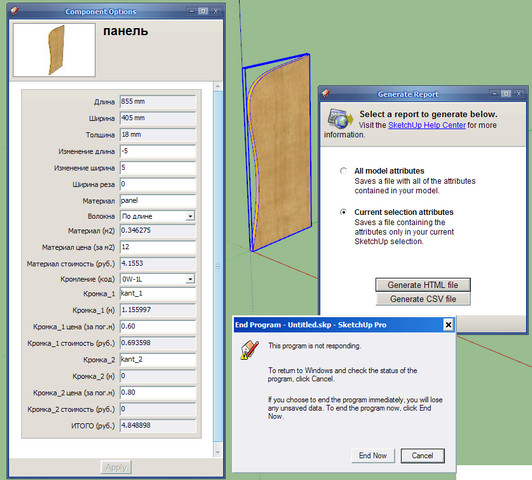
                      2010-08-19_211533.jpg

                      But this script is working fine so far!!

                      1 Reply Last reply
                      Reply Quote 0
                      • D
                        dedmin
                        last edited by

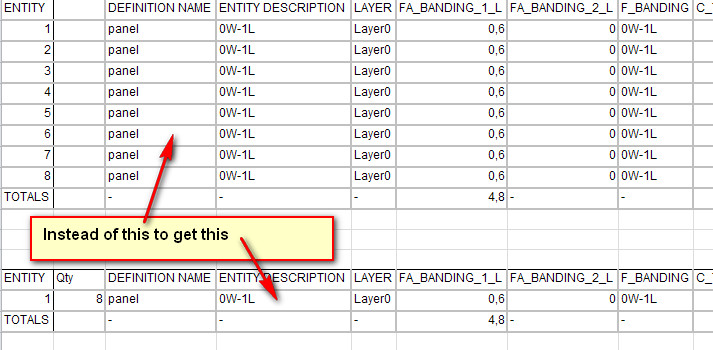
                        Now, that at least we can extract some data is there a way to filtered it. For instance to get components quantity and

                        2010-08-19_214334.jpg

                        2010-08-19_214415.jpg

                        1 Reply Last reply
                        Reply Quote 0
                        • D
                          dedmin
                          last edited by

                          Up.

                          1 Reply Last reply
                          Reply Quote 0
                          • D
                            dedmin
                            last edited by

                            I found a way to convert the inches, but the problem with counting components still remain. Any idea how to include this into the report? πŸ˜’

                            1 Reply Last reply
                            Reply Quote 0
                            • D
                              dedmin
                              last edited by

                              Still hoping... πŸ‘Š

                              1 Reply Last reply
                              Reply Quote 0
                              • TIGT
                                TIG Moderator
                                last edited by

                                Since your example is written in 'Cyrillic' [?] it's hard to understand... Ddo you find the details of a component and also want to show a total number of it in the report - like on the Entity Info window ?
                                You need to find its definition and then its instances and count them, the format the html/csv to include the 'count' - something like...

                                ss=model.selection
                                ents=ss.to_a
                                ### OR ents=model.entities
                                ### OR ents=model.active_entities
                                defns=[] ### to become a list of used definitions
                                ents.each{|e|
                                  if e.class==Sketchup;;ComponentInstance
                                    defns<< e.definition if not defns.include?(e.definition)
                                  end#if
                                }
                                counts=[] ### to become a collection of definitions [by name] and their instance counts [as a string]
                                defns.each[|d|
                                  counts<< [d.name, d.instances.length.to_s]
                                }
                                
                                
                                • note it's untested!
                                  You now have an array of selected [or all used] definitions by name, paired with the total of their instances....
                                  So to output it to the Ruby Console use something like...
                                counts.each{|e|
                                  puts e[0]+"\t"+e[1]
                                }
                                

                                I'll leave the formating of the csv / html lines etc to you or others............. πŸ€“

                                TIG

                                1 Reply Last reply
                                Reply Quote 0
                                • D
                                  dedmin
                                  last edited by

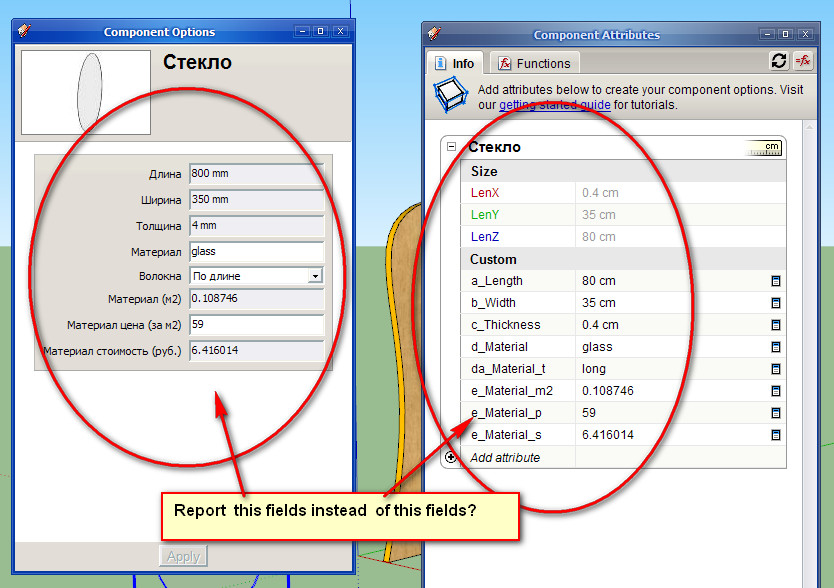
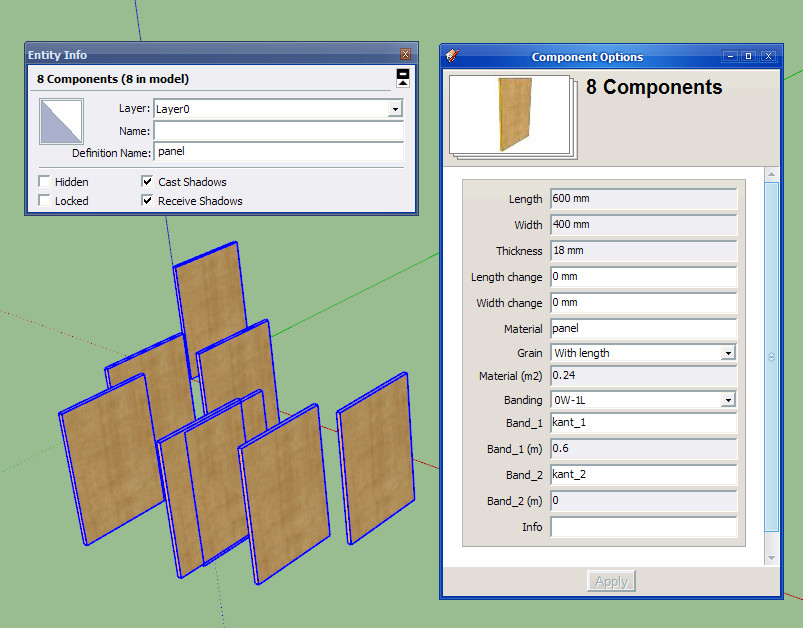
                                  Thanks so much! I made a component in English to show what I mean:
                                  2010-08-22_193107.jpg
                                  2010-08-22_193044.jpg

                                  The report is a real mess and in inches, but I managed to clean it up in Excel.

                                  1 Reply Last reply
                                  Reply Quote 0
                                  • TIGT
                                    TIG Moderator
                                    last edited by

                                    So you are almost sorted πŸ˜„

                                    TIG

                                    1 Reply Last reply
                                    Reply Quote 0
                                    • C
                                      Cjoenck
                                      last edited by

                                      I did need a plugin to creat a simple list of components with: LenX, LenZ, LenY, Material, and Name
                                      Not the boundinbox, because sometime in the draw the component could stay in angle different that axes.
                                      Please need help, Could give a good Cookie to your jar.
                                      Will use this to report list of furniture components to outside software that will calculate price.
                                      Need SAP!
                                      Best Regards
                                      πŸ˜• Celio

                                      1 Reply Last reply
                                      Reply Quote 0
                                      • G
                                        Garry K
                                        last edited by

                                        I'm thinking of creating a report writer that allows you to pick, choose and specify the order of columns in a csv report. The report definition can then be given a name that you can choose from a pick list when running subsequent reports.

                                        Any one interested?

                                        1 Reply Last reply
                                        Reply Quote 0
                                        • K
                                          katalikammello
                                          last edited by

                                          I'm really interested in this!
                                          I would like to help as well but I'm a complete beginner 😞

                                          1 Reply Last reply
                                          Reply Quote 0
                                          • G
                                            Garry K
                                            last edited by

                                            If there is enough interest then I would jump into it -- otherwise this is on a back burner.

                                            1 Reply Last reply
                                            Reply Quote 0

                                            Hello! It looks like you're interested in this conversation, but you don't have an account yet.

                                            Getting fed up of having to scroll through the same posts each visit? When you register for an account, you'll always come back to exactly where you were before, and choose to be notified of new replies (either via email, or push notification). You'll also be able to save bookmarks and upvote posts to show your appreciation to other community members.

                                            With your input, this post could be even better πŸ’—

                                            Register Login
                                            • 1
                                            • 2
                                            • 1 / 2
                                            • First post
                                              Last post
                                            Buy SketchPlus
                                            Buy SUbD
                                            Buy WrapR
                                            Buy eBook
                                            Buy Modelur
                                            Buy Vertex Tools
                                            Buy SketchCuisine
                                            Buy FormFonts

                                            Advertisement