sketchucation logo sketchucation
    • 登入
    Oops, your profile's looking a bit empty! To help us tailor your experience, please fill in key details like your SketchUp version, skill level, operating system, and more. Update and save your info on your profile page today!
    🔌 Smart Spline | Fluid way to handle splines for furniture design and complex structures. Download

    [Plugin][$] Curviloft 2.0a - 31 Mar 24 (Loft & Skinning)


    已排程 已置頂 已鎖定 已移動 Plugins
    1.3k 貼文 299 Posters 2.5m 瀏覽 297 Watching
    正在載入更多貼文
    • 從舊到新
    • 從新到舊
    • 最多點贊
    回覆
    • 在新貼文中回覆
    登入後回覆
    此主題已被刪除。只有擁有主題管理權限的使用者可以查看。
    • A 離線
      awkonradi
      最後由 編輯

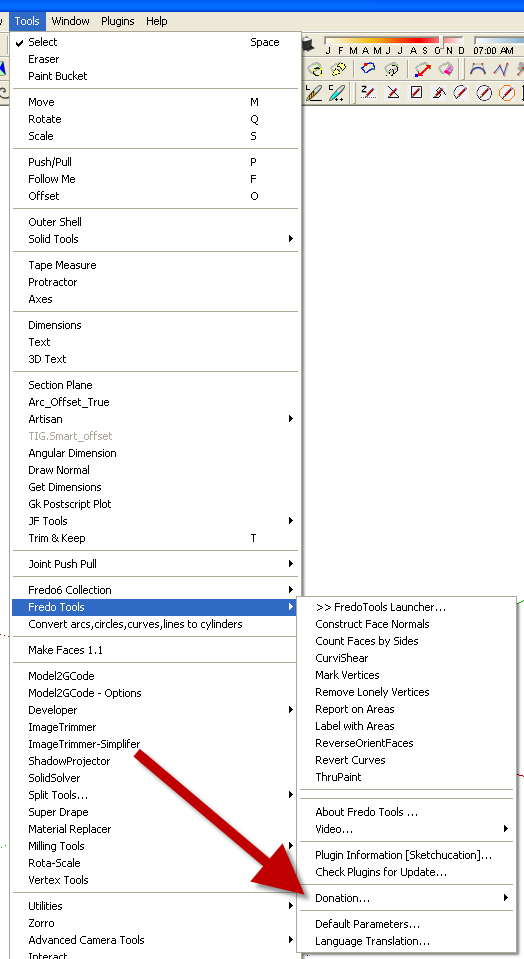
      Would someone please direct me to a "Donate" button for this plug-in?

      1 條回覆 最後回覆 回覆 引用 0
      • Dave RD 離線
        Dave R
        最後由 編輯

        donate.png

        Etaoin Shrdlu

        %

        (THERE'S NO PLACE LIKE)

        G28 X0.0 Y0.0 Z0.0

        M30

        %

        1 條回覆 最後回覆 回覆 引用 0
        • A 離線
          awkonradi
          最後由 編輯

          EDIT: Sorry, I just found the Fredo6 at PayPal menu item in Curviloft. All set here.

          Thank you Dave R.

          Do you recommend I install this plug-in, in order to follow your instructions?

          http://sketchucation.com/forums/viewtopic.php?t=42089

          That would be fine. I just want to do this right.

          1 條回覆 最後回覆 回覆 引用 0
          • T 離線
            trion
            最後由 編輯

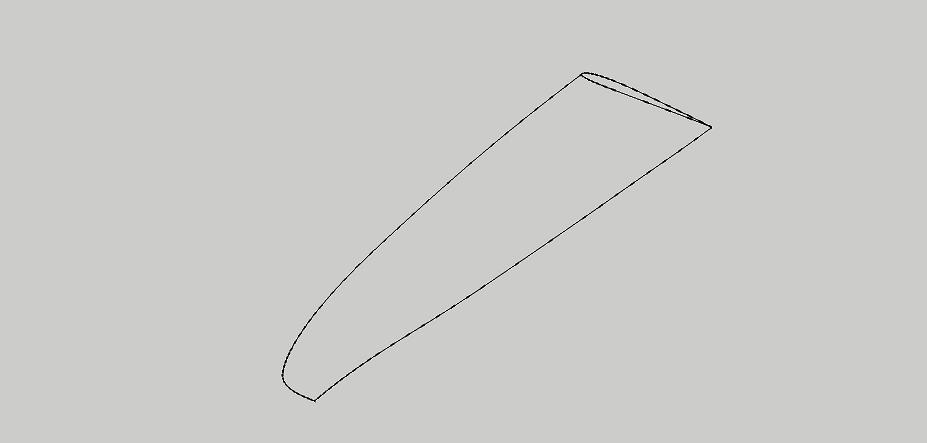
            Hello, i really like this script, but i have 1 little thing i cant seem to get it right.
            Its a airfoil of a wing and 2 path, with the sweep function i only can select 1 path.
            How can i make this work that the airfoil stays between the 2 path??

            Best ragards,

            Trion


            wing.jpg

            1 條回覆 最後回覆 回覆 引用 0
            • fredo6F 離線
              fredo6
              最後由 編輯

              @trion said:

              Hello, i really like this script, but i have 1 little thing i cant seem to get it right.
              Its a airfoil of a wing and 2 path, with the sweep function i only can select 1 path.
              How can i make this work that the airfoil stays between the 2 path??

              Best ragards,

              Trion

              You cannot do it in one pass, because there are 2 surfaces to generate.

              So Use Skinning and select the 4 contours on the top side, and again the 4 contours on the bottom side.

              Fredo

              1 條回覆 最後回覆 回覆 引用 0
              • T 離線
                trion
                最後由 編輯

                Got it, thank you so much !!

                1 條回覆 最後回覆 回覆 引用 0
                • T 離線
                  trion
                  最後由 編輯

                  Hello Fredo6

                  I made a small donation to your account, because of the great scripts and support.

                  Thank you so much.

                  Trion

                  1 條回覆 最後回覆 回覆 引用 0
                  • AlomphegaA 離線
                    Alomphega
                    最後由 編輯

                    Hello Fredo,

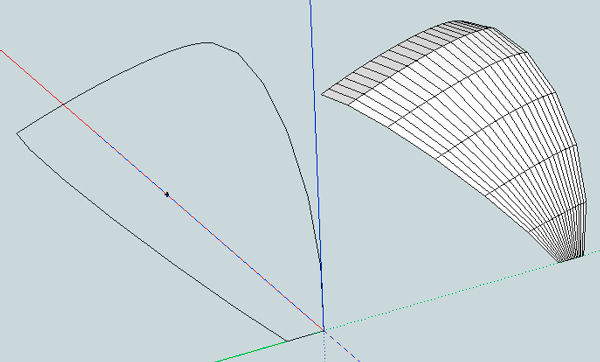
                    I have almost the same thing to do : a wing - but this time curved like a kitesurf wing.

                    I have yet done this with a triangular half wing and CurviLoft worked fine for this with 3 edges, but since I have added some right tips to do a trapezoidal half wing, I'm not able to re-do the miracle.

                    The problem : I would like to make a skin on the upper face following the tailing and the leading edges as rails, with the upper half of a foil as upper skin shape, then end flat to the tip.

                    In attachment you will find the half of the wing I talk about :
                    The purple is the upper half foil shape, the dark red is the tailing edge, the dark green is the leading edge and the green is the tip.

                    This happen after I select Tailing and leading edges as 1 & 2, then clic, then select upper foil shape and tip as 3 & 4, then "skinning" : nothing happens.
                    The same trying almost all other selecting orders.

                    Could you take a look and tell me were I'm wrong please ?

                    Best Regards,
                    Guy
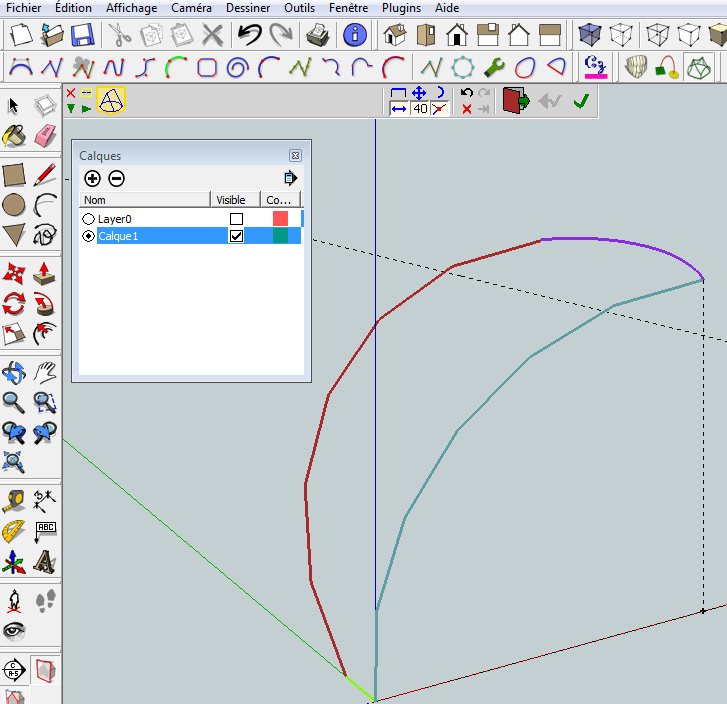

                    Test CurviLoft 'skin'

                    Guy Capra, http://www.nauticaerium.com
                    Non je ne suis pas un "Géo Trouvetou", juste un "Géo... Zéchercher" ! ;)

                    1 條回覆 最後回覆 回覆 引用 0
                    • pbacotP 離線
                      pbacot
                      最後由 編輯

                      I mocked-up something similar to your picture and can't get it to fail. Seeing as I can make a number of things fail, perhaps you should post your SU file, to see what it is exactly. But the way I am doing it is: I just select all of it and pick the skinning tool.

                      MacOSX MojaveSketchUp Pro v19 Twilight v2 Thea v3 PowerCADD

                      1 條回覆 最後回覆 回覆 引用 0
                      • AlomphegaA 離線
                        Alomphega
                        最後由 編輯

                        Thank you very much for your try to help pbacot,
                        here in attachment you will find a SKP file with the half kite wing a talk about to test it.


                        HalfKiteWing (SkinningTest).skp

                        Guy Capra, http://www.nauticaerium.com
                        Non je ne suis pas un "Géo Trouvetou", juste un "Géo... Zéchercher" ! ;)

                        1 條回覆 最後回覆 回覆 引用 0
                        • cottyC 離線
                          cotty
                          最後由 編輯

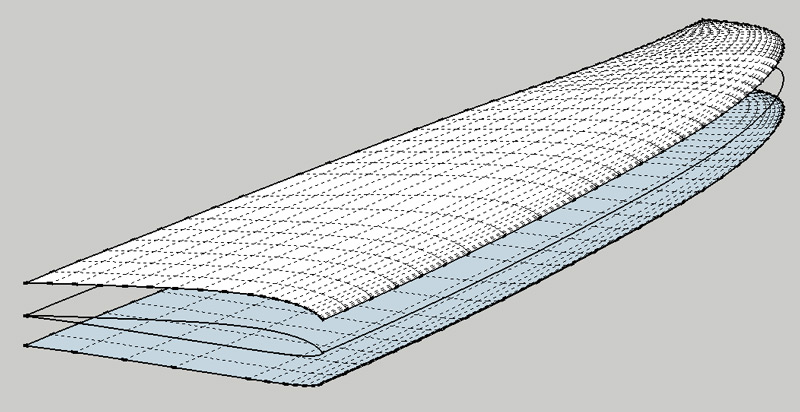
                          Something like this? I used TIGs Extrude Edges by Rails (EEbyR)...


                          kitewing_eebyr.jpg


                          HalfKiteWing (SkinningTest)_2.skp

                          my SketchUp gallery

                          1 條回覆 最後回覆 回覆 引用 0
                          • jeff hammondJ 離線
                            jeff hammond
                            最後由 編輯

                            @alomphega said:

                            Could you take a look and tell me were I'm wrong please ?

                            Best Regards,
                            Guy

                            you have a tiny line in there at an angle too steep to be picked up by curviloft's autoselection.. (it's in between the red and purple selected lines of your screenshot)

                            either a) zoom in real close and select that tiny line manually or b) fix the curve so it's continous..

                            (option b being the best.)

                            [EDIT] actually, you have more errors going on than just the one i mentioned.. i'm out the door..
                            someone else can pinpoint them for you 😉

                            dotdotdot

                            1 條回覆 最後回覆 回覆 引用 0
                            • AlomphegaA 離線
                              Alomphega
                              最後由 編輯

                              Just amazing and awesome ! Many thanks cotty ! 😄

                              Jeff, I tought this, but very difficult to fix and CurviLoft auto-fix function does not seems to work on my so dirty design. I have to re-draw the stuff but I'm not able to do more fine within SU.

                              Anyway, I have now some material to test and work on.

                              Best Regards to all, and best wishes !
                              Guy

                              Guy Capra, http://www.nauticaerium.com
                              Non je ne suis pas un "Géo Trouvetou", juste un "Géo... Zéchercher" ! ;)

                              1 條回覆 最後回覆 回覆 引用 0
                              • jgbJ 離線
                                jgb
                                最後由 編輯

                                Trion

                                I concur with Fredo.

                                What you need to do is take a copy of the chord at the root and scale it to (at least) 1 other rib location near the tip, but just before the tip curve starts.

                                Then CL skin individually the inner top and outer (tip) top airfoil, then do the bottom in 2 goes as well. Only explode the surfaces after all curves are satisfactory.

                                Should take all of 5 minutes.

                                If you have a problem, come back here with your SKP file and I will do a detailed explanation.


                                jgb

                                1 條回覆 最後回覆 回覆 引用 0
                                • T 離線
                                  trion
                                  最後由 編輯

                                  Hello,

                                  Well, it didnt work for me, so here is that file im trying.
                                  Hope you can find out why its not working.

                                  Trion


                                  wing.skp

                                  1 條回覆 最後回覆 回覆 引用 0
                                  • cottyC 離線
                                    cotty
                                    最後由 編輯

                                    I've welded some lines and Curviloft asked me if it should repair some issues ...
                                    wing_2.jpg


                                    wing_2.skp

                                    my SketchUp gallery

                                    1 條回覆 最後回覆 回覆 引用 0
                                    • T 離線
                                      trion
                                      最後由 編輯

                                      Thank you for checking and fixing the wing.
                                      would like to know what you did and where i need to look for the next time.

                                      1 條回覆 最後回覆 回覆 引用 0
                                      • T 離線
                                        trion
                                        最後由 編輯

                                        Cotty:

                                        Never mind my last question, i found out what i`m did wrong the whole time...
                                        I installed curvizard and select all contours 1 by 1 and using the make curve weld option.
                                        and your right.. the script was telling me also to fix some problems.
                                        After that there was no problem selection those lines(curves) and make the wing.

                                        this will keep me going for a while.

                                        Thanx all.

                                        1 條回覆 最後回覆 回覆 引用 0
                                        • jgbJ 離線
                                          jgb
                                          最後由 編輯

                                          Cotty & Trion

                                          The reason I would split the wing into 2+ parts is to preserve the chord section along the inner span section.

                                          Doing it in 1 go (per side) gives a nice looking result, but the chord tends to be flattening towards the outer section and wing tip.

                                          That is NOT a fault of Curviloft; it's just the way it works going from a "shape" to a point. Intermediate proportional "shapes" result in a better overall curve.

                                          This may not be relevant to a model for "show" but could be critical if accuracy is important. Such a case would be if drawing internal wing structure was part of the model, rather than just an outward appearing skin or mold line.


                                          jgb

                                          1 條回覆 最後回覆 回覆 引用 0
                                          • M 離線
                                            mikeypals23
                                            最後由 編輯

                                            I cant seem to get Curviloft to appear in SketchUp. As far as I can tell, I installed that and LibFredo6 correctly. Any help would be appreciated! Thank you for your time.



                                            Screen shot 2013-03-03 at 11.26.14 PM.png

                                            1 條回覆 最後回覆 回覆 引用 0
                                            • 1
                                            • 2
                                            • 62
                                            • 63
                                            • 64
                                            • 65
                                            • 66
                                            • 65 / 66
                                            • 第一個貼文
                                              最後的貼文
                                            Buy SketchPlus
                                            Buy SUbD
                                            Buy WrapR
                                            Buy eBook
                                            Buy Modelur
                                            Buy Vertex Tools
                                            Buy SketchCuisine
                                            Buy FormFonts

                                            Advertisement