sketchucation logo sketchucation
    • 登入
    Oops, your profile's looking a bit empty! To help us tailor your experience, please fill in key details like your SketchUp version, skill level, operating system, and more. Update and save your info on your profile page today!
    🔌 Smart Spline | Fluid way to handle splines for furniture design and complex structures. Download

    [Plugin][$] Curviloft 2.0a - 31 Mar 24 (Loft & Skinning)


    已排程 已置頂 已鎖定 已移動 Plugins
    1.3k 貼文 299 Posters 2.5m 瀏覽 297 Watching
    正在載入更多貼文
    • 從舊到新
    • 從新到舊
    • 最多點贊
    回覆
    • 在新貼文中回覆
    登入後回覆
    此主題已被刪除。只有擁有主題管理權限的使用者可以查看。
    • B 離線
      blackcat1313
      最後由 編輯

      @box said:

      You can use another of Fred's excellent plugins to cleanup before lofting.
      Here it is cleaned with Curvizard then Curviloft.

      That is amazing, thank you so much! I installed Curvizard, followed the video, and everything was looking good until the last loft segment. Then I got a bugsplat.

      Any ideas? I'm using Sketchup 2013 on a Mac if that makes any difference.

      Bill
      
      1 條回覆 最後回覆 回覆 引用 0
      • B 離線
        blackcat1313
        最後由 編輯

        Hi Box -

        I have been looking at the documentation for Curvizard and I see there are quite a few settings on the buttons palette that affect the way the tool works. Would it be possible for you to share with me the settings you used to clean up the curves? The video above is tightly cropped so the settings are not visible. Thanks!

        Bill
        
        1 條回覆 最後回覆 回覆 引用 0
        • B 離線
          blackcat1313
          最後由 編輯

          @box said:

          You can use another of Fred's excellent plugins to cleanup before lofting.
          Here it is cleaned with Curvizard then Curviloft.

          You may have been able to loft it, but can you make it into a solid? I have been able to loft using 4 the airfoils, but even though it looks good, there are too many errors to make it into a solid. I can get faces on the root, tip, and trailing edge, but Solid Inspector**2 finds hundreds of problems that it says cannot be fixed automatically.

          This is with Sketchup 2015, I upgraded to see if that would improve things. It didn't.

          1 條回覆 最後回覆 回覆 引用 0
          • caermaloC 離線
            caermalo
            最後由 編輯

            Hello fredo
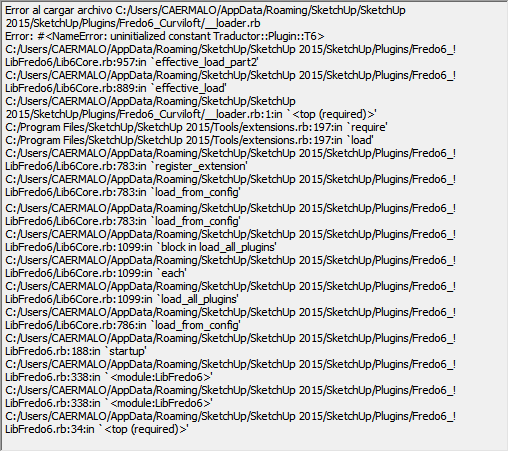
            I have the following problem with the plugin
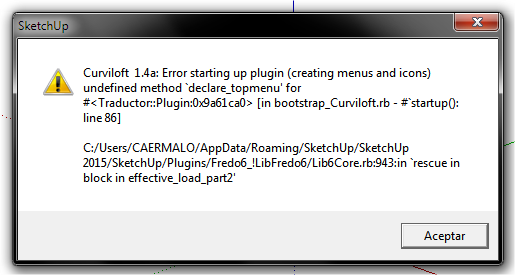

            SketchUp.png


            Load Errors.png

            1 條回覆 最後回覆 回覆 引用 0
            • D 離線
              dogtorque
              最後由 編輯

              OH MY GOD!
              Thank You so Much
              I just tried out this tool and it works it is saving me sooo much time in my creating the faces in my 3d models! and since I do 3d modeling of my own car designs so I can use them in unity this tool is like a blessing! and that it is free just makes you a generous person! if anyone else made this tool they would more than likely of charged a large amount of money for this tool which would suck because I literally don't have a budget for my 3d modeling because I don't have a job right now and I'm currently living with my parents.

              1 條回覆 最後回覆 回覆 引用 0
              • J 離線
                jmeek
                最後由 編輯

                I'm using Curviloft on a Mac. It worked great for one day. Now skinning process bar just stops with 0%. No further effort on my part seems to correct this situation. I'm trying skinning function on a very simple wire frame. Can anyone offer suggestions?

                1 條回覆 最後回覆 回覆 引用 0
                • Dave RD 離線
                  Dave R
                  最後由 編輯

                  Maybe you could post the SKP file? We might actually be able to help you if we could get our mitts on it.

                  Etaoin Shrdlu

                  %

                  (THERE'S NO PLACE LIKE)

                  G28 X0.0 Y0.0 Z0.0

                  M30

                  %

                  1 條回覆 最後回覆 回覆 引用 0
                  • J 離線
                    jmeek
                    最後由 編輯

                    Curviloft skinning is working now, after uninstalling and reinstalling Fredo6 Tools. The disruption of began after installing Fredo6 Tools over top the already installed Curviloft.

                    1 條回覆 最後回覆 回覆 引用 0
                    • JClementsJ 離線
                      JClements
                      最後由 編輯

                      Request: For lofting along a path, could its prompt read,
                      "1st Select Lofting Path, thenEdges to be Lofted".
                      It would help new users or those who haven't used the plugin in a while.

                      John | Illustrator | Beaverton, Oregon

                      1 條回覆 最後回覆 回覆 引用 0
                      • fredo6F 離線
                        fredo6
                        最後由 編輯

                        Good idea. Thanks
                        Actully Curviloft needs some refresh to be more user-friendly.

                        Fredo

                        1 條回覆 最後回覆 回覆 引用 0
                        • S 離線
                          spardacus
                          最後由 編輯

                          Is there any way to resize the control panel in the Sketchup Interface? Even when I lower my screen resolution the Control panel remains rather small - too small to read.

                          See attachment.

                          1 條回覆 最後回覆 回覆 引用 0
                          • fredo6F 離線
                            fredo6
                            最後由 編輯

                            @spardacus said:

                            Is there any way to resize the control panel in the Sketchup Interface? Even when I lower my screen resolution the Control panel remains rather small - too small to read.

                            See attachment.

                            I don't see the attachment.

                            Unfortunately, there is no solution from the plugin. You may want to have a look at the following thread, where the problem is evoked with some solution.

                            Fredo

                            1 條回覆 最後回覆 回覆 引用 0
                            • fredo6F 離線
                              fredo6
                              最後由 編輯

                              @jclements said:

                              Request: For lofting along a path, could its prompt read,
                              "1st Select Lofting Path, thenEdges to be Lofted".
                              It would help new users or those who haven't used the plugin in a while.

                              By the way, the latest version (published for SU2016) includes a status and tooltip to indicate the order of selection.

                              Fredo

                              1 條回覆 最後回覆 回覆 引用 0
                              • JClementsJ 離線
                                JClements
                                最後由 編輯

                                Thanks.

                                John | Illustrator | Beaverton, Oregon

                                1 條回覆 最後回覆 回覆 引用 0
                                • dereiD 離線
                                  derei
                                  最後由 編輯

                                  Curviloft is creating strange looking geometry on Single F-Spline Curve Mode. Can't figure out why.
                                  I would appreciate any idea why this is happening.
                                  Thank you.

                                  Please see attached image and skp file.
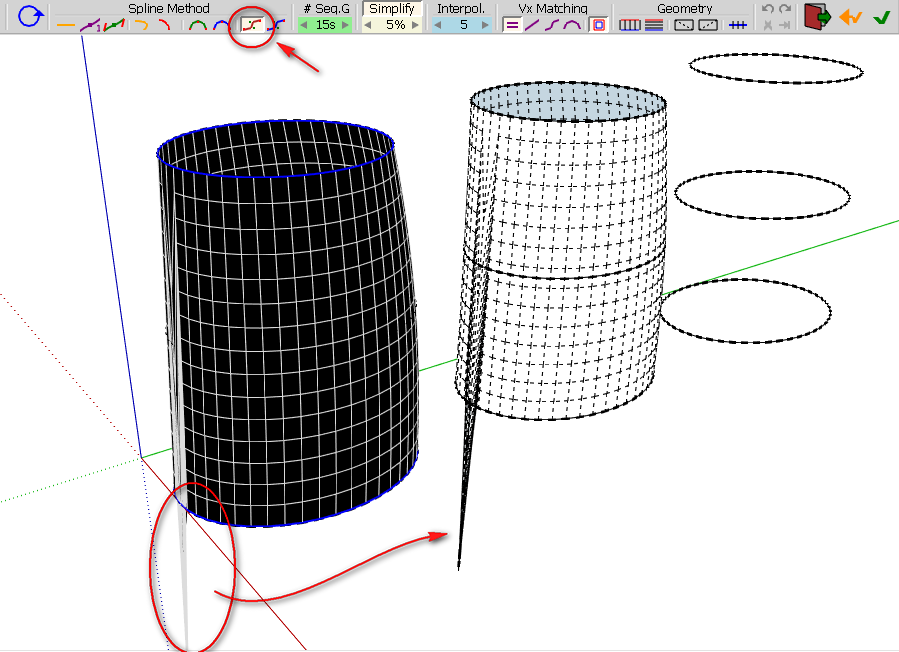
                                  curviloft.png


                                  curviloft.skp

                                  DESIGNER AND ARTIST DEREI.UK

                                  1 條回覆 最後回覆 回覆 引用 0
                                  • fredo6F 離線
                                    fredo6
                                    最後由 編輯

                                    Derei,

                                    There is a bug / limitation for close-loop contours with F-Spline. It certainly deserves a fix.

                                    Might be the same for B-Spline with close-loop by the way.

                                    Fredo

                                    1 條回覆 最後回覆 回覆 引用 0
                                    • dereiD 離線
                                      derei
                                      最後由 編輯

                                      @fredo6 said:

                                      Derei,

                                      There is a bug / limitation for close-loop contours with F-Spline. It certainly deserves a fix.

                                      Might be the same for B-Spline with close-loop by the way.

                                      Fredo

                                      After MANY tries I was able to fix it. I cut the loop in two, deleted the last segment (on the part whith the glitch), then I mirrored it to make it again closed loop. After doing the same to all tree loops, the skinning went well. Can't understand why. What was different in the newly made curve...

                                      Because I tried before only to delete the two segments (on both side of symmetry plane) and redraw them... but that didn't fix the problem. Only completely deleting half and mirroring it after redrawing the segment helped.

                                      DESIGNER AND ARTIST DEREI.UK

                                      1 條回覆 最後回覆 回覆 引用 0
                                      • fredo6F 離線
                                        fredo6
                                        最後由 編輯

                                        Glad you found a workaround.

                                        Actually, closing splines 'nicely' is not so easy, and FSpline is somehow special, home-made. So I need to adjust the method.

                                        Fredo

                                        1 條回覆 最後回覆 回覆 引用 0
                                        • K 離線
                                          kaas
                                          最後由 編輯

                                          @derei: I never close loops but always work with two halves that I group after the both lofts are done. Works quite nicely.

                                          1 條回覆 最後回覆 回覆 引用 0
                                          • E 離線
                                            Einstein
                                            最後由 編輯

                                            Thank you! If I could use only one plugin in SU, that would be Curviloft 😄

                                            1 條回覆 最後回覆 回覆 引用 0
                                            • 1
                                            • 2
                                            • 61
                                            • 62
                                            • 63
                                            • 64
                                            • 65
                                            • 66
                                            • 63 / 66
                                            • 第一個貼文
                                              最後的貼文
                                            Buy SketchPlus
                                            Buy SUbD
                                            Buy WrapR
                                            Buy eBook
                                            Buy Modelur
                                            Buy Vertex Tools
                                            Buy SketchCuisine
                                            Buy FormFonts

                                            Advertisement