sketchucation logo sketchucation
    • Login
    Oops, your profile's looking a bit empty! To help us tailor your experience, please fill in key details like your SketchUp version, skill level, operating system, and more. Update and save your info on your profile page today!
    ⚠️ Update | Sketchucation Tools 5.0.8 released with licensing improvements and bugfixes Download

    OSX - Where is the AA settings?

    Scheduled Pinned Locked Moved SketchUp Discussions
    sketchup
    20 Posts 6 Posters 1.6k Views 6 Watching
    Loading More Posts
    • Oldest to Newest
    • Newest to Oldest
    • Most Votes
    Reply
    • Reply as topic
    Log in to reply
    This topic has been deleted. Only users with topic management privileges can see it.
    • T
      tfdesign
      last edited by

      Ah Anti Aliasing!

      Yes.

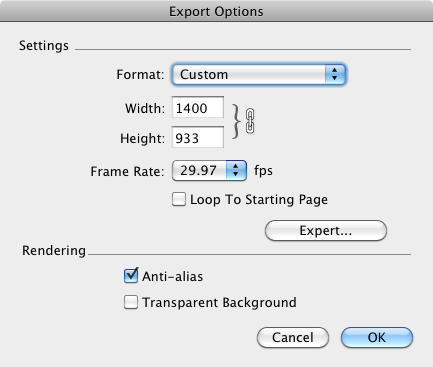
      You can find it when you export to a Quicktime movie, on that page, and you can also find it in Model Info under the Window menu. πŸ˜„

      My book "Let's SketchUp!" Download from here

      1 Reply Last reply
      Reply Quote 0
      • jeff hammondJ
        jeff hammond
        last edited by

        AA only upon 2D exporting.

        dotdotdot

        1 Reply Last reply
        Reply Quote 0
        • T
          tfdesign
          last edited by

          @unknownuser said:

          AA only upon 2D exporting.

          Really? Then how come I have it when exporting in 3D? πŸ˜•


          screenshot 01.png

          My book "Let's SketchUp!" Download from here

          1 Reply Last reply
          Reply Quote 0
          • EdsonE
            Edson
            last edited by

            @tfdesign said:

            Ah Anti Aliasing!

            Yes.

            You can find it when you export to a Quicktime movie, on that page, and you can also find it in Model Info under the Window menu. πŸ˜„

            indeed: window>model info>rendering

            edson mahfuz, architect| porto alegre β€’ brasil
            http://www.mahfuz.arq.br

            1 Reply Last reply
            Reply Quote 0
            • thomthomT
              thomthom
              last edited by

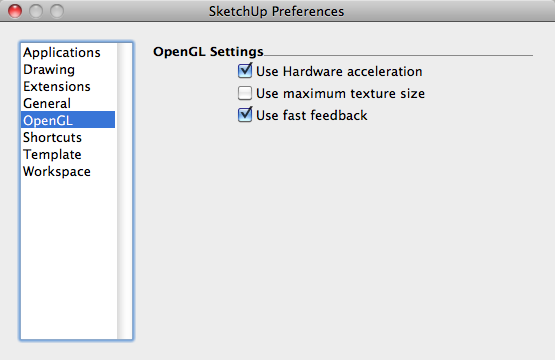
              I don't mean AA for textures and exports.

              But AA for the edges in the SU viewport itself.

              Thomas Thomassen β€” SketchUp Monkey & Coding addict
              List of my plugins and link to the CookieWare fund

              1 Reply Last reply
              Reply Quote 0
              • jeff hammondJ
                jeff hammond
                last edited by

                @tfdesign said:

                @unknownuser said:

                AA only upon 2D exporting.

                Really? Then how come I have it when exporting in 3D? πŸ˜•

                QuickTime etc are just a bunch of 2D frames. I think thom wants realtime antialiasing in the SU window itself which afaik, isn't possible on mac

                dotdotdot

                1 Reply Last reply
                Reply Quote 0
                • T
                  tfdesign
                  last edited by

                  Oh yes, I think I see what you mean. I've never needed this option.

                  My book "Let's SketchUp!" Download from here

                  1 Reply Last reply
                  Reply Quote 0
                  • jeff hammondJ
                    jeff hammond
                    last edited by

                    @tfdesign said:

                    Oh yes, I think I see what you mean. I've never needed this option.

                    I've never really used sketchup on a pc but it sounds as if you can de-rasterize the lines in the sketchup viewport. I dunno, it sounds pretty cool.

                    dotdotdot

                    1 Reply Last reply
                    Reply Quote 0
                    • A
                      alpro
                      last edited by

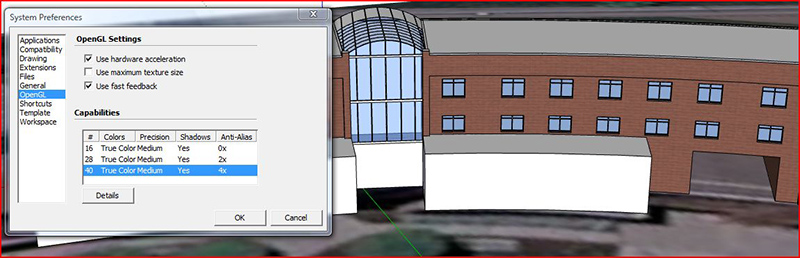
                      I would think that since SU on Mac doesn't have that option, that it's probably "built in" somehow or if not maybe you can control in in your graphic card settings. On a pc with no AA, straight SU looks like s@#t.
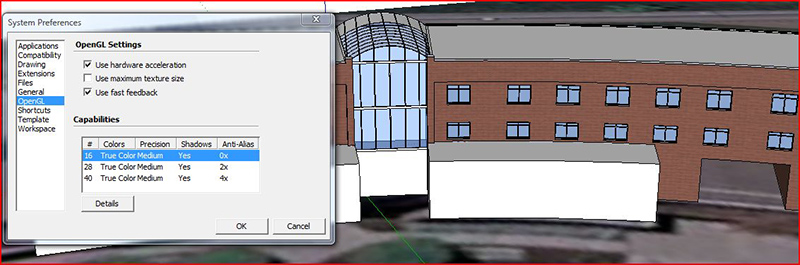
                      Capture1.JPG


                      Capture2.JPG

                      1 Reply Last reply
                      Reply Quote 0
                      • S
                        skeerc
                        last edited by

                        This lack of anti aliasing options issue has only appeared with late model Macs, I have a G4 which does give access to the graphics card & the SU viewport displayed great presentation - I contacted Apple & the Graphics card manufacturers & received no positive feedback, you can't use older Graphics cards in newer Macs either.


                        1 Reply Last reply
                        Reply Quote 0

                        Hello! It looks like you're interested in this conversation, but you don't have an account yet.

                        Getting fed up of having to scroll through the same posts each visit? When you register for an account, you'll always come back to exactly where you were before, and choose to be notified of new replies (either via email, or push notification). You'll also be able to save bookmarks and upvote posts to show your appreciation to other community members.

                        With your input, this post could be even better πŸ’—

                        Register Login
                        • 1 / 1
                        • First post
                          Last post
                        Buy SketchPlus
                        Buy SUbD
                        Buy WrapR
                        Buy eBook
                        Buy Modelur
                        Buy Vertex Tools
                        Buy SketchCuisine
                        Buy FormFonts

                        Advertisement