sketchucation logo sketchucation
    • Login
    Oops, your profile's looking a bit empty! To help us tailor your experience, please fill in key details like your SketchUp version, skill level, operating system, and more. Update and save your info on your profile page today!
    ⚠️ Important | Libfredo 15.6b introduces important bugfixes for Fredo's Extensions Update

    OSX - Where is the AA settings?

    Scheduled Pinned Locked Moved SketchUp Discussions
    sketchup
    20 Posts 6 Posters 1.1k Views 6 Watching
    Loading More Posts
    • Oldest to Newest
    • Newest to Oldest
    • Most Votes
    Reply
    • Reply as topic
    Log in to reply
    This topic has been deleted. Only users with topic management privileges can see it.
    • T Offline
      tfdesign
      last edited by

      AA?

      My book "Let's SketchUp!" Download from here

      1 Reply Last reply Reply Quote 0
      • T Offline
        tfdesign
        last edited by

        Oh yes, I too have just bought a Mac Mini late 2009- just like you. πŸ˜„

        My book "Let's SketchUp!" Download from here

        1 Reply Last reply Reply Quote 0
        • EdsonE Offline
          Edson
          last edited by

          AA as in antialiasing?

          edson mahfuz, architect| porto alegre β€’ brasil
          http://www.mahfuz.arq.br

          1 Reply Last reply Reply Quote 0
          • thomthomT Offline
            thomthom
            last edited by

            @edson said:

            AA as in antialiasing?

            Yes

            Thomas Thomassen β€” SketchUp Monkey & Coding addict
            List of my plugins and link to the CookieWare fund

            1 Reply Last reply Reply Quote 0
            • EdsonE Offline
              Edson
              last edited by

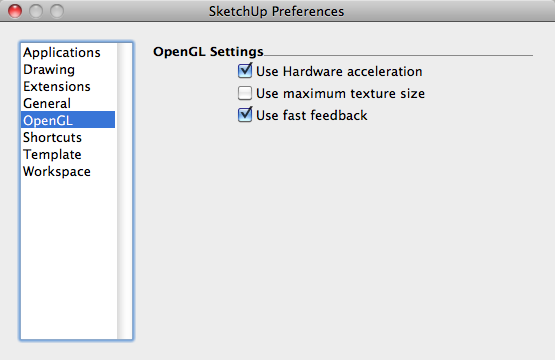
              I am afraid on macs all Open GL settings you get are the ones that appear below.
              2010-05-18_1729.png

              edson mahfuz, architect| porto alegre β€’ brasil
              http://www.mahfuz.arq.br

              1 Reply Last reply Reply Quote 0
              • thomthomT Offline
                thomthom
                last edited by

                So how do you control AA??

                Thomas Thomassen β€” SketchUp Monkey & Coding addict
                List of my plugins and link to the CookieWare fund

                1 Reply Last reply Reply Quote 0
                • EdsonE Offline
                  Edson
                  last edited by

                  I never do it in sketchup. I do it in podium when I render a scene.

                  edit: of course, if I do it in podium I am doing it in sketchup. what I meant to say is the sketchup by itself does not seem to offer any way to control AA.

                  edson mahfuz, architect| porto alegre β€’ brasil
                  http://www.mahfuz.arq.br

                  1 Reply Last reply Reply Quote 0
                  • thomthomT Offline
                    thomthom
                    last edited by

                    Does OSX SU not have the option of AA edges in the viewport?

                    Thomas Thomassen β€” SketchUp Monkey & Coding addict
                    List of my plugins and link to the CookieWare fund

                    1 Reply Last reply Reply Quote 0
                    • EdsonE Offline
                      Edson
                      last edited by

                      I never saw it.

                      edson mahfuz, architect| porto alegre β€’ brasil
                      http://www.mahfuz.arq.br

                      1 Reply Last reply Reply Quote 0
                      • T Offline
                        tfdesign
                        last edited by

                        Ah Anti Aliasing!

                        Yes.

                        You can find it when you export to a Quicktime movie, on that page, and you can also find it in Model Info under the Window menu. πŸ˜„

                        My book "Let's SketchUp!" Download from here

                        1 Reply Last reply Reply Quote 0
                        • jeff hammondJ Offline
                          jeff hammond
                          last edited by

                          AA only upon 2D exporting.

                          dotdotdot

                          1 Reply Last reply Reply Quote 0
                          • T Offline
                            tfdesign
                            last edited by

                            @unknownuser said:

                            AA only upon 2D exporting.

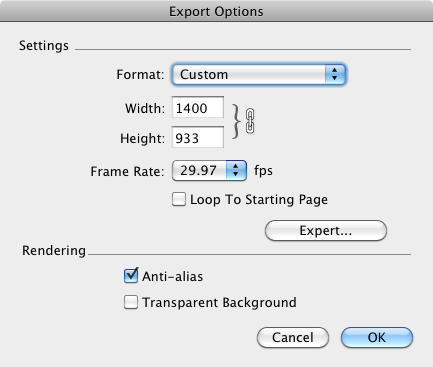
                            Really? Then how come I have it when exporting in 3D? πŸ˜•


                            screenshot 01.png

                            My book "Let's SketchUp!" Download from here

                            1 Reply Last reply Reply Quote 0
                            • EdsonE Offline
                              Edson
                              last edited by

                              @tfdesign said:

                              Ah Anti Aliasing!

                              Yes.

                              You can find it when you export to a Quicktime movie, on that page, and you can also find it in Model Info under the Window menu. πŸ˜„

                              indeed: window>model info>rendering

                              edson mahfuz, architect| porto alegre β€’ brasil
                              http://www.mahfuz.arq.br

                              1 Reply Last reply Reply Quote 0
                              • thomthomT Offline
                                thomthom
                                last edited by

                                I don't mean AA for textures and exports.

                                But AA for the edges in the SU viewport itself.

                                Thomas Thomassen β€” SketchUp Monkey & Coding addict
                                List of my plugins and link to the CookieWare fund

                                1 Reply Last reply Reply Quote 0
                                • jeff hammondJ Offline
                                  jeff hammond
                                  last edited by

                                  @tfdesign said:

                                  @unknownuser said:

                                  AA only upon 2D exporting.

                                  Really? Then how come I have it when exporting in 3D? πŸ˜•

                                  QuickTime etc are just a bunch of 2D frames. I think thom wants realtime antialiasing in the SU window itself which afaik, isn't possible on mac

                                  dotdotdot

                                  1 Reply Last reply Reply Quote 0
                                  • T Offline
                                    tfdesign
                                    last edited by

                                    Oh yes, I think I see what you mean. I've never needed this option.

                                    My book "Let's SketchUp!" Download from here

                                    1 Reply Last reply Reply Quote 0
                                    • jeff hammondJ Offline
                                      jeff hammond
                                      last edited by

                                      @tfdesign said:

                                      Oh yes, I think I see what you mean. I've never needed this option.

                                      I've never really used sketchup on a pc but it sounds as if you can de-rasterize the lines in the sketchup viewport. I dunno, it sounds pretty cool.

                                      dotdotdot

                                      1 Reply Last reply Reply Quote 0
                                      • A Offline
                                        alpro
                                        last edited by

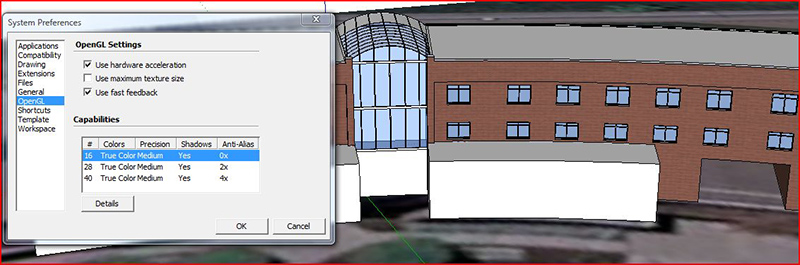
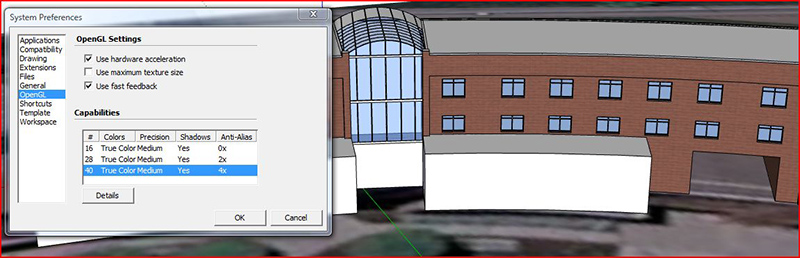
                                        I would think that since SU on Mac doesn't have that option, that it's probably "built in" somehow or if not maybe you can control in in your graphic card settings. On a pc with no AA, straight SU looks like s@#t.
                                        Capture1.JPG


                                        Capture2.JPG

                                        1 Reply Last reply Reply Quote 0
                                        • S Offline
                                          skeerc
                                          last edited by

                                          This lack of anti aliasing options issue has only appeared with late model Macs, I have a G4 which does give access to the graphics card & the SU viewport displayed great presentation - I contacted Apple & the Graphics card manufacturers & received no positive feedback, you can't use older Graphics cards in newer Macs either.


                                          1 Reply Last reply Reply Quote 0
                                          • 1 / 1
                                          • First post
                                            Last post
                                          Buy SketchPlus
                                          Buy SUbD
                                          Buy WrapR
                                          Buy eBook
                                          Buy Modelur
                                          Buy Vertex Tools
                                          Buy SketchCuisine
                                          Buy FormFonts

                                          Advertisement