[Plugin] Lattice Maker
-
good man
-
install .rbz? in sketchup
-
@tobias3d said:
install .rbz? in sketchup
Is that a question about how to install RBZ files in SketchUp?
If so: http://www.thomthom.net/thoughts/2012/01/installing-plugins-for-google-sketchup/ -
thanks¡¡¡¡ thomthom
-
help me please.
I dwnl Lattice Maker v1.3 20130528 has ".lingvo" file extension, but in the plugin folder it don't work because is not file .rb.
I wonder, how I can do to work it? -
Since you have not supplied your OS or SUp version I must guess...
How did you download this exactly ?
Did you get it as a .RBZ file ?
Did you then install it using the v8 [latest version] Preferences > Extensions > Install... buttonOR did you auto-install it using the SketchUcation Plugin Store dialog from within SketchUp?
OR did you rename it .ZIP and extract its file/subfolder of files and put these into the Plugins folder, respecting the same relative relationships of files?
This has been covered endlessly on the forums...
Thomthom linked to a relevant post a few items back...
If you do not keep the same relative locations tools just won't work! So for example if you put the tool's lingvo files directly into the Plugins folder you are screwed!Look in the .ZIP/.RBZ and you will see the tool's main 'loader' .rb and a subfolder of the same name containing a few other files - in the case of this tool there are some .lingvo files used for translations; in this tool's archive there is also a 'deBabelizer.rb' file used for the translations...
The 'automated installation' methods are by far the safest for users such as yourself who are somewhat challenged in this regard... I commend them to you.
If you have mis-installed files you MUST remove everything and start again - in the case of this tools having some duplicated lingvo files in the wrong location won't do any harm BUT for other tools that ship with rb files inside their subfolder moving those out into Plugins will break SketchUp BIG TIME!!
So please don't do it, and if you do tidy up ! -
Tig many thanks for this great tool. I have a request and question. I am trying to make gridshells (and am trying to avoid using rhino in order to do so hehem) and i am trying to make diagonals drawn accross a surface generated from your extrude tools, then mirrored and reapplied to produce a net of diagonals to then produce a lattice. i have attached what i mean.
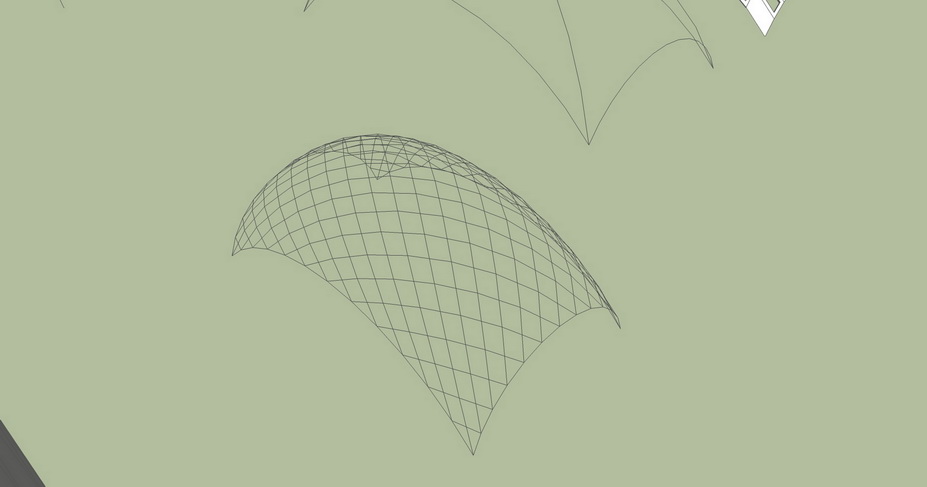
any ideas how i would do such a think. Ideally the diagonal rails would not be coplanar. they need to be placed on top of eachother. How do i take them though, apply a thickness to them, then extrude them to make the curved consequtive elements i require...
I would be very, very grateful for any help.
-
Have you tried Tigs, Extrude Edges by Rails to Lattice which you will find in his Extrusion tools.
-
As Box says...
My Extrusion Tools EEbyRailsToLattice offers several options:
There are 3d 'box-extrusions'
Just rail lines
Just profile lines
Just diagonal lines [this is probably what you want... run it twice, picking rails alternately so the two groups of diagonals run oppositely then explode/merge the groups and rails/profiles into one container] -
TIG many thanks for this reply. I did exactly as you mentioned previously in order to make the mesh i showed above. I want to make a lattice out of it though. Can the code for your latticizer be modified in order to be able to form lattices in three dimensions in the way that the latticizer works (axially on the line without splitting the lattice along that axis)? thank you for your help in advance.
-
Here's a future-proofed update.
http://sketchucation.com/forums/viewtopic.php?p=244981#p244981 -
Dear all,
I'm in the process re-installing my plugins for SU 2014.
Just downloaded from plugins store lattice maker.
got an error
Erreur de chargement du fichier latticeMaker.rb
Error: #<ArgumentError: invalid byte sequence in UTF-8>
I think this is linked to language files not encoded in UTF-8.
Is there newer version somewhere ? or plans to update.
Yours
Pascal -
Thanks for the report...
It should already be compatible with v2014...
If not I'll be able to fix it very easily ! -
I had a similar problem with my plugin.
Seems it only appears when extended caracters are read from non UTF-8 language string files.
Just re-encoded text files to solve this.
Problem did not occur with US-en version.
Yours
Pascal -
LatticeMaker IS already compatible with v2014.
I just reinstalled it to convince myself !
Please get NEW versions of ALL of your Plugins installed into v2014.
Do NOT copy older versions over - often they may be incompatible...I do not understand your report regarding the UTF8 error
Did you perhaps copy files, instead of the necessary reinstall from the newest RBZ source ?? -
Just reinstalled on a virgin setup of SU2014 the version downloaded from Pluginstore (installed with plugin store).
@tig said:
I do not understand your report regarding the UTF8 error
Did you perhaps copy files, instead of the necessary reinstall from the newest RBZ source ??Here is the error I got
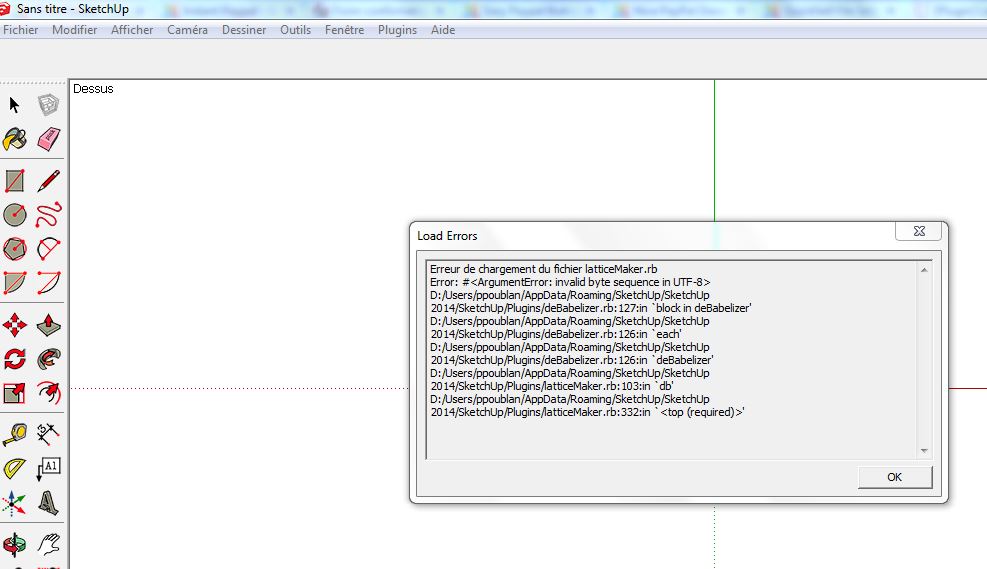
I'm using french version of SU on Windows.
I was able to correct it myself :- opened latticemakerfr.lingvo in notepad++
- converted to UTF-8
- saved the file
and then it works.
But I think it should be done at the source within your package.
Do not know the details, but UTF-8 encoding for non ascii files is a change in Ruby 2.0 vs Ruby 1.0
Yours
Pascal
-
Thanks - at last we discover that there's a rogue lingvo file...
I thought I had made all of them compatible !
The EN-US one is OK, but the FR one isn't !
I'll issue an update asap - sorry about that -
Here's version v1.5
http://sketchucation.com/pluginstore?pln=latticeMaker
Its FR lingvo file is now encoded so it's compatible with v2014 -
hey i pasted the plugin file in plug in folder but it doesn't show in the plugin menu... please help ?what to do?
-
When you say you, "Pasted the Plugin File in folder [Plugins?] but it doesn't work..." what do you mean exactly??
When you get an RBZ archive you must install it using Preferences > Extensions > Install... button OR using the AutoInstall feature of the SketchUcation PluginStore within SketchUp itself...
If you simply put the RBZ archive into the Plugins folder it does nothing !
Use the proper installer provided with all SketchUp versions >=v8MR2...
If you have tried extracting the contents of the RBZ [renamed as .ZIP etc] and putting those into the Plugins folder there's a myriad of potential trip-hazards... like not keeping the extracted files in their correct subfolders, or having insufficient permissions to really add files into the Plugins folder [VirtualStore issue etc...]When it is properly installed this tool adds an item to the Plugins menu named 'Lattice Maker' which processes a premade and preselected mesh into a lattice...




Hello! It looks like you're interested in this conversation, but you don't have an account yet.
Getting fed up of having to scroll through the same posts each visit? When you register for an account, you'll always come back to exactly where you were before, and choose to be notified of new replies (either via email, or push notification). You'll also be able to save bookmarks and upvote posts to show your appreciation to other community members.
With your input, this post could be even better 💗
Register Login


Advertisement