sketchucation logo sketchucation
    • 登入
    Oops, your profile's looking a bit empty! To help us tailor your experience, please fill in key details like your SketchUp version, skill level, operating system, and more. Update and save your info on your profile page today!
    🔌 Smart Spline | Fluid way to handle splines for furniture design and complex structures. Download

    [Plugin] Make Fur v.2.1.0(20140323)

    已排程 已置頂 已鎖定 已移動 Plugins
    650 貼文 255 Posters 1.1m 瀏覽 254 Watching
    正在載入更多貼文
    • 從舊到新
    • 從新到舊
    • 最多點贊
    回覆
    • 在新貼文中回覆
    登入後回覆
    此主題已被刪除。只有擁有主題管理權限的使用者可以查看。
    • soloS 離線
      solo
      最後由 編輯

      Please, I ask again if it would be possible to go lower than 0.1 in crowd place setting, I love this plugin but on a large terrain I seem to have no control as lowest setting is still too much.

      http://www.solos-art.com

      If you see a toilet in your dreams do not use it.

      1 條回覆 最後回覆 回覆 引用 0
      • F 離線
        feyade
        最後由 編輯

        @lasrador said:

        This is just brilliant.. Don't know how i missed this for so long. Now that vray2.0 is proxy enables the possibilities are limitless.. Convert a grass component into a proxy on sk (Though 3dsmax allows the porxy to be simplified further), import it into the model and scatter the proxy. You have a feather weight model with the punch of a heavy weight! Awesome work tak2hata! 😍

        this was my first attempt at grass..

        http://i42.tinypic.com/ncdyf6.jpg

        hi,

        quick question how did u manage to achieve this render. can't figure how to setup my settings

        1 條回覆 最後回覆 回覆 引用 0
        • H 離線
          hilalevi
          最後由 編輯

          it doesnt work on sketchup 2014. what do i need to do to make it work?

          1 條回覆 最後回覆 回覆 引用 0
          • Dave RD 離線
            Dave R
            最後由 編輯

            @hilalevi said:

            it doesnt work on sketchup 2014. what do i need to do to make it work?

            Yes. It does work on SketchUp 2014. The first thing you need to do to get help making it work is give specific and useful information. How did you install it? Which version? What are you expecting to see that you aren't seeing?

            Etaoin Shrdlu

            %

            (THERE'S NO PLACE LIKE)

            G28 X0.0 Y0.0 Z0.0

            M30

            %

            1 條回覆 最後回覆 回覆 引用 0
            • OsamaAlshamiO 離線
              OsamaAlshami
              最後由 編輯

              Hi tak

              tanks for tool it's very useful.
              I translate it to ArabicLanguage. 😄

              only little problem with translation.
              "Main" & "Default"phrase not translated in (web dialog) ❓


              Arabic translate for (Make Fur).

              1 條回覆 最後回覆 回覆 引用 0
              • B 離線
                brylie10
                最後由 編輯

                sirs can you elp me with these. there are no grass in some parts.what might be the problem???thanks in advance! 😕


                why.jpg

                1 條回覆 最後回覆 回覆 引用 0
                • T 離線
                  tak2hata
                  最後由 編輯

                  @brylie10 said:

                  sirs can you elp me with these. there are no grass in some parts.what might be the problem???thanks in advance! 😕
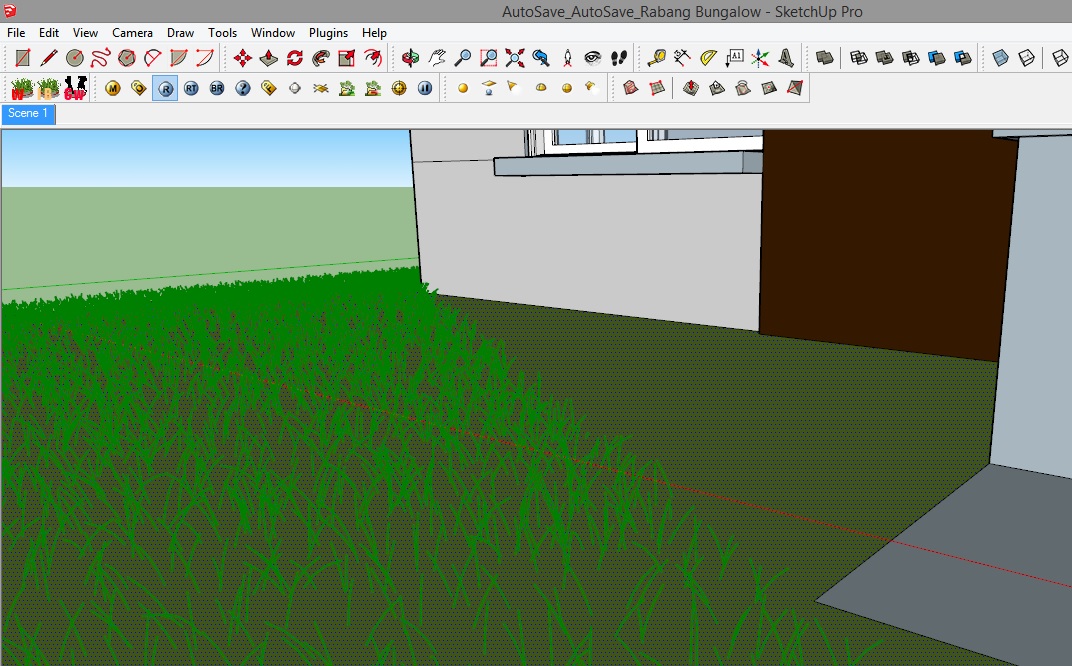
                  Hi,brylie10.
                  Please set more high value for "Max Number"
                  That is limitation of fur blades number on one face.
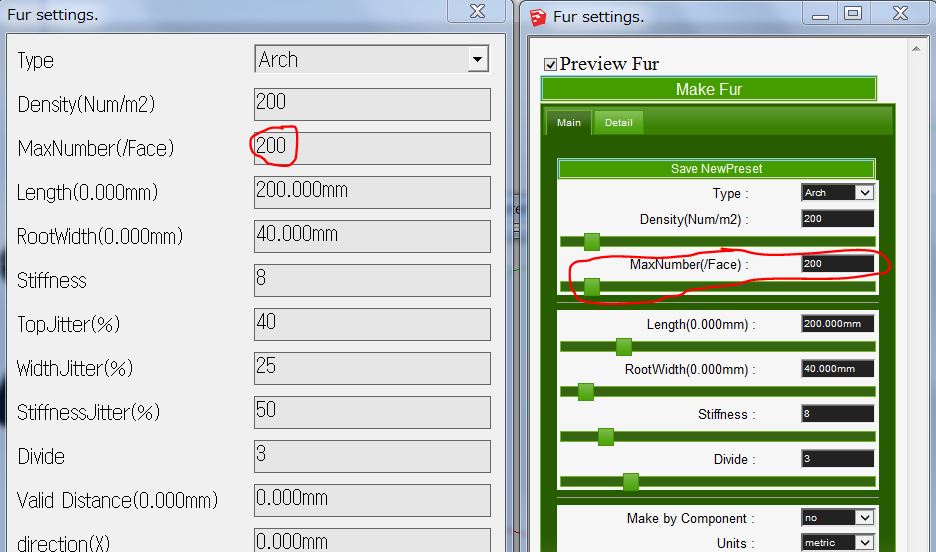
                  Max Number on dialog
                  Right Image is Inputbox dialog.
                  Left Image is Webdialog.


                  by TAK2HATA

                  1 條回覆 最後回覆 回覆 引用 0
                  • T 離線
                    tlchu6
                    最後由 編輯

                    sirs please advise how Webdialog works on mac ? Many thanks

                    1 條回覆 最後回覆 回覆 引用 0
                    • romboutR 離線
                      rombout
                      最後由 編輯

                      I have that stripped view under mac os 10.6.8 using SU8. WHen i open the HTML in Chrome it does look correct however.
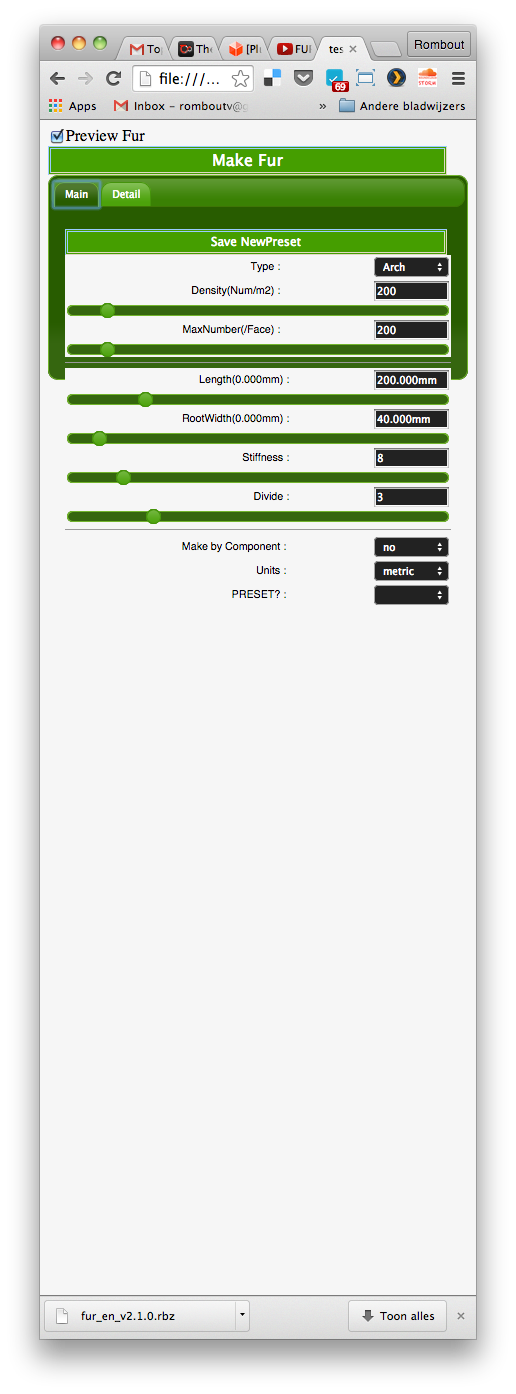

                      Schermafbeelding 2015-02-10 om 21.40.16.png

                      1 條回覆 最後回覆 回覆 引用 0
                      • G 離線
                        Gian8989
                        最後由 編輯

                        Does it works on Sketchup 8?

                        1 條回覆 最後回覆 回覆 引用 0
                        • Dave RD 離線
                          Dave R
                          最後由 編輯

                          @gian8989 said:

                          Does it works on Sketchup 8?

                          Yes. Please read through the thread.

                          Etaoin Shrdlu

                          %

                          (THERE'S NO PLACE LIKE)

                          G28 X0.0 Y0.0 Z0.0

                          M30

                          %

                          1 條回覆 最後回覆 回覆 引用 0
                          • M 離線
                            Moopingkrupdesign
                            最後由 編輯

                            thank you

                            1 條回覆 最後回覆 回覆 引用 0
                            • T 離線
                              TraxXx
                              最後由 編輯

                              Hi !
                              This is such a great plugin but I'm just having troubles to make a grass area by spraying a proxy grass made previously. I've tried different size of proxy, even a little sized bunch of grass but I still don't understand why sketch up is spreading my proxy everywhere in the scene (even on different heights). No matter what area I selected on my mesh (google earth terrain) it doesn't stick grass proxy to it but does a big crow all over my scene. Is that anything related to the fact i'm trying to apply it on a mesh, I saw a russian using "make fur" with proxy on a handmade mesh and he could apply it without troubles. I'm stuck with that, could you help me ? thanks 😄

                              1 條回覆 最後回覆 回覆 引用 0
                              • M 離線
                                marvsweden
                                最後由 編輯

                                I've read the documentation and this whole thread but I still can't get my head around the axis configuration.

                                I have this component
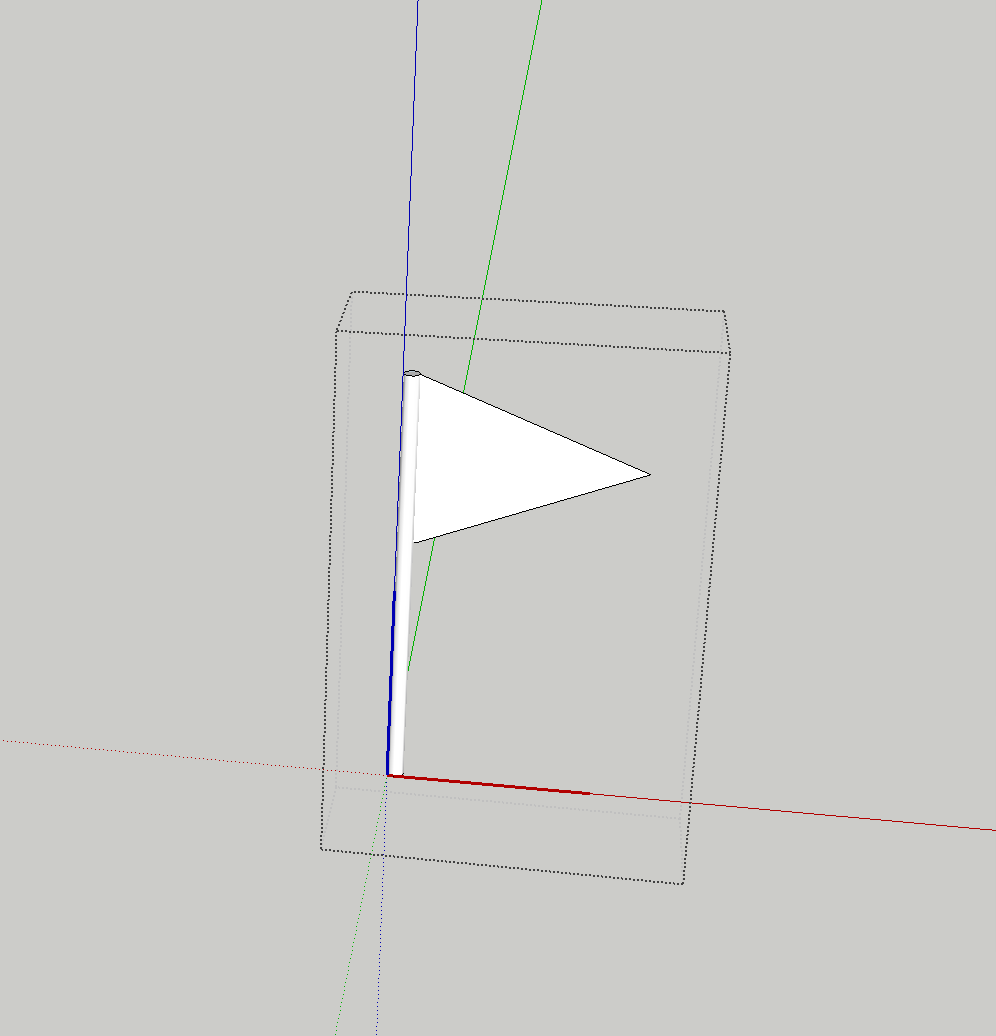
                                Screen Shot 2015-05-11 at 23.13.02.png

                                and I want the flag's front face facing the camera but all I get is this
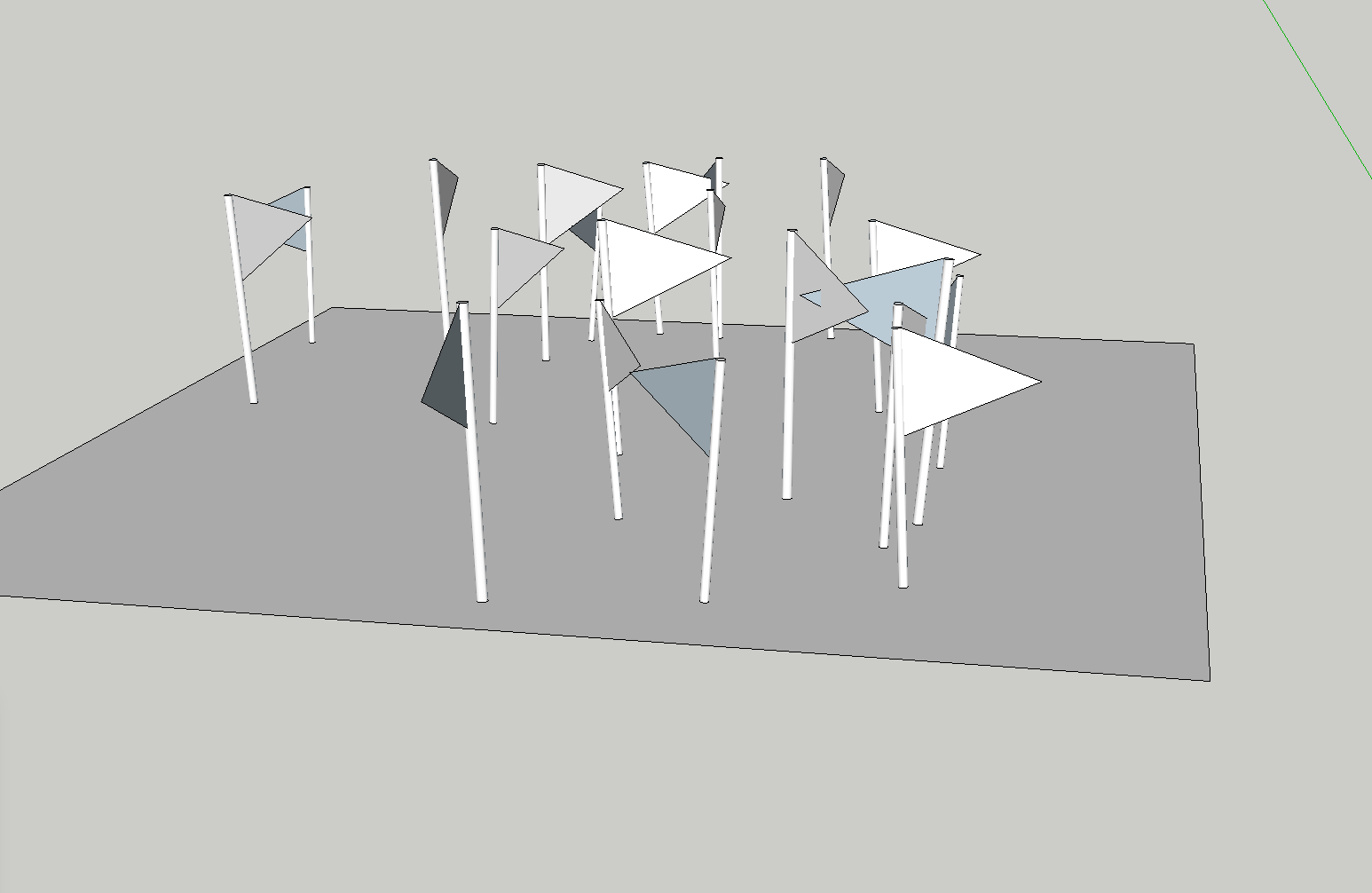
                                Screen Shot 2015-05-11 at 23.13.53.png

                                If i fiddle with direction and force I can kinda close to what I'm aiming for
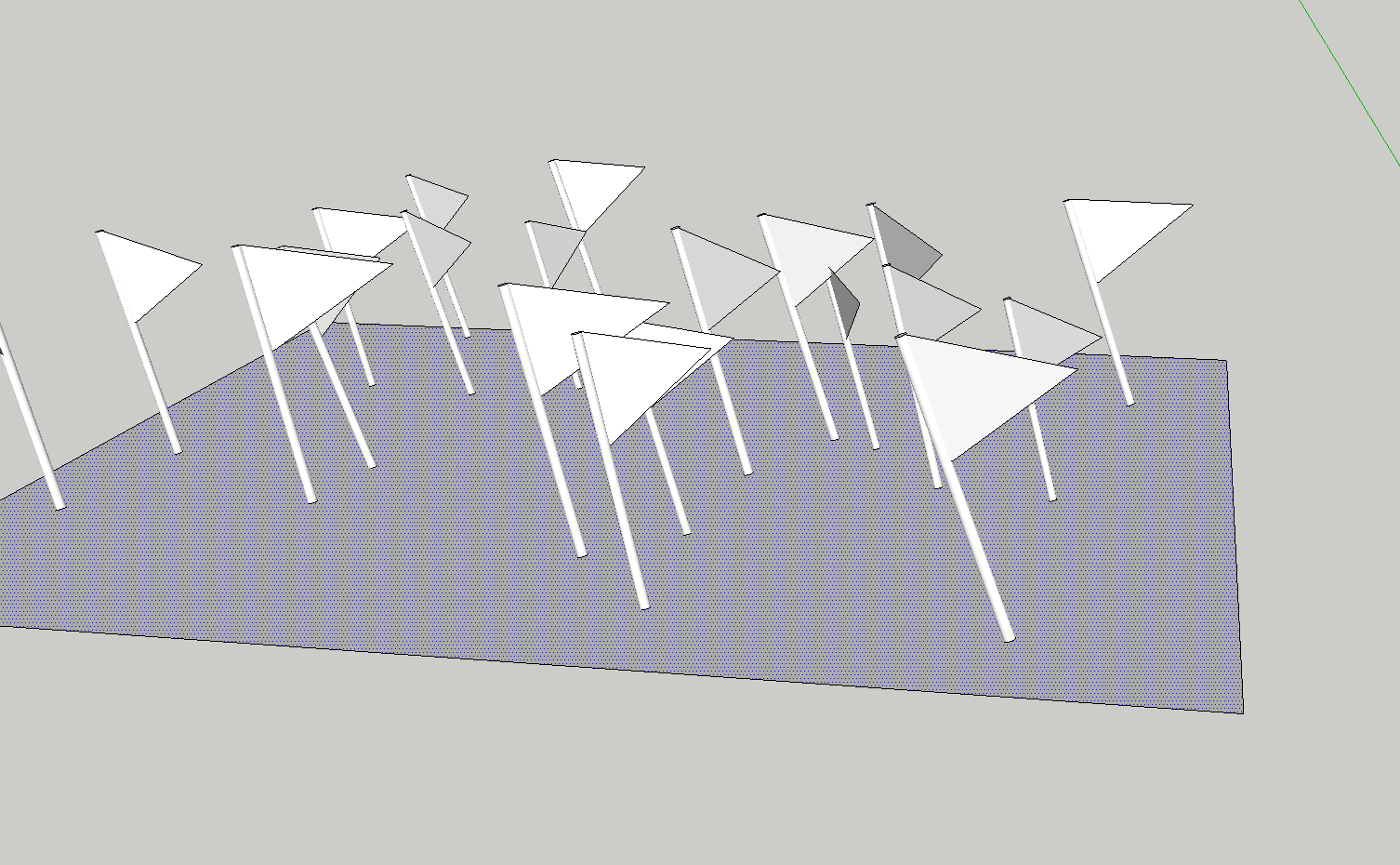
                                Screen Shot 2015-05-11 at 23.14.43.png

                                but the flags are tilted and I still think that I'm missing something here. Can anyone see what I'm doing wrong?

                                Thanks guys!

                                1 條回覆 最後回覆 回覆 引用 0
                                • TIGT 離線
                                  TIG Moderator
                                  最後由 編輯

                                  There is a degree of randomness in the Fur component-placement settings.
                                  You need to play with that to get near what you want.

                                  Alternatively look at the 'ComponentSpray' plugin, with appropriate settings it should also do what you want.

                                  To make all of your component-instances 'face' the same way, you could select them and run a snippet in the Ruby Console. Something like:

                                  m=Sketchup.active_model;s=m.selection.grep(Sketchup;;ComponentInstance).select{|i|i.definition.name="MyFlag"};m.start_operation("!");s.each{|i|t=i.transformation;x=t.xaxis;a=X_AXIS.angle_between(x);v=x.cross(X_AXIS);v=Z_AXIS if v.length==0;i.transform!(Geom;;Transformation.rotation(t.origin,v,a))};m.commit_operation;
                                  

                                  Replace the component's name with the actual one!
                                  This is one step undo-able.

                                  TIG

                                  1 條回覆 最後回覆 回覆 引用 0
                                  • M 離線
                                    marvsweden
                                    最後由 編輯

                                    Thanks TIG. That sounds like a sofisticated way. Never ran anything from the Ruby console. I'll give it a try.
                                    I did however use the make crowd option and found it to produce a somewhat more pleasing result.

                                    1 條回覆 最後回覆 回覆 引用 0
                                    • U 離線
                                      urban journey
                                      最後由 編輯

                                      Hi guys,

                                      This plugin has absolutely changed my life with Sketchup being a landscape designer, i use it all the time.
                                      I do have a similar problem though to a previous poster and couldn't see a solution from reading through. Essentially, i select an area, a grass component and then generate and it throws components outside the selected area - see screenshot showing this and my Fur settings....
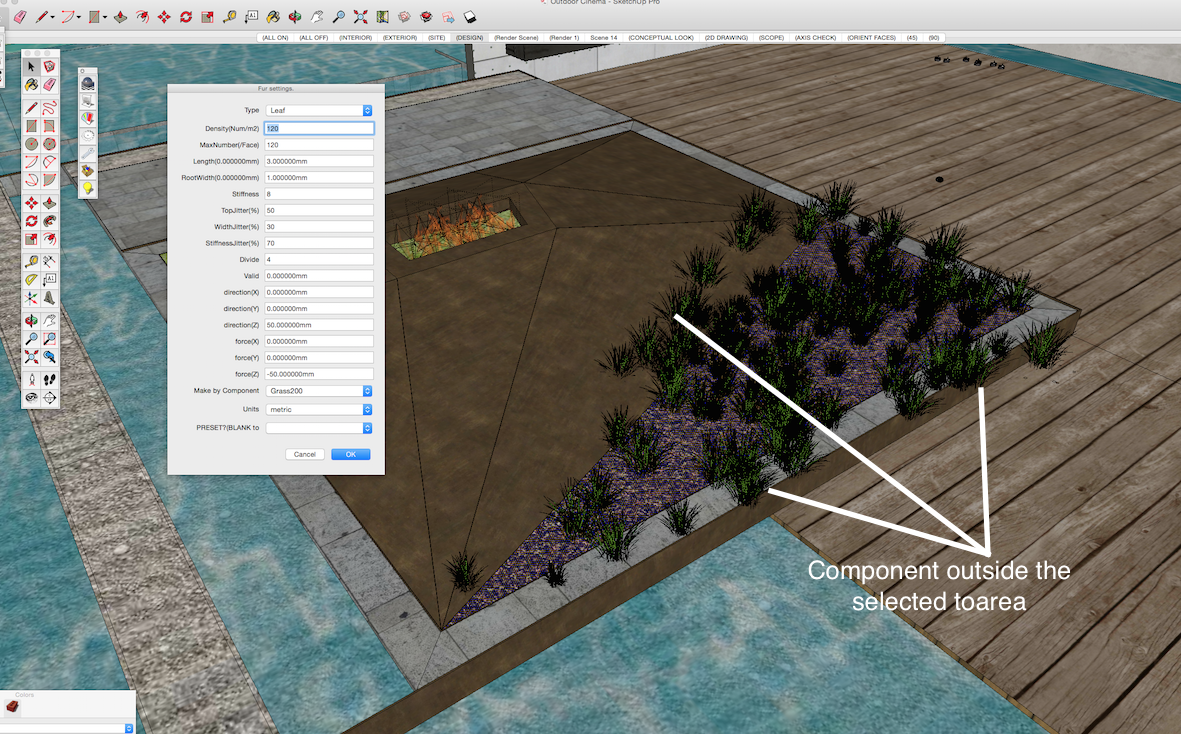
                                      Screen Shot 2015-05-19 at 8.37.29 pm.png

                                      1 條回覆 最後回覆 回覆 引用 0
                                      • T 離線
                                        TraxXx
                                        最後由 編輯

                                        Any suggestion concerning my problem ?

                                        1 條回覆 最後回覆 回覆 引用 0
                                        • TIGT 離線
                                          TIG Moderator
                                          最後由 編輯

                                          @traxxx said:

                                          Any suggestion concerning my problem ?
                                          Have you tried reading the usage notes.
                                          Perhaps you have a setting that ignores the selection ?
                                          Perhaps posting a screenshot or two would elicit more help...

                                          TIG

                                          1 條回覆 最後回覆 回覆 引用 0
                                          • T 離線
                                            TraxXx
                                            最後由 編輯

                                            I'm having the same issue as urban journey, this is pretty much what it looks like, but with grass


                                            1 條回覆 最後回覆 回覆 引用 0
                                            • 1
                                            • 2
                                            • 3
                                            • 4
                                            • 5
                                            • 6
                                            • 7
                                            • 8
                                            • 32
                                            • 33
                                            • 6 / 33
                                            • 第一個貼文
                                              最後的貼文
                                            Buy SketchPlus
                                            Buy SUbD
                                            Buy WrapR
                                            Buy eBook
                                            Buy Modelur
                                            Buy Vertex Tools
                                            Buy SketchCuisine
                                            Buy FormFonts

                                            Advertisement