[Plugin] Make Fur v.2.1.0(20140323)
-
@eidam655 said:
i get it.
at your settings, i have to keep the face's area under 64m2 (that is 8x8m) so that the grass is created on the whole face. i don't know whence comes this limitation.
I didnt understand what you meon with this...
And its not an preview issue. The fur is only made on that places!
I really would like to make this correctly... does any one knows how to make this?
Thanks
-
@jdcamc said:
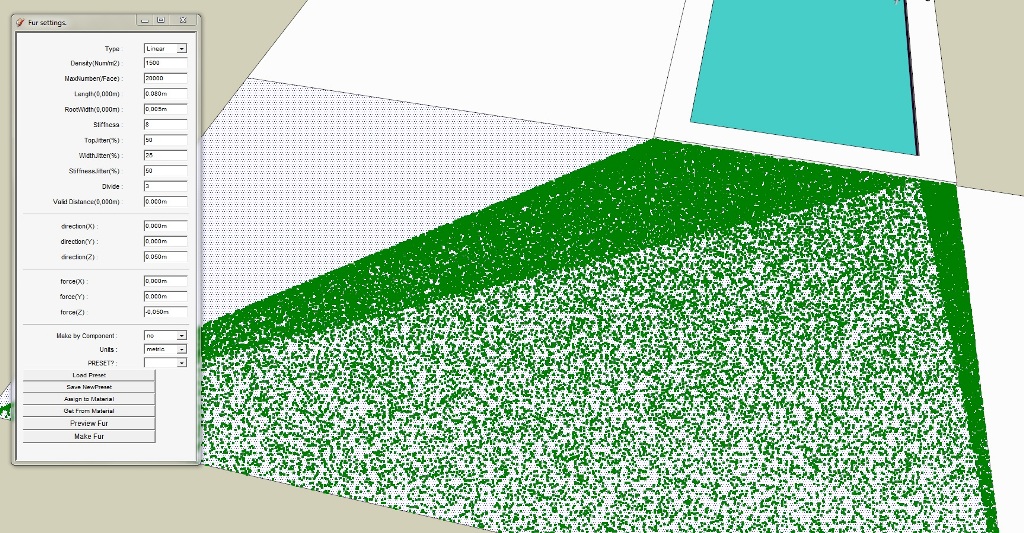
Help! I'm doing something wrong. Here is my setup:
[attachment=1:j50esvjc]<!-- ia1 -->Screen Shot 2012-01-24 at 7.03.24 AM copy.png<!-- ia1 -->[/attachment:j50esvjc]
and my render:
[attachment=0:j50esvjc]<!-- ia0 -->Screen Shot 2012-01-24 at 7.06.18 AM copy.png<!-- ia0 -->[/attachment:j50esvjc]
As you can see, the grass is just little green dots and the rendering shows nothing at all. What am I doing wrong?
FGomes, read this post again
 there's a preview button (the green dots you are getting), and Make Fur button (which will then generate the fur geometry).
 -
@eidam655 said:
@jdcamc said:
Help! I'm doing something wrong. Here is my setup:
[attachment=3:2nbvqzbl]<!-- ia3 -->Screen Shot 2012-01-24 at 7.03.24 AM copy.png<!-- ia3 -->[/attachment:2nbvqzbl]
and my render:
[attachment=2:2nbvqzbl]<!-- ia2 -->Screen Shot 2012-01-24 at 7.06.18 AM copy.png<!-- ia2 -->[/attachment:2nbvqzbl]
As you can see, the grass is just little green dots and the rendering shows nothing at all. What am I doing wrong?FGomes, read this post again
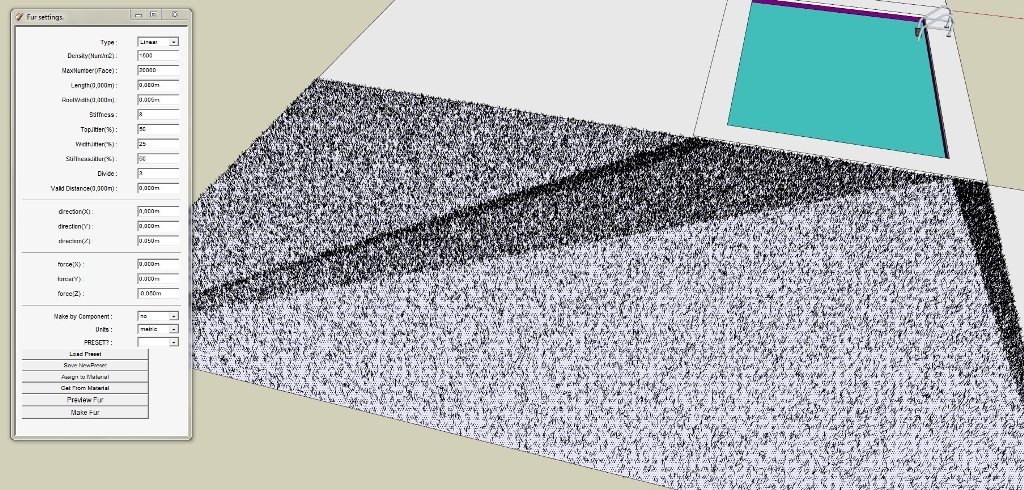
there's a preview button (the green dots you are getting), and Make Fur button (which will then generate the fur geometry).ok ... half the problem solved. Actually appeared in the preview only half the area covered, but after making the fur, the distribution was throughout the area.
However, the distribution was not homogeneous. There are areas with more grass than others.
This is strange... everyone does fantastic grass with theis plugin... I only encounter problems!
-
@fgomes said:
ok ... half the problem solved. Actually appeared in the preview only half the area covered, but after making the fur, the distribution was throughout the area.
However, the distribution was not homogeneous. There are areas with more grass than others.
This is strange... everyone does fantastic grass with theis plugin... I only encounter problems!
I have the same issue with the green dots and the distribution. You're not the only one.
-
@ineshtine said:
@fgomes said:
ok ... half the problem solved. Actually appeared in the preview only half the area covered, but after making the fur, the distribution was throughout the area.
However, the distribution was not homogeneous. There are areas with more grass than others.
This is strange... everyone does fantastic grass with theis plugin... I only encounter problems!
I have the same issue with the green dots and the distribution. You're not the only one.
Hi,Ineshtine and FGomes.
The previewing with too many green dots will be very slowly manipulation.
So It is limited.And Making fur will makes sketchup model larger.
So "MaxNumber(/Face) " limits density each faces.
Setting "MaxNumber(/Face) " to large will make density same to each faces.But be carefully.It will make file to very large.
Thanks.
-
Yes, indeed. But this is not the problem. The real problem is, the grass generation is not evenly distributed (sometimes). There is more grass on some areas (looks like big triangles). It does this with the green dots, and also when making the fur.
I have a suggestion. Can you implement clipping for the crowd? If we use a wide object instead of a tall object (like people), they go over the face edges. It would be nice if they clip, or moves inside so they don't go over the edges.
BTW, Thanks for this fantastic plugin, I love it.
-
Thanks a lot! can't wait to try this.
-
How can i get it?

-
@djdamian said:
How can i get it?
Assuming you want the 'plugin'... please look at the very first post in this thread.
There is a download link to get the archived files, and a detailed instruction on how to install it.
More recent posts include several enhancements to the toolset - read those and download their files once you are up and running... -
Very, very thanks.
-
Hey! I am so thankful for this plugin, just tried it earlier and I am very pleased for its result! thank you so much!!
) -
Hi, how can I download this plugin? Probably my browser blocks this.
-
@cas_123 said:
Hi, how can I download this plugin? Probably my browser blocks this.
Disable 'AdBlock' add-ons etc for SCF - just as you agreed in the membership ToS - then attachments should become available to you after a 'refresh'... -
Thank you, I downloaded it via IE. I put this unwrapped folder 'fur_en15a' in folder 'Plugins' in SketchUp files but it doesn't work. What should I do?
-
@cas_123 said:
Thank you, I downloaded it via IE. I put this unwrapped folder 'fur_en15a' in folder 'Plugins' in SketchUp files but it doesn't work. What should I do?
You must unzip it to that folder.
-
I did but it doesn't work

-
@cas_123 said:
I did but it doesn't work
Make sure that the fur_en folder and the fur_en.rb file is in your ..*Sketchup\Plugins* folder and re-start Sketchup if it was already opened.
if that doesn't work still, then let me ask.. what doesn't work? The fur plugin? or it's not in your Plugin menu? Give me some clues.
-
Thank you very much, the problem was that I had it all in fur_en15a folder (not.zip), instead of having it autonomously in Plugins folder, now it works, thanks a lot and sorry for keeping on at you.
-
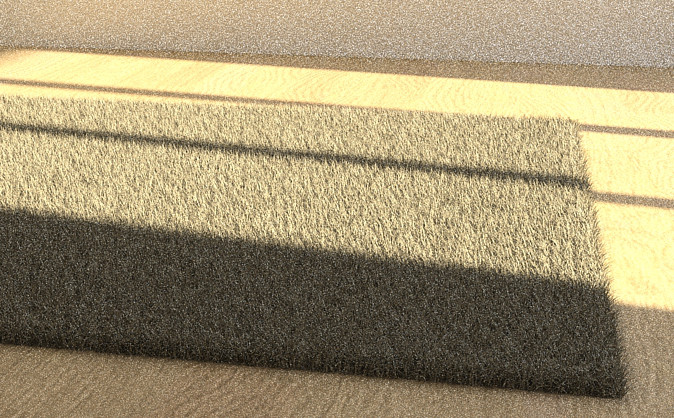
Thanks for this very helpful plugin! I will use it for carpets.
Is it possilbe to delete a preset I saved ? How?
-
@ineshtine said:
Yes, indeed. But this is not the problem. The real problem is, the grass generation is not evenly distributed (sometimes). There is more grass on some areas (looks like big triangles). It does this with the green dots, and also when making the fur.
I have a suggestion. Can you implement clipping for the crowd? If we use a wide object instead of a tall object (like people), they go over the face edges. It would be nice if they clip, or moves inside so they don't go over the edges.
BTW, Thanks for this fantastic plugin, I love it.
Anyone have a solution to this problem? I've encountered the same issue. Even just drawing a simple rectangle and generating the grass - the fur is concentrated in these triangle shapes.





Advertisement