sketchucation logo sketchucation
    • 登入
    Oops, your profile's looking a bit empty! To help us tailor your experience, please fill in key details like your SketchUp version, skill level, operating system, and more. Update and save your info on your profile page today!
    🔌 Smart Spline | Fluid way to handle splines for furniture design and complex structures. Download

    [Plugin] Make Fur v.2.1.0(20140323)

    已排程 已置頂 已鎖定 已移動 Plugins
    650 貼文 255 Posters 1.1m 瀏覽 254 Watching
    正在載入更多貼文
    • 從舊到新
    • 從新到舊
    • 最多點贊
    回覆
    • 在新貼文中回覆
    登入後回覆
    此主題已被刪除。只有擁有主題管理權限的使用者可以查看。
    • F 離線
      frv
      最後由 編輯

      TX for the great plugin, I love the idea of the crowedmaker.
      But under OSX it does not work, the dialog panel is empty for the crowed option.
      Francois

      1 條回覆 最後回覆 回覆 引用 0
      • mariochaM 離線
        mariocha
        最後由 編輯

        @frv said:

        ....., I love the idea of the crowedmaker.
        But under OSX it does not work, the dialog panel is empty for the crowed option.
        Francois

        Yep, same here. No dialog under MacOX (10.6.3) 😕

        %(#008000)[Mario C.
        Every rule has exceptions, but some.]

        1 條回覆 最後回覆 回覆 引用 0
        • M 離線
          Masoncrowell
          最後由 編輯

          can someone tell me how i do this on a mac?
          i downloaded the file and updated my version of sketchup. the file only shows up in my downloads and i can't open it with sketchup. i also enabled my plugins menu on sketchup and the only option that shows up is a "cost" option. How do i do this? 😕

          1 條回覆 最後回覆 回覆 引用 0
          • T 離線
            tak2hata
            最後由 編輯

            @mariocha said:

            @frv said:

            ....., I love the idea of the crowedmaker.
            But under OSX it does not work, the dialog panel is empty for the crowed option.
            Francois

            Yep, same here. No dialog under MacOX (10.6.3) 😕

            Hi,Francois and Mario.
            It is very regrettable.
            I will examine way for working on mac.

            @masoncrowell said:

            can someone tell me how i do this on a mac?
            i downloaded the file and updated my version of sketchup. the file only shows up in my downloads and i can't open it with sketchup. i also enabled my plugins menu on sketchup and the only option that shows up is a "cost" option. How do i do this? 😕

            This file is compressed by zip.
            First, You should extract this file with folder.
            It includes
            --fur_en.rb
            --fur_en(folder include icon images)
            and copy created files to plugins folder.
            Read here.
            http://sketchup.google.com/intl/en/download/rubyscripts.html

            Thanks.


            by TAK2HATA

            1 條回覆 最後回覆 回覆 引用 0
            • K 離線
              ktslambieng
              最後由 編輯

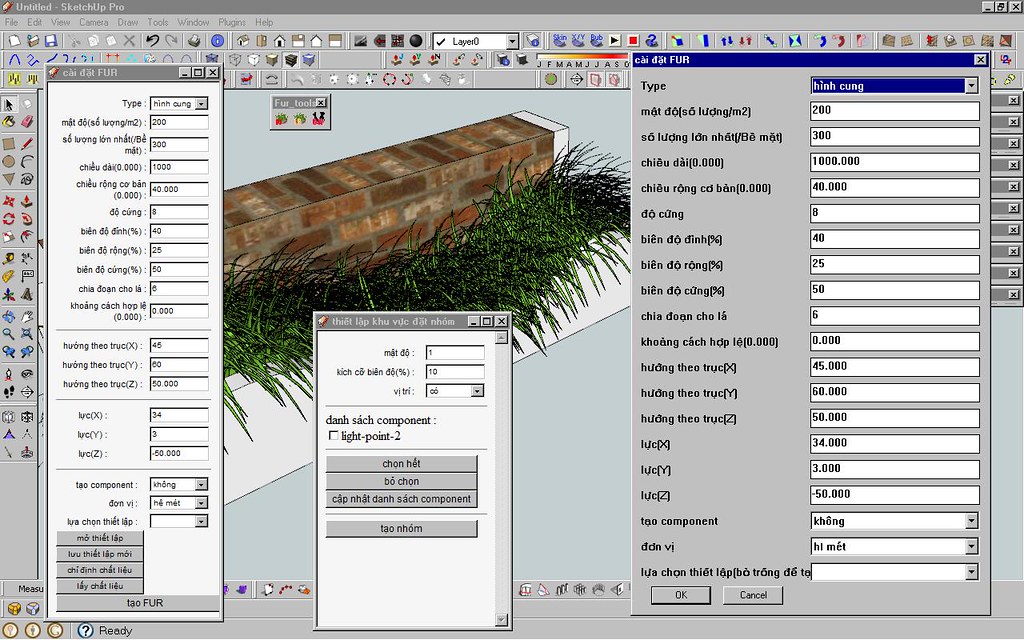
              this is this is a new : vietnam translation for fur1.4b
              Thanks you for all !

              http://farm2.static.flickr.com/1273/4676700265_23fc0faee3_b.jpg


              fur_lang_vn14b.txt

              1 條回覆 最後回覆 回覆 引用 0
              • F 離線
                frv
                最後由 編輯

                TX Tak,
                hope you find the time to look into the blanc dialog for crowds.
                I love your idea to specialise the furmaker for crowds
                Francois

                1 條回覆 最後回覆 回覆 引用 0
                • thomthomT 離線
                  thomthom
                  最後由 編輯

                  That is due to some oddness in Geom::Transformation.scaling which I mentioned earlier.
                  http://forums.sketchucation.com/viewtopic.php?f=323&t=28092&p=248300#p248300

                  But tak2hata said later he's swapped to use .scaling(a,a,a) isntead of .scaling(a) - so that should have taken care of it. Unless there is something else that also creates this scenario.

                  Oli: are you using the latest version?

                  Thomas Thomassen — SketchUp Monkey & Coding addict
                  List of my plugins and link to the CookieWare fund

                  1 條回覆 最後回覆 回覆 引用 0
                  • thomthomT 離線
                    thomthom
                    最後由 編輯

                    ❓ what happened to Oli's post..?

                    Thomas Thomassen — SketchUp Monkey & Coding addict
                    List of my plugins and link to the CookieWare fund

                    1 條回覆 最後回覆 回覆 引用 0
                    • M 離線
                      michaelhsu
                      最後由 編輯

                      amazing, thanks.

                      1 條回覆 最後回覆 回覆 引用 0
                      • W 離線
                        wanchoke
                        最後由 編輯

                        I use this plugin to my model, It's help to improve atmosphere a lot.

                        Thank you very much. 👍 👍

                        http://lh6.ggpht.com/_xQzZkoFEzSQ/TBLHIaL6eII/AAAAAAAACV8/QfktBGuUv2U/s912/House on Haunted Hill 2.jpg

                        <model link>
                        http://sketchup.google.com/3dwarehouse/details?mid=5e3202cae2da28223fc4dc5809e00c5c&prevstart=0

                        1 條回覆 最後回覆 回覆 引用 0
                        • GaieusG 離線
                          Gaieus
                          最後由 編輯

                          You do not really need to open it just drop into the plugins folder in your SU application.

                          Otherwise rb files are text files and should be opened with some simple text editor (never with some word processor!).

                          Gai...

                          1 條回覆 最後回覆 回覆 引用 0
                          • McGyverM 離線
                            McGyver
                            最後由 編輯

                            I just tried this out on my G5(Power PC) Mac using SU 6 free version... it works like a charm! I look forward to experimenting with this! Awesome job! Thank you!!!
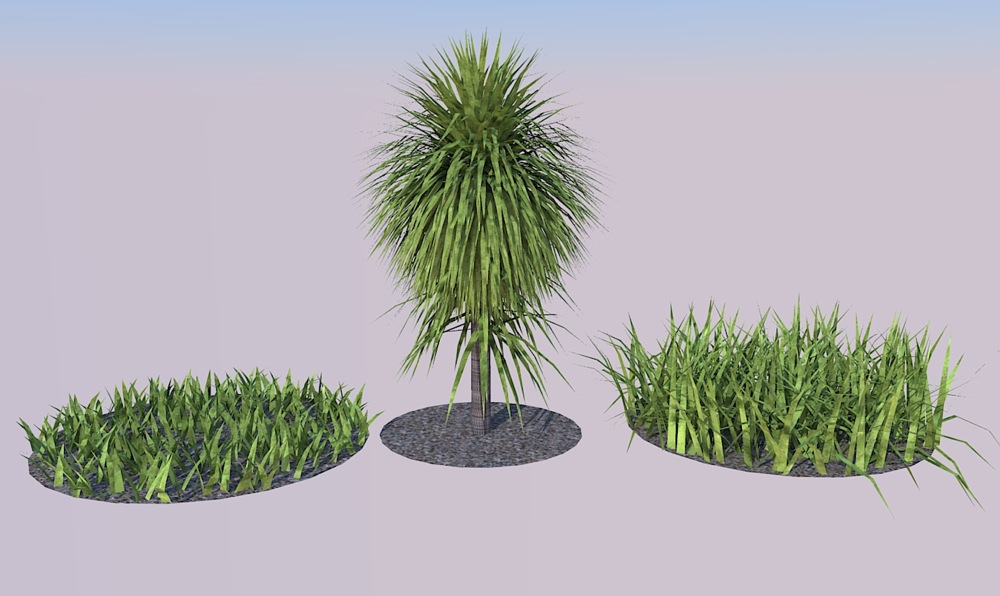

                            Just a quick test I did... rendered in Kerkythea.

                            Visit My ShareCG Freebie Gallery

                            1 條回覆 最後回覆 回覆 引用 0
                            • N 離線
                              Ninjamaster1470
                              最後由 編輯

                              I know this will sound really dumb, but it appears that i set the plugin RB (whatever) file to google sketchup program so that when ever i click it, it opens on sketchup instead on.........um.....what it's supposed to open on--btw, what is the program its on?

                              Help! do u know how to fix?

                              Update: I moved it but its still a SU app instead of the supposed text doc.

                              1 條回覆 最後回覆 回覆 引用 0
                              • A 離線
                                angor2005
                                最後由 編輯

                                Please Russian translation.
                                Many Thanks to you all !

                                1 條回覆 最後回覆 回覆 引用 0
                                • A 離線
                                  aiwkha
                                  最後由 編輯

                                  So nice plugins.

                                  1 條回覆 最後回覆 回覆 引用 0
                                  • B 離線
                                    blajnov
                                    最後由 編輯

                                    @angor2005 said:

                                    Please Russian translation.
                                    Many Thanks to you all !


                                    fur_lang_ru.txt

                                    1 條回覆 最後回覆 回覆 引用 0
                                    • GaieusG 離線
                                      Gaieus
                                      最後由 編輯

                                      👍

                                      Gai...

                                      1 條回覆 最後回覆 回覆 引用 0
                                      • McGyverM 離線
                                        McGyver
                                        最後由 編輯

                                        Hi. I've been playing around with this and have found some good uses for this plugin. The one thing I'm not getting is, which setting (if any) controls the number of (leafs, blades of grass, etc.) that are generated... I've been trying to get smaller number of "blades per inch" but I'm not really noticing much of a difference. I figured it would be Density(Num/m2) and or MaxNumber(/face)... I went as low as 10 on a 4 ft x 4 ft square and I really can't tell the difference between these set at 200... 😕
                                        Any suggestions or help in this matter is greatly appreciated.

                                        EDIT- Never mind, I figured it out... I was using sandbox and the faces(grids) were too small... works fine otherwise.

                                        Visit My ShareCG Freebie Gallery

                                        1 條回覆 最後回覆 回覆 引用 0
                                        • T 離線
                                          tak2hata
                                          最後由 編輯

                                          Hi all.
                                          I update makefur to version1.4c(webdialog test for mac)

                                          fixing webdialog problem on mac os.
                                          (referred to forum "[Web dialog] switch snippet for pc / mac" and jim's "protrude.rb")
                                          I wish this working on mac!

                                          @unknownuser said:

                                          Hi. I've been playing around with this and have found some good uses for this plugin. The one thing I'm not getting is, which setting (if any) controls the number of (leafs, blades of grass, etc.) that are generated... I've been trying to get smaller number of "blades per inch" but I'm not really noticing much of a difference. I figured it would be Density(Num/m2) and or MaxNumber(/face)... I went as low as 10 on a 4 ft x 4 ft square and I really can't tell the difference between these set at 200... 😕
                                          Any suggestions or help in this matter is greatly appreciated.

                                          EDIT- Never mind, I figured it out... I was using sandbox and the faces(grids) were too small... works fine otherwise.

                                          4 ft x 4ft = 16 ft.sq
                                          16 * 10(num/m2) = 160.
                                          16 * 200(num/m2) = 3200.
                                          If you keeping MaxNumber(/face) as 200,then It makes 200 fur on each faces.
                                          16 x200 = 3200 changes to 200.
                                          So you should glow MaxNumber(/face) like 4000.

                                          Thanks.


                                          by TAK2HATA

                                          1 條回覆 最後回覆 回覆 引用 0
                                          • mariochaM 離線
                                            mariocha
                                            最後由 編輯

                                            I'm so sorry to have to report the web dialogs still do not work on Mac here. Empty.
                                            I have other plugins that use them, and they work just fine.


                                            Web dialog, Fur 1.4c

                                            %(#008000)[Mario C.
                                            Every rule has exceptions, but some.]

                                            1 條回覆 最後回覆 回覆 引用 0
                                            • 1
                                            • 2
                                            • 11
                                            • 12
                                            • 13
                                            • 14
                                            • 15
                                            • 32
                                            • 33
                                            • 13 / 33
                                            • 第一個貼文
                                              最後的貼文
                                            Buy SketchPlus
                                            Buy SUbD
                                            Buy WrapR
                                            Buy eBook
                                            Buy Modelur
                                            Buy Vertex Tools
                                            Buy SketchCuisine
                                            Buy FormFonts

                                            Advertisement