[Plugin] Make Fur v.2.1.0(20140323)
-
 1.3e not working for me.
Error: #<NoMethodError: undefined method[]' for nil:NilClass>
C:/Program Files (x86)/Google/Google SketchUp 7/Plugins/fur_en.rb:734:infur_dialog_ini' C:/Program Files (x86)/Google/Google SketchUp 7/Plugins/fur_en.rb:741:infur_webdialog'
C:/Program Files (x86)/Google/Google SketchUp 7/Plugins/fur_en.rb:1414
C:/Program Files (x86)/Google/Google SketchUp 7/Plugins/fur_en.rb:1413:incall' -
With 1.3e I get
Error: #<TypeError: no implicit conversion to float from nil> C:/Program Files/Google/Google SketchUp 7/Plugins/fur_en.rb:1326:ininitialize'
C:/Program Files/Google/Google SketchUp 7/Plugins/fur_en.rb:1326:innew' C:/Program Files/Google/Google SketchUp 7/Plugins/fur_en.rb:1326:ins_to_vec'
C:/Program Files/Google/Google SketchUp 7/Plugins/fur_en.rb:713:inshow_webdialog' C:/Program Files/Google/Google SketchUp 7/Plugins/fur_en.rb:658:incall'`
with the 'web-dialog' accept button.
You must be passing an empty argument to a defn ? -
@thomthom said:
1.3e not working for me.Error: #<NoMethodError: undefined method[]' for nil:NilClass>
C:/Program Files (x86)/Google/Google SketchUp 7/Plugins/fur_en.rb:734:infur_dialog_ini' C:/Program Files (x86)/Google/Google SketchUp 7/Plugins/fur_en.rb:741:infur_webdialog'
C:/Program Files (x86)/Google/Google SketchUp 7/Plugins/fur_en.rb:1414
C:/Program Files (x86)/Google/Google SketchUp 7/Plugins/fur_en.rb:1413:incall'I think this is LengthFormat or LengthPrecision problem.
So I will change code..def fur_dialog_ini unitoptions = Hash.new Sketchup.active_model.options["UnitsOptions"].each{|key ,val| unitoptions[key] = val } Sketchup.active_model.options["UnitsOptions"]["LengthFormat"] = 0 if unitoptions["LengthFormat"] != 0 Sketchup.active_model.options["UnitsOptions"]["LengthPrecision"] = 1 if unitoptions["LengthPrecision"] == 0 @fur_units_metric = false lunit = unitoptions["LengthUnit"] @fur_units_metric = true if lunit >= 2 lprec = Sketchup.active_model.options["UnitsOptions"]["LengthPrecision"] @decimal_sep = 1.2.to_l.to_s.match(/\d(\D)\d/)[1] @delim = "," @delim = ";" if @decimal_sep == ',' unitoptions.each{|key ,val| Sketchup.active_model.options["UnitsOptions"][key] = val } end@tig said:
With 1.3e I get
Error: #<TypeError: no implicit conversion to float from nil> C:/Program Files/Google/Google SketchUp 7/Plugins/fur_en.rb:1326:ininitialize'
C:/Program Files/Google/Google SketchUp 7/Plugins/fur_en.rb:1326:innew' C:/Program Files/Google/Google SketchUp 7/Plugins/fur_en.rb:1326:ins_to_vec'
C:/Program Files/Google/Google SketchUp 7/Plugins/fur_en.rb:713:inshow_webdialog' C:/Program Files/Google/Google SketchUp 7/Plugins/fur_en.rb:658:incall'`
with the 'web-dialog' accept button.
You must be passing an empty argument to a defn ?Sorry,I will change the code.
-
Why are you doing this?
Sketchup.active_model.options["UnitsOptions"].each{|key ,val| unitoptions[key] = val } Sketchup.active_model.options["UnitsOptions"]["LengthFormat"] = 0 if unitoptions["LengthFormat"] != 0 Sketchup.active_model.options["UnitsOptions"]["LengthPrecision"] = 1 if unitoptions["LengthPrecision"] == 0You're changing the model settings.
-
This whole thing makes no sense...
def fur_dialog_ini unitoptions = Hash.new Sketchup.active_model.options["UnitsOptions"].each{|key ,val| unitoptions[key] = val } Sketchup.active_model.options["UnitsOptions"]["LengthFormat"] = 0 if unitoptions["LengthFormat"] != 0 Sketchup.active_model.options["UnitsOptions"]["LengthPrecision"] = 1 if unitoptions["LengthPrecision"] == 0 @fur_units_metric = false lunit = unitoptions["LengthUnit"] @fur_units_metric = true if lunit >= 2 lprec = Sketchup.active_model.options["UnitsOptions"]["LengthPrecision"] @decimal_sep = 1.2.to_l.to_s.match(/\d(\D)\d/)[1] @delim = "," @delim = ";" if @decimal_sep == ',' unitoptions.each{|key ,val| Sketchup.active_model.options["UnitsOptions"][key] = val } endYou create an hash to store model UnitOptions, then change them and then restore the original values...?
-
From what I could understand, that method could be condensed to:
def fur_dialog_ini units = Sketchup.active_model.options["UnitsOptions"]["LengthUnit"] @fur_units_metric = (units >= 2) # true if units are 2 or greater @decimal_sep = 1.2.to_l.to_s.match(/\d(\D)\d/)[1] @delim = (@decimal_sep == ',') ? ";" ; "," end -
Hmmm,
When LengthFormat is Architectural or LengthPrecision = 0,
"1.2.to_l.to_s.match(/\d(\D)\d/)[1]" return error.Is that problem excluding this?
-
Ah, yes. I see the problem. ..hm... this needs some more thinking...
-
Ok - turns out that you can't trust the SU methods to extract the decimal separator as model settings affects the length to string formatting. (Should have thought of that.
 )
)Looking at there seems to mostly be just comma or period as decimal separator. At least if you make that assumption it will cover most.
So here is an alternative:
  def get_decimal_separator
    # If this raises an error the decimal separator is not '.'
    '1.2'.to_l
    return '.'
  rescue
    return ','
  end

  def fur_dialog_ini
    @decimal_sep ||= get_decimal_separator
    @delim ||= (@decimal_sep == ',') ? ";" ; ","
  end
This snippet makes some assumptions:
Only comma or period as decimal separator.
If the separator is a period then comma is used as list separator.
If the separator is a comma then ; is used as list separator.The method is working out the decimal separator is by trial and error.
-
wow... keep it coming. Thanks.
-
I thought of a very cool thing to do with this plugin... those xmas stuff that you put on Xmas trees, you know?? Well, actually this plugin also makes it easy to do the Xmas tree itself.
I am talking about this thing that goes around the tree

-
Is v1.3e working for others?
Nothing happens when i select it?
-
I did have some issues as well, didn't check the console though. I had a model I'd saved using the previous "make fur" revision and was attempting to use the plugin, nothing happened - dialogue wouldn't open. I opened a "new" scene (File > New) and then the plugin worked.
-
I update to version 1.3g.
Vector parameter split to 3 parameter each.
and I change preset file.
I think this vesion has problem yet.For the time being, It going on my sketchup.
But very difficult for me to convert units.
and so tired.Thanks.
-
I appears to work. I'll see if I can get some time to have a better look at your script and see if I can help with the units.
-
it seems to work OK now BUT the dialog is getting too tall.
Can't you redo the web-dialog code so that some of the boxes are side-by-side - the XYZ ones could be in a line, so making it 3 input boxes wide, but with each a little narrower would be more manageable ? -
Hi ,all.
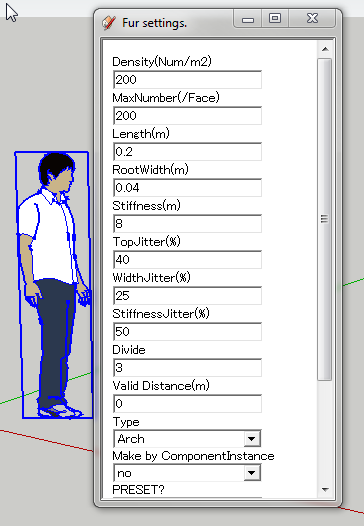
I update version 1.3h.
WebDialog becomes smaller.
fix problem about defn for Exporter.Thanks.
-
Thanks - very good...
-
Hi!
The first, incredible plugin!
I had downloaded the plugin version 1.3a and it works fine, i download the last version 1.3h and it don't works, the plugin appears in the Menu Plugins and the InputBox appears too but when I push OK nothing happens. I use Mac with SU 7.1. I have probed the plugin version 1.3h in SU (Windows) too and don't works. What's the problem?Certainly, i have done the plugin's translation to spanish language of the two versions, 1.3a (works) and 1.3h (don't works), if you want i send you them.
Bye!
-
I downloaded 1.3h and I don't see the new dialog, just the old one.
(thanks for the plugin by the way)





Hello! It looks like you're interested in this conversation, but you don't have an account yet.
Getting fed up of having to scroll through the same posts each visit? When you register for an account, you'll always come back to exactly where you were before, and choose to be notified of new replies (either via email, or push notification). You'll also be able to save bookmarks and upvote posts to show your appreciation to other community members.
With your input, this post could be even better 💗
Register Login


Advertisement