sketchucation logo sketchucation
    • 登入
    Oops, your profile's looking a bit empty! To help us tailor your experience, please fill in key details like your SketchUp version, skill level, operating system, and more. Update and save your info on your profile page today!
    🔌 Smart Spline | Fluid way to handle splines for furniture design and complex structures. Download

    [Plugin] Make Fur v.2.1.0(20140323)

    已排程 已置頂 已鎖定 已移動 Plugins
    650 貼文 255 Posters 1.1m 瀏覽 254 Watching
    正在載入更多貼文
    • 從舊到新
    • 從新到舊
    • 最多點贊
    回覆
    • 在新貼文中回覆
    登入後回覆
    此主題已被刪除。只有擁有主題管理權限的使用者可以查看。
    • T 離線
      tak2hata
      最後由 編輯

      Hi,all.
      I upadte fur plugin v1_3c(test version).

      Mario..

      @unknownuser said:

      Hum .... Although the title says V1.3b
      the download still says v1.3a

      Sorry,I made a mistake in writing title. 😲
      So Current version up to 1_3c.

      Thanks.


      by TAK2HATA

      1 條回覆 最後回覆 回覆 引用 0
      • P 離線
        portenart.emile
        最後由 編輯

        @thomthom said:

        @portenart.emile said:

        I found this plugin today. It look amazing. Ihave made the grass but i don't know why it isn't render in Vray ? I'm sure it's a specific option i have to check but i don't found it.

        I use Skectchup pro 7.1.6, Vray for sketchup 01.05.30, and Fur Plugin 1.3.

        This is due to a Sketchup bug and groups. The groups will render when you reopen the model.
        The latest VfSU does not suffer from this SU bug.

        Thanks you so much thomthom, it works.
        I'll post you my render once done.

        Emile

        1 條回覆 最後回覆 回覆 引用 0
        • FrederikF 離線
          Frederik
          最後由 編輯

          Like so many others, I'm having a blast with this new toy...

          @ tak2hata:
          Would it be possible to add an option, where you can select that components don't intersect with each other...??

          Cheers
          Kim Frederik

          1 條回覆 最後回覆 回覆 引用 0
          • GaieusG 離線
            Gaieus
            最後由 編輯

            Simply incredible! 😮
            Thanks for this continuous update,too!

            Gai...

            1 條回覆 最後回覆 回覆 引用 0
            • DareDevilD 離線
              DareDevil
              最後由 編輯

              Hi,
              I just update the v1.2 to the new 1.3c with the nice new features.

              But...
              I'm french and use SU on a french vista system. In french we use the comma (,) for decimal separation.
              In default setup, all numbers are in french (0,0cm,0,0cm,5,0cm) and of course it read like a 0,0,0 (with an unread 0,5,0 after).
              If I use a period (0.0cm,0.0cm,5.0cm) the plugin dont work 😞

              Why all the world dont use the same way to measure and write numbers ??? 😉

              1 條回覆 最後回覆 回覆 引用 0
              • TIGT 離線
                TIG Moderator
                最後由 編輯

                @unknownuser said:

                Hi,
                I just update the v1.2 to the new 1.3c with the nice new features. But...
                I'm French and use SU on a French Vista system. In French we use the comma (,) for decimal separation.
                In default setup, all numbers are in French (0,0cm,0,0cm,5,0cm) and of course it read like a 0,0,0 (with an unread 0,5,0 after).
                If I use a period (0.0cm,0.0cm,5.0cm) the plugin won't work 😞
                Why all the world don't use the same way to measure and write numbers ??? 😉

                Try substituting the comma (,) as the list separator with a semi-colon (;)... so in UK/US 1,2.3,4.5 >> 1;2,3;4,5 in FR.
                Or change you regional settings !
                Why can't everyone use a '.' as a "decimal-point" ? - after all it is not a "decimal-comma" - this would free up the ',' comma to be used as a list separator - it's prime function in grammar - and then we could leave the poor old ";" alone !

                TIG

                1 條回覆 最後回覆 回覆 引用 0
                • soloS 離線
                  solo
                  最後由 編輯

                  @unknownuser said:

                  Why all the world dont use the same way to measure and write numbers ???

                  Got no idea, here in the states we still use the imperial system or as we call it 'American standard' and we drive on the wrong side of the road according to y'all. 💚

                  http://www.solos-art.com

                  If you see a toilet in your dreams do not use it.

                  1 條回覆 最後回覆 回覆 引用 0
                  • FrederikF 離線
                    Frederik
                    最後由 編輯

                    @solo said:

                    ...and we drive on the wrong side of the road according to y'all. 💚

                    Not true, Pete...
                    In most European countries, we drive in the right (in the sense opposite to left) side of the road...
                    Only in UK in Europe (and I believe on Cypres too) they drive in the left side... 😉

                    Cheers
                    Kim Frederik

                    1 條回覆 最後回覆 回覆 引用 0
                    • thomthomT 離線
                      thomthom
                      最後由 編輯

                      @tak2hata: could you keep the filename free from the version number? That way it's easier to update by just dragging the file into the plugins folder overriding the old.

                      Thomas Thomassen — SketchUp Monkey & Coding addict
                      List of my plugins and link to the CookieWare fund

                      1 條回覆 最後回覆 回覆 引用 0
                      • thomthomT 離線
                        thomthom
                        最後由 編輯

                        @tig said:

                        Or change you regional settings !

                        That generally just causes troubles elsewhere. I've tried it. Very awkward.

                        Thomas Thomassen — SketchUp Monkey & Coding addict
                        List of my plugins and link to the CookieWare fund

                        1 條回覆 最後回覆 回覆 引用 0
                        • thomthomT 離線
                          thomthom
                          最後由 編輯

                          @unknownuser said:

                          If I use a period (0.0cm,0.0cm,5.0cm) the plugin dont work 😞

                          I use Norwegian locale, we also use comma as decimal separator. But using period in this plugin works for me.
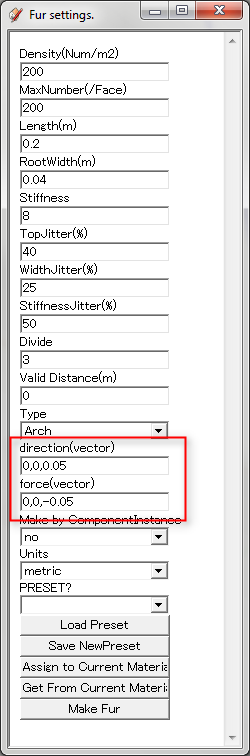
                          fur_units.png

                          I noted something in what you said though: (0.0cm,0.0cm,5.0cm)
                          Did you enter cm into the direction and force vectors?
                          They should not have length indications. Vectors are just direction indicators.

                          Thomas Thomassen — SketchUp Monkey & Coding addict
                          List of my plugins and link to the CookieWare fund

                          1 條回覆 最後回覆 回覆 引用 0
                          • DareDevilD 離線
                            DareDevil
                            最後由 編輯

                            @tig said:

                            Try substituting the comma (,) as the list separator with a semi-colon (;)... so in UK/US 1,2.3,4.5 >> 1;2,3;4,5 in FR.

                            I tried, but dont work 😞

                            @unknownuser said:

                            Or change you regional settings !

                            Nooooooooo, pleeeeaaaaase 😉

                            @thomthom said:

                            I use Norwegian locale, we also use comma as decimal separator. But using period in this plugin works for me.

                            Can you use the period in the SU standard value input ? I cant ! I must use the comma and the semi-colon as separator (i.e. 10,5;22,4 for a rectangle).

                            @unknownuser said:

                            I noted something in what you said though: (0.0cm,0.0cm,5.0cm)
                            Did you enter cm into the direction and force vectors?
                            They should not have length indications. Vectors are just direction indicators.

                            No, cm is in the default setting.
                            If it's 0cm it's ok, but if it's 0 cm (with space) it dont work.

                            OK, I know why I have the unit after value, because it's a SU setting in the Model info : "Display units format". Uncheck it, disable the cm.
                            ... And if I set the Precision (in Model info -> Units) to 0 instead 0,0 all it's ok in the Fur setting windows, I have 0,0,5 (but setting 0cm for Precision or mm for Units in it's not ok for my way of work 😉)

                            1 條回覆 最後回覆 回覆 引用 0
                            • T 離線
                              tak2hata
                              最後由 編輯

                              @frederik said:

                              Would it be possible to add an option, where you can select that components don't intersect with each other...??

                              That's very difficult for me.I will challenge future.Please wait without expecting it. 😒

                              @unknownuser said:

                              I'm french and use SU on a french vista system. In french we use the comma (,) for decimal separation
                              If it's 0cm it's ok, but if it's 0 cm (with space) it dont work.

                              Indeed,I learnt it for the first time. I will think about some measures for that problem.

                              @thomas said:

                              could you keep the filename free from the version number? That way it's easier to update by just dragging the file into the plugins folder overriding the old.

                              Thanks.That's right! I will keep the filename. 😉


                              by TAK2HATA

                              1 條回覆 最後回覆 回覆 引用 0
                              • FrederikF 離線
                                Frederik
                                最後由 編輯

                                @tak2hata said:

                                That's very difficult for me.I will challenge future.Please wait without expecting it. 😒

                                I'll keep my fingers crossed... 😄
                                This plug-in is so much fun to work with...
                                You have my deepest respect...
                                http://www.kerkythea.net/users/Frederik/Anim-Icons/praise.gif

                                Cheers
                                Kim Frederik

                                1 條回覆 最後回覆 回覆 引用 0
                                • thomthomT 離線
                                  thomthom
                                  最後由 編輯

                                  @unknownuser said:

                                  Can you use the period in the SU standard value input ? I cant ! I must use the comma and the semi-colon as separator (i.e. 10,5;22,4 for a rectangle).

                                  Not in the SU VCB area, no. But this plugin doesn't use this, does it? ❓
                                  What I was referring to was the webdialog (metric) for this plugin. The screenshot I showed last time.

                                  @unknownuser said:

                                  No, cm is in the default setting.
                                  If it's 0cm it's ok, but if it's 0 cm (with space) it dont work.

                                  OK, I know why I have the unit after value, because it's a SU setting in the Model info : "Display units format". Uncheck it, disable the cm.
                                  ... And if I set the Precision (in Model info -> Units) to 0 instead 0,0 all it's ok in the Fur setting windows, I have 0,0,5 (but setting 0cm for Precision or mm for Units in it's not ok for my way of work 😉)

                                  Are you seeing "cm" in the webdialog for this plugin?
                                  I'm confused...

                                  Or are you talking about SU in general?

                                  Thomas Thomassen — SketchUp Monkey & Coding addict
                                  List of my plugins and link to the CookieWare fund

                                  1 條回覆 最後回覆 回覆 引用 0
                                  • T 離線
                                    tak2hata
                                    最後由 編輯

                                    Hi,All.
                                    I update fur plugin.
                                    Now it's version 1_3d.
                                    this fileName will keep to "fur_en.rb" for future.
                                    When you use this version ,you must remove older version fur plugin file from sketchup plugins folder.

                                    Thanks.


                                    by TAK2HATA

                                    1 條回覆 最後回覆 回覆 引用 0
                                    • thomthomT 離線
                                      thomthom
                                      最後由 編輯

                                      Good stuff! 👍

                                      Very nice plugin this. Shaping up good.

                                      Another remark: menu names, can you also avoid version number in the menu names? Keep them static? Because when the menu name changes between updates the shortcuts assigned to them doesn't work any more.

                                      Thomas Thomassen — SketchUp Monkey & Coding addict
                                      List of my plugins and link to the CookieWare fund

                                      1 條回覆 最後回覆 回覆 引用 0
                                      • thomthomT 離線
                                        thomthom
                                        最後由 編輯

                                        hmmm...
                                        I now see the problem daredevil talked about.

                                        tak2hata:
                                        When the user's locale is decimal you can't use the comma to get the various components of the vectors.
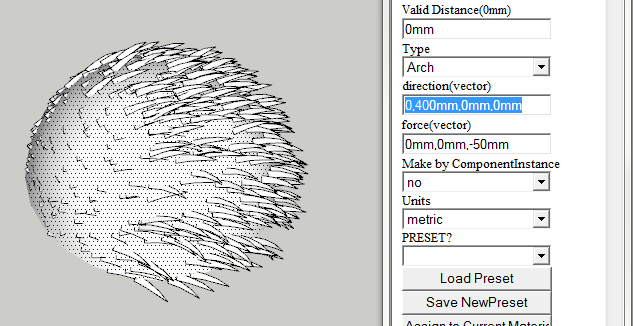
                                        2010-05-20 12h02_47.png

                                        "0,400mm,0mm,0mm" is interpreted as x=0, y=400, z=0

                                        The problem is this:

                                        
                                          def fur_dialog_ini
                                            @fur_units_metric = false
                                            @fur_units_metric = true if ( 0.to_l.to_s )["m"]
                                            @delim = ","
                                            @delim = ";" if Sketchup.get_locale.upcase == "FR"
                                          end


                                        This code only checks for FR Sketchup locale. But there are many more that uses , comma as decimal delimiter. Norwegian for instance.
                                        But, Sketchup.get_locale does not return the locale of the system. It returns the language code of Sketchup.
                                        For instance, I use Norwegian locales, but use English SU. Sketchup.get_locale returns en-US

                                        I've been recently struggling with this myself.
                                        And the hack I ended up using to find the user's comma decimal separator was this: @decimal_separator ||= 1.2.to_l.to_s.match(/\d(\D)\d/)[1]
                                        See http://forums.sketchucation.com/viewtopic.php?f=180&t=28346 for more info.

                                        Now, this only gives you what the comma separator is. I've not found a way to find the list separator. Just I think you can catch most cases by assuming locales with comma as decimal separator uses ; as list separator.

                                        So to revise your code:

                                        
                                          def fur_dialog_ini
                                            @fur_units_metric = false
                                            @fur_units_metric = true if ( 0.to_l.to_s )["m"]
                                            decimal_sep = 1.2.to_l.to_s.match(/\d(\D)\d/)[1]
                                            @delim = ";" if decimal_sep == ','
                                          end


                                        Then there is the other part of that method:
                                        @fur_units_metric = false @fur_units_metric = true if ( 0.to_l.to_s )["m"]
                                        Use model.options to get the user units.
                                        http://code.google.com/apis/sketchup/docs/ourdoc/model.html#options

                                        It returns an OptionManager that gives you access to some OptionsProvider classes.
                                        http://code.google.com/apis/sketchup/docs/ourdoc/optionsmanager.html
                                        http://code.google.com/apis/sketchup/docs/ourdoc/optionsprovider.html

                                        To inspect the available options, use this snippet:
                                        Sketchup.active_model.options.keys.each {|key| p key; Sketchup.active_model.options[key].each {|k,v| puts "> #{k} - #{v}"} }

                                        Using that you can see that model.options["UnitsOptions"] gives you all the info you need about the model units.
                                        model.options["UnitsOptions"]["LengthUnit"] gives you the unit type.

                                        The unit types are:
                                        // LENGTH_FORMAT: 0 = Decimal, 1 = Arcitectural, 2 = Engineering // LENGTH_UNITS: 0 = Inches, 1 = Feet, 2 = Millimeters 3 = centimeters, 4 = Meters // LENGTH_PRECISION: number of decimal places to show
                                        (Found this in the Google SketchUp 7\Resources\en-US\i18n.dat file)

                                        Thomas Thomassen — SketchUp Monkey & Coding addict
                                        List of my plugins and link to the CookieWare fund

                                        1 條回覆 最後回覆 回覆 引用 0
                                        • GaieusG 離線
                                          Gaieus
                                          最後由 編輯

                                          @frederik said:

                                          ...Only in UK in Europe (and I believe on Cypres too) they drive in the left side... 😉

                                          And Ireland, too.

                                          Gai...

                                          1 條回覆 最後回覆 回覆 引用 0
                                          • W 離線
                                            watkins
                                            最後由 編輯

                                            Countries that drive on the left

                                            Link Preview Image
                                            File:Countries driving on the left or right.svg - Wikipedia

                                            favicon

                                            (en.wikipedia.org)

                                            Quite a few.

                                            1 條回覆 最後回覆 回覆 引用 0
                                            • 1
                                            • 2
                                            • 13
                                            • 14
                                            • 15
                                            • 16
                                            • 17
                                            • 32
                                            • 33
                                            • 15 / 33
                                            • 第一個貼文
                                              最後的貼文
                                            Buy SketchPlus
                                            Buy SUbD
                                            Buy WrapR
                                            Buy eBook
                                            Buy Modelur
                                            Buy Vertex Tools
                                            Buy SketchCuisine
                                            Buy FormFonts

                                            Advertisement



