sketchucation logo sketchucation
    • 登入
    Oops, your profile's looking a bit empty! To help us tailor your experience, please fill in key details like your SketchUp version, skill level, operating system, and more. Update and save your info on your profile page today!
    🔌 Smart Spline | Fluid way to handle splines for furniture design and complex structures. Download

    [Plugin] Camera Stats

    已排程 已置頂 已鎖定 已移動 Plugins
    36 貼文 20 Posters 40.5k 瀏覽 20 Watching
    正在載入更多貼文
    • 從舊到新
    • 從新到舊
    • 最多點贊
    回覆
    • 在新貼文中回覆
    登入後回覆
    此主題已被刪除。只有擁有主題管理權限的使用者可以查看。
    • thomthomT 離線
      thomthom
      最後由 編輯

      @martinrinehart said:

      [...] For example, being able to view two different models from exactly the same camera position [...]

      This is in particular useful.

      Will have a look at it.

      Thomas Thomassen — SketchUp Monkey & Coding addict
      List of my plugins and link to the CookieWare fund

      1 條回覆 最後回覆 回覆 引用 0
      • JClementsJ 離線
        JClements
        最後由 編輯

        Martin, so does this just report the camera parameters or can it be used to controll the camera as well?

        John | Illustrator | Beaverton, Oregon

        1 條回覆 最後回覆 回覆 引用 0
        • J 離線
          Jim
          最後由 編輯

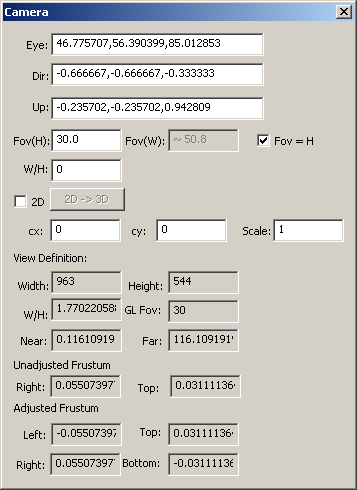
          Windows users can try this for feedback:

          
          Sketchup.send_action(10624)


          It will accept input, although it doesn't export/import.
          319.png

          Hi

          1 條回覆 最後回覆 回覆 引用 0
          • thomthomT 離線
            thomthom
            最後由 編輯

            @jim said:

            It will accept input, although it doesn't export/import.

            ... it accepts input?? facepalm!

            Thomas Thomassen — SketchUp Monkey & Coding addict
            List of my plugins and link to the CookieWare fund

            1 條回覆 最後回覆 回覆 引用 0
            • Chris FullmerC 離線
              Chris Fullmer
              最後由 編輯

              😆

              Lately you've been tan, suspicious for the winter.
              All my Plugins I've written

              1 條回覆 最後回覆 回覆 引用 0
              • M 離線
                MartinRinehart
                最後由 編輯

                @jclements said:

                Martin, so does this just report the camera parameters or can it be used to controll the camera as well?

                Both.

                Author, Edges to Rubies - The Complete SketchUp Tutorial at http://www.MartinRinehart.com/models/tutorial.

                1 條回覆 最後回覆 回覆 引用 0
                • M 離線
                  MartinRinehart
                  最後由 編輯

                  @jim said:

                  Windows users can try this for feedback:

                  
                  > Sketchup.send_action(10624)
                  > 
                  

                  Wish I'd known that!

                  Frustum? Adjusted or not?

                  Edit: I looked it up. Make a pyramid. Make a horizontal slice and discard the top. What's left is a frustum. What this has to do with a camera is a mystery.

                  Author, Edges to Rubies - The Complete SketchUp Tutorial at http://www.MartinRinehart.com/models/tutorial.

                  1 條回覆 最後回覆 回覆 引用 0
                  • F 離線
                    Fletch
                    最後由 編輯

                    Sorry Martin, haven't tried it yet, but can you, in your initial post, please explain the "send data" "get data" buttons?

                    Fletch
                    Twilight Render Cross-platform Plugin for SketchUp on PC or Mac

                    1 條回覆 最後回覆 回覆 引用 0
                    • M 離線
                      MartinRinehart
                      最後由 編輯

                      @fletch said:

                      Sorry Martin, haven't tried it yet, but can you, in your initial post, please explain the "send data" "get data" buttons?

                      Try it. If these are not immediately meaningful, tell me and I'll add some words.

                      Author, Edges to Rubies - The Complete SketchUp Tutorial at http://www.MartinRinehart.com/models/tutorial.

                      1 條回覆 最後回覆 回覆 引用 0
                      • TIGT 離線
                        TIG Moderator
                        最後由 編輯

                        A frustum is explained here... http://en.wikipedia.org/wiki/Viewing_frustum
                        It's the truncated pyramid, the camera's "view-box", in which there are objects that you will see...

                        TIG

                        1 條回覆 最後回覆 回覆 引用 0
                        • StinkieS 離線
                          Stinkie
                          最後由 編輯

                          Oooh, a most useful plugin. Thank you, Martin.

                          1 條回覆 最後回覆 回覆 引用 0
                          • M 離線
                            MartinRinehart
                            最後由 編輯

                            Edit: 58 downloads and zero bugs? Hard to believe.

                            Mac folks: any problems?

                            Author, Edges to Rubies - The Complete SketchUp Tutorial at http://www.MartinRinehart.com/models/tutorial.

                            1 條回覆 最後回覆 回覆 引用 0
                            • cmeedC 離線
                              cmeed
                              最後由 編輯

                              This looks really great!

                              Works fine on my Mac so far.
                              Can you tell me about imputing the aspect ratio? i use sketchup to design tv sets so 16:9.
                              Also does the statistics window always disappear behind the main skp window? so we have to re-size our windows when its opened?

                              Is it possible with this plugin to show a true camera zoom from a certain location? so i place my camera i can show what it looks like from this position and and THEN from that position what a zoom looks like?

                              1 條回覆 最後回覆 回覆 引用 0
                              • M 離線
                                MartinRinehart
                                最後由 編輯

                                @cmeed said:

                                Can you tell me about imputing the aspect ratio? i use sketchup to design tv sets so 16:9. Also does the statistics window always disappear behind the main skp window? so we have to re-size our windows when its opened?

                                Is it possible with this plugin to show a true camera zoom from a certain location? so i place my camera i can show what it looks like from this position and and THEN from that position what a zoom looks like?

                                Sorry to be so long. Somehow I missed your post.

                                On my PC, my stats window pops up in front of SketchUp. Stays in front until I click the SketchUp window.

                                For zoom, use two scenes. Use the Cam Stats plugin to set both scenes' cameras to identical eye, target and up values, but different field of view values. The SketchUp animation should give you a proper zoom.

                                Author, Edges to Rubies - The Complete SketchUp Tutorial at http://www.MartinRinehart.com/models/tutorial.

                                1 條回覆 最後回覆 回覆 引用 0
                                • A 離線
                                  August
                                  最後由 編輯

                                  @tig said:

                                  A frustum is ... the camera's "view-box", in which there are objects that you will see...

                                  What most newbies don't know about are the near and far Clipping Planes. Anything closer than the Near Clipping Plane or farther than the Far Clipping Plane will not be displayed. If you could show things that were arbitrarily near or arbitrarily far, the math would require too many decimal places (or bits in the CPU).

                                  “An idea, like a ghost, must be spoken to a little before it will explain itself.”
                                  [floatr:v1mcbde2]-- Charles Dickens[/floatr:v1mcbde2]

                                  1 條回覆 最後回覆 回覆 引用 0
                                  • J 離線
                                    Jim
                                    最後由 編輯

                                    @martinrinehart said:

                                    On my PC, my stats window pops up in front of SketchUp. Stays in front until I click the SketchUp window.

                                    Need to open it modal on the Mac to make it stay on top. There is not a true modal WebDialog on a Mac as there is on Windows.

                                    Hi

                                    1 條回覆 最後回覆 回覆 引用 0
                                    • M 離線
                                      MartinRinehart
                                      最後由 編輯

                                      @jim said:

                                      Need to open it modal on the Mac to make it stay on top.

                                      Thanks, Jim.

                                      I changed it to "show_modal" but it turned the friendly little guy into a huge pain. Almost useless. Certainly no fun.

                                      Mac users: edit the code. It's ...Plugins/camera_stats/camera_stats.rb. Change the line at the bottom that now reads "wd.show()" to "wd.show_modal()". Is that better?

                                      Author, Edges to Rubies - The Complete SketchUp Tutorial at http://www.MartinRinehart.com/models/tutorial.

                                      1 條回覆 最後回覆 回覆 引用 0
                                      • thomthomT 離線
                                        thomthom
                                        最後由 編輯

                                        @martinrinehart said:

                                        I changed it to "show_modal" but it turned the friendly little guy into a huge pain. Almost useless. Certainly no fun.

                                        What happened?

                                        Thomas Thomassen — SketchUp Monkey & Coding addict
                                        List of my plugins and link to the CookieWare fund

                                        1 條回覆 最後回覆 回覆 引用 0
                                        • cmeedC 離線
                                          cmeed
                                          最後由 編輯

                                          very good idea about the camera 'zoom'. I'll test your code for the mac users when i have the chance.... Work!!!

                                          1 條回覆 最後回覆 回覆 引用 0
                                          • RunnerPackR 離線
                                            RunnerPack
                                            最後由 編輯

                                            Thanks, Martin. Another in a long line of very handy plugins! 😄

                                            Just a couple of bugs to report, and one feature request:

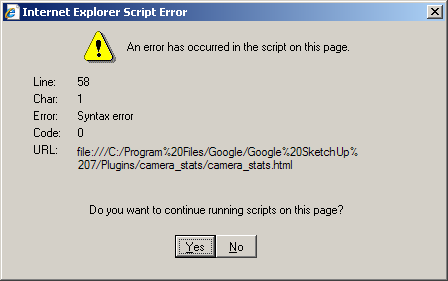
                                            First, I'm running XP SP3, SU 7.1.6860 (free version), and my IE is version 8.0.6001.18702. It seems to have problems when I use it, (which is rarely 😛 ) so it could be IE's fault, not yours... Anyway, I get the JavaScript error dialog shown in the attached image when I start the plugin (that is, when I open the window, not when SU starts).

                                            Also, the "close" button on the Camera Stats window doesn't do anything (possibly related to the JavaScript error?).

                                            Finally, the feature request:

                                            It would be very handy if I could "pan" the camera left and right, relative to the viewport, by a specified value. For example, if I panned it right by about 2.5", it would be like I closed my left eye and opened my right (do you see where I'm going with this? 😉 ). I know (for me, anyway) the math would be pretty rough, but if you have the time, (you obviously have the grey-matter 😉 ) I would use this feature ALL OF THE TIME! 😄

                                            Anyway, thanks again for the cool plugin!

                                            EDIT: I just had another look at the Camera object API, and I think I know how to do this... Take the cross product of Camera#up and Camera#direction, use the resulting vector (or its negative) to transform Camera#target and Camera#eye, and use Camera#set to put it all back together. Am I close?

                                            EDIT 2: ☀ Success! After just a bit of tinkering, I got it working! 😮 😲 😄

                                            It's pretty much as I said above, but I had to experiment to find out how the API wants things done (plus I was a bit rusty at Ruby 😳)

                                            I'm going to clean this up and make a new thread for it, just in case someone can use it, but here it is if you, Martin, want to incorporate it (not that you need my amateurish code 😉 ) or if someone wants to see what I'm blathering about 😉.


                                            IE JavaScript error dialog


                                            Stereo Panning Plugin (WIP)

                                            You might have noticed... I'm a bit of a ferpectionist.

                                            1 條回覆 最後回覆 回覆 引用 0
                                            • 1
                                            • 2
                                            • 1 / 2
                                            • 第一個貼文
                                              最後的貼文
                                            Buy SketchPlus
                                            Buy SUbD
                                            Buy WrapR
                                            Buy eBook
                                            Buy Modelur
                                            Buy Vertex Tools
                                            Buy SketchCuisine
                                            Buy FormFonts

                                            Advertisement