sketchucation logo sketchucation
    • Login
    Oops, your profile's looking a bit empty! To help us tailor your experience, please fill in key details like your SketchUp version, skill level, operating system, and more. Update and save your info on your profile page today!
    ⚠️ Update | Sketchucation Tools 5.0.8 released with licensing improvements and bugfixes Download

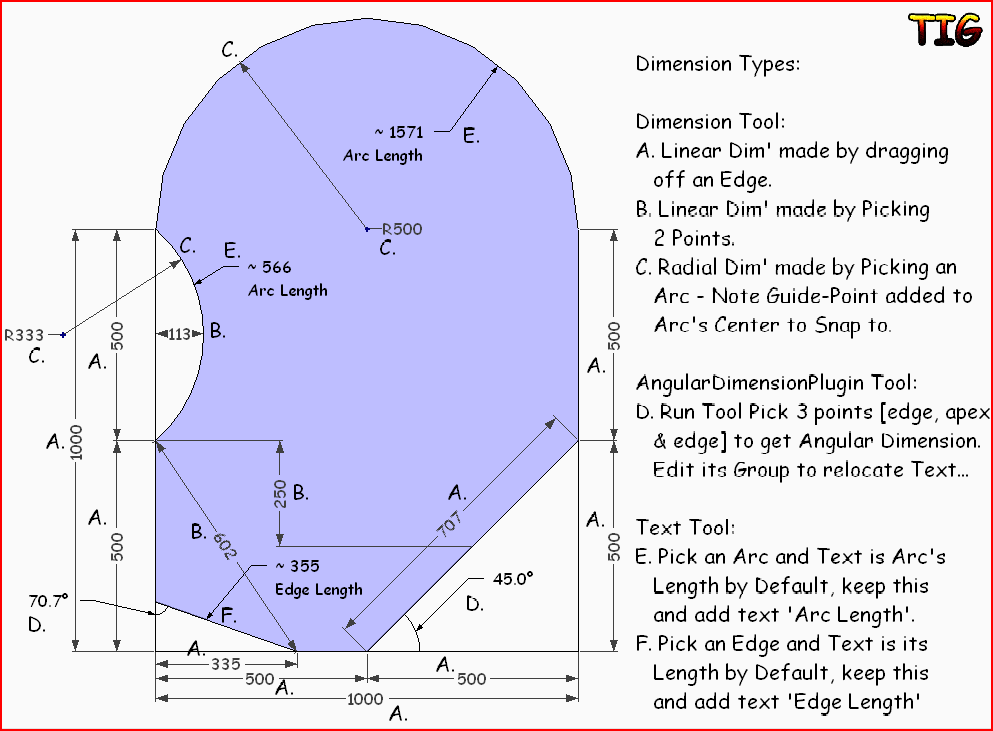
    How to dimension the length of an arc?

    Scheduled Pinned Locked Moved Newbie Forum
    sketchup
    12 Posts 7 Posters 1.1k Views 7 Watching
    Loading More Posts
    • Oldest to Newest
    • Newest to Oldest
    • Most Votes
    Reply
    • Reply as topic
    Log in to reply
    This topic has been deleted. Only users with topic management privileges can see it.
    • P
      prismcnd
      last edited by

      Thank you for that Massimo, that gets me halfway there. I realized after your help that the info was contained in entity info. Sometimes I don't see the forest for the trees. However, i need to show the length of a number of arcs. Is there a plugin like Mr.Bur's dimension by angle or the ability to annotate the length of a curve ( circumference) that will take that info and create a dimension annotation for the length of any curve? Any body?

      “Whatever the mind of man can conceive and believe, it can achieve.” -W.Clement Stone (American best selling Author and Founder of Combined Insurance Co (now a part of Aon Corp.), 1902-2002)

      1 Reply Last reply
      Reply Quote 0
      • TIGT
        TIG Moderator
        last edited by

        Here's how to do 'all' types of dims...DimTypes.PNG

        TIG

        1 Reply Last reply
        Reply Quote 0
        • Jean LemireJ
          Jean Lemire
          last edited by

          Hi folks.

          If you have some time to loose here is a possible workaround:


          Arc length dimensionning.skp

          Jean (Johnny) Lemire from Repentigny, Quebec, Canada.

          1 Reply Last reply
          Reply Quote 0
          • P
            prismcnd
            last edited by

            There we go! That's what i was looking for! Thanks a lot guys, i knew it was in there some where. this forum is the best. okay now to do it in the real world
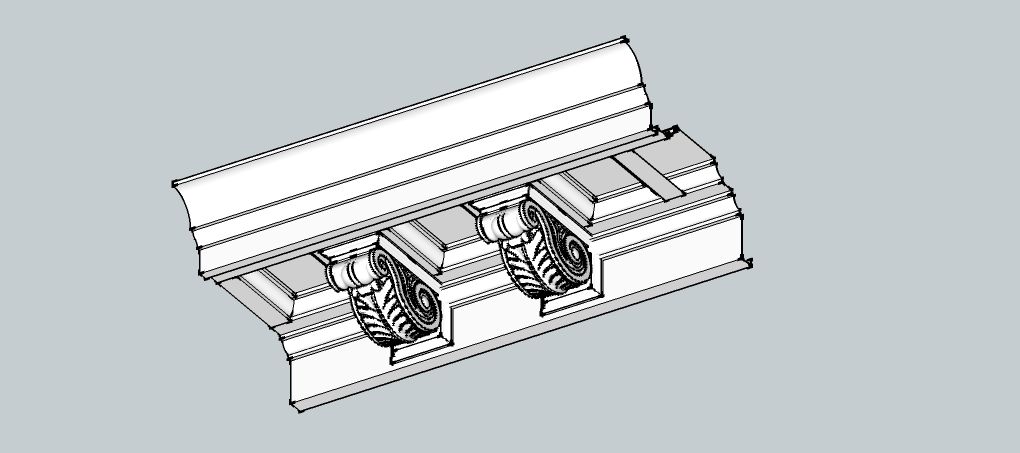

            Tin Crown

            “Whatever the mind of man can conceive and believe, it can achieve.” -W.Clement Stone (American best selling Author and Founder of Combined Insurance Co (now a part of Aon Corp.), 1902-2002)

            1 Reply Last reply
            Reply Quote 0
            • G
              GoldenFrog
              last edited by

              Jon

              Amazing work! I like the details. 😄

              Remember, great minds think alike, and fools never differ.

              1 Reply Last reply
              Reply Quote 0
              • P
                prismcnd
                last edited by

                I wish i could take credit for the design but its a restoration on a hundred and fifty year old commercial building and i need to replicate the work of the old craftsmen which means i have to pretty much relearn the trade and workflow as well as the methodology of their design.

                “Whatever the mind of man can conceive and believe, it can achieve.” -W.Clement Stone (American best selling Author and Founder of Combined Insurance Co (now a part of Aon Corp.), 1902-2002)

                1 Reply Last reply
                Reply Quote 0
                • G
                  GoldenFrog
                  last edited by

                  Oh. Still, nice model. 😄

                  Remember, great minds think alike, and fools never differ.

                  1 Reply Last reply
                  Reply Quote 0
                  • M
                    miker-gr
                    last edited by

                    is there a plugin to add the dimension of an arc but not in the layout?

                    1 Reply Last reply
                    Reply Quote 0
                    • M
                      miker-gr
                      last edited by

                      @tig said:

                      Here's how to do 'all' types of dims...[attachment=0:egunaibi]<!-- ia0 -->DimTypes.PNG<!-- ia0 -->[/attachment:egunaibi]

                      I find out how this work!
                      Thanx!
                      But it would be very convenient to have a tool like linear dimension!

                      1 Reply Last reply
                      Reply Quote 0
                      • Dave RD
                        Dave R
                        last edited by

                        TIG, That's an excellent reference. Thank you for making it.

                        Etaoin Shrdlu

                        %

                        (THERE'S NO PLACE LIKE)

                        G28 X0.0 Y0.0 Z0.0

                        M30

                        %

                        1 Reply Last reply
                        Reply Quote 0

                        Hello! It looks like you're interested in this conversation, but you don't have an account yet.

                        Getting fed up of having to scroll through the same posts each visit? When you register for an account, you'll always come back to exactly where you were before, and choose to be notified of new replies (either via email, or push notification). You'll also be able to save bookmarks and upvote posts to show your appreciation to other community members.

                        With your input, this post could be even better 💗

                        Register Login
                        • 1 / 1
                        • First post
                          Last post
                        Buy SketchPlus
                        Buy SUbD
                        Buy WrapR
                        Buy eBook
                        Buy Modelur
                        Buy Vertex Tools
                        Buy SketchCuisine
                        Buy FormFonts

                        Advertisement