Bonzai3D - double take
-
Rick,
In the case of a hill or a pond, the contours will be closed, so their last point is the same as the first point. Contours always connect back to themselves somewhere...
Xrok,
The Insufficient memory message probably appears because you are trying to generate a Meshed Terrain using a very small mesh size relative to the size of the terrain site boundary. Measure the longest length of the site, divide this by ~20, and use this distance as a starting point for your mesh spacing for the terrain model.
Once you generate this properly, you can then determine the desired mesh spacing (perhaps 1/50th or 1/100th of your site length).
Regarding the Run command, this is Microsoft's Security Policy manager, and it is coming up because of your security policy settings on your computer. True, bonzai3d will try to connect to the internet to access tutorial video files, or download files from Google's Warehouse, so perhaps you have set up some security measures to bring up this run command in that event? (No one else has reported this, and we are not seeing this on any of our computers, so we are not sure what settings that you may have employed that are causing this to appear -- but this is because of your settings and not because of the update -- other than the fact that bonzai3d 2.1 is a "different program" than version 2.0.)
-
This may be of interest?
bonzai3d Webinar
RenderZone Rendering
Join this webinar to hear Matthew Holewinski from AutoDesSys
demonstrate the power of photorealistic rendering with RenderZone,
for bonzai3d and form•Z.RenderZone is the rendering engine of choice when you need full
raytrace rendering, giving you the power to visualize your ideas in
very abstract or photorealistic ways. RenderZone adds a full arsenal
of tools to assist you with anything from simple scene development to
your most demanding rendering needs.This informative webinar will give
you insight into why RenderZone is such a valuable compliment to your
visualization needs.Wednesday, June 2, 2010 at 12:00pm-1:00pm EST (GMT - 4hrs)
https://www1.gotomeeting.com/register/958028537
bonzai3d Introduction Webinar
Join this webinar to hear Matthew Holewinski from AutoDesSys
demonstrate and explain how bonzai3d is used to accelerate the 3D
design process with its intuitive interface, flexible modeling tools,
and extensive visualization capabilities.Discover how the robust models created with bonzai3d can be used
further down the production pipeline with worry free geometry. This
informative webinar will give you insight into why bonzai3d is fast
becoming the 3D modeler of choice in all design disciplines.Thursday June 17, 2010 at 12:00pm-1:00pm EST (GMT - 4hrs)
https://www1.gotomeeting.com/register/512139233
Space is limited. Reserve your Webinar seat now! After registering
you will receive a confirmation email containing information about
joining the Webinar.System Requirements:
PC-based attendees:
Required: Windows
 7, Vista, XP, 2003 Server or 2000
Macintosh
-based attendees:Required: Mac OS
X 10.4.11 (Tiger) or newerCopyright ? 2010 AutoDesSys, Inc. 2011 Riverside Drive, Columbus, OH
43221 Phone: (614) 488-8838 Fax:(614)488-0848 support@formz.com -
just received an email:
Bonzai 3D v2.2 is out
also, a free webinar this thursday (sept30,10)
https://www1.gotomeeting.com/register/732623209@unknownuser said:
You are personally invited to attend this free webinar by Markus Bonn, who will create an architectural building using bonzai3d as a conceptual design tool, highlighting the fluid workflow and 3d sketching capabilities of the program.
-
doesn't say anything about working better, just trying to do things SU does already?????????

maybe they could prioritize function over feature. Personally, i'll check back in a couple versions. -
They're not quite in your Weight-class yet Rocky!

-
@xrok1 said:
doesn't say anything about working better, just trying to do things SU does already?????????
maybe they could prioritize function over feature. Personally, i'll check back in a couple versions.you might be right about a couple of more versions... supposedly, they're going hard at the flagship so i'm sure it will trickle down the pipeline.. (thinking some of the things needing worked on in bonzai are also needed in form-z.. if i were them, i'd do form-z first too)
[/speculation]@unknownuser said:
You will also be pleased to know that work on form.Z 7.0 is at full
speed and making noticeable strides. More to come on this in the near
future. -
I just noticed that my menus in B3D is File - Edit - Window - View - Display - Palettes - Help
Has it always been like this? Or changed in v2.2?
It seem like an odd placement of the Window menu.... -
@unknownuser said:
This has been a very different approach to reviewing software.....seeing it through with a virgin so to speak....
 A very difficult test!!
i should've documented a recent effort of mine.. i have a project starting tomorrow and while i did the initial design in SU, i forced myself to do the actual design entirely in another app.. (something with nurbs surfaces as there isn't a straight cut in this thing im building)
i downloaded bonzai 2.2 as it's seemingly an app that i'd like to know as well as i do sketchup.. honestly, i gave up on it after about 3 hrs.. it crashed on me twice but the final death blow was this weird thing it kept doing.. basically, the model would get lost in space and i couldn't recover it no matter what i tried (zoom extents etc..) it was just gone and saving/reopening didn't help either.. i need the app to preform while on the jobsite and this finicky behavior was a major turnoff.. there's also a major (well, major to me) bug in there that won't allow certain curves to happen.. i emailed them about it when v2 first came out and they agreed it's a mistake and they'll fix it but it's still not working.
i'm sure a autodessys rep would say it's user error etc. or 'send us the file so we can look at it' etc. but i dunno, first impressions are lasting ones..i ended up doing it in rhino (which i've dabbled with in the past but never committed to it) and seriously, that app is great.. i think some of my attraction towards bonzai is that it's basically pitched as sketchup and rhino (or whatever) in a single package.. after last weeks' work though, i'm over that idea and am actually excited about furthering my rhino skills..
-
sometimes "virgins" find more flaws cause their not used to working around them like users who are experienced with the offending software. I never claimed it was a tutorial and i sure as hell know how 3d software should function and so far this ain't IT!
I may be a Bonzai virgin, but a 3D virgin i'm not. (experienced in MAX, Solidworks, Modo, Sketchup...) -
This has been a looooong interesting read... There wasn't any mention though of how this software handles large amount of geometry. But i haven't seen much development on this in the past year or so... Maybe waiting for a better sketchup is the way forward?
-
But i haven't seen much development on this in the past year or so... Maybe waiting for a better sketchup is the way forward?[/quote]
I noticed that also. Keep going back to see what's happening and don't see anything progressing.
-
@mukul.ar said:
There wasn't any mention though of how this software handles large amount of geometry.
download the trial.. import an x-frog tree or something then try wiggling it around?
shouldn't be too hard to figure out if it can handle geometry..@unknownuser said:
Maybe waiting for a better sketchup is the way forward?
nah, don't do that.. sketchup is sketchup and will always be.. there are already other apps that can handle situations where sketchup breaks down.. instead of waiting for sketchup to (do whatever it is you wish it would do), learn the other app that can already do it..
[and maybe bonsai is that app? it wasn't for me but maybe for you]
-
Mukul.ar et al,
Thanks for your interest in bonzai3d. We just posted a response to a similar question you had here:
http://forums.sketchucation.com/viewtopic.php?f=10&t=38102&p=370239#p370239
(We don't want to post the answer twice and appear to be spamming the forum, so please find your answer there...)
-
@ bonzai3d support
there's this one small thing that always bugs me about you guys' (gals'?) responses both at scf and at your own forums..
[and i realize, this could very well be my own problem so not something you must take seriously or whatever.. regardless, i truly mean this as being a positive statement to you.. not trying to battle or anything like that]
it's that you guys (gals?) use the generic name of 'bonzai3d support' or 'support@formz' or 'user name - tech' when you're posting on the internet..
i mean, are you one person? a bunch of people using the same user names? an automated response?dunno, it just feels way too impersonal to me.. especially when you're representing a corporation.. you know?
anonymous internet posting went out of style circa 2006 or so.. gotta get up to date on that
-
Jeff,
There is a whole team of people that provide support and answers for our users (or potential users). Wouldn't it be confusing to get a series of official company replies -- one from Dan, another from John, or Dave, all on the same topic?
I would think that it would be a bigger concern to get a polite and correct reply as quickly as possible. No?
-
xrok, did you check the Insert checkbox?
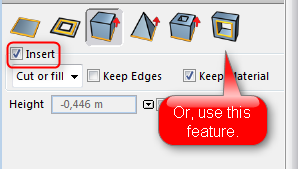
Ooops.... I replied to a very old post.... http://forums.sketchucation.com/viewtopic.php?f=80&t=27022#p233455
Never mind me...

-
@bonzai3d support said:
Jeff,
There is a whole team of people that provide support and answers for our users (or potential users). Wouldn't it be confusing to get a series of official company replies -- one from Dan, another from John, or Dave, all on the same topic?
I would think that it would be a bigger concern to get a polite and correct reply as quickly as possible. No?
just as an example, the google employees (as well as some other software devs) that post here use their own names but they have a title under their names which designate the company they are with.. i believe Gaieus would do the same for you all if you're so inclined.
but take my statement for what it's worth.. i'm just one person giving an opinion on the internet.. wether or not others see it the same way, i don't know..
but just using your previous post as an example, i bet typing that message with (Jeff,) as the beginning seemed at least a little different than addressing it to (LurkerBoi2000,) -- to which you click on my profile and it being empty as well..
-
Rocky,
I'd like to give a word of thanks for your doing this thread. I appreciate having an experienced modeler share is experience with a new software. When I have time to spare I like to look at new software as well, and hate running into these kind of dead-ends (poor inferencing seems to be the biggest culprit here)
Andy
-
Your very welcome. I'm glad I could contribute here at sketchucation, it has been invaluable to me.
@unknownuser said:
When I have time to spare I like to look at new software as well, and hate running into these kind of dead-ends
yes it seems to be the nature of the beast to keep searching because no software ever seems to work exactly the way we'd want or expect it to.
 (some more than others) But I think that software should at very least operate the way the author wanted and expected, when even that is not acheived reliably its called beta in my books and there's no way anyone should be expected to shell out for it. Should be an embarassment to even ask payment for it!
My opinion & I'm not necessarily pointing fingers, its more of a general statement obout the software industry attitude as a whole.








Advertisement