sketchucation logo sketchucation
    • 登入
    Oops, your profile's looking a bit empty! To help us tailor your experience, please fill in key details like your SketchUp version, skill level, operating system, and more. Update and save your info on your profile page today!
    🔌 Smart Spline | Fluid way to handle splines for furniture design and complex structures. Download

    [Plugin] Repeat Copy UPDATED 2-24-2010

    已排程 已置頂 已鎖定 已移動 Plugins
    62 貼文 24 Posters 60.2k 瀏覽 24 Watching
    正在載入更多貼文
    • 從舊到新
    • 從新到舊
    • 最多點贊
    回覆
    • 在新貼文中回覆
    登入後回覆
    此主題已被刪除。只有擁有主題管理權限的使用者可以查看。
    • Chris FullmerC 離線
      Chris Fullmer
      最後由 編輯

      I just wrote and released a new script called Repeat Copy, based on the request made in this thread. Repeat Copy can be downloaded from smustard for $8.00 USD.

      Download Repeat Copy at Smustard

      Description
      This script allows you to quickly add copies of components to your model by just clicking where the copy should be added. Its a great way to quickly add component copies to a model.

      It is installed in Plugins > Chris Fullmer Tools > Repeat Copy. To use it, first select a component or series of components, then activate the Repeat Copy tool. Clicking anywhere in the model will add a copy of one of the selected components. It randomly selects a component to place based on the selected components at the time the script is initiated. Holding ctrl will force it to place components in order instead of randomly.

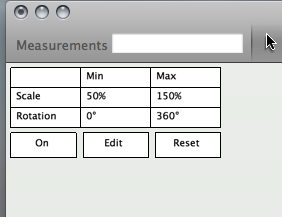
      v1.6 Update lets you move the user interface by clicking and dragging in the upper left box of the User Interface!

      v1.5 Update includes rotation and scaling plus a new OnScreen Interface!

      [flash=800,475:33uk5x7b]http://www.youtube.com/v/TZzVFQ-pETQ&hd=1&fs=1[/flash:33uk5x7b]
      http://www.youtube.com/user/ChrisFullmer#p/u/11/_Rm9Os6bix4

      Hope you like it!

      Chris

      Download Repeat Copy at Smustard

      Lately you've been tan, suspicious for the winter.
      All my Plugins I've written

      1 條回覆 最後回覆 回覆 引用 0
      • D 離線
        d12dozr
        最後由 編輯

        Very useful...I've wished for this many times. I really like the instruction video too 👍

        3D Printing with SketchUp Book
        http://goo.gl/f7ooYh

        1 條回覆 最後回覆 回覆 引用 0
        • pilouP 離線
          pilou
          最後由 編輯

          Free suggestion 😄
          Cool but will be very more cool if by option that works too as long as you don't release the left mouse button! 😉

          Frenchy Pilou
          Is beautiful that please without concept!
          My Little site :)

          1 條回覆 最後回覆 回覆 引用 0
          • D 離線
            DIEGO-RODRIGUEZ
            最後由 編輯

            very good plugins.
            perhaps could add two variables.
            max and min scale
            rotate max and min

            is it possible?

            1 條回覆 最後回覆 回覆 引用 0
            • Chris FullmerC 離線
              Chris Fullmer
              最後由 編輯

              That is a possibility. I already wrote a script that randomzies scale and rotation of components, but it works on a selection of components, not like this where this could randomize them on insertion into the model, which would be cool.

              So we'll see, it might find its way into this plugin in time.

              Chris

              Lately you've been tan, suspicious for the winter.
              All my Plugins I've written

              1 條回覆 最後回覆 回覆 引用 0
              • P 離線
                Panga
                最後由 編輯

                Nice plugin Chris, and as the others said, some options to randomize scale and/or rotation could be great.

                Thanks anyway !!

                Regards.

                1 條回覆 最後回覆 回覆 引用 0
                • utilerU 離線
                  utiler
                  最後由 編輯

                  Well Done, Chris, great plugin!!! Simple but effective. Going there now to buy; it'll save me plenty of time........ 👍

                  Just Curious...

                  1 條回覆 最後回覆 回覆 引用 0
                  • Chris FullmerC 離線
                    Chris Fullmer
                    最後由 編輯

                    Sweet!, thanks Andrew!

                    Lately you've been tan, suspicious for the winter.
                    All my Plugins I've written

                    1 條回覆 最後回覆 回覆 引用 0
                    • Chris FullmerC 離線
                      Chris Fullmer
                      最後由 編輯

                      This is a preview of the updates that are currently available in the version 1.5 that is available for download at smustard. $8.00(USD).

                      Here's a quick teaser video that shows what I've added to it 😄 I think its pretty cool.(no sound)

                      [flash=640,360:2j1wt1u3]http://www.youtube.com/v/EK3DkcTwJgo&hd=1&fs=1[/flash:2j1wt1u3]
                      http://www.youtube.com/user/ChrisFullmer#p/u/11/EK3DkcTwJgo

                      Download Repeat Copy at Smustard

                      Chris

                      Lately you've been tan, suspicious for the winter.
                      All my Plugins I've written

                      1 條回覆 最後回覆 回覆 引用 0
                      • J 離線
                        Jim
                        最後由 編輯

                        That's really slick, Chris! I think that sort of on-screen interface fits nicely into the "SketchUp way" of working.

                        Hi

                        1 條回覆 最後回覆 回覆 引用 0
                        • Rich O BrienR 離線
                          Rich O Brien Moderator
                          最後由 編輯

                          Jeez 😲

                          Lookin' good, look forward to giving it a whirl

                          Download the free D'oh Book for SketchUp 📖

                          1 條回覆 最後回覆 回覆 引用 0
                          • D 離線
                            DIEGO-RODRIGUEZ
                            最後由 編輯

                            chris excellent. very good update.
                            and innovative user interface, NO?

                            1 條回覆 最後回覆 回覆 引用 0
                            • D 離線
                              DIEGO-RODRIGUEZ
                              最後由 編輯

                              hi chris. I thought a little icon for this plugins

                              you like?

                              http://img713.imageshack.us/img713/632/repeat24x24o.png
                              or
                              http://img32.imageshack.us/img32/1551/repeat124x24.png
                              or
                              http://img268.imageshack.us/img268/8206/repeat224x24.png

                              1 條回覆 最後回覆 回覆 引用 0
                              • D 離線
                                DIEGO-RODRIGUEZ
                                最後由 編輯

                                thought. perhaps an option would be good to insert groups or components of two ways -

                                position> onto face
                                position> as the original

                                perhaps, following start of the tool. pressing Ctrl ( switch between insert original and ontoface)

                                http://img713.imageshack.us/img713/426/sinttulo1copiaso.png

                                1 條回覆 最後回覆 回覆 引用 0
                                • F 離線
                                  Fletch
                                  最後由 編輯

                                  looks promising, Chris - great job/development.

                                  I agree w/ Pilou - holding down mouse button should continue placing components 1 every half second or something reasonable like that... would have to try it out to see what is a 'reasonable' speed - something fast enough, but not so fast you can't control it.

                                  Fletch
                                  Twilight Render Cross-platform Plugin for SketchUp on PC or Mac

                                  1 條回覆 最後回覆 回覆 引用 0
                                  • utilerU 離線
                                    utiler
                                    最後由 編輯

                                    Love your work, Chris!

                                    Your scripts are so simple, mate. I will continue to support the cause....I just saved $2.24AU.... 😉

                                    Just Curious...

                                    1 條回覆 最後回覆 回覆 引用 0
                                    • Chris FullmerC 離線
                                      Chris Fullmer
                                      最後由 編輯

                                      Great, thanks Andrew!

                                      Yeah, I thought $6.00 was a good simple price for a pretty cool plugin. But Once I took the time to put in those cool buttons, I think is sort of steped up a level in complexity and coolness. Hence the small price jump. So I'm glad you were able to get in on it while it was only $6.00

                                      BTW - I just finished updating the new version, it has been uploaded to smustard, along with a new video tutorial. Thanks to everyone for cheking this script out, and for the helpful ideas. I will still be looking at them into the next update, or perhaps an even more comprehensive version of this script.

                                      Chris

                                      Lately you've been tan, suspicious for the winter.
                                      All my Plugins I've written

                                      1 條回覆 最後回覆 回覆 引用 0
                                      • utilerU 離線
                                        utiler
                                        最後由 編輯

                                        So how do I D/L without paying the new fee?

                                        Just Curious...

                                        1 條回覆 最後回覆 回覆 引用 0
                                        • Rich O BrienR 離線
                                          Rich O Brien Moderator
                                          最後由 編輯

                                          How do i update?

                                          Download the free D'oh Book for SketchUp 📖

                                          1 條回覆 最後回覆 回覆 引用 0
                                          • wind-borneW 離線
                                            wind-borne
                                            最後由 編輯

                                            @unknownuser said:

                                            How do i update?

                                            I just clicked on link in the old email

                                            Is there a way to move dialog box, seems stuck in top left corner.

                                            SketchUp.png

                                            "To read between the lines was easier than to follow the text."OSX 10.11.6

                                            %(#BF80BF)[SU 8 pro

                                            1 條回覆 最後回覆 回覆 引用 0
                                            • 1
                                            • 2
                                            • 3
                                            • 4
                                            • 1 / 4
                                            • 第一個貼文
                                              最後的貼文
                                            Buy SketchPlus
                                            Buy SUbD
                                            Buy WrapR
                                            Buy eBook
                                            Buy Modelur
                                            Buy Vertex Tools
                                            Buy SketchCuisine
                                            Buy FormFonts

                                            Advertisement



