Toggle hide rest of model while editing components
-
Hello and sorry if this is obvious or posted elsewhere.
Is there a shortcut to the hide rest of model while editing a component? It would be nice to be able to hide/show the rest of the model on the fly while editing. I know clicking model info, hide isn't that much work but just checking! Thanks!
-
View -> Component Edit -> Hide Rest of Model
No shortcut assigned by default, but you can do that from under Preferences -> Shortcuts
-
@blaw789 said:
Hello and sorry if this is obvious or posted elsewhere.
Is there a shortcut to the hide rest of model while editing a component? It would be nice to be able to hide/show the rest of the model on the fly while editing. I know clicking model info, hide isn't that much work but just checking! Thanks!There is no built-in shortcut BUT you can add whatever shortcuts you want - unfortunately this particular one is context sensitive and that usually fools a lot of people...
To make a shortcut for this edit a group or component by double-clicking it.
Now open Window > Preferences and the Shortcuts tab.
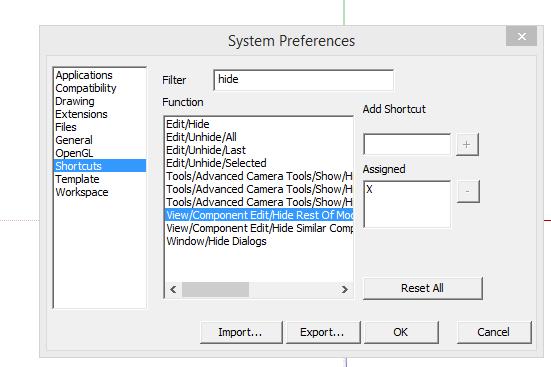
In the filter field typehideand you should see the toggle option you want [View > Component Edit > Hide Rest of Model] - select it and enter a shortcut key - e.g. Ctrl+H - if it's already defined decide to overwrite it or choose another key-combo...
In passing, other useful context sensitive commands that greatly benefit from shortcutting areExplode[group/instance],Reverse[selected face(s)],Orient[faces] etc... -
@unknownuser said:
Hide all objects that are not in the current selection. All hiding operations are grouped as a single UNDO operation.
-
I use a shortcut (Ctrl+H but that is obviously up to your taste) to hide rest of model a lot. It's not good to have it hidden all the time as you may want to reference some outside geometry often of course.
Also I have Shift+Ctrl+H set to "hide similar components". Not bad when you have dozens around.
-
I think i have the opposite problem. I DO NOT want to hide, but UNHIDE easily.
I have some users that have "HIDE REST OF MODEL" checked all the time, which means everytime i use their files and i edit components i cannot see the rest of the model unless i goto model info and uncheck the "hide".
This drives me CRAZY!!
There does not seem to be a command to "UNHIDE REST OF MODEL" or a toggle to do this. Am i missing something simple?
I would just like to be able to use a keyboard shortcut to uncheck or turn off "HIDE REST OF MODEL"
As a matter of fact, i wouldn't mind disabling it if possible. I never like having the rest hidden while editing components.
An help is greatly appreciated.
Thanks,
Bob -
NEVERMIND! Problem solved.
Although it does not say "toggle" in the command, setting the [View > Component Edit > Hide Rest of Model] does indeed toggle on/off. Sorry i missed that but its worth noting.
Thanks,
Bob -
I have made a scene that has as a style hide rest of model. So when I want edit and hide the rest of the model I go to that scene. When done I go back to my main drawing scene.
-
I'm not sure when this was added to Sketchup but certainly in the SU 2015 Pro I'm using you just select keyboard shortcut "X" to toggle between seeing or hiding the rest of the model when editing a group or component.
-
@maxhouserocks said:
NEVERMIND! Problem solved.
Although it does not say "toggle" in the command, setting the [View > Component Edit > Hide Rest of Model] does indeed toggle on/off. Sorry i missed that but its worth noting.
Thanks,
BobBeen toggling this for years. Don't know how to do without this. Half the time a reference to the rest of the model is needed in editing a component. Other times you really want the view clear. Often both during a single editing session.
-
yep. Its odd that they don't list it as a toggle in the menu. SOOOO glad it works!
Bob
-
@calstock said:
I'm not sure when this was added to Sketchup but certainly in the SU 2015 Pro I'm using you just select keyboard shortcut "X" to toggle between seeing or hiding the rest of the model when editing a group or component.
Maybe I am doing something wrong but I have not been able to get this to work...sure would like to though.
-
@ntxdave said:
@calstock said:
I'm not sure when this was added to Sketchup but certainly in the SU 2015 Pro I'm using you just select keyboard shortcut "X" to toggle between seeing or hiding the rest of the model when editing a group or component.
Maybe I am doing something wrong but I have not been able to get this to work...sure would like to though.
First enter (double-click) a component in order to edit it. Then open Preferences and the Shortcuts TAB. Scroll to "View" menu shortcuts and set a key combination under the appropriate command "Component Edit /Hide rest of model" Were you able to do that?
-
@ntxdave said:
@calstock said:
I'm not sure when this was added to Sketchup but certainly in the SU 2015 Pro I'm using you just select keyboard shortcut "X" to toggle between seeing or hiding the rest of the model when editing a group or component.
Maybe I am doing something wrong but I have not been able to get this to work...sure would like to though.
-
@calstock said:
@ntxdave said:
@calstock said:
I'm not sure when this was added to Sketchup but certainly in the SU 2015 Pro I'm using you just select keyboard shortcut "X" to toggle between seeing or hiding the rest of the model when editing a group or component.
Maybe I am doing something wrong but I have not been able to get this to work...sure would like to though.
When I went there, the X was not assigned as a shortcut. I did create my own shortcut though. I thought from the previous message that it was assigned by default. Sorry for any confusion I might have created. All is well for me.
-
Personally I avoid a bare X as a shortcut, because I usually type x10 to make 10 copies [I know 10x and *10 etc will work too !]
I use Alt-X for X-ray mode ON/OFF and Ctrl+X is fixed as Edit-CUT.I Use Ctrl+H to toggle-hide rest-of-model ON/OFF
I also use Ctril+Shift+H to toggle-hide similar-components ON/OFF
But whatever floats your boat... -
Great point to mention TIG. I made the mistake of binding X as a shortcut and realized the error of my ways when trying to make multiple copies later on.
I recommend NEVER using X as a shortcut!

-
Are you both saying when you type 10X you get the model disappearing as well, (if X is assigned to that task) ? I may have misled people slightly because I think I may have assigned the letter myself last year having seen the tip somewhere, (rather than it being default), but I use the 10X method extensively and X for show/hide and have never had a problem. Still like Tig says, assign whatever suits you best.
A similar one for me is I use H to hide the toolbar windows and I can't remember whether that's a default setting either. That's the thing with Sketchup, it's so customisable, (which is a good thing), you end up forgetting what you've customised and what the program did out of the box after a while !
-
Well Well, calstock! Thanks for specifying that here.
It turns out i have always typed in "x10" to make multiple copies not knowing that "10x" will work the same way.
AWESOME!
BTW, decided to look for a utility to PRINT my shortcuts and found this old one. works well. plan to pay more attention and make more shortcuts.
printkeys.rb
https://sites.google.com/site/jimfoltz/my-sketchup-plugins/print-shortcuts







Hello! It looks like you're interested in this conversation, but you don't have an account yet.
Getting fed up of having to scroll through the same posts each visit? When you register for an account, you'll always come back to exactly where you were before, and choose to be notified of new replies (either via email, or push notification). You'll also be able to save bookmarks and upvote posts to show your appreciation to other community members.
With your input, this post could be even better 💗
Register Login


Advertisement