sketchucation logo sketchucation
    • 登入
    Oops, your profile's looking a bit empty! To help us tailor your experience, please fill in key details like your SketchUp version, skill level, operating system, and more. Update and save your info on your profile page today!
    🔌 Smart Spline | Fluid way to handle splines for furniture design and complex structures. Download

    Bonzai 2.0 released

    已排程 已置頂 已鎖定 已移動 Extensions & Applications Discussions
    extensions
    215 貼文 28 Posters 37.2k 瀏覽 28 Watching
    正在載入更多貼文
    • 從舊到新
    • 從新到舊
    • 最多點贊
    回覆
    • 在新貼文中回覆
    登入後回覆
    此主題已被刪除。只有擁有主題管理權限的使用者可以查看。
    • T 離線
      tfdesign
      最後由 編輯

      @bonzai3d support said:

      Tom,

      Thanks for the suggestion regarding "Ledas." (Yes, we are aware of them...) 😄

      Yes, Dimitry seems like a very pleasant and approachable chap. It's really nice to know that there is finally another 3D parametric kernel out there, ready to take on the likes of Spatial and Parasolid. 😄

      My book "Let's SketchUp!" Download from here

      1 條回覆 最後回覆 回覆 引用 0
      • soloS 離線
        solo
        最後由 編輯

        Hey guys, anyone done any UV mapping with Bonsai yet?

        I need to map a chair cover for an SU model, I have seen the video tutorial but I'm still lost, seems that he has edit windows that I cannot find, the tutorial jumps to an edit applet without showing where in the world one finds it.

        So, my question is... anyone got a tutorial or explanation on how to import an SU model and map UV's correctly then back into SU?

        http://www.solos-art.com

        If you see a toilet in your dreams do not use it.

        1 條回覆 最後回覆 回覆 引用 0
        • Rich O BrienR 離線
          Rich O Brien Moderator
          最後由 編輯

          Hi Pete,

          I've been trying the same but seems that it's not a feature. 'Texture Mapping' seems what is associated with Bonzai3d. Here's what CG Forum members say...

          @unknownuser said:

          no UV editor. but if you are working in nurbs it does map correctly to curved surfaces. you can see a video about it here:

          favicon

          (www.bonzai3d.com)

          look for "texture mapping"

          if you figure it out or any member does, please post there solution.

          What's your opinion so far Pete?

          Download the free D'oh Book for SketchUp 📖

          1 條回覆 最後回覆 回覆 引用 0
          • soloS 離線
            solo
            最後由 編輯

            I guess you are right, parametric mapping (which I need) only works with Nurbs, the problem is the cushion is modeled with SU and once imported you are limited to what UV mapping you can do.

            I will need to use Vue as it can kinda achieve a result that is okay (not great).

            So far I like Bonsai, I have not had enough practice to give a detailed review, but I think that once I get familiar with where everything is and what does what then I should start loving it as it's got all the bells and whistles.

            http://www.solos-art.com

            If you see a toilet in your dreams do not use it.

            1 條回覆 最後回覆 回覆 引用 0
            • D 離線
              dedmin
              最後由 編輯

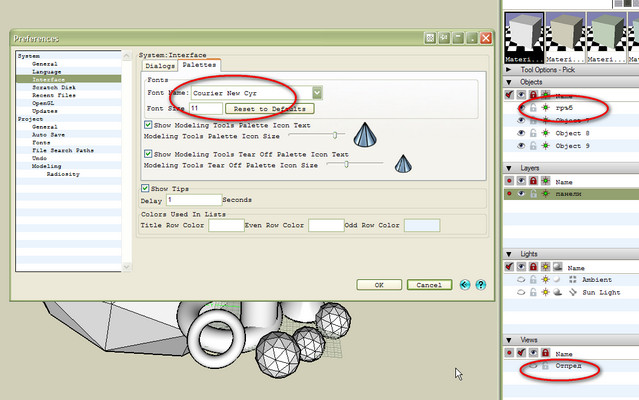
              The default GUI font doesn't support Cyrillic names. I had to choose a Cyrillic font so see it properly.
              2010-02-28_102809.jpg

              1 條回覆 最後回覆 回覆 引用 0
              • X 離線
                xrok1
                最後由 編輯

                Pete, Rich... check pages 176 through 18? in the manual to see if this helps you.

                from page 176:

                @unknownuser said:

                The default texture mapping assignments can be changed and edited with two tools. The Map Texture tool allows you to assign a different mapping type to an object or its face. The Edit Texture tool is used to interactively adjust the orientation and size of the texture.

                “There are three classes of people: those who see. Those who see when they are shown. Those who do not see.”

                http://www.Twilightrender.com try it!

                1 條回覆 最後回覆 回覆 引用 0
                • soloS 離線
                  solo
                  最後由 編輯

                  Rocky, Ive seen that and used both those options, they let you orientate, scale and even change the mapping from planar to cylindrical and spherical, what I really need is Parametric which is only an available option for a Bonsai created nurb shape.

                  http://www.solos-art.com

                  If you see a toilet in your dreams do not use it.

                  1 條回覆 最後回覆 回覆 引用 0
                  • X 離線
                    xrok1
                    最後由 編輯

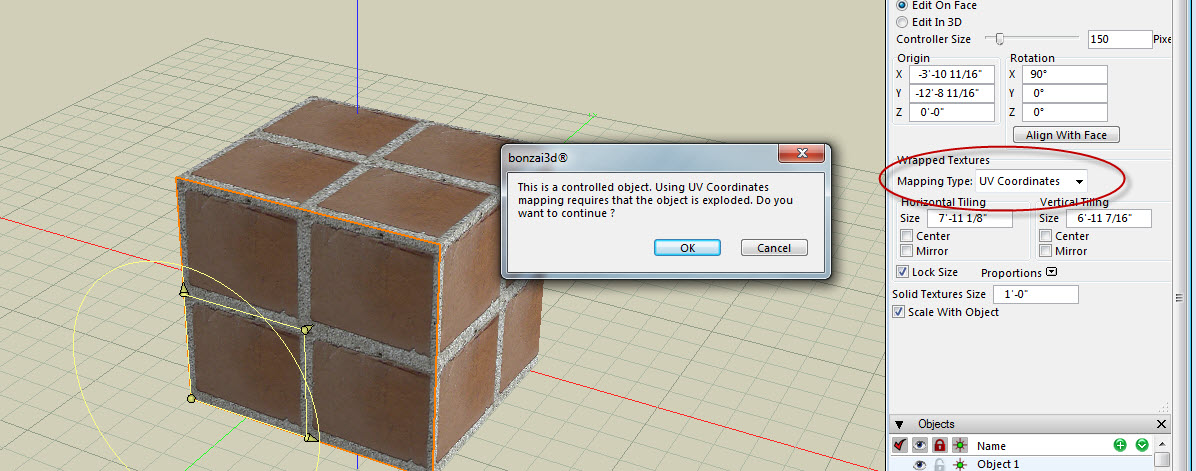
                    did you try changing the mapping type to UV coordinates from the edit tool?
                    not sure what you mean by parametric? you want all faces joined when you edit? the method in this .jpg seems to work for that.

                    Capture1.JPG

                    “There are three classes of people: those who see. Those who see when they are shown. Those who do not see.”

                    http://www.Twilightrender.com try it!

                    1 條回覆 最後回覆 回覆 引用 0
                    • X 離線
                      xrok1
                      最後由 編輯

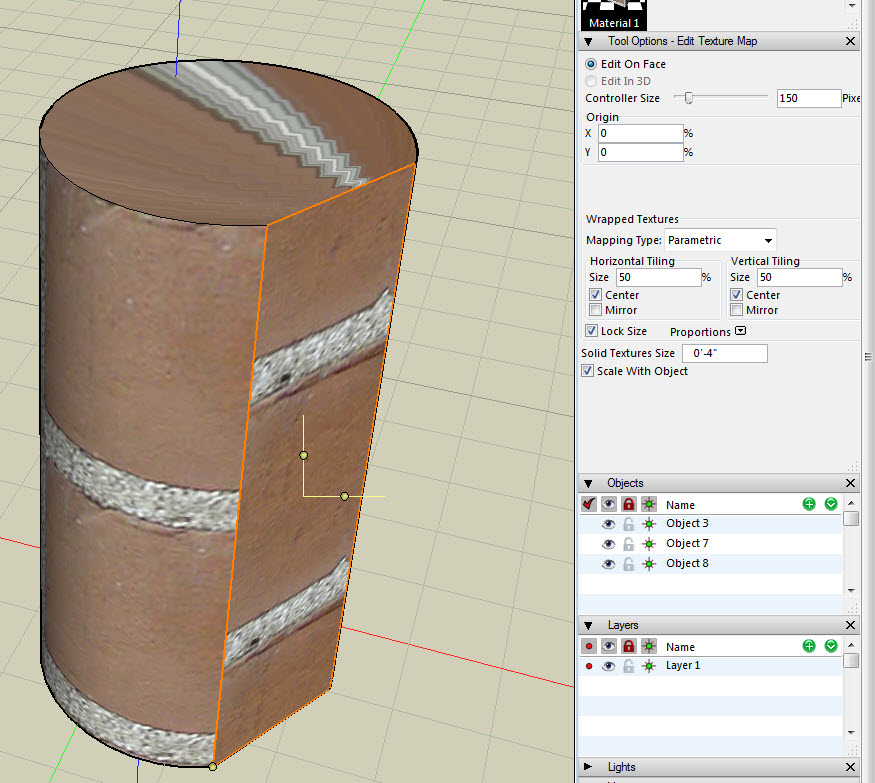
                      Solo, can you explain the attraction to parametric texture mapping? as you can see i mapped this cylinder parametrically and its fubar so i can't seem to see any advantages.

                      Capture1.JPG

                      “There are three classes of people: those who see. Those who see when they are shown. Those who do not see.”

                      http://www.Twilightrender.com try it!

                      1 條回覆 最後回覆 回覆 引用 0
                      • soloS 離線
                        solo
                        最後由 編輯

                        Rocky, Parametric mapping is for organic shapes, for tube shapes use the cylindrical mapping.

                        http://www.solos-art.com

                        If you see a toilet in your dreams do not use it.

                        1 條回覆 最後回覆 回覆 引用 0
                        • X 離線
                          xrok1
                          最後由 編輯

                          ah... the UV coordinate mapping seems to be about the closest. have you tried that?

                          “There are three classes of people: those who see. Those who see when they are shown. Those who do not see.”

                          http://www.Twilightrender.com try it!

                          1 條回覆 最後回覆 回覆 引用 0
                          • T 離線
                            toxicvoxel
                            最後由 編輯

                            Unless the blokes over at SU HQ wake up and smell the coffee they will lose their professional design user core.
                            (But then do they even care? With the new Bing Augmented Reality looming even more focus may be concentrated on GE support rather than design functionality in Sketchup.)

                            1 條回覆 最後回覆 回覆 引用 0
                            • B 離線
                              bonzai3d support
                              最後由 編輯

                              Gentlemen,

                              Sorry for the delay in replying back to your questions and comments. Due to popular demand, we have been extremely busy answering all the emails and phone calls that we are receiving directly (at support@bonzai3d.com, or 614 488-8838). We shall try to keep a closer eye on your discussions so we can help or respond a little more quickly in the future!

                              (Feel free to contact us directly if you have any urgent needs...)

                              Solo,

                              Yes, Parametric mapping is for Nurbs objects in bonzai3d -- so if you created this in bonzai3d, mapping it would be pretty straightforward, but if you create the geometry with SketchUp, then you are pretty limited with what you can do with it.

                              Also, with UV mapping, you typically assign the desired mapping type first (ie, Flat, Cubic, Spherical...) and then set it to UV. Then when you adjust the geometry, the mapping is locked to the surfaces and will "stretch" accordingly if the shape is adjusted non-uniformly.

                              Dedmin,

                              We do not understand exactly what you are saying regarding Cyrillic names. Can you please clarify?

                              ToxicVoxel,

                              I am having my coffee right now and it smells pretty good. 😄

                              We plan to continue aggressive development to give designers the best possible 3d tools to realize their projects. Please check out our tutorial videos, give out Trial version a chance, and let us know what you think!

                              Tutorial videos: http://www.formz.com/products/bonzai3d/bonzai3dVideo_320.php?startMovie=Interface_320.flv
                              Feature videos: http://www.formz.com/products/bonzai3d/bonzai3dFeatures.html
                              Free Trial: http://www.formz.com/products/bonzai3d/bonzai3dTrial.html

                              All our best!

                              Explore * Design * Deliver
                              http://www.bonzai3d.com
                              Version 2.5 Now Available!

                              1 條回覆 最後回覆 回覆 引用 0
                              • D 離線
                                dedmin
                                最後由 編輯

                                Copy and paste this into Bonzai3D as a name of object, layer or scene:

                                страница
                                
                                1 條回覆 最後回覆 回覆 引用 0
                                • B 離線
                                  bonzai3d support
                                  最後由 編輯

                                  Dedmin,

                                  Yes, thanks for clarifying. We have now reproduced this and we will get it corrected. As you note, selecting a Cyrillic font is a way to work around this.

                                  Please let us know if there is anything further. 😄

                                  Explore * Design * Deliver
                                  http://www.bonzai3d.com
                                  Version 2.5 Now Available!

                                  1 條回覆 最後回覆 回覆 引用 0
                                  • D 離線
                                    dedmin
                                    最後由 編輯

                                    @toxicvoxel said:

                                    Unless the blokes over at SU HQ wake up and smell the coffee they will lose their professional design user core.
                                    (But then do they even care? With the new Bing Augmented Reality looming even more focus may be concentrated on GE support rather than design functionality in Sketchup.)

                                    It depends at what You are doing. For me the community is very important. For instance, I needed a way to incremental rename a lot of components and asked for a script and I had it in an hour thanks to TIG! For small woodworking, melamine and MDF furniture SketchUp is perfect - there are FredoScale,CutList,Dovetails and bunch of other plugins to do the job!

                                    1 條回覆 最後回覆 回覆 引用 0
                                    • T 離線
                                      toxicvoxel
                                      最後由 編輯

                                      @unknownuser said:

                                      It depends at what You are doing. For me the community is very important. For instance, I needed a way to incremental rename a lot of components and asked for a script and I had it in an hour thanks to TIG! For small woodworking, melamine and MDF furniture SketchUp is perfect - there are FredoScale,CutList,Dovetails and bunch of other plugins to do the job!

                                      If you are reliant on community scripts for staying competitive while the world moves on, then good luck mate.

                                      Sketchup will not remain the ground breaking technology it once was.
                                      It's owners have another agenda, - designers are now a secondary consideration.
                                      I resisted moving to Sketchup when it showed the way forward, - don't want to make that same mistake again.

                                      1 條回覆 最後回覆 回覆 引用 0
                                      • R 離線
                                        remus
                                        最後由 編輯

                                        @toxicvoxel said:

                                        Sketchup will not remain the ground breaking technology it once was.

                                        I beg to differ. In my opinion the developers of SU are a very hard working bunch who want to produce a good product that helps people get their jobs done.

                                        http://remusrendering.wordpress.com/

                                        1 條回覆 最後回覆 回覆 引用 0
                                        • D 離線
                                          dedmin
                                          最後由 編輯

                                          @unknownuser said:

                                          If you are reliant on community scripts for staying competitive while the world moves on, then good luck mate.

                                          Yes - it proofs to be the fastest and the cheapest way 😄 And I prefer to move on with the industry and my customers not with the software. I'm working with flat panels and SketchUP has it enough. As I said - it depends.

                                          1 條回覆 最後回覆 回覆 引用 0
                                          • T 離線
                                            toxicvoxel
                                            最後由 編輯

                                            @remus said:

                                            I beg to differ. In my opinion the developers of SU are a very hard working bunch who want to produce a good product that helps people get their jobs done.
                                            When you have the pioneering lead in the industry, you have to be pretty stupid to lose it.
                                            What we are beginning to see is the Autodesk syndrome of adding fringe functionality with every release while the core remains the same. Ironically Sketchup is what gave Autodesk their wake-up call. I suspect however that Google is in a far deeper slumber.

                                            The fact that other contenders now offer the functionality asked by SU users 3-4 releases ago while there is no sign of it yet in the development roadmap, speaks for itself.


                                            1 條回覆 最後回覆 回覆 引用 0
                                            • 1
                                            • 2
                                            • 5
                                            • 6
                                            • 7
                                            • 8
                                            • 9
                                            • 10
                                            • 11
                                            • 7 / 11
                                            • 第一個貼文
                                              最後的貼文
                                            Buy SketchPlus
                                            Buy SUbD
                                            Buy WrapR
                                            Buy eBook
                                            Buy Modelur
                                            Buy Vertex Tools
                                            Buy SketchCuisine
                                            Buy FormFonts

                                            Advertisement