Distace from Camera to object in drawing.
-
I would like to be able to move the mouse around on a drawing and view the distance from the camera to the object near the mouse.
I know I could write a tool to do this, but there is probably one out there already. Can someone point me in the right direction?
Al Hart

IRender nXt from Render Plus -
Hi Al,
Here is one - by Rick - and it's free!
http://www.smustard.com/script/CameraDistance -
Maybe Fullmer (or you) can add this to his Onscreen plugin:
-
@gaieus said:
Hi Al,
Here is one - by Rick - and it's free!
http://www.smustard.com/script/CameraDistanceThanks, I'll give it a look.

Al Hart
IRender nXt from Render Plus -
@jim said:
Maybe Fullmer (or you) can add this to his Onscreen plugin:
Oh Jim, that is an old plugin. I should look at it again. i can't believe it works at all!
Chris
-
Oh sorry - I know how you feel!
-
@gaieus said:
Hi Al,
Here is one - by Rick - and it's free!
http://www.smustard.com/script/CameraDistanceThis one returns to distance from the camera t the eye.
I would like to have a tool which lets you determine the distance from the camera to arbitrary objects in the drawing. I want to use it to set Focal Lengths for Depth of Field calculations.
This is not a good example, because the eye may be in the same place as the center of focus, but if the eye were raised up a bit, then it would probably be way behind the desired focal point.

Al Hart
IRender nXt from Render Plus -
Ah - yes. That would be a good tool. And for my use, since I'd use V-Ray I'd want it to display the distance in inches as well as model units.
Not sure if there's a tool like that out there though.
-
Assuming that you have something selected then
model=Sketchup.active_model
eye=model.active_view.camera.eye
ss=model.selection[0]
distance=eye.distance(ss.bounds.center)
returns the distance from the camera's 'eye' to the 'center' of the selection's bounding-box...
You can of course improve this - another way to get the distance to the 'face' of a selection would be to get the vector between the 'eye' and the 'center' and then do a 'raytest' to find the first point hit and get that distance...model=Sketchup.active_model eye=model.active_view.camera.eye ss=model.selection[0] distance=(model.raytest[eye, eye.vector_to(ss.bounds.center)])[0].distance(eye)This then returns the 'distance'...
You can improve it further by testing if the second item in the returned raytest array contains the selected object and if not redo the raytest from the first item [point] in its array along the same vector...model=Sketchup.active_model eye=model.active_view.camera.eye ss=model.selection[0] vector=eye.vector_to(ss.bounds.center) rayt=model.raytest[eye,vector] pt=rayt[0] while not rayt[1].include?(ss) rayt=model.raytest[pt,vector] pt=rayt[0] end#while pt=rayt[0] distance=eye.distance(pt)Hope this helps...

-
I took the utilitiestools.rb script in SketchUp, which displays an X,Y location as you move the mouse and changed it to display the distance from the camera instead.
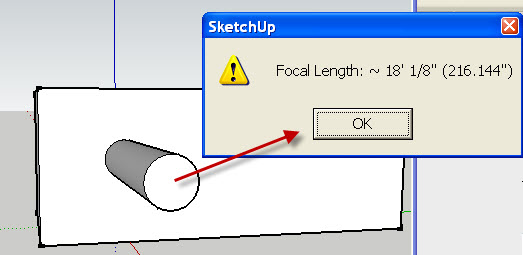
The heart of the change is this routine to display the camera distance:
	# get camera distance from the eye to a point at (x,y,0)
	def get_distance(target)
		model = Sketchup.active_model
		eye = model.active_view.camera.eye
		distance = eye.distance(target)
		# display in drawing units and inches
		slength = Sketchup.format_length(distance) + sprintf(" (%g\")", distance)
		return slength
	end#def
Try the attached script: get_camera_distance.rb
[Edit: I uploaded a new version of get_camera_distance.rb]
Al Hart
IRender nXt from Render Plus -
But that measures the eye to target distance...
You want the eye to object distance ?
The object might be between the target and the eye positions !
See my example on how to use the eye>>>target vector and raytest from the eye along that vector for objects in between... perhaps using a selected object as the source [it needs work as it was only a first draft... but selecting a group/instance between the eye and target will give the distance to it ?]
-
There was a bug in get_camera_distance.rb.
I uploaded a new version.
(One person had downloaded it already - sorry - please get a new version)
Al Hart
IRender nXt from Render Plus -
@tig said:
But that measures the eye to target distance...
You want the eye to object distance ?
The object might be between the target and the eye positions !
See my example on how to use the eye>>>target vector and raytest from the eye along that vector for objects in between... perhaps using a selected object as the source [it needs work as it was only a first draft... but selecting a group/instance between the eye and target will give the distance to it ?]
I call get_distance(target) with the point from OnMouseMove() after calling pick(x,y) - not the target of the camera view.
I think it is working properly.
Here is a rendering after selecting the end of the cylinder as the target point and setting the Depth of Field to be very blurry (3.0).
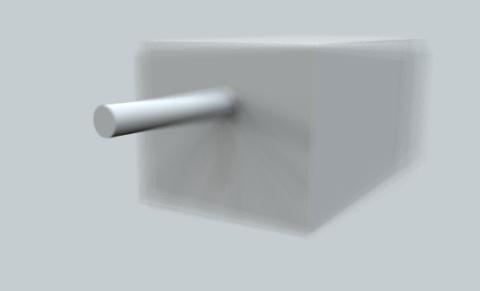
Al Hart
IRender nXt from Render Plus -
I apologize...

I hadn't read your script fully - yourtargetisn'tcamera.target- you have a good idea - it works fine...
-
hello
could that plugin be used to create motion blur in an animation ?
thank you.
-
Cool, thanks. Love it when I can know how far away something is in a model.

@al hart said:
I took the utilitiestools.rb script in SketchUp, which displays an X,Y location as you move the mouse and changed it to display the distance from the camera instead.
[attachment=1:2q0r3qa8]<!-- ia1 -->get_focal_length.jpg<!-- ia1 -->[/attachment:2q0r3qa8]
The heart of the change is this routine to display the camera distance:
> 	# get camera distance from the eye to a point at (x,y,0)
> 	def get_distance(target)
> 		model = Sketchup.active_model
> 		eye = model.active_view.camera.eye
> 		distance = eye.distance(target)
> 		# display in drawing units and inches
> 		slength = Sketchup.format_length(distance) + sprintf(" (%g\")", distance)
> 		return slength
> 	end#def
>
Try the attached script: get_camera_distance.rb
[Edit: I uploaded a new version of get_camera_distance.rb]
-
That is a lovely script, but it seems I'm not able to load it..
How can I do that?Thanks a lot Al!
**EDIT: ok, I moved the original utilities rb to another folder and renamed your script "utilitiestools.rb", and it works: now I can get camera distance
Is there a less homemade or brute method? Thanks again?
 -
Renaming files is dangerous.
Make a subfolder of Plugins dir, named: !_autoload
"
%(#8000BF)[Plugins/!_autoload]"Then get my !autoload script here, and put it in Plugins folder.
After.. you can put little scripts that you wish to autoload in the "
%(#8000BF)[Plugins/!_autoload]" folder. -
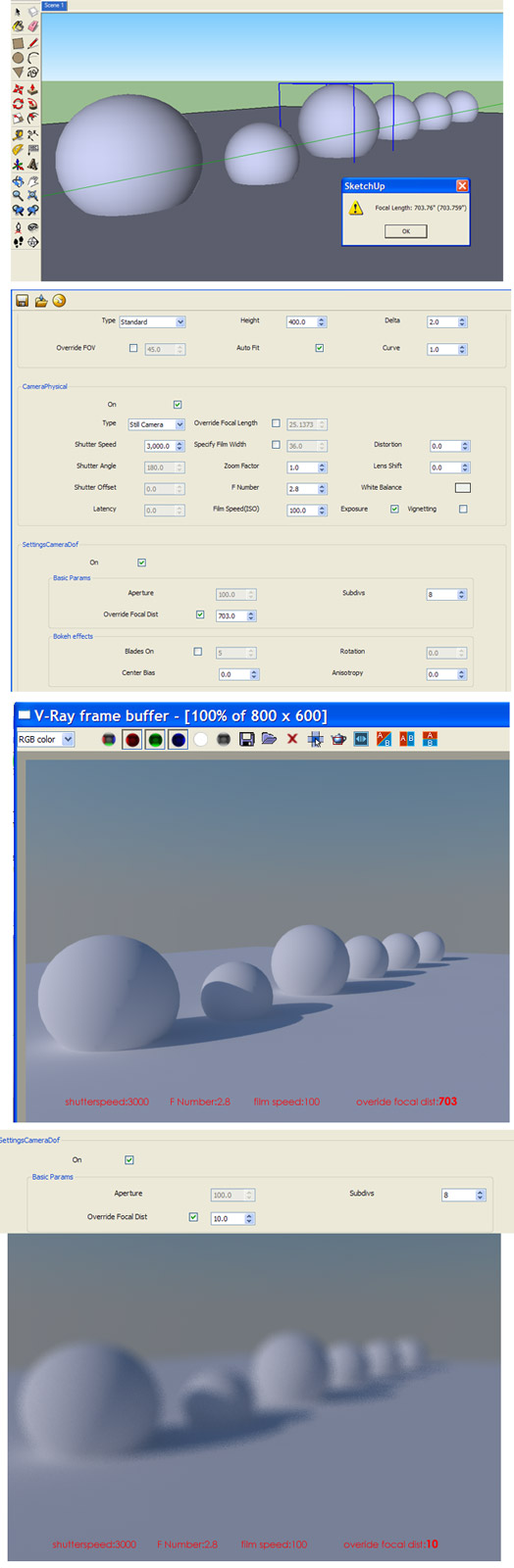
Hi, I got confused about this.
I try using get_camera_distance but the result aren't DOF
am I missing something ?here I attach my screen shot
if too small I also upload here:
http://imageshack.us/f/254/bingungdof2.jpgplease advice, thanks alot.
-
But the distance given by the tool is 703" - not '10' units in the Camera DOF dialog ?
Try using the real equivalent distance [in the correct units for that dialog] to see what happens.
The distance returned by the tool is the distance from the camera 'eye' up to the picked point - in your screenshot it's given in 'inches'...






Hello! It looks like you're interested in this conversation, but you don't have an account yet.
Getting fed up of having to scroll through the same posts each visit? When you register for an account, you'll always come back to exactly where you were before, and choose to be notified of new replies (either via email, or push notification). You'll also be able to save bookmarks and upvote posts to show your appreciation to other community members.
With your input, this post could be even better 💗
Register Login


Advertisement