sketchucation logo sketchucation
    • 登入
    Oops, your profile's looking a bit empty! To help us tailor your experience, please fill in key details like your SketchUp version, skill level, operating system, and more. Update and save your info on your profile page today!
    🔌 Smart Spline | Fluid way to handle splines for furniture design and complex structures. Download

    Distace from Camera to object in drawing.

    已排程 已置頂 已鎖定 已移動 Developers' Forum
    44 貼文 14 Posters 40.5k 瀏覽 14 Watching
    正在載入更多貼文
    • 從舊到新
    • 從新到舊
    • 最多點贊
    回覆
    • 在新貼文中回覆
    登入後回覆
    此主題已被刪除。只有擁有主題管理權限的使用者可以查看。
    • Al HartA 離線
      Al Hart
      最後由 編輯

      I would like to be able to move the mouse around on a drawing and view the distance from the camera to the object near the mouse.

      I know I could write a tool to do this, but there is probably one out there already. Can someone point me in the right direction?

      Al Hart

      http:wiki.renderplus.comimageseefRender_plus_colored30x30%29.PNG
      IRender nXt from Render Plus

      1 條回覆 最後回覆 回覆 引用 0
      • GaieusG 離線
        Gaieus
        最後由 編輯

        Hi Al,

        Here is one - by Rick - and it's free!
        http://www.smustard.com/script/CameraDistance

        Gai...

        1 條回覆 最後回覆 回覆 引用 0
        • J 離線
          Jim
          最後由 編輯

          Maybe Fullmer (or you) can add this to his Onscreen plugin:

          http://forums.sketchucation.com/viewtopic.php?f=323&t=16837

          Hi

          1 條回覆 最後回覆 回覆 引用 0
          • Al HartA 離線
            Al Hart
            最後由 編輯

            @gaieus said:

            Hi Al,

            Here is one - by Rick - and it's free!
            http://www.smustard.com/script/CameraDistance

            Thanks, I'll give it a look. 🤓

            Al Hart

            http:wiki.renderplus.comimageseefRender_plus_colored30x30%29.PNG
            IRender nXt from Render Plus

            1 條回覆 最後回覆 回覆 引用 0
            • Chris FullmerC 離線
              Chris Fullmer
              最後由 編輯

              @jim said:

              Maybe Fullmer (or you) can add this to his Onscreen plugin:

              http://forums.sketchucation.com/viewtopic.php?f=323&t=16837

              Oh Jim, that is an old plugin. I should look at it again. i can't believe it works at all!

              Chris

              Lately you've been tan, suspicious for the winter.
              All my Plugins I've written

              1 條回覆 最後回覆 回覆 引用 0
              • J 離線
                Jim
                最後由 編輯

                Oh sorry - I know how you feel!

                Hi

                1 條回覆 最後回覆 回覆 引用 0
                • Al HartA 離線
                  Al Hart
                  最後由 編輯

                  @gaieus said:

                  Hi Al,

                  Here is one - by Rick - and it's free!
                  http://www.smustard.com/script/CameraDistance

                  This one returns to distance from the camera t the eye.

                  I would like to have a tool which lets you determine the distance from the camera to arbitrary objects in the drawing. I want to use it to set Focal Lengths for Depth of Field calculations.

                  This is not a good example, because the eye may be in the same place as the center of focus, but if the eye were raised up a bit, then it would probably be way behind the desired focal point.

                  http://wiki.renderplus.com/images/thumb/f/fa/Dof-100-1.0.jpg/350px-Dof-100-1.0.jpg

                  Al Hart

                  http:wiki.renderplus.comimageseefRender_plus_colored30x30%29.PNG
                  IRender nXt from Render Plus

                  1 條回覆 最後回覆 回覆 引用 0
                  • thomthomT 離線
                    thomthom
                    最後由 編輯

                    Ah - yes. That would be a good tool. And for my use, since I'd use V-Ray I'd want it to display the distance in inches as well as model units.

                    Not sure if there's a tool like that out there though.

                    Thomas Thomassen — SketchUp Monkey & Coding addict
                    List of my plugins and link to the CookieWare fund

                    1 條回覆 最後回覆 回覆 引用 0
                    • TIGT 離線
                      TIG Moderator
                      最後由 編輯

                      Assuming that you have something selected then

                      model=Sketchup.active_model
                      eye=model.active_view.camera.eye
                      ss=model.selection[0]
                      distance=eye.distance(ss.bounds.center)
                      

                      returns the distance from the camera's 'eye' to the 'center' of the selection's bounding-box...
                      You can of course improve this - another way to get the distance to the 'face' of a selection would be to get the vector between the 'eye' and the 'center' and then do a 'raytest' to find the first point hit and get that distance...

                      model=Sketchup.active_model
                      eye=model.active_view.camera.eye
                      ss=model.selection[0]
                      distance=(model.raytest[eye, eye.vector_to(ss.bounds.center)])[0].distance(eye)


                      This then returns the 'distance'...
                      You can improve it further by testing if the second item in the returned raytest array contains the selected object and if not redo the raytest from the first item [point] in its array along the same vector...

                      model=Sketchup.active_model
                      eye=model.active_view.camera.eye
                      ss=model.selection[0]
                      vector=eye.vector_to(ss.bounds.center)
                      rayt=model.raytest[eye,vector]
                      pt=rayt[0]
                      while not rayt[1].include?(ss)
                        rayt=model.raytest[pt,vector]
                        pt=rayt[0]
                      end#while
                      pt=rayt[0]
                      distance=eye.distance(pt)


                      Hope this helps... 😕

                      TIG

                      1 條回覆 最後回覆 回覆 引用 0
                      • Al HartA 離線
                        Al Hart
                        最後由 編輯

                        I took the utilitiestools.rb script in SketchUp, which displays an X,Y location as you move the mouse and changed it to display the distance from the camera instead.
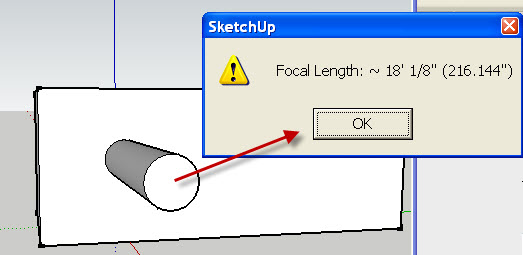
                        get_focal_length.jpg

                        The heart of the change is this routine to display the camera distance:

                        
                        	# get camera distance from the eye to a point at (x,y,0)
                        	def get_distance(target)
                        		model = Sketchup.active_model
                        		eye = model.active_view.camera.eye
                        		distance = eye.distance(target)
                        		# display in drawing units and inches
                        		slength = Sketchup.format_length(distance) + sprintf(" (%g\")", distance)
                        		return slength
                        	end#def


                        Try the attached script: get_camera_distance.rb

                        [Edit: I uploaded a new version of get_camera_distance.rb]


                        get_camera_distance.rb

                        Al Hart

                        http:wiki.renderplus.comimageseefRender_plus_colored30x30%29.PNG
                        IRender nXt from Render Plus

                        1 條回覆 最後回覆 回覆 引用 0
                        • TIGT 離線
                          TIG Moderator
                          最後由 編輯

                          But that measures the eye to target distance...
                          You want the eye to object distance ?
                          The object might be between the target and the eye positions !
                          See my example on how to use the eye>>>target vector and raytest from the eye along that vector for objects in between... perhaps using a selected object as the source [it needs work as it was only a first draft... but selecting a group/instance between the eye and target will give the distance to it ?]
                          😕

                          TIG

                          1 條回覆 最後回覆 回覆 引用 0
                          • Al HartA 離線
                            Al Hart
                            最後由 編輯

                            There was a bug in get_camera_distance.rb.

                            I uploaded a new version.

                            (One person had downloaded it already - sorry - please get a new version)

                            Al Hart

                            http:wiki.renderplus.comimageseefRender_plus_colored30x30%29.PNG
                            IRender nXt from Render Plus

                            1 條回覆 最後回覆 回覆 引用 0
                            • Al HartA 離線
                              Al Hart
                              最後由 編輯

                              @tig said:

                              But that measures the eye to target distance...
                              You want the eye to object distance ?
                              The object might be between the target and the eye positions !
                              See my example on how to use the eye>>>target vector and raytest from the eye along that vector for objects in between... perhaps using a selected object as the source [it needs work as it was only a first draft... but selecting a group/instance between the eye and target will give the distance to it ?]
                              😕

                              I call get_distance(target) with the point from OnMouseMove() after calling pick(x,y) - not the target of the camera view.

                              I think it is working properly.

                              Here is a rendering after selecting the end of the cylinder as the target point and setting the Depth of Field to be very blurry (3.0).
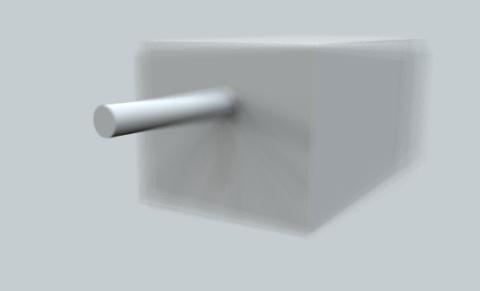
                              focal_length.jpg

                              Al Hart

                              http:wiki.renderplus.comimageseefRender_plus_colored30x30%29.PNG
                              IRender nXt from Render Plus

                              1 條回覆 最後回覆 回覆 引用 0
                              • TIGT 離線
                                TIG Moderator
                                最後由 編輯

                                I apologize... 😳
                                I hadn't read your script fully - your target isn't camera.target - you have a good idea - it works fine... 😎

                                TIG

                                1 條回覆 最後回覆 回覆 引用 0
                                • B 離線
                                  Bertier
                                  最後由 編輯

                                  hello

                                  could that plugin be used to create motion blur in an animation ?

                                  thank you.

                                  1 條回覆 最後回覆 回覆 引用 0
                                  • M 離線
                                    mpowell1234567890
                                    最後由 編輯

                                    Cool, thanks. Love it when I can know how far away something is in a model. 😄

                                    @al hart said:

                                    I took the utilitiestools.rb script in SketchUp, which displays an X,Y location as you move the mouse and changed it to display the distance from the camera instead.

                                    [attachment=1:2q0r3qa8]<!-- ia1 -->get_focal_length.jpg<!-- ia1 -->[/attachment:2q0r3qa8]

                                    The heart of the change is this routine to display the camera distance:

                                    
                                    > 	# get camera distance from the eye to a point at (x,y,0)
                                    > 	def get_distance(target)
                                    > 		model = Sketchup.active_model
                                    > 		eye = model.active_view.camera.eye
                                    > 		distance = eye.distance(target)
                                    > 		# display in drawing units and inches
                                    > 		slength = Sketchup.format_length(distance) + sprintf(" (%g\")", distance)
                                    > 		return slength
                                    > 	end#def
                                    > 
                                    

                                    Try the attached script: get_camera_distance.rb

                                    [Edit: I uploaded a new version of get_camera_distance.rb]

                                    1 條回覆 最後回覆 回覆 引用 0
                                    • P 離線
                                      pibuz
                                      最後由 編輯

                                      That is a lovely script, but it seems I'm not able to load it..
                                      How can I do that?

                                      Thanks a lot Al!

                                      **EDIT: ok, I moved the original utilities rb to another folder and renamed your script "utilitiestools.rb", and it works: now I can get camera distance 😎
                                      Is there a less homemade or brute method? 😆 Thanks again?

                                      WEB (ita) - https://filipposcarso.wixsite.com/ordinentropico

                                      1 條回覆 最後回覆 回覆 引用 0
                                      • Dan RathbunD 離線
                                        Dan Rathbun
                                        最後由 編輯

                                        Renaming files is dangerous.

                                        Make a subfolder of Plugins dir, named: !_autoload

                                        " %(#8000BF)[Plugins/!_autoload]"

                                        Then get my !autoload script here, and put it in Plugins folder.

                                        After.. you can put little scripts that you wish to autoload in the " %(#8000BF)[Plugins/!_autoload]" folder.

                                        I'm not here much anymore.

                                        1 條回覆 最後回覆 回覆 引用 0
                                        • A 離線
                                          angeli7on
                                          最後由 編輯

                                          Hi, I got confused about this.
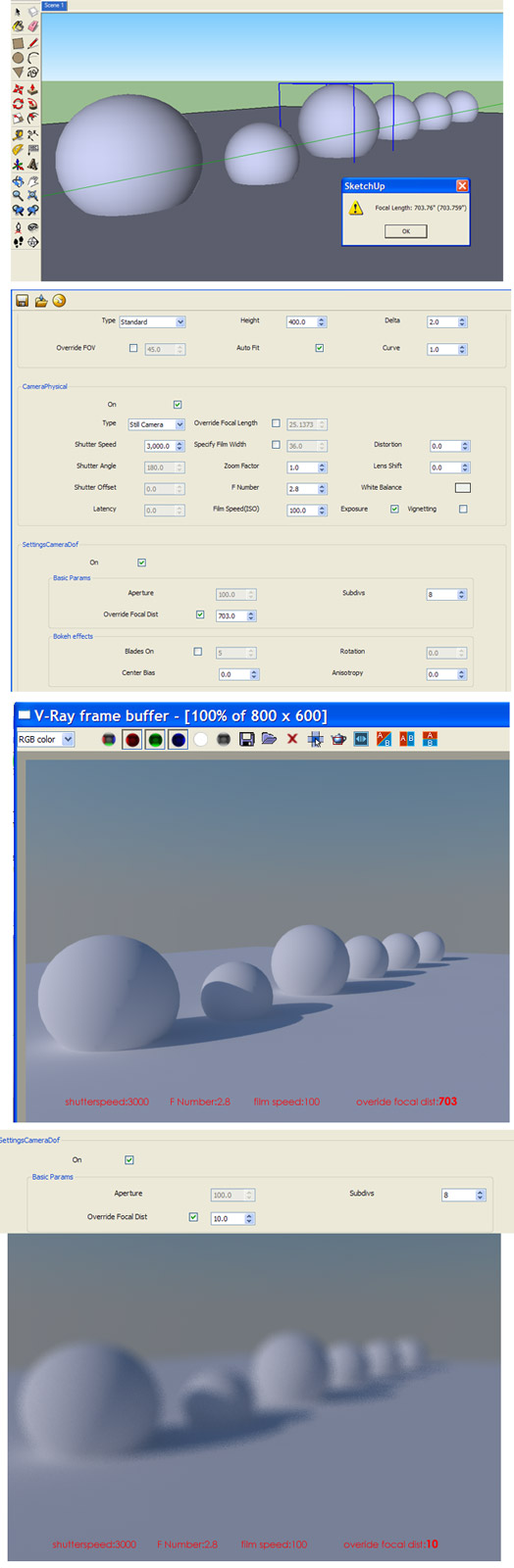
                                          I try using get_camera_distance but the result aren't DOF
                                          am I missing something ?

                                          here I attach my screen shot
                                          if too small I also upload here:
                                          http://imageshack.us/f/254/bingungdof2.jpg

                                          please advice, thanks alot.


                                          confusing dof

                                          1 條回覆 最後回覆 回覆 引用 0
                                          • TIGT 離線
                                            TIG Moderator
                                            最後由 編輯

                                            But the distance given by the tool is 703" - not '10' units in the Camera DOF dialog ?
                                            Try using the real equivalent distance [in the correct units for that dialog] to see what happens.
                                            The distance returned by the tool is the distance from the camera 'eye' up to the picked point - in your screenshot it's given in 'inches'...

                                            TIG

                                            1 條回覆 最後回覆 回覆 引用 0
                                            • 1
                                            • 2
                                            • 3
                                            • 1 / 3
                                            • 第一個貼文
                                              最後的貼文
                                            Buy SketchPlus
                                            Buy SUbD
                                            Buy WrapR
                                            Buy eBook
                                            Buy Modelur
                                            Buy Vertex Tools
                                            Buy SketchCuisine
                                            Buy FormFonts

                                            Advertisement