[Plugin] Manifold v2.2
-
Here's v1.4
http://forums.sketchucation.com/viewtopic.php?p=218691#p218691It has some improved algorithms for inner flap removal...

Still fails on some 'pretzelled' shapes...

-
@d12dozr said:
Sure...PM me a few sample models
Have you got the program?, I put a link at CornerBar, and really the test I'm suggesting you/and anyone else to do is just checking some of your own or 3D WareHouse stuff that looks watertight, and see how the plug behaves, cope, etc.. , then run the same model with Manifold1.4 (and rising) to compare results. It can then define some targets/parameters for this super-duper one TIG is creating. which is coming along very well indeed.
thanks for putting your head above the parapet..
MORE TESTERS REQUIRED....
-
I just installed it...164 MB! I'll run some tests but if you have some models you know you are are having problems with, send them to me...easier than me starting over from scratch
-
@d12dozr said:
I just installed it...164 MB! I'll run some tests but if you have some models you know you are are having problems with, send them to me...easier than me starting over from scratch

the 'pretzel' is posted up the top, TIG's name on front, that gives trouble on careful examination, small triangles round the back, I think... I've got harder tests but one step at a time, I got ahead of myself....
TIG......THIS IS SO FAST... I didn't have time to start the stopwatch on the boxes.....CHEERS
anyhow, more testing...
-
What does the word "manifold" mean in this context? I gather "water-tight", but is it more than that?
-
@jim said:
but is it more than that?
Yes , and tons of info at wikipedia, but the way I described to my six year old if the computer trying to find the walls of a room from the inside and the window is open it will precede to circumnavigate the earth until it gets back to where it started and then panic... she believed me...
-
@jim said:
What does the word "manifold" mean in this context? I gather "water-tight", but is it more than that?
Manifold means 'many' or 'of many parts' - it's also a type of thin typing paper !
But in the sense of a 3D mesh it means 'whole', 'complete', 'imperforate', 'without holes, imperfections, complexities or sub-elements'... from the Mathematical term "Manifold: a Topological surface or space that is connected and locally Euclidean"...
Ironically its 'antonym' is 'simple or single', which is exactly what we are trying to achieve with the processed mesh !!!
-
TIG, no dialogs and I get this that I haven't had before,
27/01/2010 16:26:58 [0x0-0x6f06f.com.google.sketchupfree7[925] #<NoMethodError: undefined method
flattenUVQ' for #<Manifold:0x1e6005a4>> 27/01/2010 16:26:58 [0x0-0x6f06f].com.google.sketchupfree7[925] /Library/Application Support/Google SketchUp 7/SketchUp/Plugins/manifold.rb:580:intriangulateFace'
27/01/2010 16:26:58 [0x0-0x6f06f].com.google.sketchupfree7[925] /Library/Application Support/Google SketchUp 7/SketchUp/Plugins/manifold.rb:574:ineach' 27/01/2010 16:26:58 [0x0-0x6f06f].com.google.sketchupfree7[925] /Library/Application Support/Google SketchUp 7/SketchUp/Plugins/manifold.rb:574:intriangulateFace'
27/01/2010 16:26:58 [0x0-0x6f06f].com.google.sketchupfree7[925] /Library/Application Support/Google SketchUp 7/SketchUp/Plugins/manifold.rb:621:intriangulate_faces' 27/01/2010 16:26:58 [0x0-0x6f06f].com.google.sketchupfree7[925] /Library/Application Support/Google SketchUp 7/SketchUp/Plugins/manifold.rb:619:ineach'
27/01/2010 16:26:58 [0x0-0x6f06f].com.google.sketchupfree7[925] /Library/Application Support/Google SketchUp 7/SketchUp/Plugins/manifold.rb:619:intriangulate_faces' 27/01/2010 16:26:58 [0x0-0x6f06f].com.google.sketchupfree7[925] /Library/Application Support/Google SketchUp 7/SketchUp/Plugins/manifold.rb:112:inactivate'
27/01/2010 16:26:58 [0x0-0x6f06f].com.google.sketchupfree7[925] /Library/Application Support/Google SketchUp 7/SketchUp/Plugins/manifold.rb:701:inselect_tool' 27/01/2010 16:26:58 [0x0-0x6f06f].com.google.sketchupfree7[925] /Library/Application Support/Google SketchUp 7/SketchUp/Plugins/manifold.rb:701:inmanifold'
27/01/2010 16:26:58 [0x0-0x6f06f].com.google.sketchupfree7[925] /Library/Application Support/Google SketchUp 7/SketchUp/Plugins/manifold.rb:716] -
@driven said:
TIG, no dialogs and I get this that I haven't had before,
27/01/2010 16:26:58 [0x0-0x6f06f.com.google.sketchupfree7[925] #<NoMethodError: undefined methodflattenUVQ' for #<Manifold:0x1e6005a4>> 27/01/2010 16:26:58 [0x0-0x6f06f].com.google.sketchupfree7[925] /Library/Application Support/Google SketchUp 7/SketchUp/Plugins/manifold.rb:580:intriangulateFace'
27/01/2010 16:26:58 [0x0-0x6f06f].com.google.sketchupfree7[925] /Library/Application Support/Google SketchUp 7/SketchUp/Plugins/manifold.rb:574:ineach' 27/01/2010 16:26:58 [0x0-0x6f06f].com.google.sketchupfree7[925] /Library/Application Support/Google SketchUp 7/SketchUp/Plugins/manifold.rb:574:intriangulateFace'
27/01/2010 16:26:58 [0x0-0x6f06f].com.google.sketchupfree7[925] /Library/Application Support/Google SketchUp 7/SketchUp/Plugins/manifold.rb:621:intriangulate_faces' 27/01/2010 16:26:58 [0x0-0x6f06f].com.google.sketchupfree7[925] /Library/Application Support/Google SketchUp 7/SketchUp/Plugins/manifold.rb:619:ineach'
27/01/2010 16:26:58 [0x0-0x6f06f].com.google.sketchupfree7[925] /Library/Application Support/Google SketchUp 7/SketchUp/Plugins/manifold.rb:619:intriangulate_faces' 27/01/2010 16:26:58 [0x0-0x6f06f].com.google.sketchupfree7[925] /Library/Application Support/Google SketchUp 7/SketchUp/Plugins/manifold.rb:112:inactivate'
27/01/2010 16:26:58 [0x0-0x6f06f].com.google.sketchupfree7[925] /Library/Application Support/Google SketchUp 7/SketchUp/Plugins/manifold.rb:701:inselect_tool' 27/01/2010 16:26:58 [0x0-0x6f06f].com.google.sketchupfree7[925] /Library/Application Support/Google SketchUp 7/SketchUp/Plugins/manifold.rb:701:inmanifold'
27/01/2010 16:26:58 [0x0-0x6f06f].com.google.sketchupfree7[925] /Library/Application Support/Google SketchUp 7/SketchUp/Plugins/manifold.rb:716]I haven't changed that ? It's trying to map textures back onto triangulated faces properly ??? I'll investigate...
Avoid textured faces for now... -
TIG,
I have had it before, I just went back through the logs and buried in there is the same report, at least for 1.3, 1.4
-
A re-start found the dialogs, so 1.3 would not pass this (which is correct) due to more then 2 faces per edge, also reversed faces made it through...
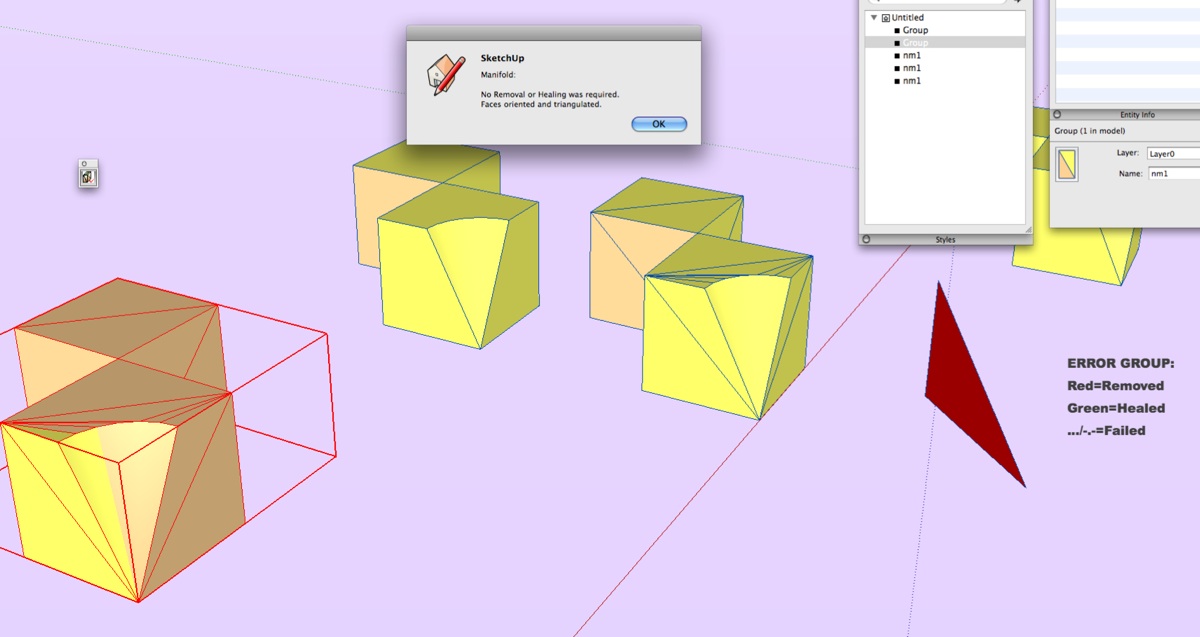
-
@d12dozr said:
...easier than me starting over from scratch
Here's a semi complex one that sort of worked with 1.2, but on 1.3 it would only hang....
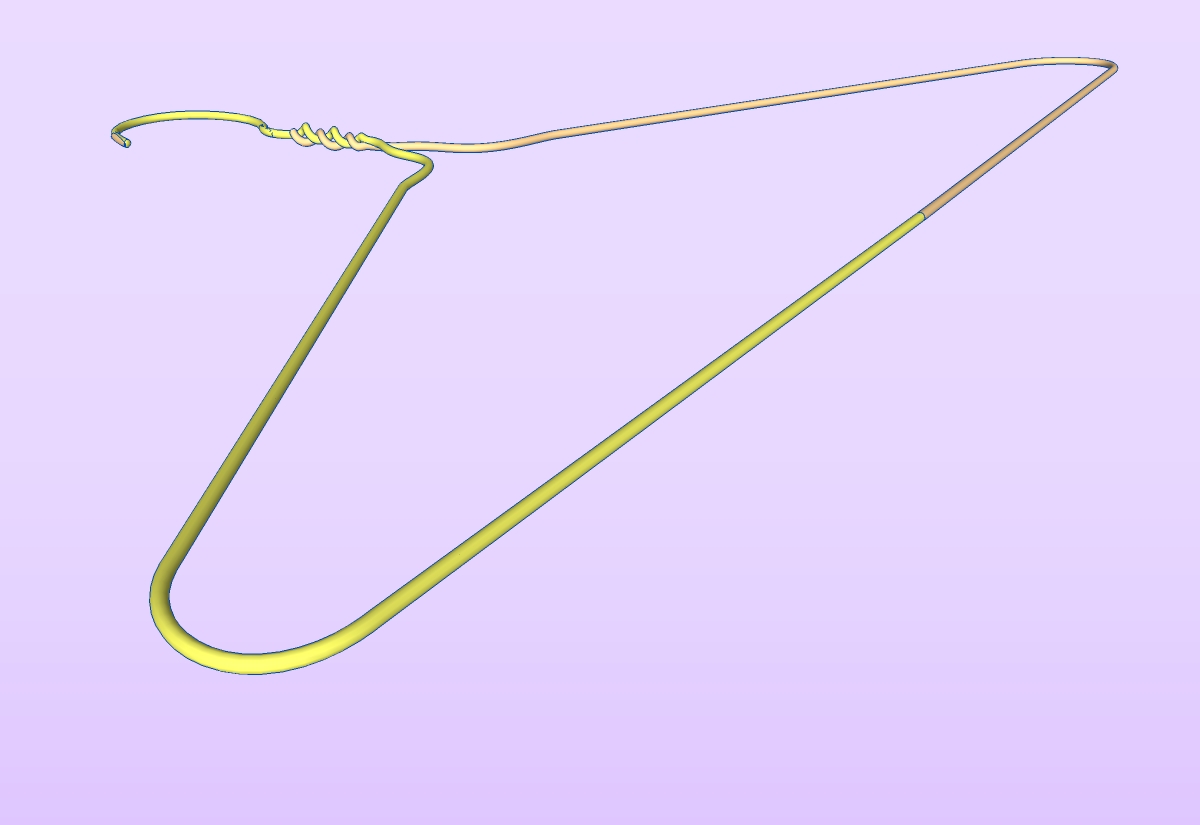
I'm about to re-test it on my Mac and a PC comparison would show up if some of the problems are me or not...
If it fails first try, manually orient the reversed faces, then remove the internal disc on the bottom run and try again.
it 'should' remove the internal overlap on the bottom 2/3 twists (1.2 left these intact)
it might still make a hash of the end, Fredo's bend tool can be unkind to meshes.
I been running it without manual repairs -
HI,TIG,is there have some differece between trigulaer face .rb and Manifold v1.4?
-
@hsjzyangbin said:
HI,TIG,is there have some difference between trigulate face .rb and Manifold v1.4?
If the read the notes in the first post... 'manifold' does triangulate faces at the end, BUT it does so much more - it tidies the shapes to remove faceless edges, remove flaps, remove disconnected geometry, heal holes and very small faces, orient faces and then triangulates, and finally 'reports' on what it's done.
It is an attempt to automate the making of a 'manifold' surfaced mesh that will work properly when it's exported for use in a 3D printer, and some other 3D apps...
It's still under development...
-
You are the Man, TIG!
This plug in is a great great idea.
Cheers, Chuck
-
Here's v1.5 http://forums.sketchucation.com/viewtopic.php?p=218691#p218691
Various adjustments on speed, reporting, lingvo etc...
Still need to sort out 'pretzels' better...
-
Cheers TIG,
I was just logging in to say, I've set up one of my Macs, with a fresh instal and only a few basic rubies that I've triple checked are clean. Just to test Manifold. That way any log errors on my system console should be easily spotted, and you posted this, so excellent timing. I'll keep you informed. john -
driven
Can you PM that file so I can test it too...

Don't bother - I made one like it and I see the problem -
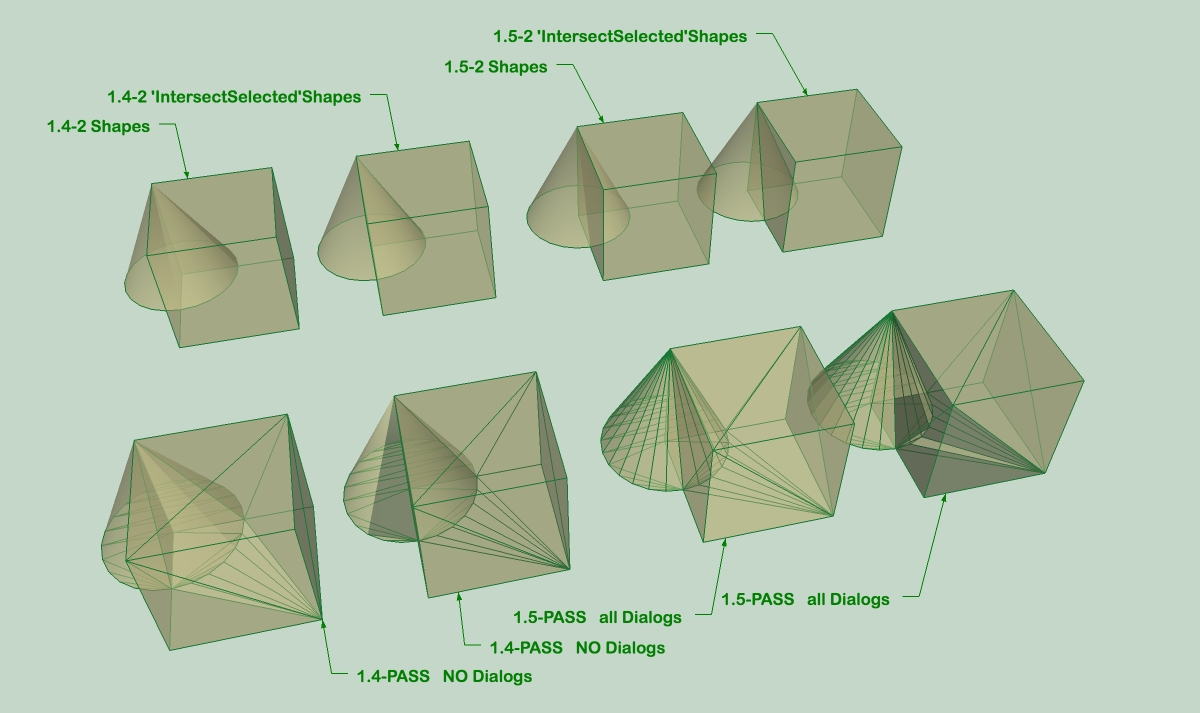
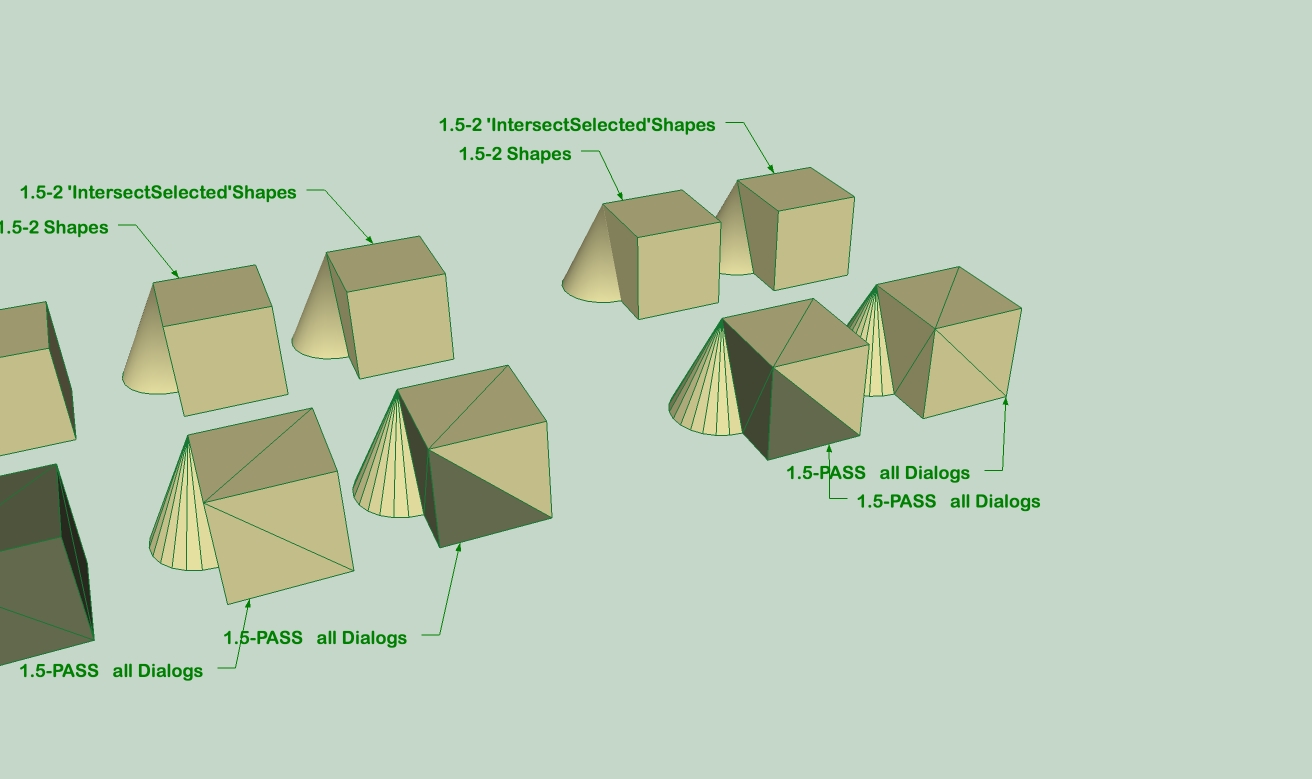
Fresh off the press, No error messages in console, had lots of info zipping through, had Pass dialogs, so all seems to be functioning, but all passed have inner faces? john
EDIT: I did the first with Transparency ON, so just in case it wasn't see the faces I re-did with Trans OFF, but the faces are still inside and the orientation is different from first
-
Here's v1.6 http://forums.sketchucation.com/viewtopic.php?p=218691#p218691
Face making error fixed, 3-edge faces removal improved.
Sub-groups/Instances now within Group removed & reported.
Error reporting improved.



Advertisement