sketchucation logo sketchucation
    • 登入
    Oops, your profile's looking a bit empty! To help us tailor your experience, please fill in key details like your SketchUp version, skill level, operating system, and more. Update and save your info on your profile page today!
    🔌 Smart Spline | Fluid way to handle splines for furniture design and complex structures. Download

    [Plugin] Manifold v2.2

    已排程 已置頂 已鎖定 已移動 Plugins
    126 貼文 19 Posters 63.3k 瀏覽 19 Watching
    正在載入更多貼文
    • 從舊到新
    • 從新到舊
    • 最多點贊
    回覆
    • 在新貼文中回覆
    登入後回覆
    此主題已被刪除。只有擁有主題管理權限的使用者可以查看。
    • thomthomT 離線
      thomthom
      最後由 編輯

      @tig said:

      I'm thinking perhaps to move these vertices to heal these tiny gaps rather than fail making edges that are too small inside a 'rescue' ?

      You need to rescue? Doesn't add_face return nil if it fails?

      Thomas Thomassen — SketchUp Monkey & Coding addict
      List of my plugins and link to the CookieWare fund

      1 條回覆 最後回覆 回覆 引用 0
      • TIGT 離線
        TIG Moderator
        最後由 編輯

        @thomthom said:

        @tig said:

        I'm thinking perhaps to move these vertices to heal these tiny gaps rather than fail making edges that are too small inside a 'rescue' ?

        You need to rescue? Doesn't add_face return nil if it fails?

        Yes BUT then I do things with the face that fail if it's nil - if the points are non-planar - which I can't see how but it rarely says they are - perhaps co-linear there's an error - therefore a rescue seems appropriate - I need to look at how I get these points.
        At the moment to 'heal' a gap we find an edge with only one face and if it has a shared vertex with another edge then we try to use three points from their vertices' points to make a face - however it's possible for the points to be co-linear or virtually so and no face gets made... I'm looking at a more robust algorithm that ensure such edges are 'faceable' before trying it... 😒

        TIG

        1 條回覆 最後回覆 回覆 引用 0
        • TIGT 離線
          TIG Moderator
          最後由 編輯

          @thomthom said:

          @tig said:

          Three-faced-edged external-faces now usually kept. [fixed TT's ball-breaker boxy mess 😄 ]

          Very interesting. I was stomped on this when I some time ago tried to make a remove_inner_faces script. Will have to snoop around the code. I'll probably dig up some more fun geometry - thing I got a batch of trouble-samples... 😄

          That was a quick fix BUT it will fail with very convoluted shapes that have inner faces like driven's pretzel ! I looking at an even better fix...

          TIG

          1 條回覆 最後回覆 回覆 引用 0
          • EarthMoverE 離線
            EarthMover
            最後由 編輯

            I'm still a little confused about the use of this plugin. Would it be of any value for anyone who is not doing 3D printing?

            3D Artist at Clearstory 3D Imaging
            Guide Tool at Winning With Sketchup
            Content Creator at Skapeup

            1 條回覆 最後回覆 回覆 引用 0
            • TIGT 離線
              TIG Moderator
              最後由 編輯

              @earthmover said:

              I'm still a little confused about the use of this plugin. Would it be of any value for anyone who is not doing 3D printing?

              Probably not... but it does remove internal partition faces in a volume and fixes any 'holes'... 😄

              TIG

              1 條回覆 最後回覆 回覆 引用 0
              • D 離線
                driven
                最後由 編輯

                any form of additive or subtractive rapid prototyping will require good clean meshes to work from, 3D printing is just one of many format used on a day to day basis.

                in more generalised modeling if you ever intersect or bool two solids and then try to continue with more advanced manipulations (readily available to SU ruby users) then chances are at some stage you've had to manually repair the mesh, this tool does it for you.

                I was doing test last night using it between bool operations on the standard SU shapes, and was surprised. A. how many little holes it found and B. how many holes the bool tool had left.

                Rendering engines that have been developed for solids will perform much quicker on a manifold objects

                So if you never use need to modify after intersecting two objects, and only ever upload to google earth or make sheet material products then this type of tool is probably not needed...

                john

                learn from the mistakes of others, you may not live long enough to make them all yourself...

                1 條回覆 最後回覆 回覆 引用 0
                • D 離線
                  driven
                  最後由 編輯

                  took 15 mins but did a fine job this one TIG
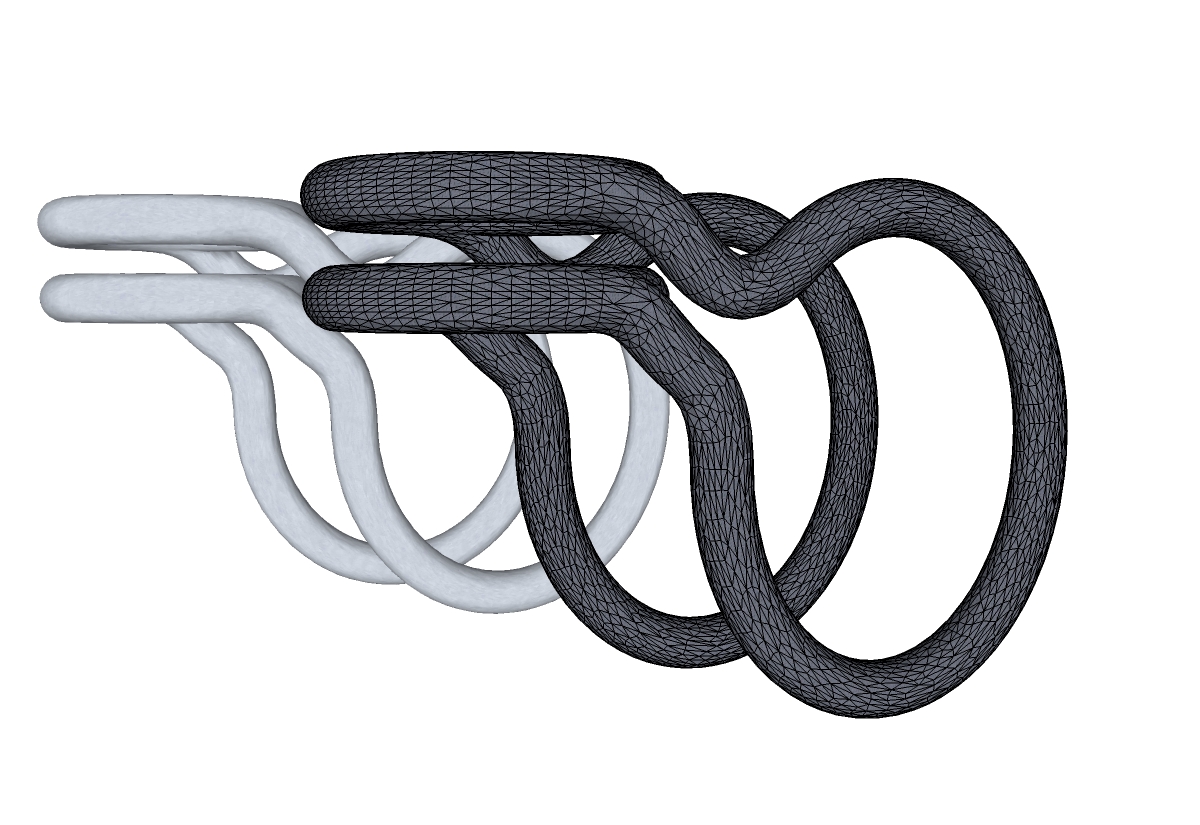
                  34000 polys

                  learn from the mistakes of others, you may not live long enough to make them all yourself...

                  1 條回覆 最後回覆 回覆 引用 0
                  • N 離線
                    notareal
                    最後由 編輯

                    Nice... apart from 3D printing. I think this can be used for healing models for rendering... when dielectric or SSS materials are used, there are a similar requirement as for 3D printing.

                    Welcome to try Thea Render, Thea support | kerkythea.net -team member

                    1 條回覆 最後回覆 回覆 引用 0
                    • EarthMoverE 離線
                      EarthMover
                      最後由 編輯

                      @notareal said:

                      Nice... apart from 3D printing. I think this can be used for healing models for rendering... when dielectric or SSS materials are used, there are a similar requirement as for 3D printing.

                      Can you elaborate? Curious about the logic of the renderer. Would it be similarly for meshes requiring displacement?

                      3D Artist at Clearstory 3D Imaging
                      Guide Tool at Winning With Sketchup
                      Content Creator at Skapeup

                      1 條回覆 最後回覆 回覆 引用 0
                      • D 離線
                        driven
                        最後由 編輯

                        I know when I put a light source inside that dragon before xmas, light leaked out of all the holes in the mesh, so I had to fix them. cap hole didn't do it. you had ago at that one didn't you?

                        learn from the mistakes of others, you may not live long enough to make them all yourself...

                        1 條回覆 最後回覆 回覆 引用 0
                        • EarthMoverE 離線
                          EarthMover
                          最後由 編輯

                          I did. I didn't have any issue with light leaks...but I used a higher poly version than most.

                          I wasn't sure if the plugin subdivided the mesh as well. I guess I should download and try. I keep telling myself I have to stop adding unnecessary plugins as it is becoming hard to deal with a plugins list three pages long!! Time to clean house.

                          3D Artist at Clearstory 3D Imaging
                          Guide Tool at Winning With Sketchup
                          Content Creator at Skapeup

                          1 條回覆 最後回覆 回覆 引用 0
                          • Chris FullmerC 離線
                            Chris Fullmer
                            最後由 編輯

                            Just remember while you are cleaning house, all mine fit nicely into a single menu item 😄

                            TIG, this is a WAAAY COOL plugin! I have no idea how it works, but it has been on my list of plugins I'd like to write some day. This is invaluable for file conversion and mesh cleanup and 3d printing, and, and, and...

                            Chris

                            Lately you've been tan, suspicious for the winter.
                            All my Plugins I've written

                            1 條回覆 最後回覆 回覆 引用 0
                            • D 離線
                              driven
                              最後由 編輯

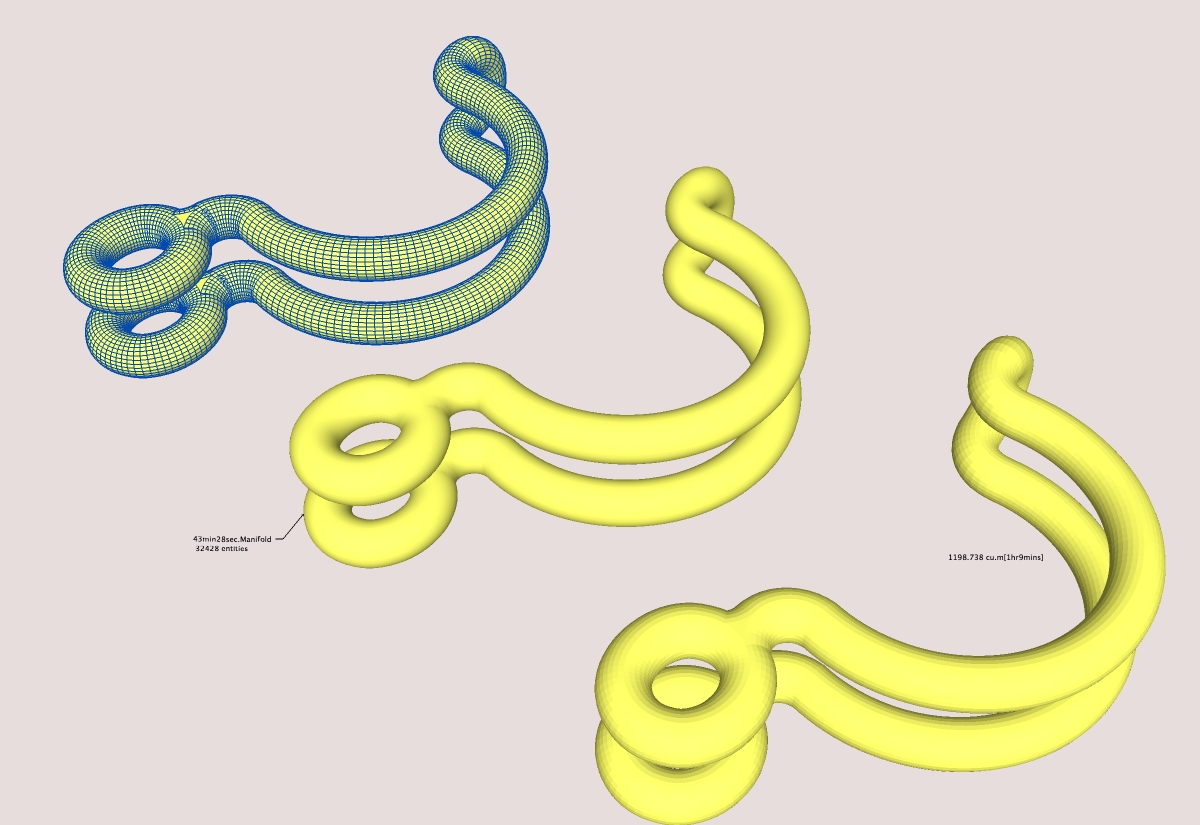
                              time comparison

                              some time check, sorry the fonts so small.

                              learn from the mistakes of others, you may not live long enough to make them all yourself...

                              1 條回覆 最後回覆 回覆 引用 0
                              • EarthMoverE 離線
                                EarthMover
                                最後由 編輯

                                @chris fullmer said:

                                Just remember while you are cleaning house, all mine fit nicely into a single menu item 😄

                                TIG, this is a WAAAY COOL plugin! I have no idea how it works, but it has been on my list of plugins I'd like to write some day. This is invaluable for file conversion and mesh cleanup and 3d printing, and, and, and...

                                Chris

                                ....and I can't thank you enough for having the foresight to do that. I wish there were some way to better organize all the scripters plugins as you have with yours.

                                3D Artist at Clearstory 3D Imaging
                                Guide Tool at Winning With Sketchup
                                Content Creator at Skapeup

                                1 條回覆 最後回覆 回覆 引用 0
                                • TIGT 離線
                                  TIG Moderator
                                  最後由 編輯

                                  Here's v1.3 http://forums.sketchucation.com/viewtopic.php?p=218691#p218691

                                  1.3 20100126
                                  Trapped near colinear/planar points giving healing crashes.
                                  Very small edges [0.1mm] now 'erased' by combining their vertices.
                                  Orienting faces is now 'foolproof' - unless it's not made 'manifold'.
                                  Now it only asks Yes/No to change to Xray mode if that's not on already.
                                  Unhealed or Failed Fixes now reported, with failed edges shown as ... or -.- clines in Error Group.
                                  [TIP: Move or Copy the error-group to one side to better see any errors - but if there are red/green faces obscuring the error dotted-lines showing problem edges etc then edit this error-group by treble clicking on a face till you have selected all then delete-key - now the error dotted-lines [clines] can be seen... manually edit and then retry 'manifold']

                                  TO DO: Get three-faced-edges external-faces to be retained in 'pretzels'. 😒 groan......

                                  Feedback please...

                                  TIG

                                  1 條回覆 最後回覆 回覆 引用 0
                                  • D 離線
                                    driven
                                    最後由 編輯

                                    I was about to post a drawing with timings for 1.2 and VolumeCalc2, so I'lll re-run it with 1.3, should be interesting..... cheers TIG, watch this space

                                    learn from the mistakes of others, you may not live long enough to make them all yourself...

                                    1 條回覆 最後回覆 回覆 引用 0
                                    • thomthomT 離線
                                      thomthom
                                      最後由 編輯

                                      Tig, did you see this post by Google's Tyler: http://forums.sketchucation.com/viewtopic.php?f=15&t=25175&p=218997#p218989

                                      Might be useful to predict when SU will be able to create faces/edges?

                                      Thomas Thomassen — SketchUp Monkey & Coding addict
                                      List of my plugins and link to the CookieWare fund

                                      1 條回覆 最後回覆 回覆 引用 0
                                      • TIGT 離線
                                        TIG Moderator
                                        最後由 編輯

                                        @thomthom said:

                                        Tig, did you see this post by Google's Tyler: http://forums.sketchucation.com/viewtopic.php?f=15&t=25175&p=218997#p218989

                                        Might be useful to predict when SU will be able to create faces/edges?

                                        Thanks - I did - hence the small line 'erasing' algorithm... 😉

                                        TIG

                                        1 條回覆 最後回覆 回覆 引用 0
                                        • TIGT 離線
                                          TIG Moderator
                                          最後由 編輯

                                          @driven said:

                                          Hi all

                                          can anyone confirm if they can see TIGtoolbar, while running manifold1.3, this drawing really slow compared to 1.2 and I just noticed I don't have the TIG-RRby icons in the toolbar which have never vanished before....

                                          john

                                          Check your files are in the same folders as shown in the original zip ?
                                          It might be a bit slower running because the new algorithms ?
                                          Try it one something simpler first ?? 😉

                                          TIG

                                          1 條回覆 最後回覆 回覆 引用 0
                                          • D 離線
                                            driven
                                            最後由 編輯

                                            Hi all

                                            can anyone confirm if they can see TIGtoolbar, while running manifold1.3, this drawing really slow compared to 1.2 and I just noticed I don't have the TIG-RRby icons in the toolbar which have never vanished before....

                                            johnEDIT: TOOLbar sorted didn't update TIG folder in my rush to try 1.3, so that shouldn't effect performance, must be something else


                                            learn from the mistakes of others, you may not live long enough to make them all yourself...

                                            1 條回覆 最後回覆 回覆 引用 0
                                            • 1
                                            • 2
                                            • 3
                                            • 4
                                            • 5
                                            • 6
                                            • 7
                                            • 4 / 7
                                            • 第一個貼文
                                              最後的貼文
                                            Buy SketchPlus
                                            Buy SUbD
                                            Buy WrapR
                                            Buy eBook
                                            Buy Modelur
                                            Buy Vertex Tools
                                            Buy SketchCuisine
                                            Buy FormFonts

                                            Advertisement