[Plugin] ExtrudeTools - Full Set
-
Thank you Box and TIG for help and efforts
I suppose the configuration of my computer is the problem. And since the computer is managed, there is very little I can do. But at least I know where the problem lies and fortunately I've also found a workaround.
/Lars -
Hello,
Every time i try to download the plug-in, this comes up, and I get nothing. Do you know what is wrong with my software?
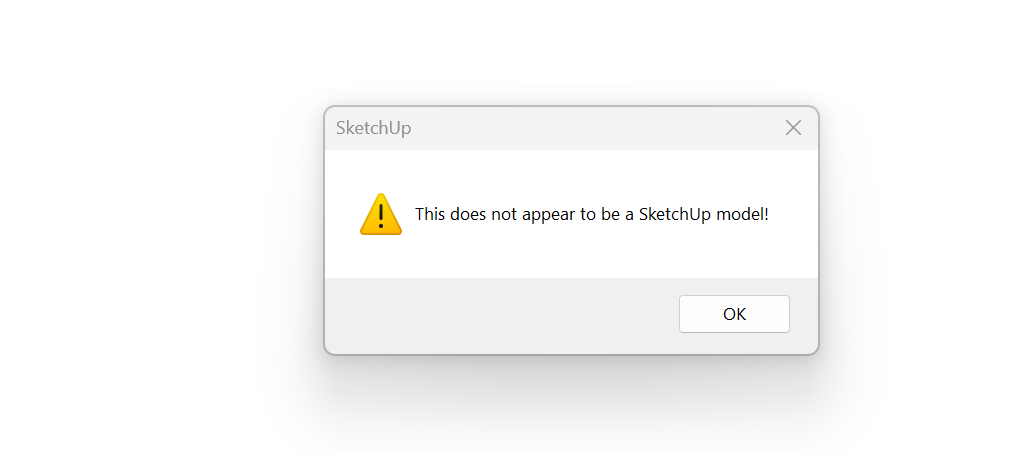
-
Your browser's settings are incorrect.
You do not download & open an extension's RBZ file, only a SKP will open OK with SketchUp.
Your browser's download options are set wrong, a RBZ will never open in SketchUp.
Change the browser's file-associations for RBZ files in your browser's setting to 'download'.
Then simply download it onto your computer - typically into your Downloads folder.
You now need to install the RBZ in SketchUp.
Open SketchUp and use its Extension Manager's dialog's Install button, find the RBZ in the file-browser which will open, and SketchUp then installs it for you, automatically putting files and related subfolders into the correct locations in your Plugins subfolder.
Restart SketchUp to sync everything... -
Thank you all
-
Does this plugin work in Sketchup 2022?
I have tried installing it, no errors appears, but the plugin doesn't show up in the toolbar, and it doesn't appear in the list of plugins to add to the toolbar.
Thank you.
-
It should work fine in all current versions of SketchUp.
How did you install it ?
Use the native Extension Manager > Install... button, on its RBZ, downloaded from the PluginStore...
Restart SketchUp after installation to sync everything... -
Hello,
I have installed the plugin in the last 2024 version. But nothing happens, it is marked as installer but won't show up anywhere. -
It has a toolbar and also submenu entries under Extensions > Extrusion Tools...
Have you restarted SketchUp to sync everything ?
It works fine in newer versions of SketchUp.
If you start SketchUp with the Ruby Console previously activated, do you see any error messages ? -
I know this is an oldie but I occasionally dig it our for certain tasks. Seems to be a few errors on some tools.
Error:
#<NoMethodError: undefined method `position' for nil:NilClass>
C:/Users/rclub/AppData/Roaming/SketchUp/SketchUp 2023/SketchUp/Plugins/ExtrudeTools/extrudeEdgesByRailsToLattice.rb:1017:in `block (2 levels) in make_shell'
C:/Users/rclub/AppData/Roaming/SketchUp/SketchUp 2023/SketchUp/Plugins/ExtrudeTools/extrudeEdgesByRailsToLattice.rb:1015:in `upto'
C:/Users/rclub/AppData/Roaming/SketchUp/SketchUp 2023/SketchUp/Plugins/ExtrudeTools/extrudeEdgesByRailsToLattice.rb:1015:in `block in make_shell'
C:/Users/rclub/AppData/Roaming/SketchUp/SketchUp 2023/SketchUp/Plugins/ExtrudeTools/extrudeEdgesByRailsToLattice.rb:980:in `upto'
C:/Users/rclub/AppData/Roaming/SketchUp/SketchUp 2023/SketchUp/Plugins/ExtrudeTools/extrudeEdgesByRailsToLattice.rb:980:in `make_shell'
C:/Users/rclub/AppData/Roaming/SketchUp/SketchUp 2023/SketchUp/Plugins/ExtrudeTools/extrudeEdgesByRailsToLattice.rb:644:in `make_mesh'
C:/Users/rclub/AppData/Roaming/SketchUp/SketchUp 2023/SketchUp/Plugins/ExtrudeTools/extrudeEdgesByRailsToLattice.rb:235:in `onLButtonDown'
Download the free D'oh Book for SketchUp 📖
-
Without knowing exactly the steps and settings it's hard to deduce what happened.
Some temporary cpoints are not getting made, not returning their position and causing the error message.
I just checked it and it worked OK.
But the Temp folder's SketchUp log file does show some missing 'commit_operations', which can cause bugsplat errors etc...
I'll put it on my long 'to-do' list...
Meanwhile make sure you same the model before doing anything complex like this in case there's a splat ... -
@Rich-O-Brien said in [Plugin] ExtrudeTools - Full Set:
I occasionally dig it our for certain tasks
I use "extrude edges by rails" all the times. I believe it's the first plugin I ever used and I originally discovered the whole Sketchucation community because of that. Still using it after maybe 15 years. Love it. (Should be a native tool)

-
Agreed, it is the most used pplugin I have, flipping between this and Curviloft but Extrude tools has more control over the end result imho.






Advertisement