sketchucation logo sketchucation
    • Login
    Oops, your profile's looking a bit empty! To help us tailor your experience, please fill in key details like your SketchUp version, skill level, operating system, and more. Update and save your info on your profile page today!
    Mac User? | Join the Rayscaper Beta for Mac Learn More

    [Plugin] ExtrudeTools - Full Set

    Scheduled Pinned Locked Moved Plugins
    636 Posts 178 Posters 1.0m Views 175 Watching
    Loading More Posts
    • Oldest to Newest
    • Newest to Oldest
    • Most Votes
    Reply
    • Reply as topic
    Log in to reply
    This topic has been deleted. Only users with topic management privileges can see it.
    • TIGT
      TIG Moderator
      last edited by

      I have most of the problems fixed.
      However, I might need to recast how some of the tools exit, as I am finding that no permutations of the current exit strategies avoid a BugSplat !
      ๐Ÿ˜ฎ

      TIG

      1 Reply Last reply
      Reply Quote 0
      • 2
        2k328ci
        last edited by

        Hi TIG,

        I love your tools especially this one! Glad you're working on a 2017 solution. Any news on possible updates? Thanks so much for all your efforts.

        1 Reply Last reply
        Reply Quote 0
        • TIGT
          TIG Moderator
          last edited by

          Here's v4.0
          https://sketchucation.com/pluginstore?pln=ExtrudeTools
          It's now recoded for v2017/v2018 compatibility.
          However, please be aware it is more prone to BugSplats [especially with an 'undo'] in these newer SketchUp versions, so use with care and always remember to save your model before using these tools...
          You've been warned !

          TIG

          1 Reply Last reply
          Reply Quote 0
          • BoxB
            Box
            last edited by

            Thank you thank you thank you.

            1 Reply Last reply
            Reply Quote 0
            • pilouP
              pilou
              last edited by

              Thx for the efforts! ๐Ÿ˜Ž

              Frenchy Pilou
              Is beautiful that please without concept!
              My Little site :)

              1 Reply Last reply
              Reply Quote 0
              • JQLJ
                JQL
                last edited by

                They will be the most welcome bugsplats. Thanks!

                www.casca.pt
                Visit us on facebook!

                1 Reply Last reply
                Reply Quote 0
                • C
                  Coolz8
                  last edited by

                  Hi TIG! There's a function of the Extrude Edges by Face tool that doesn't seem to work.

                  https://www.youtube.com/watch?v=Oq55prLHBhs (Skip to 19:55)

                  The first part works fine, but when working with multiple lines, nothing happens. This seems to work on earlier versions. Are we doing something wrong?

                  1 Reply Last reply
                  Reply Quote 0
                  • TIGT
                    TIG Moderator
                    last edited by

                    I see the issue.
                    I see the cause.
                    I am working on a fix.
                    [Looks like a stoopid typo !]
                    Watch out for an update...

                    TIG

                    1 Reply Last reply
                    Reply Quote 0
                    • R
                      rilian
                      last edited by

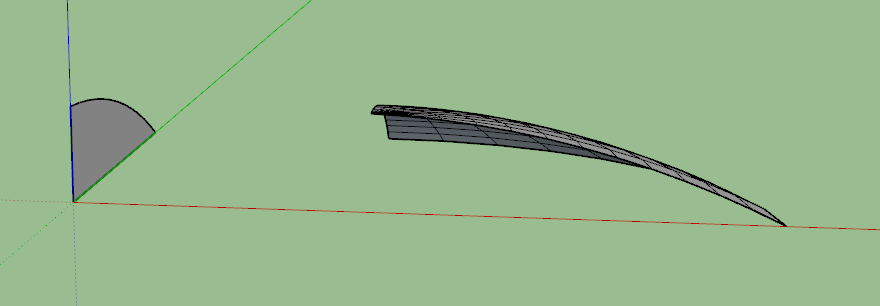
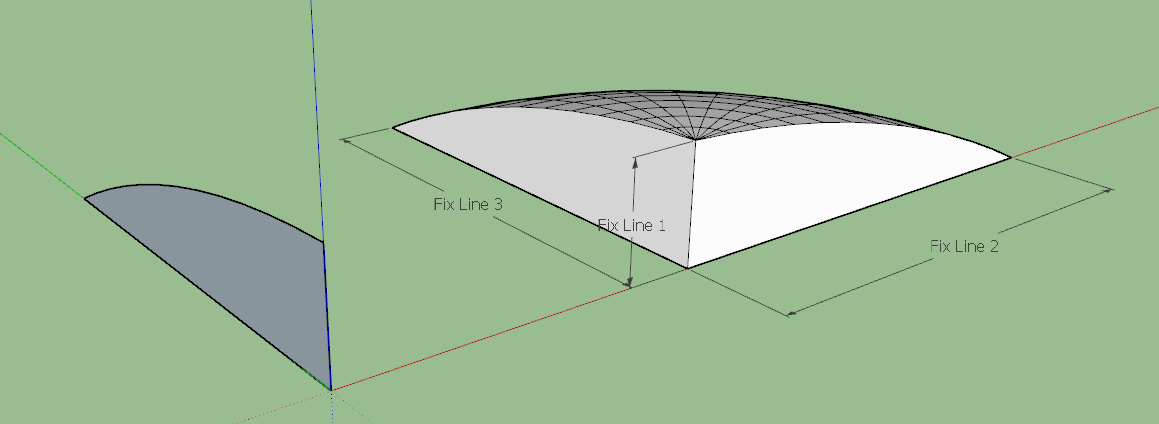
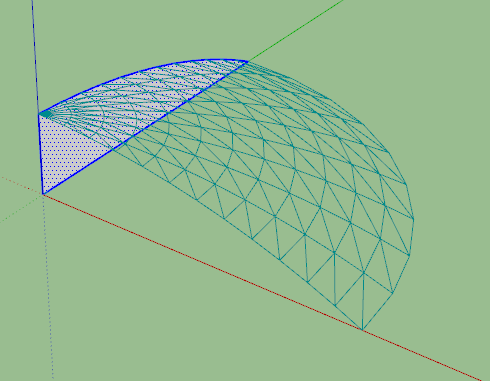
                      I ran into an issue w/ the lathe tool. Seems sometimes it doesn't put the starting and ending faces on the lathed object. Pics attached. The face created consists of 2 edges and 1 arc. I've tried making them all curves and even welding them all into one big arc to no avail. The fix is simple. I'm ok w/ it but thought I'd bring it up.

                      Thanks Tig for all the great tools you've made and maintained over the years! Your work is heartily appreciated!! ๐Ÿ‘

                      [edit] Using SU Make 2017 for Windows

                      shows mesh before create. Vertical line is chosen axis of rotation


                      Shows mesh post-create


                      Shows fixed mesh and lines that had to be added to fix it.

                      1 Reply Last reply
                      Reply Quote 0
                      • E
                        Einstein
                        last edited by

                        Hi!
                        Your tool always asks a lot of questions and honestly, it takes time to answer them. What about some dialog box to set default parameters for each sub-tool, like Fredo does, and do not prompting questions every time after making an extrusion?

                        1 Reply Last reply
                        Reply Quote 0
                        • Didier BurD
                          Didier Bur
                          last edited by

                          If it takes you time to answer several question, ask yourself how many hours TIG spent writing this plugin, or draw your extrusion by hand, you surely will go faster ๐Ÿ˜‰

                          DB

                          1 Reply Last reply
                          Reply Quote 0
                          • Dave RD
                            Dave R
                            last edited by

                            @didier bur said:

                            If it takes you time to answer several question, ask yourself how many hours TIG spent writing this plugin, or draw your extrusion by hand, you surely will go faster ๐Ÿ˜‰

                            Maybe TIG could release a commercial version that offers some user set parameters instead of the way the free version works.

                            Etaoin Shrdlu

                            %

                            (THERE'S NO PLACE LIKE)

                            G28 X0.0 Y0.0 Z0.0

                            M30

                            %

                            1 Reply Last reply
                            Reply Quote 0
                            • E
                              Einstein
                              last edited by

                              @didier bur said:

                              If it takes you time to answer several question, ask yourself how many hours TIG spent writing this plugin, or draw your extrusion by hand, you surely will go faster ๐Ÿ˜‰

                              Sometimes I have to create a lot of extrusions in the row and speed matters then.
                              He surely devoted a lot of time to that but isn't it the aim of programming to make things as fast as possible?
                              And yes, I'd gladly pay for a version that works smooth with SU 17 and has ability to set default params ๐Ÿ˜„ If only TIG would like to go commercial.

                              1 Reply Last reply
                              Reply Quote 0
                              • F
                                Fillister
                                last edited by

                                Very sorry to say SketchUp 2019 appears to have caused a conflict. These messages did not appear with 2018.

                                Error Loading File C:/.../SketchUp/SketchUp 2019/SketchUp/Plugins/ExtrudeTools/ExtrudeToolsLoader.rb
                                Error: #<SyntaxError: C:/.../SketchUp/SketchUp 2019/SketchUp/Plugins/ExtrudeTools/ExtrudeToolsLoader.rb:33: Invalid return in class/module body
                                return nil if noPlugin ### we've go...
                                ^~~~~~>
                                C:/Program Files/SketchUp/SketchUp 2019/Tools/extensions.rb:197:in require' C:/Program Files/SketchUp/SketchUp 2019/Tools/extensions.rb:197:in load'
                                C:/.../SketchUp/SketchUp 2019/SketchUp/Plugins/ExtrudeTools.rb:67:in register_extension' C:/.../SketchUp/SketchUp 2019/SketchUp/Plugins/ExtrudeTools.rb:67:in module:ExtrudeTools'
                                C:/.../SketchUp/SketchUp 2019/SketchUp/Plugins/ExtrudeTools.rb:24:in `<top (required)>'

                                Other TIG plugins seem to be fine: Lattice Maker, Mirror, Split tools, TIG Weld

                                Your time and abilities are so valuable. I hope you can find some way to look into this.

                                1 Reply Last reply
                                Reply Quote 0
                                • TIGT
                                  TIG Moderator
                                  last edited by

                                  I have a fix for this.
                                  I'll publish an update soonest...

                                  TIG

                                  1 Reply Last reply
                                  Reply Quote 0
                                  • TIGT
                                    TIG Moderator
                                    last edited by

                                    https://sketchucation.com/pluginstore?pln=ExtrudeTools
                                    Version 5.0 fixes the v2019 incompatibility.
                                    However, please note that the ExtrudeEdgesbyFace tool no longer loads, this is because it crashes in v2019, and was already known to be flaky in the more recent SketchUp versions anyway ! Safest to skip it completely...
                                    I have been looking for a workaround [I must admit with little success], but if I can get that tool de-flaked then I'll re-update things back to the full set of 11...

                                    TIG

                                    1 Reply Last reply
                                    Reply Quote 0
                                    • BoxB
                                      Box
                                      last edited by

                                      Thanks Tig, that has been stopping me from moving to 2019 full time.

                                      1 Reply Last reply
                                      Reply Quote 0
                                      • N
                                        notapoireau
                                        last edited by

                                        Hi,
                                        Just installed today, and pleased to see that is translated in french.
                                        Unfortunately, the plugin palette doesn't appear, and I don't know to get it visible.

                                        Then, the first test is not good; certainely do I need to see one more time the video tutorial

                                        1 Reply Last reply
                                        Reply Quote 0
                                        • TIGT
                                          TIG Moderator
                                          last edited by

                                          I assume you mean the toolset's 'Toolbar'.
                                          On a MAC 'Toolbars' are activated from the .... View > Tool Palettes menu item...

                                          TIG

                                          1 Reply Last reply
                                          Reply Quote 0
                                          • X
                                            xandra22
                                            last edited by

                                            Hi TIG,

                                            Your Extrudetools-Full set is excellent, but I find that there only 10 tools, single Section Lofting is not included,could you please add that into the Extrudetools-Full set.Then the plugin would be more pefect.

                                            Thanks.
                                            Best Regards.

                                            Xandra

                                            1 Reply Last reply
                                            Reply Quote 0

                                            Hello! It looks like you're interested in this conversation, but you don't have an account yet.

                                            Getting fed up of having to scroll through the same posts each visit? When you register for an account, you'll always come back to exactly where you were before, and choose to be notified of new replies (either via email, or push notification). You'll also be able to save bookmarks and upvote posts to show your appreciation to other community members.

                                            With your input, this post could be even better ๐Ÿ’—

                                            Register Login
                                            • 1
                                            • 2
                                            • 27
                                            • 28
                                            • 29
                                            • 30
                                            • 31
                                            • 32
                                            • 29 / 32
                                            • First post
                                              Last post
                                            Buy SketchPlus
                                            Buy SUbD
                                            Buy WrapR
                                            Buy eBook
                                            Buy Modelur
                                            Buy Vertex Tools
                                            Buy SketchCuisine
                                            Buy FormFonts

                                            Advertisement