sketchucation logo sketchucation
    • 登入
    Oops, your profile's looking a bit empty! To help us tailor your experience, please fill in key details like your SketchUp version, skill level, operating system, and more. Update and save your info on your profile page today!
    🔌 Smart Spline | Fluid way to handle splines for furniture design and complex structures. Download

    [Plugin] Edge Tools

    已排程 已置頂 已鎖定 已移動 Plugins
    211 貼文 74 Posters 283.8k 瀏覽 74 Watching
    正在載入更多貼文
    • 從舊到新
    • 從新到舊
    • 最多點贊
    回覆
    • 在新貼文中回覆
    登入後回覆
    此主題已被刪除。只有擁有主題管理權限的使用者可以查看。
    • thomthomT 離線
      thomthom
      最後由 編輯

      @jorge2011 said:

      Thom, if I when be able use the new toolbar "architecture"?. 😄 thanks

      Soon my friend, soon! 😄

      Thomas Thomassen — SketchUp Monkey & Coding addict
      List of my plugins and link to the CookieWare fund

      1 條回覆 最後回覆 回覆 引用 0
      • J 離線
        jokewalker
        最後由 編輯

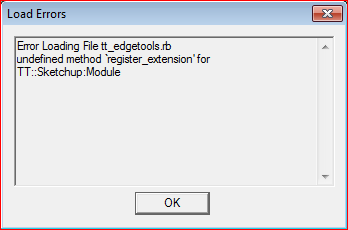
        @dedmin said:

        Capture.PNG

        Hey all,
        Just installed 2.0.4 and am seeing this pop up again. Any simple fixes to make this go away?

        1 條回覆 最後回覆 回覆 引用 0
        • TIGT 線上
          TIG Moderator
          最後由 編輯

          Did you get-and-install the TT Lib that was linked on the download page ?

          TIG

          1 條回覆 最後回覆 回覆 引用 0
          • J 離線
            jokewalker
            最後由 編輯

            TIG,
            I did have a version of TT_Lib2 in the Plugins folder already, but went ahead and re-downloaded/installed per your suggestion. Seems to be working now. Thanks!

            1 條回覆 最後回覆 回覆 引用 0
            • S 離線
              sarkarshomit
              最後由 編輯

              Thanks ...very useful for me....

              Shomit,
              India

              1 條回覆 最後回覆 回覆 引用 0
              • thomthomT 離線
                thomthom
                最後由 編輯

                @jokewalker said:

                @dedmin said:

                [attachment=1:6l2q4qpb]<!-- ia1 -->Capture.PNG<!-- ia1 -->[/attachment:6l2q4qpb]

                Hey all,
                Just installed 2.0.4 and am seeing this pop up again. Any simple fixes to make this go away?

                Sounds like you extracted the content of TT_Lib directly in the plugins folder istead of preserving the TT_Lib2 that contains them.

                Thomas Thomassen — SketchUp Monkey & Coding addict
                List of my plugins and link to the CookieWare fund

                1 條回覆 最後回覆 回覆 引用 0
                • M 離線
                  Mra
                  最後由 編輯

                  thomthom, sweet script. However i'm having problems with one of your tools.

                  The "Split faces into multiple pieces" doesn't seem to work properly on this face;

                  http://i.imgur.com/At0My.jpg

                  I can't give you the full scene though (NDA) and when I just paste this piece into a new sketchup scene your tool works. Any ideas? 😄

                  Exploding object doesn't work either. The axis is at default place in the world at 0,0,0.

                  1 條回覆 最後回覆 回覆 引用 0
                  • thomthomT 離線
                    thomthom
                    最後由 編輯

                    @unknownuser said:

                    I can't give you the full scene though (NDA) and when I just paste this piece into a new sketchup scene your tool works. Any ideas? 😄

                    Can you save a copy of the model - erasing everything else - purge the model, then send it to me?

                    Thomas Thomassen — SketchUp Monkey & Coding addict
                    List of my plugins and link to the CookieWare fund

                    1 條回覆 最後回覆 回覆 引用 0
                    • M 離線
                      Mra
                      最後由 編輯

                      Hi Thomthom, today is another day, so after I turn on the computer again, it seems there is no problem on the same piece of mesh anymore. Something must've been corrected when restarting SketchUp. Perhaps I ran into a bug by somehow? But anyway, thanks for your offer to take a look. If it ever happens again, I will try and get some reproducible steps.

                      1 條回覆 最後回覆 回覆 引用 0
                      • thomthomT 離線
                        thomthom
                        最後由 編輯

                        Ghost in the box. 😄

                        Thomas Thomassen — SketchUp Monkey & Coding addict
                        List of my plugins and link to the CookieWare fund

                        1 條回覆 最後回覆 回覆 引用 0
                        • E 離線
                          ErikLiu0801
                          最後由 編輯

                          thanks a lot.
                          i'm not good at english but i still want to say thanks for your sharing.

                          1 條回覆 最後回覆 回覆 引用 0
                          • bobpineoB 離線
                            bobpineo
                            最後由 編輯

                            Thomthom,
                            Using this plugin again today on another very large autocad import, can't tell you how grateful I am for your plugin!

                            Bob Pineo, Design Develop LLC http://www.designdevelop.org.

                            1 條回覆 最後回覆 回覆 引用 0
                            • thomthomT 離線
                              thomthom
                              最後由 編輯

                              😄

                              Thomas Thomassen — SketchUp Monkey & Coding addict
                              List of my plugins and link to the CookieWare fund

                              1 條回覆 最後回覆 回覆 引用 0
                              • G 離線
                                gina
                                最後由 編輯

                                HELP !
                                It doesnt work for me. i'm using su 8, and at the beginning of load screen a message box appear saying that theres an error from loading the edges tool plugins.

                                1 條回覆 最後回覆 回覆 引用 0
                                • Dave RD 離線
                                  Dave R
                                  最後由 編輯

                                  What is the exact error message?

                                  Etaoin Shrdlu

                                  %

                                  (THERE'S NO PLACE LIKE)

                                  G28 X0.0 Y0.0 Z0.0

                                  M30

                                  %

                                  1 條回覆 最後回覆 回覆 引用 0
                                  • thomthomT 離線
                                    thomthom
                                    最後由 編輯

                                    As Dave said, without knowing the error it's impossible to determine what the problem is.

                                    If I'd hazard a guess, did you install the required TT_Lib2? Linked under Requirements right above the Download button?

                                    Thomas Thomassen — SketchUp Monkey & Coding addict
                                    List of my plugins and link to the CookieWare fund

                                    1 條回覆 最後回覆 回覆 引用 0
                                    • onzkiO 離線
                                      onzki
                                      最後由 編輯

                                      This is an amazing tool. Thanks so much it's very useful. I like the concept of curve simplification.. However, forgive my out of the world request, is it also possible to have a way to make curves smoother- meaning an option to add segments rather than reduce. I know it sounds crazy but there are times when most of my CAD import are roughly segmented like the one shown on screenshot.

                                      Thanks!

                                      http://img837.imageshack.us/img837/3300/roughlysegmented.jpg


                                      [/hr]Dell Alienware Area-51. SKU 2021 Pro. AutoCAD 2023. Landscape design firm

                                      1 條回覆 最後回覆 回覆 引用 0
                                      • thomthomT 離線
                                        thomthom
                                        最後由 編輯

                                        Problem here is that they are part of complex geometry. Adding more segments to that isn't easy for a computer operation to do.

                                        Thomas Thomassen — SketchUp Monkey & Coding addict
                                        List of my plugins and link to the CookieWare fund

                                        1 條回覆 最後回覆 回覆 引用 0
                                        • R 離線
                                          rv1974
                                          最後由 編輯

                                          Thomthom, would it be hard to refine 'divide face' to make it offset '0' from stray line laying on the face (AB in the attachment)?
                                          Another thing: Could there be 'magneto' or double click feature (like in standard move and offset) that'd glue to the last numeric input?
                                          Thank you.
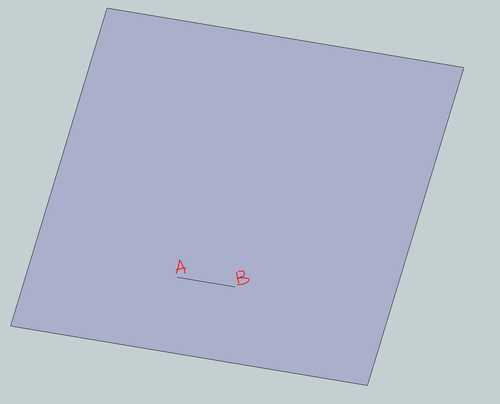

                                          Capture.JPG

                                          1 條回覆 最後回覆 回覆 引用 0
                                          • thomthomT 離線
                                            thomthom
                                            最後由 編輯

                                            @rv1974 said:

                                            Thomthom, would it be hard to refine 'divide face' to make it offset '0' from stray line laying on the face (AB in the attachment)?

                                            Offset zero? I'm afraid I don't understand the request. What is the expected result?

                                            @rv1974 said:

                                            Another thing: Could there be 'magneto' or double click feature (like in standard move and offset) that'd glue to the last numeric input?
                                            Thank you.

                                            That would be nice indeed.

                                            Thomas Thomassen — SketchUp Monkey & Coding addict
                                            List of my plugins and link to the CookieWare fund

                                            1 條回覆 最後回覆 回覆 引用 0
                                            • 1
                                            • 2
                                            • 7
                                            • 8
                                            • 9
                                            • 10
                                            • 11
                                            • 10 / 11
                                            • 第一個貼文
                                              最後的貼文
                                            Buy SketchPlus
                                            Buy SUbD
                                            Buy WrapR
                                            Buy eBook
                                            Buy Modelur
                                            Buy Vertex Tools
                                            Buy SketchCuisine
                                            Buy FormFonts

                                            Advertisement