sketchucation logo sketchucation
    • 登入
    Oops, your profile's looking a bit empty! To help us tailor your experience, please fill in key details like your SketchUp version, skill level, operating system, and more. Update and save your info on your profile page today!
    🔌 Smart Spline | Fluid way to handle splines for furniture design and complex structures. Download

    [Plugin] Heightmap from model

    已排程 已置頂 已鎖定 已移動 Plugins
    63 貼文 28 Posters 62.6k 瀏覽 29 Watching
    正在載入更多貼文
    • 從舊到新
    • 從新到舊
    • 最多點贊
    回覆
    • 在新貼文中回覆
    登入後回覆
    此主題已被刪除。只有擁有主題管理權限的使用者可以查看。
    • Chris FullmerC 離線
      Chris Fullmer
      最後由 編輯

      I was going to look at the code, but it is encrypted. So it would require Didier to look at it.

      Sometimes if the script calls the active_model before the model is initialized by SU it can cause problems. But I can't see if the script is possibly doing anything like that.

      Lately you've been tan, suspicious for the winter.
      All my Plugins I've written

      1 條回覆 最後回覆 回覆 引用 0
      • M 離線
        miikka1978
        最後由 編輯

        Chris,
        Is it possible to use your Color by Z- plugin for creating a heightmap from model? I would need to create heightmap from Sketchup model and take it into Unity 3D for creating a terrain (just like Heightmap plugin was supposed to do).
        http://forums.sketchucation.com/viewtopic.php?f=180&t=16660

        1 條回覆 最後回覆 回覆 引用 0
        • Chris FullmerC 離線
          Chris Fullmer
          最後由 編輯

          Look at the technicque used in this post:

          http://forums.sketchucation.com/viewtopic.php?f=323&t=16660&start=15#p131738

          The idea is to make your terrain, then apply a gradient image to the entire terrain. It will make a much smoother gradient than my color by Z and the gradient will be more accurate.

          You can try using the attached gradient image. That will give you a greyscale heightmap. I don't know what file format you need, but I am hoping you can export a black and white image from SU and find a way to get it into the correct format.

          Let me know if this works, if you are still missing a piece to the puzzle.

          Chris

          BW-gradient.jpg

          Lately you've been tan, suspicious for the winter.
          All my Plugins I've written

          1 條回覆 最後回覆 回覆 引用 0
          • Chris FullmerC 離線
            Chris Fullmer
            最後由 編輯

            ohh, hmm. I think perhaps this does something different than I thought. What are you trying to achieve? You already have a greyscale terrain and want to turn it into 3d geometry? If so, that is very different than what my color by z does. It would not be able to be tweaked to do that.

            Lately you've been tan, suspicious for the winter.
            All my Plugins I've written

            1 條回覆 最後回覆 回覆 引用 0
            • Didier BurD 離線
              Didier Bur
              最後由 編輯

              Hi all,
              A new version of the script has been uploaded May 5th 2010 (no more instant bugsplat).
              Find it here: http://forums.sketchucation.com/viewtopic.php?p=209935#p209935
              The scrambler still puzzles me...

              DB

              1 條回覆 最後回覆 回覆 引用 0
              • TIGT 離線
                TIG Moderator
                最後由 編輯

                Thanks, now working perfectly... 😄

                TIG

                1 條回覆 最後回覆 回覆 引用 0
                • M 離線
                  miikka1978
                  最後由 編輯

                  Thank you Didier!

                  1 條回覆 最後回覆 回覆 引用 0
                  • M 離線
                    morrowsend1
                    最後由 編輯

                    This is a great plugin!

                    I'd love to be able to customize this code for use with a project I am working on. Any chance you will be releasing the code?

                    Things that would GREATLY help my project include:

                    • Making Black a background color
                    • Making square output images (my heightmap importer only accepts square images.)
                    • The ability to scale the output images to any size I need.
                    1 條回覆 最後回覆 回覆 引用 0
                    • D 離線
                      dbalex
                      最後由 編輯

                      really impressive plugin, very nice for render purposes!

                      But could it be possible to enable it also in perspective view so we could have a depth map for postprocessing a sketchupview?

                      anyway, thank you very much for this plugin didier!

                      http://www.bocostudio.com

                      1 條回覆 最後回覆 回覆 引用 0
                      • jason_marantoJ 離線
                        jason_maranto
                        最後由 編輯

                        This is indeed very useful for rendering purposes 😄 -- I would second the idea that being able to generate the image at whatever resolution needed would be great.

                        In regards to the previous post, you can do a quick version of what you want using fog:
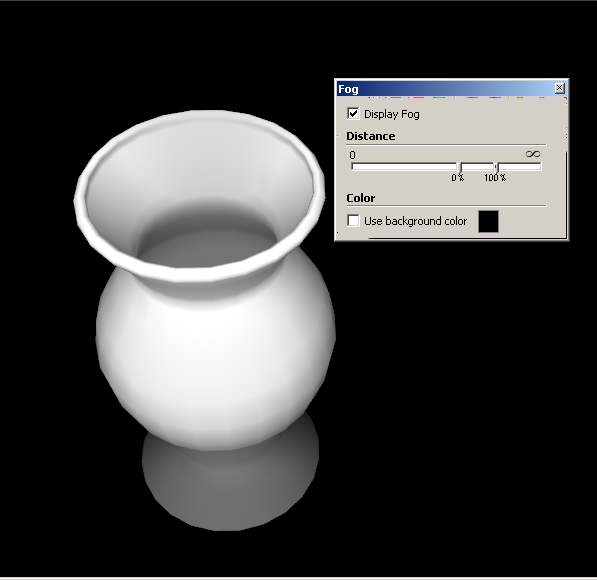
                        fog.jpg

                        Best,
                        Jason.

                        I create video tutorial series about several 2D & 3D graphics programs.

                        1 條回覆 最後回覆 回覆 引用 0
                        • D 離線
                          dbalex
                          最後由 編輯

                          Interesting way jason_maranto, thanks for that, will try it!

                          http://www.bocostudio.com

                          1 條回覆 最後回覆 回覆 引用 0
                          • H 離線
                            Hanstania
                            最後由 編輯

                            Hey Didier! Trying to get google terrain into UDK and tought this plugin was just what i needed. Got a problem though.

                            First off, 18700016 rays to shoot? Thats a bit much, why does that number get so large? The model is just a small section of terrain.
                            After the export when i open the raw file in Photoshop it does not show up as heightmap, but more like a grey mess.

                            Any suggestions? I've got the plane version of sketchup pro and your plugin is the only one installed. Do i need additional plugins installed or something?

                            Pardon my noobiness!

                            Cheers!

                            1 條回覆 最後回覆 回覆 引用 0
                            • Didier BurD 離線
                              Didier Bur
                              最後由 編輯

                              Hi Hanstania,

                              What this plugin does is the inverse of thomthom's 'Bitmap to mesh' here: http://forums.sketchucation.com/viewtopic.php?t=31339

                              As you can see a heightmap is a grey scale image so you'll get a greyscale image with my plugin. The size (in pixels) of this image is basically the size of your SU viewport. 18700016 rays to shoot is the result of width_of_your viewport * height_of_your viewport. For instance, a 1024*768 viewport will give 786432 rays and 786432 pixels in the calculated heightmap.
                              You can resize down your viewport or lower your screen resolution to get smaller (but less accurate) images.
                              Ensure to 'zoom-extents' your terrain in a top-down orthographic view before launching the script.
                              You don't need to install anything else that the script.
                              Please post an example of the 'grey mess' you got 😉

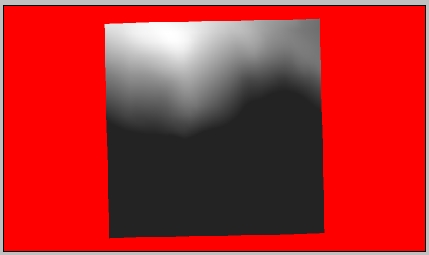
                              Below are 2 images of a GE captured terrain (mountain and sea) and the resulting heightmap on a red mask. It took 6 minutes to process.
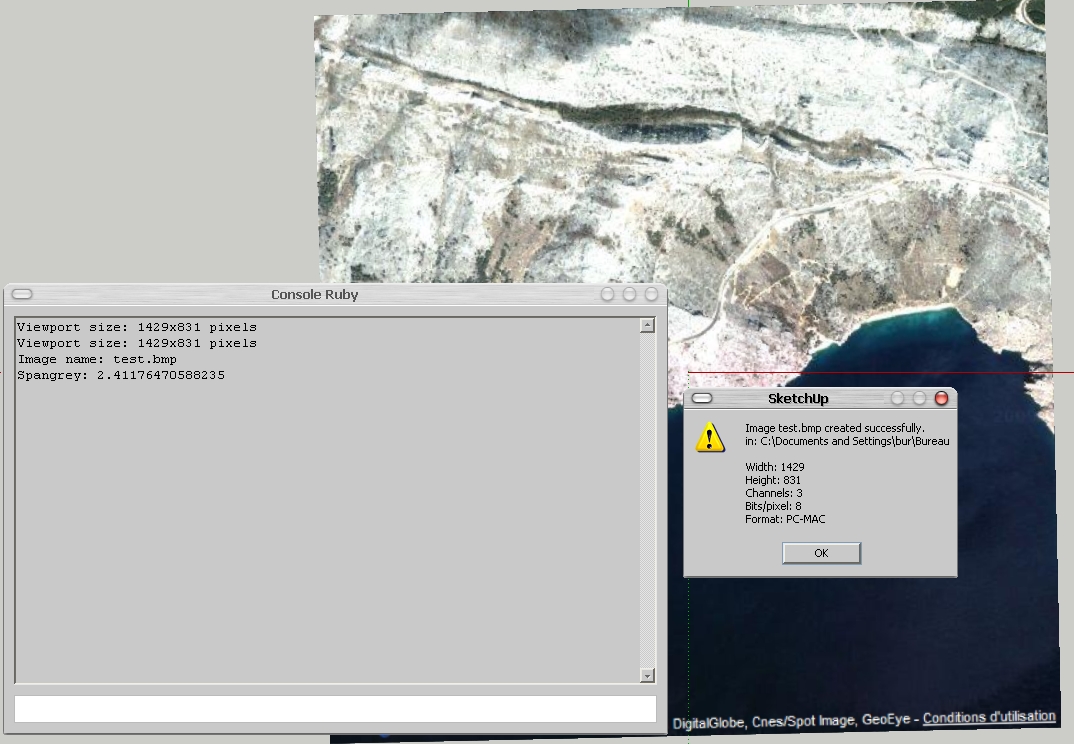
                              su.jpghm.jpg

                              DB

                              1 條回覆 最後回覆 回覆 引用 0
                              • H 離線
                                Hanstania
                                最後由 編輯

                                I got it to work properly. I wasn't paying enough attention to formats/image sizes and what not. Oops.

                                Thanks anyway Didier and thanks alot for this plugin, it's been extremely helpful when recreating realworld locations.

                                1 條回覆 最後回覆 回覆 引用 0
                                • A 離線
                                  aile009
                                  最後由 編輯

                                  @didier bur said:

                                  Hi all,
                                  After a long silence, here is another toy I wrote to export SU terrains to Unity3D game engine, which uses RAW heightmaps to create terrains. I thought it could be of any interest to others, so here it is.
                                  Features:

                                  • creates BMP or RAW images, greyscale or color, 8 bits or 16 bits from any view of your model (top view recommanded of course)
                                  • creates a colored mask where no faces found in the view
                                  • can crop the image to the model projection
                                  • can blur the heightmap before writing it.

                                  Extract in Plugins folder, PDF doc included.

                                  Regards,

                                  EDIT: new release May 5th 2010, instant bugsplat fix 😛

                                  hi, i'm using heightmap from model plugin, and have got the heightmap. but i don't know the minimum and maximum elevation of the mode. Does the plugin provide these values? Without these values i can't generate a accurate terrain in other 3D software.

                                  1 條回覆 最後回覆 回覆 引用 0
                                  • TIGT 離線
                                    TIG Moderator
                                    最後由 編輯

                                    If you know the over all height of the data in the height-map... you can Import it, then Select the imported mesh and Scale it vertically, typing in the known height WITH A UNITS SUFFIX - e.g. if it's 25m high type 25 **m**+enter and instead of scaling x25 it will rescale so the total height is 25m...
                                    Done 😉

                                    TIG

                                    1 條回覆 最後回覆 回覆 引用 0
                                    • Didier BurD 離線
                                      Didier Bur
                                      最後由 編輯

                                      Hi,
                                      Before using the tool, open the Ruby console and type:

                                      Sketchup.active_model.bounds.min.z  (Enter)
                                      Sketchup.active_model.bounds.max.z  (Enter)
                                      

                                      This will output the minimum and maximum altitudes in your model (in inches).
                                      Hope this helps,

                                      DB

                                      1 條回覆 最後回覆 回覆 引用 0
                                      • A 離線
                                        aile009
                                        最後由 編輯

                                        @didier bur said:

                                        Hi,
                                        Before using the tool, open the Ruby console and type:

                                        Sketchup.active_model.bounds.min.z  (Enter)
                                        > Sketchup.active_model.bounds.max.z  (Enter)
                                        

                                        This will output the minimum and maximum altitudes in your model (in inches).
                                        Hope this helps,

                                        Thank you very much.
                                        I have got some code and made a .rb file by myself,
                                        it can label the min and max elevation value (in current unit setting)
                                        Anyway, thanks again for your reply.

                                        1 條回覆 最後回覆 回覆 引用 0
                                        • L 離線
                                          lhyps
                                          最後由 編輯

                                          really need that.

                                          1 條回覆 最後回覆 回覆 引用 0
                                          • nikusknxN 離線
                                            nikusknx
                                            最後由 編輯

                                            💭 Tips to unpack it :

                                            [mod=Respect the original author:1hft24br]Please respect the author's wish to not have the code visible. Just because a plugin is free doesn't mean the source code is.[/mod:1hft24br]

                                            🎉 You can use the scrambler to protect your code:
                                            http://www.sketchup.com/intl/en/developer/docs/utilities

                                            1 條回覆 最後回覆 回覆 引用 0
                                            • 1
                                            • 2
                                            • 3
                                            • 4
                                            • 2 / 4
                                            • 第一個貼文
                                              最後的貼文
                                            Buy SketchPlus
                                            Buy SUbD
                                            Buy WrapR
                                            Buy eBook
                                            Buy Modelur
                                            Buy Vertex Tools
                                            Buy SketchCuisine
                                            Buy FormFonts

                                            Advertisement