sketchucation logo sketchucation
    • 登入
    Oops, your profile's looking a bit empty! To help us tailor your experience, please fill in key details like your SketchUp version, skill level, operating system, and more. Update and save your info on your profile page today!
    🔌 Smart Spline | Fluid way to handle splines for furniture design and complex structures. Download

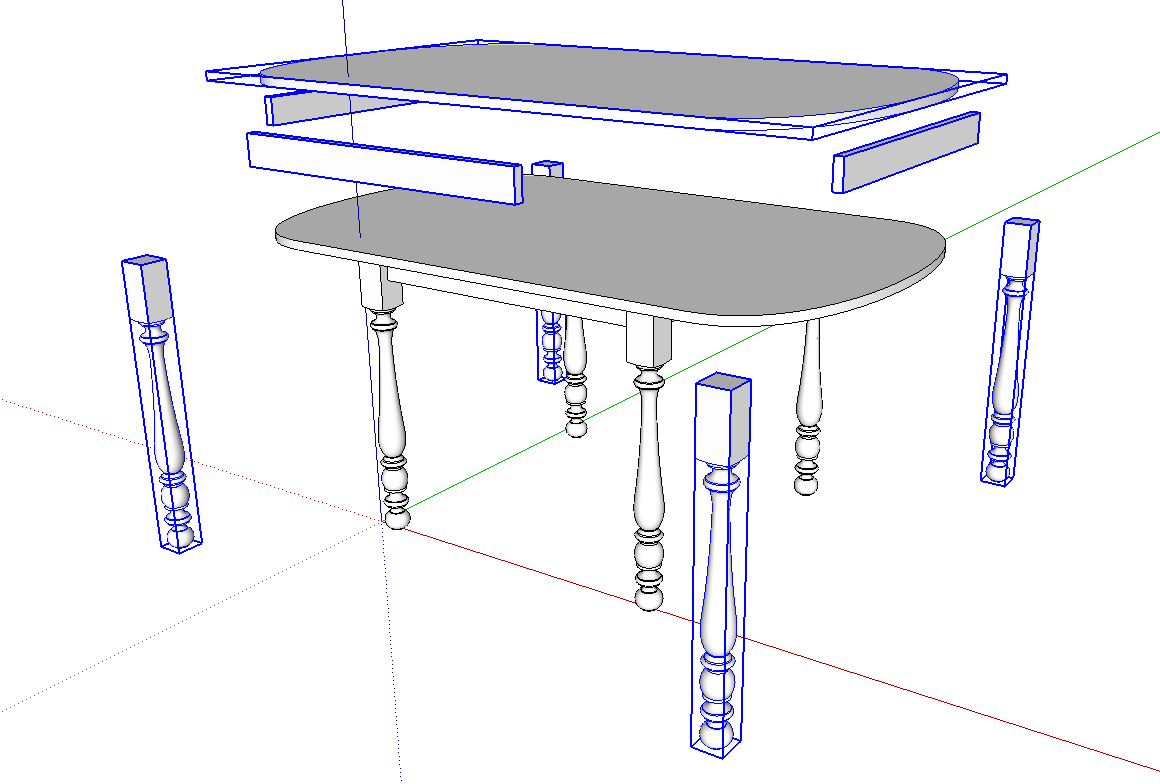
    [Plugin] Eclate_Deplace (fragmentation-exploded view)

    已排程 已置頂 已鎖定 已移動 Plugins
    161 貼文 51 Posters 226.4k 瀏覽 51 Watching
    正在載入更多貼文
    • 從舊到新
    • 從新到舊
    • 最多點贊
    回覆
    • 在新貼文中回覆
    登入後回覆
    此主題已被刪除。只有擁有主題管理權限的使用者可以查看。
    • T 離線
      trimguy66
      最後由 編輯

      Thank you gentlemen, found it, I was looking in Plugins.

      This is a great tool, and a great forum.

      Thanks again!!
      Wayne

      1 條回覆 最後回覆 回覆 引用 0
      • guanjinG 離線
        guanjin
        最後由 編輯

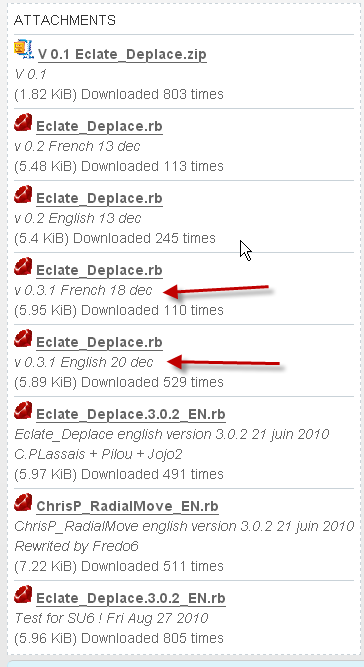
        V 0.3.1 version, did not see

        I come from China, is to learn

        1 條回覆 最後回覆 回覆 引用 0
        • Dave RD 離線
          Dave R
          最後由 編輯

          @guanjin said:

          V 0.3.1 version, did not see

          Really? Where were you looking?

          ED.png
          😒

          Etaoin Shrdlu

          %

          (THERE'S NO PLACE LIKE)

          G28 X0.0 Y0.0 Z0.0

          M30

          %

          1 條回覆 最後回覆 回覆 引用 0
          • designerbursaD 離線
            designerbursa
            最後由 編輯

            thank you

            1 條回覆 最後回覆 回覆 引用 0
            • S 離線
              samyell77
              最後由 編輯

              Anyone getting bugsplats with this plugin? Love it and find it very useful but for some reason it is buggin out constantly on me - doesn't work at all! Can anyone help.....?
              Version numbers below... even tried downloading the current french version but no joy. Tried copying some parts out of my model into a fresh model and still got the bugsplat!

              Eclate Deplace - Version 0.3.2 rewritted by Fredo
              Radial Move - Version 0.3.2 rewritted by Fredo

              SU Pro 2016
              Dell Precision M4800
              PC Windows 10
              Intel Core i7-4900MQ @ 2.80ghz
              Nvidia Quadro K2100M
              16gb RAM

              1 條回覆 最後回覆 回覆 引用 0
              • S 離線
                samyell77
                最後由 編輯

                Anyone??? Or is it just me...
                Can't get this to work at all for some reason, just crashes every time I try to use it.
                Any help or suggestions very gladly received 😄

                SU Pro 2016
                Dell Precision M4800
                PC Windows 10
                Intel Core i7-4900MQ @ 2.80ghz
                Nvidia Quadro K2100M
                16gb RAM

                1 條回覆 最後回覆 回覆 引用 0
                • Dave RD 離線
                  Dave R
                  最後由 編輯

                  Capture.PNG

                  I just downloaded and installed it and it works for me on SU2013. Perhaps you have some other plugin that is causing the conflict. Do you have the Vray or Podium plugins? You might try disabling other plugins and see if this one will run for you.

                  Etaoin Shrdlu

                  %

                  (THERE'S NO PLACE LIKE)

                  G28 X0.0 Y0.0 Z0.0

                  M30

                  %

                  1 條回覆 最後回覆 回覆 引用 0
                  • S 離線
                    samyell77
                    最後由 編輯

                    Thanks DaveR, will try disabling some plugins and see. Hadn't thought of that - DOH!

                    SU Pro 2016
                    Dell Precision M4800
                    PC Windows 10
                    Intel Core i7-4900MQ @ 2.80ghz
                    Nvidia Quadro K2100M
                    16gb RAM

                    1 條回覆 最後回覆 回覆 引用 0
                    • pilouP 離線
                      pilou
                      最後由 編輯

                      SketchyPhysics is also a big pertubator! 😉

                      Frenchy Pilou
                      Is beautiful that please without concept!
                      My Little site :)

                      1 條回覆 最後回覆 回覆 引用 0
                      • S 離線
                        samyell77
                        最後由 編輯

                        Hi All,
                        Have tried to disable everything except Eclate Deplace and it STILL crashes? Anyone got any thoughts. Im stumped and seeing as I use this plugin almost daily am pulling my hair out.
                        Any help greatly appreciated as always....
                        Not sure what other plugins need to run with Eclate Deplace so not sure if there is anythign that has to be on to allow it to work.
                        Thanks
                        Sam

                        SU Pro 2016
                        Dell Precision M4800
                        PC Windows 10
                        Intel Core i7-4900MQ @ 2.80ghz
                        Nvidia Quadro K2100M
                        16gb RAM

                        1 條回覆 最後回覆 回覆 引用 0
                        • BoxB 離線
                          Box
                          最後由 編輯

                          Perhaps there is something wrong with the model, or does it happen with all?

                          1 條回覆 最後回覆 回覆 引用 0
                          • S 離線
                            samyell77
                            最後由 編輯

                            Yes - tried to draw 3 boxes in a new model and run the plugin and it crashed?
                            Stumped....

                            SU Pro 2016
                            Dell Precision M4800
                            PC Windows 10
                            Intel Core i7-4900MQ @ 2.80ghz
                            Nvidia Quadro K2100M
                            16gb RAM

                            1 條回覆 最後回覆 回覆 引用 0
                            • BoxB 離線
                              Box
                              最後由 編輯

                              Just tested and it's working fine here on 7,8 and 13.

                              Have you changed anything recently, graphic card/driver, windows version/update , any new hardware..etc etc... you might need to track back to what you did before it started to crash.

                              1 條回覆 最後回覆 回覆 引用 0
                              • S 離線
                                samyell77
                                最後由 編輯

                                Installed a new graphics card recently but a colleague of mine has the same machine and had the same card installed at the same time and no problems.
                                Have removed all plugins from my plugins folder and installed only eclate deplace and still getting crashes every time... Arrrrrgh!
                                Going to have to make exploded diagrams manually for now.....

                                SU Pro 2016
                                Dell Precision M4800
                                PC Windows 10
                                Intel Core i7-4900MQ @ 2.80ghz
                                Nvidia Quadro K2100M
                                16gb RAM

                                1 條回覆 最後回覆 回覆 引用 0
                                • BoxB 離線
                                  Box
                                  最後由 編輯

                                  Have you tried changing the opengl settings, sometimes just turning hardware acceleration off or on fixes things and it can often be switched back after.

                                  1 條回覆 最後回覆 回覆 引用 0
                                  • S 離線
                                    samyell77
                                    最後由 編輯

                                    Thanks Box - tried and no joy Im afraid. Think its an issue with a graphics card. Going to sort it next week some time (hopefully)...
                                    Cheers
                                    Sam

                                    SU Pro 2016
                                    Dell Precision M4800
                                    PC Windows 10
                                    Intel Core i7-4900MQ @ 2.80ghz
                                    Nvidia Quadro K2100M
                                    16gb RAM

                                    1 條回覆 最後回覆 回覆 引用 0
                                    • S 離線
                                      samyell77
                                      最後由 編輯

                                      Have found a work around for this but still not got to the bottom of it. SU crashes pretty consistently if I run Eclate Deplace and have the outliner window open? So have been making sure I save, collapse the outliner window, open radial move first and then run eclate deplace. This seems to avoid the crashes but have no idea why...

                                      SU Pro 2016
                                      Dell Precision M4800
                                      PC Windows 10
                                      Intel Core i7-4900MQ @ 2.80ghz
                                      Nvidia Quadro K2100M
                                      16gb RAM

                                      1 條回覆 最後回覆 回覆 引用 0
                                      • pilouP 離線
                                        pilou
                                        最後由 編輯

                                        Maybe you can also try to run it with it alone inside the Plugins folder for see if there is no compatibility with an another plugin!

                                        Frenchy Pilou
                                        Is beautiful that please without concept!
                                        My Little site :)

                                        1 條回覆 最後回覆 回覆 引用 0
                                        • TIGT 離線
                                          TIG Moderator
                                          最後由 編輯

                                          It has been a know problem with SketchUp that having the Outliner open and 'rolled-down' when running ANY processes that require intensive/multiple creation/changes to groups/components... it can at least significantly slow down the processing, and at worst cause a full crash/splat.
                                          So the simple rule is when doing this kind of intensive processing, do not have the Outliner open, or if it is open, then do not have it 'rolled-down'.
                                          And of course always save your work before starting any really complex operations that might lead to a failure/crash...

                                          TIG

                                          1 條回覆 最後回覆 回覆 引用 0
                                          • S 離線
                                            samyell77
                                            最後由 編輯

                                            Hi TIG, Pilou,
                                            Thanks - had come around to that conclusion but thanks for confirming. Pilou, with outlier closed I have had no crashes and don't seem to have to run radial move first to get Eclate Deplace to work. As TIG says from now on I'll make sure I have the outliner window shut when doing anything with Eclate Deplace.
                                            Thanks again for your help and Pilou thanks for a great plugin - I use it all the time and its a massive time saver for me...! 👍

                                            SU Pro 2016
                                            Dell Precision M4800
                                            PC Windows 10
                                            Intel Core i7-4900MQ @ 2.80ghz
                                            Nvidia Quadro K2100M
                                            16gb RAM

                                            1 條回覆 最後回覆 回覆 引用 0
                                            • 1
                                            • 2
                                            • 3
                                            • 4
                                            • 5
                                            • 6
                                            • 7
                                            • 8
                                            • 9
                                            • 6 / 9
                                            • 第一個貼文
                                              最後的貼文
                                            Buy SketchPlus
                                            Buy SUbD
                                            Buy WrapR
                                            Buy eBook
                                            Buy Modelur
                                            Buy Vertex Tools
                                            Buy SketchCuisine
                                            Buy FormFonts

                                            Advertisement