sketchucation logo sketchucation
    • 登入
    Oops, your profile's looking a bit empty! To help us tailor your experience, please fill in key details like your SketchUp version, skill level, operating system, and more. Update and save your info on your profile page today!
    🔌 Smart Spline | Fluid way to handle splines for furniture design and complex structures. Download

    Menu Options Keeps Graying Out!

    已排程 已置頂 已鎖定 已移動 SketchUp Bug Reporting
    sketchup
    55 貼文 15 Posters 9.8k 瀏覽 15 Watching
    正在載入更多貼文
    • 從舊到新
    • 從新到舊
    • 最多點贊
    回覆
    • 在新貼文中回覆
    登入後回覆
    此主題已被刪除。只有擁有主題管理權限的使用者可以查看。
    • TIGT 離線
      TIG Moderator
      最後由 編輯

      Occurs in all models - even brand new ones...
      Try it, open a new model make a few simple components, copy scale etc - context-menu is OK.
      Explode one of the Instances - you now have wrongly greyed-out context-menu items !
      Undoing the explode doesn't get the menu fixed !
      Only corrected by closing SUp and reopening model.
      Happens for me consistently...

      TIG

      1 條回覆 最後回覆 回覆 引用 0
      • thomthomT 離線
        thomthom
        最後由 編輯

        @tig said:

        Occurs in all models - even brand new ones...
        Try it, open a new model make a few simple components, copy scale etc - context-menu is OK.
        Explode one of the Instances - you now have wrongly greyed-out context-menu items !
        Undoing the explode doesn't get the menu fixed !
        Only corrected by closing SUp and reopening model.
        Happens for me consistently...

        Can't reproduce.

        Only time I've ever seen it on my own machine - excluding repeated right-clicking - was with my Selection Toys when I made two context menu items per layer.
        It seems that the scenario where this bug crops up vary from user to user.

        Thomas Thomassen — SketchUp Monkey & Coding addict
        List of my plugins and link to the CookieWare fund

        1 條回覆 最後回覆 回覆 引用 0
        • TIGT 離線
          TIG Moderator
          最後由 編輯

          Might be a clash of certain script combinations ?
          Haven't got to the bottom of it yet... 😒

          TIG

          1 條回覆 最後回覆 回覆 引用 0
          • thomthomT 離線
            thomthom
            最後由 編輯

            Right-clicking will reproduce it without any plugins. But I suspect that plugins increase the chance of triggering it.

            Thomas Thomassen — SketchUp Monkey & Coding addict
            List of my plugins and link to the CookieWare fund

            1 條回覆 最後回覆 回覆 引用 0
            • F 離線
              flyashy
              最後由 編輯

              Hi Tig,
              nope. didn't happen when I made copies of components and exploded one instance. In fact I went around like a madman right-clicking everything in sight too just to make sure.
              The only difference being I'd emptied my plugins directory. Just moved everything including the examples folder to a temp folder.

              I also opened up some of the fairy complex models to check if it was the complexity of the file that prompted this..nothing. No greying out.

              Could it be about scripts that have submenus in the context menu? I did not have any scripts that had submenus before this started happening.

              thanks,
              flyashy

              1 條回覆 最後回覆 回覆 引用 0
              • thomthomT 離線
                thomthom
                最後由 編輯

                hm.. when my Selection Toys caused this it was after adding lots of menus to sub-menu in the context menu.

                flyashy: before moving the plugins, where you able to reproduce it by right-clicking then? but after clearing all plugins you can't reproduce it?

                Thomas Thomassen — SketchUp Monkey & Coding addict
                List of my plugins and link to the CookieWare fund

                1 條回覆 最後回覆 回覆 引用 0
                • TIGT 離線
                  TIG Moderator
                  最後由 編輯

                  Another consistently reproducible way I've found of making some context-menu items become greyed-out is caused by right-clicking...
                  First I left-click pick on something to highlight it, THEN right-click for the context-menu - all its menu items appear OK.
                  I do this many many times - I always get good results.
                  Now without having anything highlighted I right-click over something, and it will become highlighted [although I didn't actively click onto it] and now many of the the context-menu items will be grey-out !
                  However, if I THEN left-click onto that object [or any other] to highlight it first, and THEN right-click the greyed-out context-menu items magically rejuvenate themselves [unlike my previously reported 'post-explode' grey-out glitch which is irreversible unless I restart SUp and reopen the model] 😕 ☀

                  Go figure...

                  TIG

                  1 條回覆 最後回覆 回覆 引用 0
                  • F 離線
                    flyashy
                    最後由 編輯

                    @TT,
                    erm..I didn't try the exploding instance method before moving the plugins, but yes I could right click and get the greyed out menu.
                    right now in the process of picking out the non submenu scripts and putting them back to see if the greying out happens or not..
                    lessee..

                    1 條回覆 最後回覆 回覆 引用 0
                    • jim smithJ 離線
                      jim smith
                      最後由 編輯

                      I have noticed functions drop out lately, and as a user since 2002, it seems to me this has happened only since the 7.0 upgrade. It isn't often but usually after I have been working on a model for a long time,maybe 4 or 5 hours, suddenly I can't copy anything - copy only moves objects. Some other functions will gray out as well but I have not kept track of which ones. The copy drop out is the most annoying and what I have been doing is closing GSU and reopen it which seems to rejuvinate everything. I have not kept track of what triggers the drop outs, except large models, lots of left and right clicking and long sessions. I will keep notes now that I see it is not just me.

                      "Out of clutter find simplicity,
                      from discord find harmony,
                      In the middle of difficulty lies opportunity"
                      Albert Einstein

                      1 條回覆 最後回覆 回覆 引用 0
                      • EarthMoverE 離線
                        EarthMover
                        最後由 編輯

                        It's been about 5 months that I've been dealing with the issue.

                        A work around without having to restart, is to select the object/group/component and then access the context (right click) menu through the Edit menu..all the way at the bottom.

                        I also find that the menu will go gray for a long while, then sometimes, it will spontaneously come back for a little while. Also, while most options are grayed out, I can always access the Selection Toys options, while nothing else works.
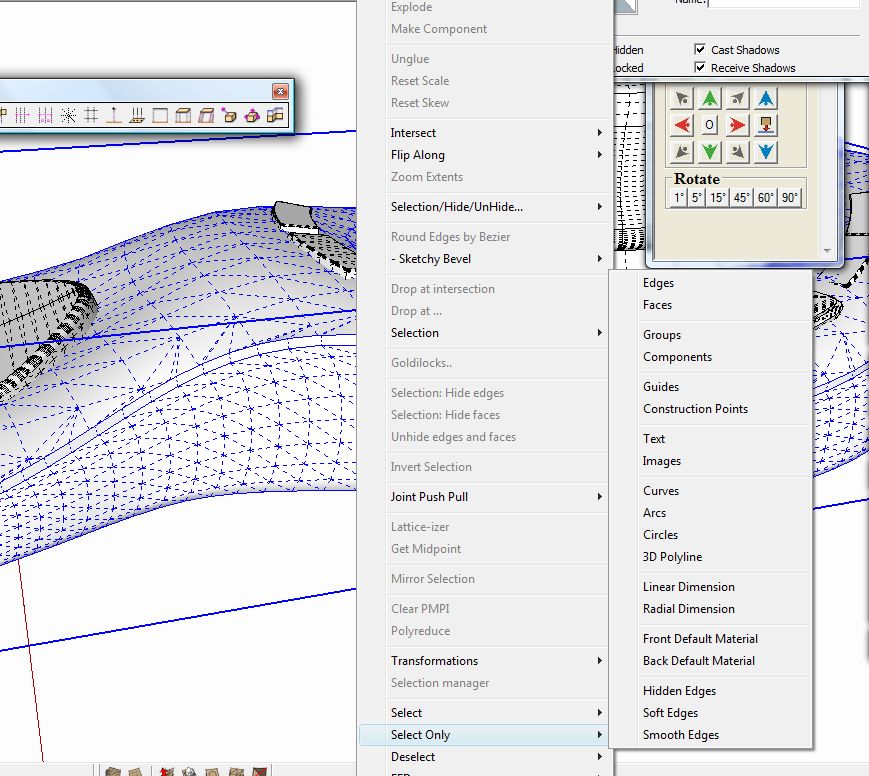

                        Clipboard02.jpg

                        3D Artist at Clearstory 3D Imaging
                        Guide Tool at Winning With Sketchup
                        Content Creator at Skapeup

                        1 條回覆 最後回覆 回覆 引用 0
                        • GaieusG 離線
                          Gaieus
                          最後由 編輯

                          Seems like Thom rigged the app so that at least his plugin will work.
                          This way we can say that "see, Google, a plugin scripter can make sure his plugin does not grey out - why cannot you?"
                          😄

                          Gai...

                          1 條回覆 最後回覆 回覆 引用 0
                          • thomthomT 離線
                            thomthom
                            最後由 編輯

                            😎

                            Thomas Thomassen — SketchUp Monkey & Coding addict
                            List of my plugins and link to the CookieWare fund

                            1 條回覆 最後回覆 回覆 引用 0
                            • F 離線
                              flyashy
                              最後由 編輯

                              Okay end of experiment.
                              in short,

                              Heavy file + Lots of plugins + repeated right click = grayed out menu.

                              back to a less engorged plugins directory...

                              sigh

                              1 條回覆 最後回覆 回覆 引用 0
                              • thomthomT 離線
                                thomthom
                                最後由 編輯

                                Jinx!

                                Now I got it as well with a model I worked on. But the odd thing is that Selection Toys didn't grey out. o_O

                                Thomas Thomassen — SketchUp Monkey & Coding addict
                                List of my plugins and link to the CookieWare fund

                                1 條回覆 最後回覆 回覆 引用 0
                                • EscapeArtistE 離線
                                  EscapeArtist
                                  最後由 編輯

                                  I have a workaround that has worked for me without removing any plugins.

                                  When your right-click menu grays out, go to EDIT > and at the very bottom of the drop-down should the item that you just selected/right-clicked. Click that, and the same options will be available as your right-click. Select what you wanted and continue. The right-click menu will be available again until the next gray-out. Repeat for each gray-out.

                                  1 條回覆 最後回覆 回覆 引用 0
                                  • F 離線
                                    flyashy
                                    最後由 編輯

                                    thanks escapeartist,
                                    i must try that out next time i get the jinx 😉

                                    1 條回覆 最後回覆 回覆 引用 0
                                    • EscapeArtistE 離線
                                      EscapeArtist
                                      最後由 編輯

                                      I've noticed something else. This error seems to occur after an auto-save event.

                                      1 條回覆 最後回覆 回覆 引用 0
                                      • thomthomT 離線
                                        thomthom
                                        最後由 編輯

                                        @escapeartist said:

                                        I've noticed something else. This error seems to occur after an auto-save event.

                                        hmm... that should be easy to test. what happens if you disable auto-save?

                                        Thomas Thomassen — SketchUp Monkey & Coding addict
                                        List of my plugins and link to the CookieWare fund

                                        1 條回覆 最後回覆 回覆 引用 0
                                        • EscapeArtistE 離線
                                          EscapeArtist
                                          最後由 編輯

                                          @thomthom said:

                                          @escapeartist said:

                                          I've noticed something else. This error seems to occur after an auto-save event.

                                          hmm... that should be easy to test. what happens if you disable auto-save?

                                          Sketchup crashes and I lose my work... 😆 😒

                                          1 條回覆 最後回覆 回覆 引用 0
                                          • L 離線
                                            lapx
                                            最後由 編輯

                                            @unknownuser said:

                                            When your right-click menu grays out, go to EDIT > and at the very bottom of the drop-down should the item that you just selected/right-clicked. Click that, and the same options will be available as your right-click. Select what you wanted and continue. The right-click menu will be available again until the next gray-out. Repeat for each gray-out.

                                            This does not work for me. Is google finding a fix for this or is there a workaround. Its becoming impossible to work! Help?


                                            1 條回覆 最後回覆 回覆 引用 0
                                            • 1
                                            • 2
                                            • 3
                                            • 2 / 3
                                            • 第一個貼文
                                              最後的貼文
                                            Buy SketchPlus
                                            Buy SUbD
                                            Buy WrapR
                                            Buy eBook
                                            Buy Modelur
                                            Buy Vertex Tools
                                            Buy SketchCuisine
                                            Buy FormFonts

                                            Advertisement


