sketchucation logo sketchucation
    • Login
    Oops, your profile's looking a bit empty! To help us tailor your experience, please fill in key details like your SketchUp version, skill level, operating system, and more. Update and save your info on your profile page today!
    Mac User? | Join the Rayscaper Beta for Mac Learn More

    [Plugin] Extrude Edges by Rails

    Scheduled Pinned Locked Moved Plugins
    381 Posts 71 Posters 424.9k Views 71 Watching
    Loading More Posts
    • Oldest to Newest
    • Newest to Oldest
    • Most Votes
    Reply
    • Reply as topic
    Log in to reply
    This topic has been deleted. Only users with topic management privileges can see it.
    • I
      InterArchi
      last edited by

      @tig said:

      If anyone else is having similar problems or has a fix then please share !
      πŸ˜• πŸ˜• πŸ˜•

      Can you please upload for us a video tutoriel ? I think It will be more practical If you please of course

      I will be very happy if you do, I couldnt even do a single work with the scripts

      1 Reply Last reply
      Reply Quote 0
      • R
        Rip Tanion
        last edited by

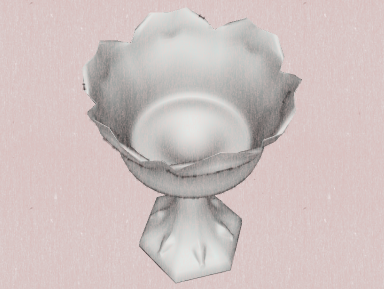
        Below is a W.I.P. made with TIG's extrude plugins. I drink a toast to you and your genius, TIG. (Sorry that the cup is empty, but I already drank the toast. πŸ˜„ )

        [attachment=2:3w44uwco]<!-- ia2 -->chalice1.png<!-- ia2 -->[/attachment:3w44uwco]
        [attachment=1:3w44uwco]<!-- ia1 -->chalice2.png<!-- ia1 -->[/attachment:3w44uwco]
        [attachment=0:3w44uwco]<!-- ia0 -->chalice3.png<!-- ia0 -->[/attachment:3w44uwco]
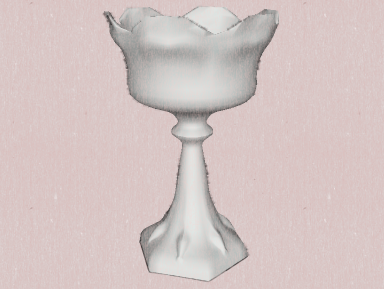

        challice1a.png


        challice2.png


        challice3.png

        1 Reply Last reply
        Reply Quote 0
        • H
          h_Rvn10
          last edited by

          Just here to say thanks πŸ‘
          this plugin is amazing,like a magic

          1 Reply Last reply
          Reply Quote 0
          • S
            solodown
            last edited by

            Bonjour,

            Pourrais-je avoir une explication sur le fonctionnement de ce plugin

            1 Reply Last reply
            Reply Quote 0
            • pilouP
              pilou
              last edited by

              @Solodown
              Il y en a plein dans la version franΓ§aise πŸ˜‰
              (9 pages πŸ’š

              Frenchy Pilou
              Is beautiful that please without concept!
              My Little site :)

              1 Reply Last reply
              Reply Quote 0
              • Dave RD
                Dave R
                last edited by

                TIG, thank you for this most excellent tool. It made these twisted spindles absolutely trivial to draw. And lightweight at 47 Kb, too.


                http://farm4.static.flickr.com/3207/5819092833_b558ffdda7_z.jpg

                Etaoin Shrdlu

                %

                (THERE'S NO PLACE LIKE)

                G28 X0.0 Y0.0 Z0.0

                M30

                %

                1 Reply Last reply
                Reply Quote 0
                • Rich O BrienR
                  Rich O Brien Moderator
                  last edited by

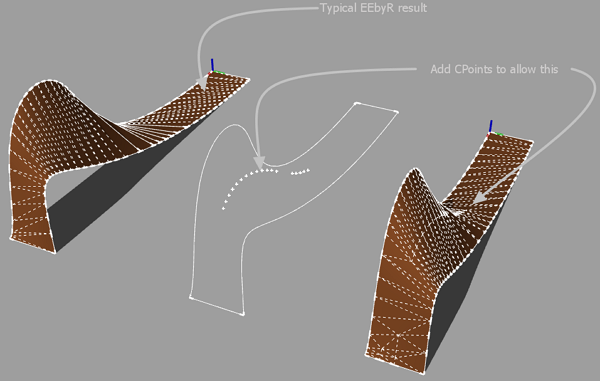
                  Possible?

                  Eebyr_Query.png

                  Download the free D'oh Book for SketchUp πŸ“–

                  1 Reply Last reply
                  Reply Quote 0
                  • TIGT
                    TIG Moderator
                    last edited by

                    That'd make it the Bezier-surface-editor that ThomThom's working on ?
                    You could add a central 'spine' curve scaled/adjusted as desired and make the mesh in two halves that you recombine later on - erasing coplanar edges etc... To quickly make the spine-rail divide the profile into two equal parts and weld back, then use EEbyRailsToLattice > Rails only - then adjust the central spine-rail as desired and use that curve as a rail twice to make the two meshes you'll later combine....

                    TIG

                    1 Reply Last reply
                    Reply Quote 0
                    • Rich O BrienR
                      Rich O Brien Moderator
                      last edited by

                      I just want to be able to place Cpoints here and there as anchors for the mesh. It's not possible? [under one tool]

                      Download the free D'oh Book for SketchUp πŸ“–

                      1 Reply Last reply
                      Reply Quote 0
                      • TIGT
                        TIG Moderator
                        last edited by

                        @unknownuser said:

                        davs001 from 'CatchUp Edition 4' thread ...: I have problems when I followed the niche tutorial. When I tried to use Extrude Edges by Rails in SU8, it allow me to select the profile, rails, etc. but nothing happens. I changed to SU7 and the extruded surface came up immediately. This is my second Issue with SU8…
                        Your help please...
                        [I've split the thread off into EEbyRails...]
                        Assuming you follow the steps correctly as prompted there should be no issues with EEbyRails
                        There are some rare clashes with other scripts that change base classes - like group - ill-advisedly... These then stop some tools like Mirror, EEbyRails... and 2dBoolean - actually it's more common in v7 than v8 πŸ˜•
                        Some culprit scripts are DrivingDimensions[seen with v7 only - so far], SketchyPhysics[some versions] and a few pretty unusual tools I can recall off hand but you are unlikely to have loading...
                        The scripts that fail are doing nothing wrong - the 'rogue' scripts are messing with the way Sketchup handles groups etc...

                        TIG

                        1 Reply Last reply
                        Reply Quote 0
                        • D
                          davs001
                          last edited by

                          @tig said:

                          Assuming you follow the steps correctly as prompted there should be no issues with EEbyRails
                          There are some rare clashes with other scripts that change base classes - like group - ill-advisedly... These then stop some tools like Mirror, EEbyRails... and 2dBoolean - actually it's more common in v7 than v8 πŸ˜•
                          Some culprit scripts are DrivingDimensions[seen with v7 only - so far], SketchyPhysics[some versions] and a few pretty unusual tools I can recall off hand but you are unlikely to have loading...
                          The scripts that fail are doing nothing wrong - the 'rogue' scripts are messing with the way Sketchup handles groups etc...

                          Thank you TIG.
                          I did the same steps in SU8 and SU7. they allow me to select all the elements. The difference is, in SU8 after selecting the melding profile nothing happens, but in SU7 it generates the surface immediately. May I offer you some information to diagnose the issue?
                          Kind Regards from CHILE!

                          1 Reply Last reply
                          Reply Quote 0
                          • TIGT
                            TIG Moderator
                            last edited by

                            If you try it with the Ruby Console open do you get any error messages?
                            Most of users [99.9%] have no problems with any 'version'.
                            You must either have something wrongly installed OR [more likely] an unusual script loading that's messing with stuff !
                            So - error messages and/or a list of loading plugins, please... πŸ˜•

                            TIG

                            1 Reply Last reply
                            Reply Quote 0
                            • L
                              lea moura
                              last edited by

                              @tig said:

                              That'd make it the Bezier-surface-editor that ThomThom's working on ?
                              You could add a central 'spine' curve scaled/adjusted as desired and make the mesh in two halves that you recombine later on - erasing coplanar edges etc... To quickly make the spine-rail divide the profile into two equal parts and weld back, then use EEbyRailsToLattice > Rails only - then adjust the central spine-rail as desired and use that curve as a rail twice to make the two meshes you'll later combine....

                              1 Reply Last reply
                              Reply Quote 0
                              • TIGT
                                TIG Moderator
                                last edited by

                                Version 3.3 has been released - it now includes a 'Quad Face' option [smoothed diagonals only] to complement thomthom's Quad-Tools...
                                It is part of the 'zipped set'.
                                See here for notes and link http://forums.sketchucation.com/viewtopic.php?p=201286#p201286

                                TIG

                                1 Reply Last reply
                                Reply Quote 0
                                • thomthomT
                                  thomthom
                                  last edited by

                                  @tig said:

                                  Version 3.3 has been released - it now includes a 'Quad Face' option [smoothed diagonals only] to complement thomthom's Quad-Tools...
                                  It is part of the 'zipped set'.
                                  See here for notes and link http://forums.sketchucation.com/viewtopic.php?p=201286#p201286

                                  πŸ‘ πŸ‘

                                  ( QF 0.4 will change the definition of a QuadFace slightly, after a discussion I had with Fredo. But I'll be offering a conversion tool, so it should be of no trouble for users to get things working while the new definition is rolled out. I'll let you know when it's shipping ready. )

                                  Thomas Thomassen β€” SketchUp Monkey & Coding addict
                                  List of my plugins and link to the CookieWare fund

                                  1 Reply Last reply
                                  Reply Quote 0
                                  • TIGT
                                    TIG Moderator
                                    last edited by

                                    Version 3.4 has been released - it now includes a 'Quad Face' option [smoothed+soft+hidden diagonals only] to complement thomthom's imminent Quad-Tools...
                                    It is part of the 'zipped set'.
                                    See here for notes and link http://forums.sketchucation.com/viewtopic.php?p=201286#p201286

                                    TIG

                                    1 Reply Last reply
                                    Reply Quote 0
                                    • TIGT
                                      TIG Moderator
                                      last edited by

                                      Version 3.5 has been released - it now only smooths edges with more than one face [like the built-in tool]... It is part of the 'zipped set'.
                                      See here for notes and link http://forums.sketchucation.com/viewtopic.php?p=201286#p201286

                                      TIG

                                      1 Reply Last reply
                                      Reply Quote 0
                                      • A
                                        amro amro
                                        last edited by

                                        @unknownuser said:

                                        Next will be Coon'Surface? β˜€
                                        (just add the oposite profile as Rail 3 πŸ˜„

                                        thanx

                                        1 Reply Last reply
                                        Reply Quote 0
                                        • TIGT
                                          TIG Moderator
                                          last edited by

                                          Version 3.6 has been released http://forums.sketchucation.com/viewtopic.php?p=201286#p201286
                                          The Quad Faces option now meets latest changes to Thomthom's spec.
                                          See notes and download as part of the zipped set, obtained from the linked thread...

                                          TIG

                                          1 Reply Last reply
                                          Reply Quote 0
                                          • D
                                            devran
                                            last edited by

                                            Please help!!! "Extrude Edges by Lines" does not work with edges and circles as the path. The Edge does not rotate at the center of the circle.

                                            http://img442.imageshack.us/img442/5513/extrudeedgesbypath.jpg

                                            I prefer to use extrusion tools instead of "follow me", with follow Me i would use the Circle as the path and delete the unnessassery faces...

                                            http://img696.imageshack.us/img696/985/extrudeedgesbypath2.jpg

                                            1 Reply Last reply
                                            Reply Quote 0

                                            Hello! It looks like you're interested in this conversation, but you don't have an account yet.

                                            Getting fed up of having to scroll through the same posts each visit? When you register for an account, you'll always come back to exactly where you were before, and choose to be notified of new replies (either via email, or push notification). You'll also be able to save bookmarks and upvote posts to show your appreciation to other community members.

                                            With your input, this post could be even better πŸ’—

                                            Register Login
                                            • 1
                                            • 2
                                            • 13
                                            • 14
                                            • 15
                                            • 16
                                            • 17
                                            • 18
                                            • 19
                                            • 20
                                            • 15 / 20
                                            • First post
                                              Last post
                                            Buy SketchPlus
                                            Buy SUbD
                                            Buy WrapR
                                            Buy eBook
                                            Buy Modelur
                                            Buy Vertex Tools
                                            Buy SketchCuisine
                                            Buy FormFonts

                                            Advertisement