sketchucation logo sketchucation
    • 登入
    Oops, your profile's looking a bit empty! To help us tailor your experience, please fill in key details like your SketchUp version, skill level, operating system, and more. Update and save your info on your profile page today!
    🔌 Smart Spline | Fluid way to handle splines for furniture design and complex structures. Download

    [Plugin] Extrude Edges by Rails

    已排程 已置頂 已鎖定 已移動 Plugins
    381 貼文 71 Posters 354.1k 瀏覽 71 Watching
    正在載入更多貼文
    • 從舊到新
    • 從新到舊
    • 最多點贊
    回覆
    • 在新貼文中回覆
    登入後回覆
    此主題已被刪除。只有擁有主題管理權限的使用者可以查看。
    • TIGT 離線
      TIG Moderator
      最後由 編輯

      The face must lie FLAT.
      I'll sort this eventually !!! 🤓

      TIG

      1 條回覆 最後回覆 回覆 引用 0
      • X 離線
        xrok1
        最後由 編輯

        appears to be the same


        Capture1.JPG

        “There are three classes of people: those who see. Those who see when they are shown. Those who do not see.”

        http://www.Twilightrender.com try it!

        1 條回覆 最後回覆 回覆 引用 0
        • TIGT 離線
          TIG Moderator
          最後由 編輯

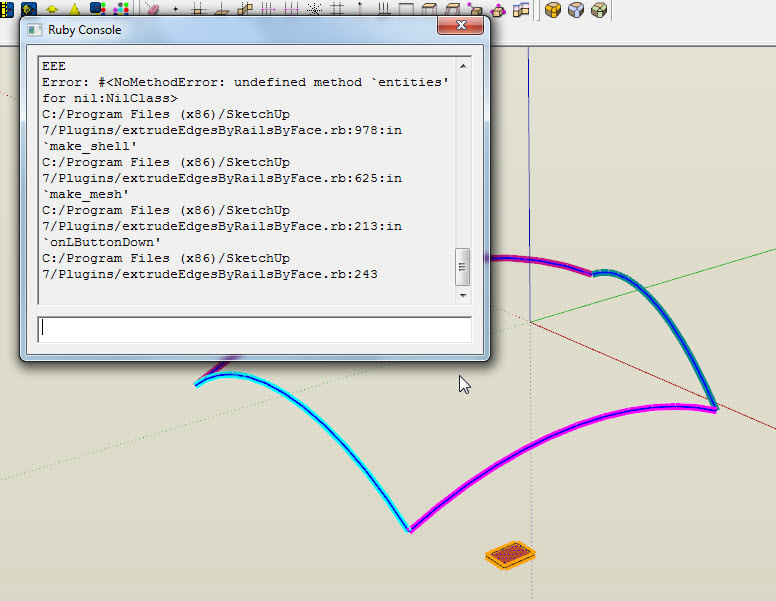
          Aaargh!
          The group isn't getting made or kept...
          I'll send you a PM version with lots of intermediate prompts and progress/error messages in the console...
          It'll take me a while to make it... please be patient... 😒

          TIG

          1 條回覆 最後回覆 回覆 引用 0
          • X 離線
            xrok1
            最後由 編輯

            i guess i should note that my problem was caused by a sketchy physics conflict, i changed my version of sketchy physics and now everything is great! 😄

            “There are three classes of people: those who see. Those who see when they are shown. Those who do not see.”

            http://www.Twilightrender.com try it!

            1 條回覆 最後回覆 回覆 引用 0
            • A 離線
              arjunmax09
              最後由 編輯

              does anyone know this plugin's video tutorial link..... 😒 ??

              when you fail at something....you haven't really failed...you've found one way the thing will not work out

              1 條回覆 最後回覆 回覆 引用 0
              • A 離線
                arjunmax09
                最後由 編輯

                does anyone know this plugin's video tutorial link?? or any pdf file giving tutorials in this plugin

                when you fail at something....you haven't really failed...you've found one way the thing will not work out

                1 條回覆 最後回覆 回覆 引用 0
                • U 離線
                  Ultimatez 32
                  最後由 編輯

                  @xrok1 said:

                  i guess i should note that my problem was caused by a sketchy physics conflict, i changed my version of sketchy physics and now everything is great! 😄

                  TIG, I confirm this. Sketchyphysics is the plugin that's clashing with EEbyRails

                  ultimatez

                  Windows 7 64-bit, Intel Core i3 M350 @2.27GHz, nVidia GEFORCE 310M 512Mb with CUDA, 4gb RAM

                  1 條回覆 最後回覆 回覆 引用 0
                  • Dave RD 離線
                    Dave R
                    最後由 編輯

                    Thanks TIG.

                    Etaoin Shrdlu

                    %

                    (THERE'S NO PLACE LIKE)

                    G28 X0.0 Y0.0 Z0.0

                    M30

                    %

                    1 條回覆 最後回覆 回覆 引用 0
                    • O 離線
                      oskadoska
                      最後由 編輯

                      Having some difficulty with this plugin (in Extrusion Tools).

                      It will not let me select the profile in the attached file (the narrow ends) - will let me select the long edges OK (my intended rails) but this is not much use. Have no idea what the issue is - have also updated SketchyPhysics as there was a comment that earlier versions of this caused a problem.

                      Any thoughts appreciated, its driving me nuts!


                      Off_the_Rails.skp

                      1 條回覆 最後回覆 回覆 引用 0
                      • TIGT 離線
                        TIG Moderator
                        最後由 編輯

                        @oskadoska said:

                        Having some difficulty with this plugin (in Extrusion Tools).
                        It will not let me select the profile in the attached file (the narrow ends) - will let me select the long edges OK (my intended rails) but this is not much use. Have no idea what the issue is - have also updated SketchyPhysics as there was a comment that earlier versions of this caused a problem.
                        Any thoughts appreciated, its driving me nuts!

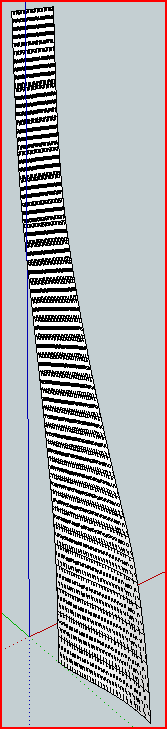
                        First the shape is very small and has many facets [bottom profile is ~5mm and with 30 segment some faces would be tiny] - there is a limitation on making very small faces with SUp/OpenGL - Scale it up x10 EEbyRails then Scale x0.1 if you want it to be so small - small faces will be kept on scaling down, you just can't make them that small in the first place.
                        The skp you supplied has all of the parts as edges in separate bits.
                        Use weld.rb to make the 2 profiles and 2 rails into their own curves.
                        The short top melding-profile is a lone edge. EEbyRails needs its profiles/rails' edges in a "curve" form.
                        You can't make a single edge curve with weld BUT remember that it's best to match you two profiles' [and rails'] segment count anyway - it will be interpolated but making both with 30 forces what you want.
                        To set the short top profile to a 30 segment 'straight' curve, select the edge, right-click Divide, type 30, the bits remain highlighted now 'weld' - you now have both profiles with 30 segments.Capture.PNG
                        TIG

                        1 條回覆 最後回覆 回覆 引用 0
                        • O 離線
                          oskadoska
                          最後由 編輯

                          Hooray! Extrusion now realized.

                          Thanks for your advice TIG, much appreciated.

                          Summarising:

                          1. All Profiles and Rails must be welded curves - even straight lines must be converted.
                          2. Use plugin weld.rb to weld
                          3. Convert a straight line to a welded curve by select > divide > segments ~30 > weld
                          4. For small objects best to scale up > process/extrude > scale down.
                          1 條回覆 最後回覆 回覆 引用 0
                          • I 離線
                            InterArchi
                            最後由 編輯

                            @tig said:

                            If anyone else is having similar problems or has a fix then please share !
                            😕 😕 😕

                            Can you please upload for us a video tutoriel ? I think It will be more practical If you please of course

                            I will be very happy if you do, I couldnt even do a single work with the scripts

                            1 條回覆 最後回覆 回覆 引用 0
                            • R 離線
                              Rip Tanion
                              最後由 編輯

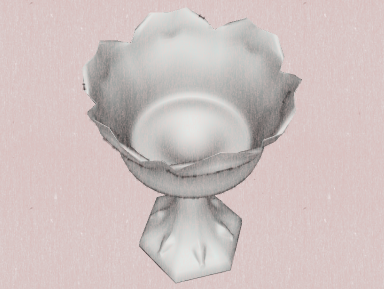
                              Below is a W.I.P. made with TIG's extrude plugins. I drink a toast to you and your genius, TIG. (Sorry that the cup is empty, but I already drank the toast. 😄 )

                              [attachment=2:3w44uwco]<!-- ia2 -->chalice1.png<!-- ia2 -->[/attachment:3w44uwco]
                              [attachment=1:3w44uwco]<!-- ia1 -->chalice2.png<!-- ia1 -->[/attachment:3w44uwco]
                              [attachment=0:3w44uwco]<!-- ia0 -->chalice3.png<!-- ia0 -->[/attachment:3w44uwco]
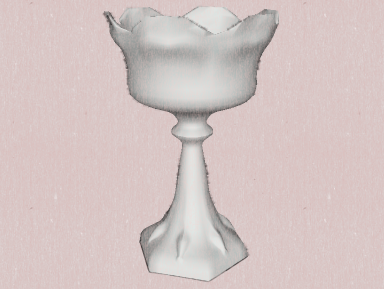

                              challice1a.png


                              challice2.png


                              challice3.png

                              1 條回覆 最後回覆 回覆 引用 0
                              • H 離線
                                h_Rvn10
                                最後由 編輯

                                Just here to say thanks 👍
                                this plugin is amazing,like a magic

                                1 條回覆 最後回覆 回覆 引用 0
                                • S 離線
                                  solodown
                                  最後由 編輯

                                  Bonjour,

                                  Pourrais-je avoir une explication sur le fonctionnement de ce plugin

                                  1 條回覆 最後回覆 回覆 引用 0
                                  • pilouP 離線
                                    pilou
                                    最後由 編輯

                                    @Solodown
                                    Il y en a plein dans la version française 😉
                                    (9 pages 💚

                                    Frenchy Pilou
                                    Is beautiful that please without concept!
                                    My Little site :)

                                    1 條回覆 最後回覆 回覆 引用 0
                                    • Dave RD 離線
                                      Dave R
                                      最後由 編輯

                                      TIG, thank you for this most excellent tool. It made these twisted spindles absolutely trivial to draw. And lightweight at 47 Kb, too.


                                      http://farm4.static.flickr.com/3207/5819092833_b558ffdda7_z.jpg

                                      Etaoin Shrdlu

                                      %

                                      (THERE'S NO PLACE LIKE)

                                      G28 X0.0 Y0.0 Z0.0

                                      M30

                                      %

                                      1 條回覆 最後回覆 回覆 引用 0
                                      • Rich O BrienR 離線
                                        Rich O Brien Moderator
                                        最後由 編輯

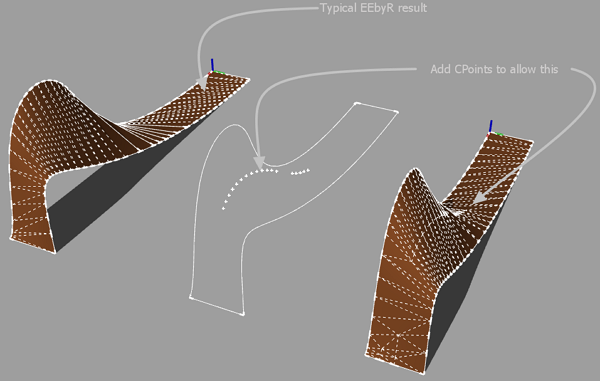
                                        Possible?

                                        Eebyr_Query.png

                                        Download the free D'oh Book for SketchUp 📖

                                        1 條回覆 最後回覆 回覆 引用 0
                                        • TIGT 離線
                                          TIG Moderator
                                          最後由 編輯

                                          That'd make it the Bezier-surface-editor that ThomThom's working on ?
                                          You could add a central 'spine' curve scaled/adjusted as desired and make the mesh in two halves that you recombine later on - erasing coplanar edges etc... To quickly make the spine-rail divide the profile into two equal parts and weld back, then use EEbyRailsToLattice > Rails only - then adjust the central spine-rail as desired and use that curve as a rail twice to make the two meshes you'll later combine....

                                          TIG

                                          1 條回覆 最後回覆 回覆 引用 0
                                          • Rich O BrienR 離線
                                            Rich O Brien Moderator
                                            最後由 編輯

                                            I just want to be able to place Cpoints here and there as anchors for the mesh. It's not possible? [under one tool]


                                            Download the free D'oh Book for SketchUp 📖

                                            1 條回覆 最後回覆 回覆 引用 0
                                            • 1
                                            • 2
                                            • 5
                                            • 6
                                            • 7
                                            • 8
                                            • 9
                                            • 19
                                            • 20
                                            • 7 / 20
                                            • 第一個貼文
                                              最後的貼文
                                            Buy SketchPlus
                                            Buy SUbD
                                            Buy WrapR
                                            Buy eBook
                                            Buy Modelur
                                            Buy Vertex Tools
                                            Buy SketchCuisine
                                            Buy FormFonts

                                            Advertisement