sketchucation logo sketchucation
    • Login
    Oops, your profile's looking a bit empty! To help us tailor your experience, please fill in key details like your SketchUp version, skill level, operating system, and more. Update and save your info on your profile page today!
    ⚠️ Update | Sketchucation Tools 5.0.8 released with licensing improvements and bugfixes Download

    Sandbox tools

    Scheduled Pinned Locked Moved Newbie Forum
    sketchup
    13 Posts 7 Posters 1.8k Views 7 Watching
    Loading More Posts
    • Oldest to Newest
    • Newest to Oldest
    • Most Votes
    Reply
    • Reply as topic
    Log in to reply
    This topic has been deleted. Only users with topic management privileges can see it.
    • jeff hammondJ
      jeff hammond
      last edited by

      oh wait, that's the same on a mac too.. πŸ˜„
      i forgot about that part..ha

      (and, i can't remember if sanbox is turned on or off in the extensions by default?)

      dotdotdot

      1 Reply Last reply
      Reply Quote 0
      • Rich O BrienR
        Rich O Brien Moderator
        last edited by

        I think it's off by default Jeff, but not 100%

        Download the free D'oh Book for SketchUp πŸ“–

        1 Reply Last reply
        Reply Quote 0
        • S
          smhbrv
          last edited by

          Hi everyone.
          I want to write my problem on this title.
          I have a problem with Sandbox.
          I creted my land with your help. I want to put my building to the levels.
          I know, we use "Stamp" for putting building on levels. But I didn't write numeral value for determine the building how much deep or up.
          How can regulate that.?
          Thank you.

          1 Reply Last reply
          Reply Quote 0
          • TIGT
            TIG Moderator
            last edited by

            Push/Pull the building up/down. Perhaps leave it a little higher/lower than you intend it to be finally [depending on whether it is to be built up or cut in]... Afterwards you can always Select the building AND its flat stamped area (you can vary the offset of that flat area at the time of stamping by typing a new distance into the VCB) and by then using the Move Tool on this Selection: constrained vertically (blue) with Shift-key: then all connected geometry like 'embankments' will adjust their angle to suit...

            TIG

            1 Reply Last reply
            Reply Quote 0
            • K
              katarina urbanska
              last edited by

              Thank you Guys,

              I have done it this way before-didnt work. When I wrote you...made it again-it worked
              You are magic Guys.
              Thanks a lot,
              Have a Good one.
              Kat

              1 Reply Last reply
              Reply Quote 0
              • S
                smhbrv
                last edited by

                @tig said:

                Push/Pull the building up/down. Perhaps leave it a little higher/lower than you intend it to be finally [depending on whether it is to be built up or cut in]... Afterwards you can always Select the building AND its flat stamped area (you can vary the offset of that flat area at the time of stamping by typing a new distance into the VCB) and by then using the Move Tool on this Selection: constrained vertically (blue) with Shift-key: then all connected geometry like 'embankments' will adjust their angle to suit...

                Thank you but I dont understand generally.
                Can you explain with pictures... ?

                1 Reply Last reply
                Reply Quote 0
                • TIGT
                  TIG Moderator
                  last edited by

                  http://sketchup.google.com/support/bin/answer.py?hl=en&answer=116008
                  https://sketchup.google.com/support/bin/answer.py?hl=en&answer=46410
                  http://sketchup.google.com/support/bin/answer.py?answer=95061
                  http://sketchup.google.com/support/bin/answer.py?hl=en&answer=115432
                  ❓

                  TIG

                  1 Reply Last reply
                  Reply Quote 0
                  • M
                    mambo.harts.u
                    last edited by

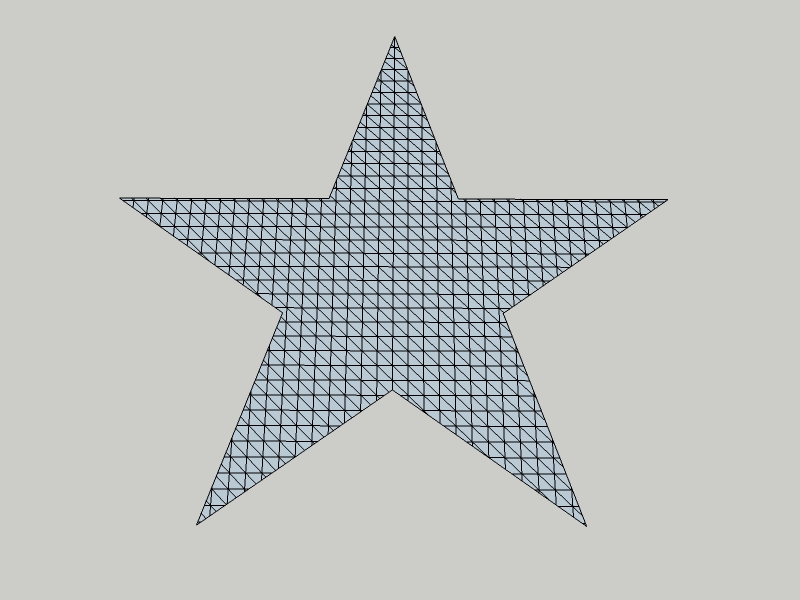
                    Is there a way that i can use scratch tool with irregular shape instead of the rectangular shape? say a star for example?

                    1 Reply Last reply
                    Reply Quote 0
                    • GaieusG
                      Gaieus
                      last edited by

                      Once you drew your rectangular shape, you can draw any shape to intersect it with.


                      StarTIN.jpg


                      StarTIN.skp

                      Gai...

                      1 Reply Last reply
                      Reply Quote 0
                      • M
                        mambo.harts.u
                        last edited by

                        ohh... thanks a lot Gaieus!! This one's a great tool!

                        1 Reply Last reply
                        Reply Quote 0

                        Hello! It looks like you're interested in this conversation, but you don't have an account yet.

                        Getting fed up of having to scroll through the same posts each visit? When you register for an account, you'll always come back to exactly where you were before, and choose to be notified of new replies (either via email, or push notification). You'll also be able to save bookmarks and upvote posts to show your appreciation to other community members.

                        With your input, this post could be even better πŸ’—

                        Register Login
                        • 1 / 1
                        • First post
                          Last post
                        Buy SketchPlus
                        Buy SUbD
                        Buy WrapR
                        Buy eBook
                        Buy Modelur
                        Buy Vertex Tools
                        Buy SketchCuisine
                        Buy FormFonts

                        Advertisement