[Plugin] CleanUp
-
Or you could just use the "outer shell" command from the solid tools in Sketchup 8.
Best,
Jason. -
@zenhipster said:
............ Inside a lot of extra polygons.
If you are trying to remove the polygons "out of view", this app will not do that. -
@jason_maranto said:
Or you could just use the "outer shell" command from the solid tools in Sketchup 8.

-
Well, had a closer look. Neither solution will work properly as the pieces are not aligned correctly (there are extremely small but gaps)
-
Not sure if it's the proper thread for this tip, but here goes.
@unknownuser said:
Wow, it looks promising. One suggestion, though: you could use big buttons instead of radio buttons and check-boxes. Such elements need more precision to click them (because they are small) and when using such plugin several times it can come more handy.
This was a request about v3 in another thread, that is very easily solvable by just using some proper HTML and keeping the radio buttons / checkboxes too.
Just make use of the <label> tag like this:
<label for="idname">Descriptive text here; <input type="radio" name="whatever" id="idname" /></label>and that should keep everyone happy

-
That it uses already, and thatæs what the initial v3 will be using.
-
That's great then, you should advertise it as "click the text and the checkbox is magically selected"
Keep it up mate :] -
@arty2 said:
That's great then, you should advertise it as "click the text and the checkbox is magically selected"
Keep it up mate :]I'll be doing a video presentation.
Another issue with the UI is displaying extra information. At the moment I use tooltips for each element, but I want to provide a better interface for this as well. But now I just need to get this first version out, otherwise it'll never be done.
(Btw, you're a webdesigner? Scripter/programmer? Doing any SketchUp plugins?)
Cheers!
-
Version 3
- New UI
- More cleaning
Remember to update TT_Lib2
-
Thanks Thom
-
Been playing and love the new %/Timer feature
Ban witheld...temporarily
-
Nice update. Thanks.
-
ThomThom
a QUESTION:
Possibility of " other" errors. I don't know what the program float is, single, double etc but a 32 bit float only has a equivalent 24 bits. See IEEE 754 single precision floating point. In addition the Taylor series expansion, or what ever is used, of the arc trig functions could come into play althought I doubt you are using that?? -
Thank you for this very useful plugin.
-
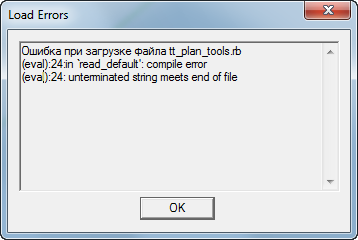
Thank you very much for the update, but downloading SketchUP Pro v.8, an error ...
-
@mac1 said:
ThomThom
a QUESTION:
Possibility of " other" errors. I don't know what the program float is, single, double etc but a 32 bit float only has a equivalent 24 bits. See IEEE 754 single precision floating point. In addition the Taylor series expansion, or what ever is used, of the arc trig functions could come into play althought I doubt you are using that??I just use Ruby, so I have no control over low level functionality such a float types. That's all done by SketchUp and the Ruby core.
-
@blajnov said:
Thank you very much for the update, but downloading SketchUP Pro v.8, an error ...

That refers to Plan Tools...Can you open the Ruby Console and type in
load 'tt_plan_tools.rb'? Post back the whole message. (In the Plan Tools thread please.) -
@blajnov: I moved your post to the Plan Tools thread.
-
Thank you for this plugin. It looks to be very powerful. I beg to report, however, that there was some odd behavior when I tried it.
After selecting the tool from the menu I got this:

I clicked on Yes to see what would happen. I got the following:

(click on the image and you'll have access to a larger version if you need it.)I didn't know what to do other than making a screen shot of it for you so I closed the debugger and found this:

I clicked No and the error messages quit coming up. The tick boxes seemed to work as expected and so I hit Cleanup. It seems to have worked its magic as you can see here:

The error message popups are repeatable. They occur every time I run the plugin. Any ideas? I just installed this plugin today and the Lib file last night before hitting the sack so I should be up to date on the current versions.
-
Dave, I'm not sure what that is. Maybe you have a stricter reporting in your IE settings. I'll see what I can find when I get home.









Hello! It looks like you're interested in this conversation, but you don't have an account yet.
Getting fed up of having to scroll through the same posts each visit? When you register for an account, you'll always come back to exactly where you were before, and choose to be notified of new replies (either via email, or push notification). You'll also be able to save bookmarks and upvote posts to show your appreciation to other community members.
With your input, this post could be even better 💗
Register Login


Advertisement