sketchucation logo sketchucation
    • 登入
    Oops, your profile's looking a bit empty! To help us tailor your experience, please fill in key details like your SketchUp version, skill level, operating system, and more. Update and save your info on your profile page today!
    🔌 Smart Spline | Fluid way to handle splines for furniture design and complex structures. Download

    [Plugin] CleanUp

    已排程 已置頂 已鎖定 已移動 Plugins
    974 貼文 217 Posters 865.9k 瀏覽 217 Watching
    正在載入更多貼文
    • 從舊到新
    • 從新到舊
    • 最多點贊
    回覆
    • 在新貼文中回覆
    登入後回覆
    此主題已被刪除。只有擁有主題管理權限的使用者可以查看。
    • thomthomT 離線
      thomthom
      最後由 編輯

      @rspierenburg said:

      Found out what the problem is...or rather..solution. I guessing the problem has to do with administrative rights somehow. Because if I set the Sketchup 8 Desktop shortcut to 'Run with administrative rights' then there is no error. Not sure what in the system.rb requires administration rights other than what I have but it works for now I guess.

      Rob

      There shouldn't be anything. But - Vista and Win7 got something called compatibility mode where Windows place folders in a hidden location elsewhere on the system - though this is not visible to the user. It could be that this caused an older version to be loaded.
      When you're in the Plugins folder, do you see a Compatibility Files button in Explorer?

      Thomas Thomassen — SketchUp Monkey & Coding addict
      List of my plugins and link to the CookieWare fund

      1 條回覆 最後回覆 回覆 引用 0
      • R 離線
        rspierenburg
        最後由 編輯

        Actually I do. So what exactly does this other folder do? Does it store older versions of the files that are in it? I've never noticed it before. But now that I see it I noticed there are other plugins that I couldn't find before.

        1 條回覆 最後回覆 回覆 引用 0
        • R 離線
          rspierenburg
          最後由 編輯

          Yup, that did the trick. I just deleted the TT_Lib2 folder from the 'Compatibility' folder and everything starts up as it should. Thanks for the tip, and the wonderful plugins.

          Rob

          1 條回覆 最後回覆 回覆 引用 0
          • thomthomT 離線
            thomthom
            最後由 編輯

            @rspierenburg said:

            Actually I do. So what exactly does this other folder do? Does it store older versions of the files that are in it? I've never noticed it before. But now that I see it I noticed there are other plugins that I couldn't find before.

            I'm not very familiar with it - but I've heard some reports on it.

            Thomas Thomassen — SketchUp Monkey & Coding addict
            List of my plugins and link to the CookieWare fund

            1 條回覆 最後回覆 回覆 引用 0
            • TIGT 離線
              TIG Moderator
              最後由 編輯

              It tries to stop you updating files/folders in 'Program Files' so the versions in 'Compatibility Files' version is likely to be newer and the older version left unchanged. It depends how you copy/move over the files... Give yourself wide-ranging access-rights to Sketchup folder and subfolders/files - the Compatibility Files won't bug-you 😒

              TIG

              1 條回覆 最後回覆 回覆 引用 0
              • bagateloB 離線
                bagatelo
                最後由 編輯

                I think this is good option to insert in this plugin:

                http://forums.sketchucation.com/viewtopic.php?f=180&t=35180

                While the cat's away, the mice will play

                1 條回覆 最後回覆 回覆 引用 0
                • bagateloB 離線
                  bagatelo
                  最後由 編輯

                  Do not worry. I've done that.

                  Your version 3 of the cleanup is not working properly, when I select to delete duplicate faces.

                  Error 404 (Not Found)!!1

                  favicon

                  (sketchup.google.com)

                  I modified your previous version of the plugin cleanup and working properly. It's a pity that this did not erase non solid surfaces within groups. But this is not so bad.
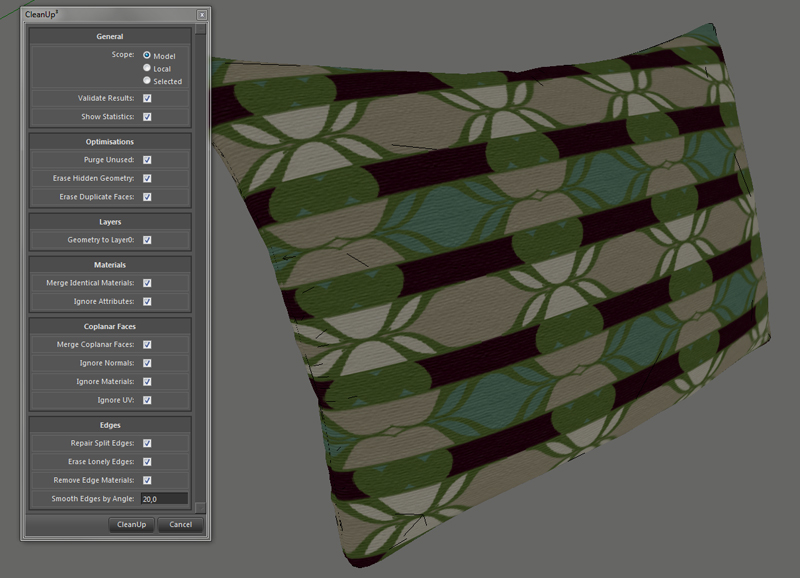
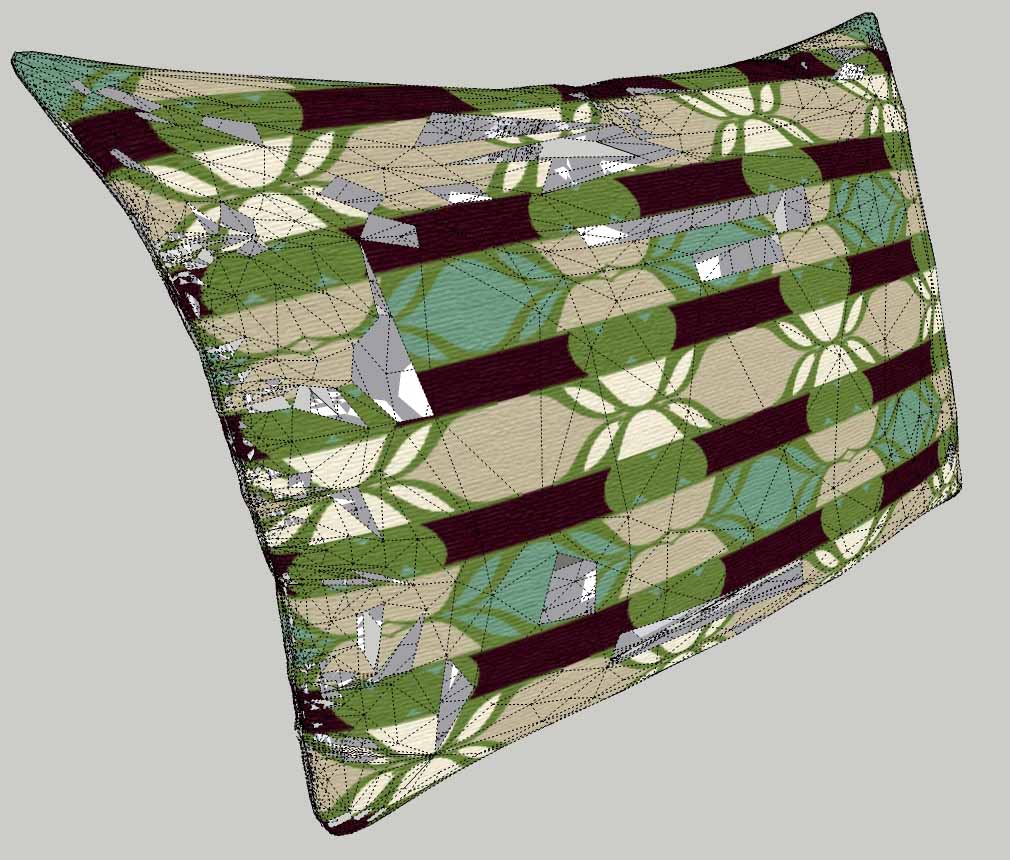
                  before erros.jpg


                  errosfaces.jpg


                  tt_limpa.rb

                  While the cat's away, the mice will play

                  1 條回覆 最後回覆 回覆 引用 0
                  • thomthomT 離線
                    thomthom
                    最後由 編輯

                    @bagatelo said:

                    Your version 3 of the cleanup is not working properly, when I select to delete duplicate faces.

                    The Erase Duplicate Faces feature is a bit unstable. It's hard to properly figure out when a face is overlapping another. Though on the model you provided that feature would do no good anyway, since that pillow is a solid.
                    Erase Duplicate Faces is intended to address faces where you see Z-fighting.

                    I tested your model, with just Erase Duplicate Faces and no faces disappeared.
                    It happens with Merge Coplanar Faces. (Ignore Normals and Ignore UVs)
                    I'm pretty sure it's because the mesh has some very small faces. Some edges are less than a millimeter. SketchUp doesn't deal with small geometry like that very well.
                    If you scale the geometry up a few times (the definition, not the instance) you'll see that no faces disappear.

                    @bagatelo said:

                    I modified your previous version of the plugin cleanup and working properly.

                    The faces didn't disappear? That might be, as the old version had a tendency to not clean up as much as it should. It's a very buggy version which in this case just happen to cover up a weakness in SketchUp.

                    I strongly recommend not using the older versions of CleanUp as version 3.1 has fixed a great number of bugs and issues which in other cases can cause you to loose geometry. The only thing you need to take care of is ensuring that your mesh doesn't have very small faces because SketchUp begins to acts odd then. Scale up small geometry before cleanup and you'll be fine.

                    Thomas Thomassen — SketchUp Monkey & Coding addict
                    List of my plugins and link to the CookieWare fund

                    1 條回覆 最後回覆 回覆 引用 0
                    • bagateloB 離線
                      bagatelo
                      最後由 編輯

                      Did you see/test your "tt_limpa.rb" ?


                      tt_limpa.rb

                      While the cat's away, the mice will play

                      1 條回覆 最後回覆 回覆 引用 0
                      • thomthomT 離線
                        thomthom
                        最後由 編輯

                        I looked at it briefly. Added your request to the list of things to look at for future version. But it won't happen immediately. Got some other projects I need to attend. ( Also, I've been ill for a week - still am - so I've got quite a bit of catching up to do when my head stops throbbing.)

                        Thomas Thomassen — SketchUp Monkey & Coding addict
                        List of my plugins and link to the CookieWare fund

                        1 條回覆 最後回覆 回覆 引用 0
                        • bagateloB 離線
                          bagatelo
                          最後由 編輯

                          Wow, what a pity. I am sorry you are sick. Health to you!

                          While the cat's away, the mice will play

                          1 條回覆 最後回覆 回覆 引用 0
                          • bagateloB 離線
                            bagatelo
                            最後由 編輯

                            I think this can be useful: http://forums.sketchucation.com/viewtopic.php?f=18&t=35291

                            @bagatelo said:

                            I would like to share here a technique to export models from 3dsmax Autodesk to google sketchup using 3ds files.

                            Please download the file: DetachElements.mcr in this site:
                            http://www.scriptspot.com/3ds-max/scripts/detach-elements

                            Then insert this file in the folder:
                            C:\Program Files (x86)\Autodesk\3ds Max 2010\Scripts\Startup

                            I import the model to be exported into the Sketchup into the 3dsmax, I press on the keyboard Alt+NumPad2 and after this Alt+NumPad3. What do these shortcuts?

                            Alt + NumPad2 Separates groups in all elements of the model, using the script mentioned above.
                            Alt + NumPad3 Makes 'Reset Xform'.

                            After that it's only export to Google Sketchup, that objects do not come all messed up.

                            Surely you want to use the plugin CleanUP done by thomthom.

                            Thanks..

                            While the cat's away, the mice will play

                            1 條回覆 最後回覆 回覆 引用 0
                            • C 離線
                              cadmunkey
                              最後由 編輯

                              Great ruby, just halved the size of my current model. Cheers!

                              1 條回覆 最後回覆 回覆 引用 0
                              • J 離線
                                JPMays
                                最後由 編輯

                                ThomThom,

                                I've been having a lot of success with this plugin so far, but I just came across a few problems. First, running Merge Faces on my model deletes geometry, and also it isn't actually merging most of my co planar faces:

                                Before running merge faces:

                                http://img717.imageshack.us/img717/6093/36578289.jpg

                                After merge faces:

                                http://img220.imageshack.us/img220/841/77504264.jpg

                                See deleted and non-merged faces circled in red.

                                Hofstadter's Law: It always takes longer than you expect, even when you take into account Hofstadter's Law.

                                1 條回覆 最後回覆 回覆 引用 0
                                • thomthomT 離線
                                  thomthom
                                  最後由 編輯

                                  Can you share the model? Or send it directly to me if you don't want it shared in public?
                                  Without the model it's hard to determine what's going on.

                                  (The scale of the model isn't very small, is it?)
                                  And do you have Erase Duplicate Faces on or off? (leave it off unless you have problems with faces overlapping the same space. it's very slow and can be buggy)

                                  Thomas Thomassen — SketchUp Monkey & Coding addict
                                  List of my plugins and link to the CookieWare fund

                                  1 條回覆 最後回覆 回覆 引用 0
                                  • J 離線
                                    JPMays
                                    最後由 編輯

                                    No, the model is not small scale, in fact it's pretty large. No, I have not had erase duplicate faces checked.

                                    I'll pm you with the file.

                                    Hofstadter's Law: It always takes longer than you expect, even when you take into account Hofstadter's Law.

                                    1 條回覆 最後回覆 回覆 引用 0
                                    • thomthomT 離線
                                      thomthom
                                      最後由 編輯

                                      The disappearing faces seems to be related to some rouge faces with area of 0 - or close to. Some very very thing faces which throws off the calculations. I'll see if I can find time this week to find a way to deal with them.

                                      The co-planar faces that where not merged: I could not test these as the model you sent appear to be somewhat different that the once you posted screens off. Doesn't seem to include the faces.

                                      Thomas Thomassen — SketchUp Monkey & Coding addict
                                      List of my plugins and link to the CookieWare fund

                                      1 條回覆 最後回覆 回覆 引用 0
                                      • thomthomT 離線
                                        thomthom
                                        最後由 編輯

                                        SketchUp considers all the edges in these troublesome faces to be all parallel to each other. I might be able to use that as a way to detect potentially troublesome faces.

                                        Thomas Thomassen — SketchUp Monkey & Coding addict
                                        List of my plugins and link to the CookieWare fund

                                        1 條回覆 最後回覆 回覆 引用 0
                                        • J 離線
                                          JPMays
                                          最後由 編輯

                                          Oops, I must have saved over the model that was having the problems. Sorry.

                                          Hofstadter's Law: It always takes longer than you expect, even when you take into account Hofstadter's Law.

                                          1 條回覆 最後回覆 回覆 引用 0
                                          • thomthomT 離線
                                            thomthom
                                            最後由 編輯

                                            Well, at least I managed to reproduce the most critical. Disappearing geometry is much worse than some bits that remain.


                                            Thomas Thomassen — SketchUp Monkey & Coding addict
                                            List of my plugins and link to the CookieWare fund

                                            1 條回覆 最後回覆 回覆 引用 0
                                            • 1
                                            • 2
                                            • 3
                                            • 4
                                            • 5
                                            • 6
                                            • 7
                                            • 8
                                            • 48
                                            • 49
                                            • 6 / 49
                                            • 第一個貼文
                                              最後的貼文
                                            Buy SketchPlus
                                            Buy SUbD
                                            Buy WrapR
                                            Buy eBook
                                            Buy Modelur
                                            Buy Vertex Tools
                                            Buy SketchCuisine
                                            Buy FormFonts

                                            Advertisement
