sketchucation logo sketchucation
    • 登入
    Oops, your profile's looking a bit empty! To help us tailor your experience, please fill in key details like your SketchUp version, skill level, operating system, and more. Update and save your info on your profile page today!
    🔌 Smart Spline | Fluid way to handle splines for furniture design and complex structures. Download

    [Plugin] Control points ver. 1.6.

    已排程 已置頂 已鎖定 已移動 Plugins
    115 貼文 42 Posters 64.0k 瀏覽 42 Watching
    正在載入更多貼文
    • 從舊到新
    • 從新到舊
    • 最多點贊
    回覆
    • 在新貼文中回覆
    登入後回覆
    此主題已被刪除。只有擁有主題管理權限的使用者可以查看。
    • K 離線
      kirill2008
      最後由 編輯

      @xrok1 said:

      this is getting better and better
      now all we need is a visual representation (ideally interactive 😉 ) for the weight.

      Well, I think, it's possible
      http://kolobok.us/smiles/standart/yes4.gif
      , why not.

      1 條回覆 最後回覆 回覆 引用 0
      • X 離線
        xrok1
        最後由 編輯

        @kirill2008 said:

        @xrok1 said:

        this is getting better and better
        now all we need is a visual representation (ideally interactive 😉 ) for the weight.

        Well, I think, it's possible
        http://kolobok.us/smiles/standart/yes4.gif
        , why not.

        😲 don't tease.

        “There are three classes of people: those who see. Those who see when they are shown. Those who do not see.”

        http://www.Twilightrender.com try it!

        1 條回覆 最後回覆 回覆 引用 0
        • EarthMoverE 離線
          EarthMover
          最後由 編輯

          Krill, would it be possible to have an option to place a cage of control points on a mesh? Perhaps one FFD style cage box option for people used to that method and another that would place evenly distributed control points which would conform around the mesh at a given distance. You're already 80% of the way to a new type of Free Form Deformation plugin, might as well go all the way and improve on the existing.

          3D Artist at Clearstory 3D Imaging
          Guide Tool at Winning With Sketchup
          Content Creator at Skapeup

          1 條回覆 最後回覆 回覆 引用 0
          • X 離線
            xrok1
            最後由 編輯

            @earthmover said:

            Krill, would it be possible to have an option to place a cage of control points on a mesh? Perhaps one FFD style cage box option for people used to that method and another that would place evenly distributed control points which would conform around the mesh at a given distance. You're already 80% of the way to a new type of Free Form Deformation plugin, might as well go all the way and improve on the existing.

            yes that would be great since FFD thread says "Unfortunately, I am out of time to work on this script. If anyone wants to pick it up contact me. The code is simple and (for me) well commented. It needs a UI and bug fixes." and doesn't seem to be progressing. 👍

            “There are three classes of people: those who see. Those who see when they are shown. Those who do not see.”

            http://www.Twilightrender.com try it!

            1 條回覆 最後回覆 回覆 引用 0
            • K 離線
              kirill2008
              最後由 編輯

              Preview of interaction capabilities of ver. 1.6. (will be ready in the coming days).
              Set of 4 videos:
              [flash=480,385:lwr4hh5j]http://www.youtube.com/p/51499EA555BCA0CC&hl=ru_RU&fs=1" type="application/x-shockwave-flash" width="480" height="385" allowscriptaccess="always" allowfullscreen="true"[/flash:lwr4hh5j]

              In case if someone wants to try prerelease version:
              ver. 1.6. (prerelease)

              1 條回覆 最後回覆 回覆 引用 0
              • D 離線
                dedmin
                最後由 編輯

                Ой! Кажется какая то "волшебная" водка дает тебе творческие силы!

                1 條回覆 最後回覆 回覆 引用 0
                • jim smithJ 離線
                  jim smith
                  最後由 編輯

                  @dedmin said:

                  Ой! Кажется какая то "волшебная" водка дает тебе творческие силы!

                  Google translator

                  Oops It seems some sort of a "magic" vodka gives you the creative power!

                  I'll drink to that 👍 👍 Thank you Kirill

                  "Out of clutter find simplicity,
                  from discord find harmony,
                  In the middle of difficulty lies opportunity"
                  Albert Einstein

                  1 條回覆 最後回覆 回覆 引用 0
                  • D 離線
                    Daniel S
                    最後由 編輯

                    Awesome plugin Kirill!!!

                    Will be possible to add control points automatic to have this results?
                    If you select a line:
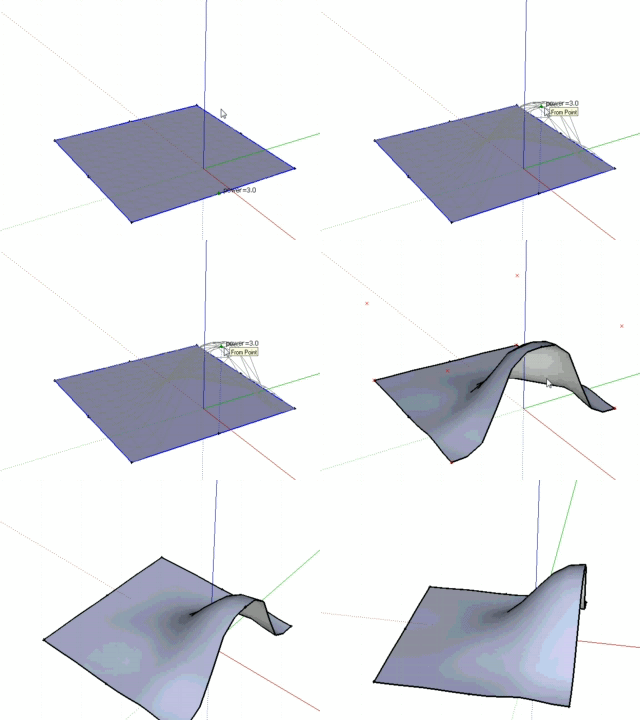
                    Deform in SU 1.gif
                    If you select a face:
                    Deform in SU 2.gif

                    For more information:
                    http://forums.sketchucation.com/viewtopic.php?f=180&t=19321

                    Daniel S
                    PS: I suppose that ask to add automatic slicing to entities like Fredoscale does (Bend, Twist...) would be asking too much?

                    1 條回覆 最後回覆 回覆 引用 0
                    • mitcorbM 離線
                      mitcorb
                      最後由 編輯

                      This is pretty much what I was asking here:

                      http://forums.sketchucation.com/viewtopic.php?f=323&t=25082

                      In Blender they use variable "brushes" with adjustable radius of influence, sort of like the inverse square law, or sort of like -BTM's Sculpt tools. But the deformations can be spherical, or even planar. Your gifs show a sort of spherical effect.

                      This ability would be delicious

                      I take the slow, deliberate approach in my aimless wandering.

                      1 條回覆 最後回覆 回覆 引用 0
                      • U 離線
                        unclex
                        最後由 編輯

                        Wonderful

                        1 條回覆 最後回覆 回覆 引用 0
                        • K 離線
                          kirill2008
                          最後由 編輯

                          The work on ver. 1.6. is still in progress...
                          The current stage new features:

                          • wireframe preview of geometry group deformation is a bit faster now
                          • ability to interact with curve control points is also available now

                          Demo video (first 3 minutes are about faster wireframe, last ones about curve control points):
                          [flash=320,265:2fn1qvwi]http://www.youtube.com/v/dO8Nk40IypQ&hl=ru_RU&fs=1&" type="application/x-shockwave-flash" allowscriptaccess="always" allowfullscreen="true" width="320" height="265"[/flash:2fn1qvwi]

                          ver. 1.6. (prerelease again)

                          @daniel s said:

                          Daniel S
                          PS: I suppose that ask to add automatic slicing to entities like Fredoscale does (Bend, Twist...) would be asking too much?

                          Well, LibFredo6 is also free and open source and I think that almost everyone has it (Fredo tools are must-have ones), so, I guess, it is possible to utilize 'automatic slicing' if it is already implemented and present within the library. At least I'll try to.
                          Actually, I thought about something like adaptive tessellation around control point before, so I was going to make it anyway sooner or later.

                          @dedmin said:

                          Ой! Кажется какая то "волшебная" водка дает тебе творческие силы!

                          Ога, "волшебная": 3,2% жирности, производится в Чебаркуле, называется ряженка (fermented baked milk). По 0,5 в день и творческих сил, хоть отбавляй
                          http://smiles.kolobok.us/personal/russian.gif

                          1 條回覆 最後回覆 回覆 引用 0
                          • EscapeArtistE 離線
                            EscapeArtist
                            最後由 編輯

                            I see in your 1.5 update that you've fixed the "undo" error.

                            Fantastic, and thanks again for a great plugin!!

                            1 條回覆 最後回覆 回覆 引用 0
                            • K 離線
                              kirill2008
                              最後由 編輯

                              First steps of interactive face deformation:
                              [flash=480,385:2m8btgdg]http://www.youtube.com/p/8AB5C9C23863405C&hl=ru_RU&fs=1" type="application/x-shockwave-flash" width="480" height="385" allowscriptaccess="always" allowfullscreen="true"[/flash:2m8btgdg]
                              The initial face dividing was actually not so difficult. Treating deformed result surface as a single entity is more tricky... I don't know yet how to do it. So ver. 1.6. release is delayed again.

                              ver. 1.6. prerelease

                              1 條回覆 最後回覆 回覆 引用 0
                              • K 離線
                                kirill2008
                                最後由 編輯

                                Still prerelease...
                                ver. 1.6.(prerelease)

                                • 2 modes of interactive curve control points dragging: 1) 'preview' mode: shows curve preview while dragging, 2) 'full' mode: deforms the curve (it affects instances 'glued' to curve immediately, but sometimes causes SU crashes...), <Home> key to switch to 'preview' mode, <End> key to switch to 'full' mode.

                                Video shows 2 modes difference, when curves which are under control are also in use within 'blended object' (sublend.rb)
                                [flash=480,385:1q5ubzq1]http://www.youtube.com/v/Wt_Isl5tzP8&hl=ru_RU&fs=1&" type="application/x-shockwave-flash" allowscriptaccess="always" allowfullscreen="true" width="480" height="385"[/flash:1q5ubzq1]

                                1 條回覆 最後回覆 回覆 引用 0
                                • S 離線
                                  SHAHEEN
                                  最後由 編輯

                                  thanks a million !!
                                  Great Plugin

                                  " An eye for an eye only ends up making the whole world blind "
                                  Gandhi

                                  1 條回覆 最後回覆 回覆 引用 0
                                  • M 離線
                                    Merlan
                                    最後由 編輯

                                    Amazing !!!
                                    Thank you so much !!!

                                    1 條回覆 最後回覆 回覆 引用 0
                                    • K 離線
                                      kirill2008
                                      最後由 編輯

                                      New version:
                                      ver. 1.6.( prerelease)
                                      New features:

                                      • the current version shows geometry deformation preview while moving control points (both geometry group control c-points and curve control c-points)
                                      • it is possible to choose preview mode by hitting <Ins> key (3 modes available: 1. flat-faced surface, 2. surface + edges, 3. wire)
                                        [flash=480,385:33h537rh]http://www.youtube.com/p/5077FD48856CD56D&amp;hl=ru_RU&amp;fs=1" type="application/x-shockwave-flash" width="480" height="385" allowscriptaccess="always" allowfullscreen="true"[/flash:33h537rh]
                                      1 條回覆 最後回覆 回覆 引用 0
                                      • mitcorbM 離線
                                        mitcorb
                                        最後由 編輯

                                        Kirill:
                                        This looks excellent. I presume it will deform any volumetric mesh?
                                        Are you by chance creating a bezier control mesh to do the deformations?

                                        I take the slow, deliberate approach in my aimless wandering.

                                        1 條回覆 最後回覆 回覆 引用 0
                                        • K 離線
                                          kirill2008
                                          最後由 編輯

                                          @mitcorb said:

                                          Are you by chance creating a bezier control mesh to do the deformations?

                                          Not exactly. Ctrlpnts.rb utilizes 2 different methods:

                                          • for curve shape changing: linear and cosine smoothed methods
                                          • for geometry group deformation: the same method as pnts2mesh.rb uses for creating terrain surface (when 'according to distance' z-calculation method is chosen)
                                            The second method calculates offset vectors lengths of each vertex according to distances from it to all control points. The degree of influence of each control c-point depends on <1/(distance^power)>. Power is an adjustable value.

                                          Currently I'm thinking about making a kind of substitute for nurbs surface (I don't know what will come of this). It is necessary to add possibility to adjust the slope of the surface area, which is under control of each c-point.
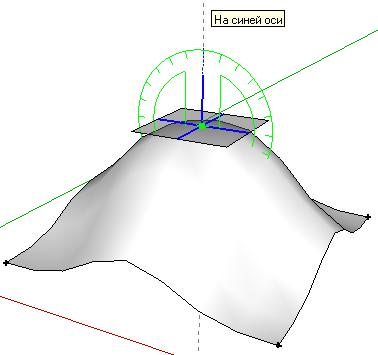
                                          slope adjusting will look something like that
                                          I guess it is possible after adding some linear terms to <1/(distance^power)>.

                                          1 條回覆 最後回覆 回覆 引用 0
                                          • mitcorbM 離線
                                            mitcorb
                                            最後由 編輯

                                            Ok. Just curious. And thanks for your reply.
                                            Does the plugin operate on ungrouped geometry, or groups, or components? Or, how does it deal with these. Even though I watched the video, I am missing something.
                                            I presume this is better for smaller models, because I was trying to deform a rather dense mesh ungrouped. I made a selection of a portion of the mesh and the control point was lost in the blue highlights. It took me a while to find it. And I know I did something wrong because I saw the prompt at the bottom of the screen but I got no results--no action.
                                            Also, I noted that in the plugins menu are some interact commands. But because there is no identifier in the command, I wasn't sure if this was related to Control Points. Perhaps you could do something there to identify with the script.
                                            I was just the other day wishing for an operation like this that would do "smooth mesh deformations" such as in your video. I am using currently Sketchup 6 free version in Windows XP.
                                            Thanks again,
                                            mitcorb

                                            I take the slow, deliberate approach in my aimless wandering.

                                            1 條回覆 最後回覆 回覆 引用 0
                                            • 1
                                            • 2
                                            • 3
                                            • 4
                                            • 5
                                            • 6
                                            • 4 / 6
                                            • 第一個貼文
                                              最後的貼文
                                            Buy SketchPlus
                                            Buy SUbD
                                            Buy WrapR
                                            Buy eBook
                                            Buy Modelur
                                            Buy Vertex Tools
                                            Buy SketchCuisine
                                            Buy FormFonts

                                            Advertisement