sketchucation logo sketchucation
    • 登入
    Oops, your profile's looking a bit empty! To help us tailor your experience, please fill in key details like your SketchUp version, skill level, operating system, and more. Update and save your info on your profile page today!
    ⚠️ Important | Libfredo 15.6b introduces important bugfixes for Fredo's Extensions Update

    [Plugin] SU2KT 3.18 - Kerkythea exporter

    已排程 已置頂 已鎖定 已移動 Plugins
    35 貼文 13 Posters 32.3k 瀏覽 13 Watching
    正在載入更多貼文
    • 從舊到新
    • 從新到舊
    • 最多點贊
    回覆
    • 在新貼文中回覆
    登入後回覆
    此主題已被刪除。只有擁有主題管理權限的使用者可以查看。
    • D 離線
      Debecorator
      最後由 編輯

      Hi Tomasz, I may have made a serious mistake in updating to SU2KT ver 3.1 while I am still running Sketchup 6.4.112? Now when I try to export my (fairly large) model with several scenes created, the model will export but not the scenes or cameras. Is there any way for me to workaround this?

      1 條回覆 最後回覆 回覆 引用 0
      • T 離線
        tomasz
        最後由 編輯

        @debecorator said:

        Hi Tomasz, I may have made a serious mistake in updating to SU2KT ver 3.1 while I am still running Sketchup 6.4.112? Now when I try to export my (fairly large) model with several scenes created, the model will export but not the scenes or cameras. Is there any way for me to workaround this?

        You can try version 3.15. If is available in SketchUp section of KT forum and on my website.
        Do you get the report window after the export?

        Author of [Thea Render for SketchUp](http://www.thearender.com/sketchup)

        1 條回覆 最後回覆 回覆 引用 0
        • T 離線
          tomasz
          最後由 編輯

          @debecorator said:

          Is there any way for me to workaround this?

          The error has been caused by a plugin you have recently installed. It has nothing to do with SU2KT.
          An IDIOT has modified '.to_s' method of standard Array class to display a content of an array in 'nice' way.

          It is not possible to protect from all such a irresponsible actions.

          If you know how, please find a plugin in your plugins folder containing following strings:

          class Array
          
          def self.to_s
          

          delete the plugin and report its name here.

          Once the plugin deleted, you can open your model, detach "KT material" from Emit 6 and do the attachment once again. Now the export should run successfully.

          Thanks for reporting this
          Tomasz

          Author of [Thea Render for SketchUp](http://www.thearender.com/sketchup)

          1 條回覆 最後回覆 回覆 引用 0
          • R 離線
            Rob D
            最後由 編輯

            Hi Tomasz
            I don't know if this is part of the same issue. When using 3.1 or 3.15 for animation, the model does not open in KKT. I get a blank model in KKT and the kst script doesn't run either. This means I can't get the faceme or fullmodelperframe animations to work. I've tried all sorts and tried it on different pcs but to no avail. Any suggestions what this might be?

            Can I say a heartfelt thanks for your work on this plugin. A lot of KKt's success has got to be down to you! 👍

            1 條回覆 最後回覆 回覆 引用 0
            • R 離線
              Rob D
              最後由 編輯

              I couldn't find which plugin has the conflict with SU2KT. So I moved all my plugins into a temporary folder (except SU2KT) so SketchUp can't see them. Restarted SU and now the KKT export works fine. I still have to open the first scene manually and run the script, but at least it's working 😄

              1 條回覆 最後回覆 回覆 引用 0
              • T 離線
                tomasz
                最後由 編輯

                First of all. Uninstall Matchbox 1.1 and Train Simulator plugins!
                http://forums.sketchucation.com/viewtopic.php?f=180&t=12423&p=125042&hilit=matchbox#p103041

                @unknownuser said:

                SOLVED Vista KT autoload issue

                You probably noticed that, if you run SU as administrator (also true for an administrator account !), KT autoloads on export. It is an workaround but it is annoying.
                So:
                Go to your KT installation folder.
                Locate start.bat file.
                Right click > Properties > Security.
                You'll probably see three types of users: System, Administrators and Users.
                Select Users.
                Go to Advanced, select Users and Edit the permissions to full control. OK, Apply etc.
                That's all !

                Author of [Thea Render for SketchUp](http://www.thearender.com/sketchup)

                1 條回覆 最後回覆 回覆 引用 0
                • D 離線
                  Debecorator
                  最後由 編輯

                  This was a bit of a mystery to me because I have not installed any plugins recently for SketchUp except for SU2kt, but I did have an old Podium plugin (very old) so I got rid of that. Went through materials list renaming those with extra long names and I found one material I changed a while ago but it would not delete, and SU would freeze each time I tried. I managed to get it renamed and then deleted (it was pillow shams guestroom. The only other suspect material is one named "reset". Is this anything to be concerned about and is there more I should be doing before trying to export again apart from purging?

                  1 條回覆 最後回覆 回覆 引用 0
                  • T 離線
                    tomasz
                    最後由 編輯

                    Just remove KT material present in Emit6 SU material. The export will go just fine.

                    Author of [Thea Render for SketchUp](http://www.thearender.com/sketchup)

                    1 條回覆 最後回覆 回覆 引用 0
                    • D 離線
                      Debecorator
                      最後由 編輯

                      Hi Thomasz, Sorry it took me so long to send you my thanks. My graphics card started acting up and I had a crash and it took me all afternoon to update the driver, NVidia GeForce 6200, but I got it. Whew. I tried to export the model again and was unsuccessful until I deleted emit 6 completely. I got rid of emit fake too just in case and was able to export with the scenes into Kerky. My first render is underway now and I have results in my window. You rock. I don't know what I would have done without you.

                      1 條回覆 最後回覆 回覆 引用 0
                      • T 離線
                        taufikohidayat
                        最後由 編輯

                        Hi! I've been having problems installing the plugins, I copied the file into the exact folder, but it seems not working for me, I still couldn't find the plugins option in my sketch up, thanks

                        1 條回覆 最後回覆 回覆 引用 0
                        • massimoM 離線
                          massimo Moderator
                          最後由 編輯

                          There is SU2KT 3.17 now.
                          About your issue have a look here.

                          1 條回覆 最後回覆 回覆 引用 0
                          • T 離線
                            taufikohidayat
                            最後由 編輯

                            @massimo said:

                            There is SU2KT 3.17 now.
                            About your issue have a look here.

                            I also have tried that, and it doesn't work -__-

                            1 條回覆 最後回覆 回覆 引用 0
                            • Dave RD 離線
                              Dave R
                              最後由 編輯

                              Although you say, "copied the file into the exact folder," if it doesn't work, it is likely you didn't install it correctly. To make it easier to install the plugin correctly after you've downloaded the ZIP file, change the extension to .rbz. Then use Install Extension from Preferences>Extensions to install it correctly. Before doing that, however, go to the Plugins folder and remove any thing related to Kerkyhtea there.

                              Etaoin Shrdlu

                              %

                              (THERE'S NO PLACE LIKE)

                              G28 X0.0 Y0.0 Z0.0

                              M30

                              %

                              1 條回覆 最後回覆 回覆 引用 0
                              • T 離線
                                taufikohidayat
                                最後由 編輯

                                @dave r said:

                                Although you say, "copied the file into the exact folder," if it doesn't work, it is likely you didn't install it correctly. To make it easier to install the plugin correctly after you've downloaded the ZIP file, change the extension to .rbz. Then use Install Extension from Preferences>Extensions to install it correctly. Before doing that, however, go to the Plugins folder and remove any thing related to Kerkyhtea there.

                                this is what happened after i tried installing it from the extensions


                                http://imagizer.imageshack.us/v2/150x100q90/841/eu9y.png

                                i'm sure there is some parts of installing that I did wrong, but I can't figure out which steps that i did wrong

                                1 條回覆 最後回覆 回覆 引用 0
                                • Dave RD 離線
                                  Dave R
                                  最後由 編輯

                                  That's a worthless screen shot. It's way too small. 😒 Make a larger screen shot.

                                  Etaoin Shrdlu

                                  %

                                  (THERE'S NO PLACE LIKE)

                                  G28 X0.0 Y0.0 Z0.0

                                  M30

                                  %

                                  1 條回覆 最後回覆 回覆 引用 0
                                  • T 離線
                                    taufikohidayat
                                    最後由 編輯

                                    @dave r said:

                                    That's a worthless screen shot. It's way too small. 😒 Make a larger screen shot.

                                    sorry, I didn't realise the size of the screen shot when I uploaded it
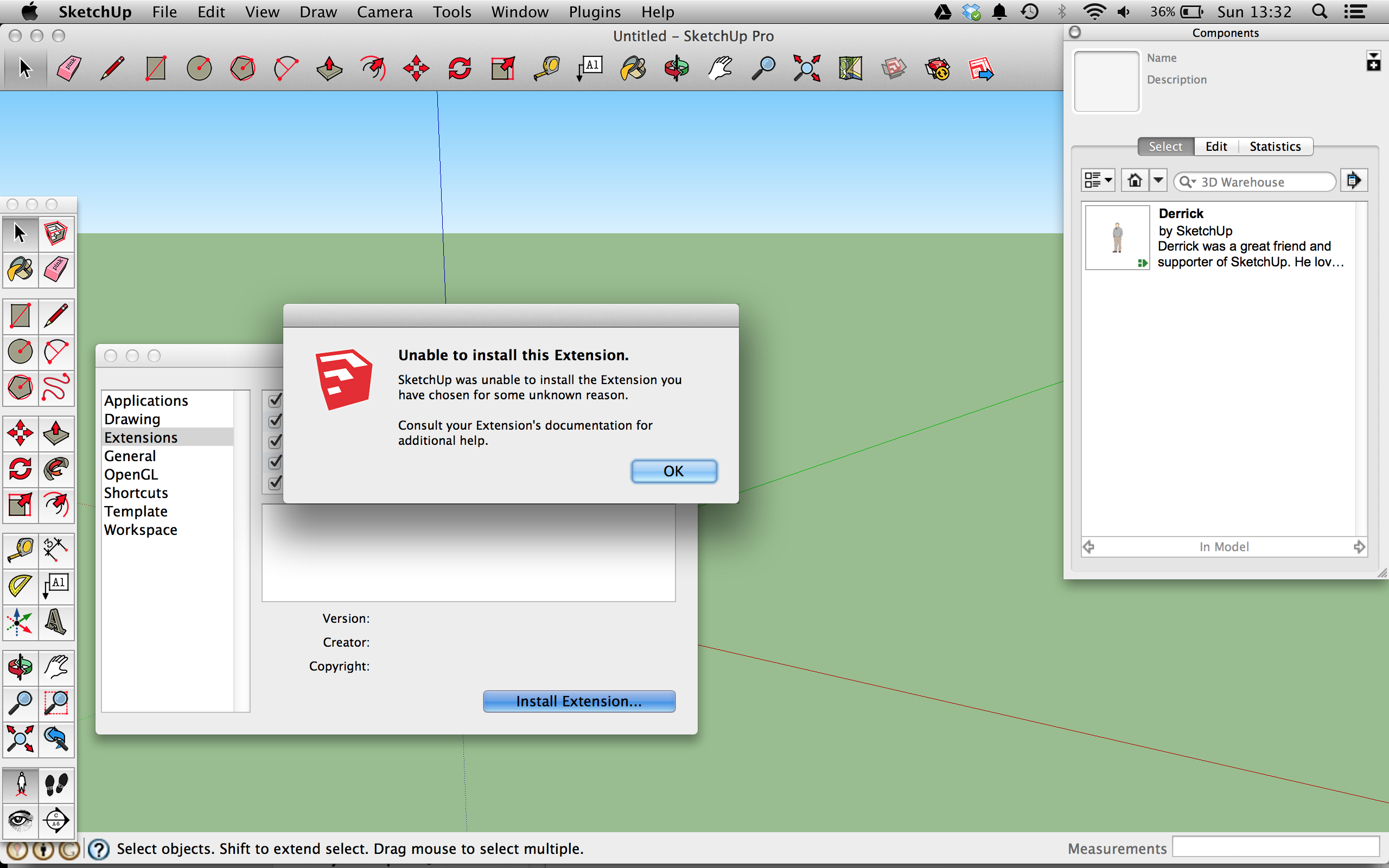
                                    http://res.cloudinary.com/dsafcphpe/image/upload/v1405265665/Screen_Shot_2014-07-13_at_13_32_45_oeagck.png

                                    hope this time will be much better

                                    1 條回覆 最後回覆 回覆 引用 0
                                    • Dave RD 離線
                                      Dave R
                                      最後由 編輯

                                      Did you make sure you have Read & Write permissions set for the Plugins folder?

                                      Etaoin Shrdlu

                                      %

                                      (THERE'S NO PLACE LIKE)

                                      G28 X0.0 Y0.0 Z0.0

                                      M30

                                      %

                                      1 條回覆 最後回覆 回覆 引用 0
                                      • T 離線
                                        taufikohidayat
                                        最後由 編輯

                                        @dave r said:

                                        Did you make sure you have Read & Write permissions set for the Plugins folder?

                                        yes, I have

                                        1 條回覆 最後回覆 回覆 引用 0
                                        • Dave RD 離線
                                          Dave R
                                          最後由 編輯

                                          You must be missing something. I just installed it on my Mac using the ZIP file converted to .rbz as I described, above. It worked just fine. There's nothing wrong with the plugin itself.
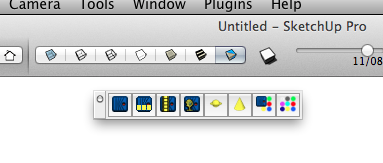
                                          2014-07-13_11-34-43.png

                                          Etaoin Shrdlu

                                          %

                                          (THERE'S NO PLACE LIKE)

                                          G28 X0.0 Y0.0 Z0.0

                                          M30

                                          %

                                          1 條回覆 最後回覆 回覆 引用 0
                                          • T 離線
                                            taufikohidayat
                                            最後由 編輯

                                            @dave r said:

                                            You must be missing something. I just installed it on my Mac using the ZIP file converted to .rbz as I described, above. It worked just fine. There's nothing wrong with the plugin itself.

                                            [attachment=0:2incryk5]<!-- ia0 -->2014-07-13_11-34-43.png<!-- ia0 -->[/attachment:2incryk5]

                                            yeah i know, but I can't figure out what i am missing -__-

                                            1 條回覆 最後回覆 回覆 引用 0
                                            • 1
                                            • 2
                                            • 2 / 2
                                            • 第一個貼文
                                              最後的貼文
                                            Buy SketchPlus
                                            Buy SUbD
                                            Buy WrapR
                                            Buy eBook
                                            Buy Modelur
                                            Buy Vertex Tools
                                            Buy SketchCuisine
                                            Buy FormFonts

                                            Advertisement
