sketchucation logo sketchucation
    • 登入
    Oops, your profile's looking a bit empty! To help us tailor your experience, please fill in key details like your SketchUp version, skill level, operating system, and more. Update and save your info on your profile page today!
    🔌 Smart Spline | Fluid way to handle splines for furniture design and complex structures. Download

    [Plugin] FreeDXF Importer

    已排程 已置頂 已鎖定 已移動 Plugins
    148 貼文 41 Posters 185.0k 瀏覽 41 Watching
    正在載入更多貼文
    • 從舊到新
    • 從新到舊
    • 最多點贊
    回覆
    • 在新貼文中回覆
    登入後回覆
    此主題已被刪除。只有擁有主題管理權限的使用者可以查看。
    • S 離線
      srknytgn
      最後由 編輯

      Hey Jim, please don't mention it : )
      But the same problem is here, I've attached the screenshot.
      I've also tried clean install, but no way.
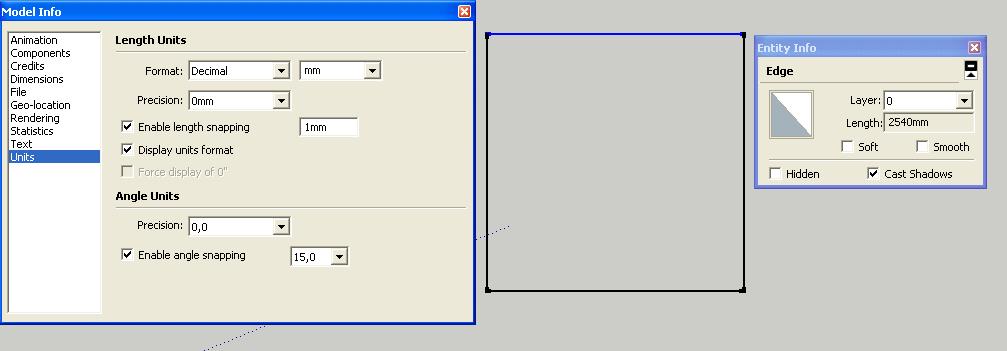

      100x100_square.dxf


      dxf_imp.JPG

      1 條回覆 最後回覆 回覆 引用 0
      • J 離線
        Jim
        最後由 編輯

        I found it - this had to do with updating the options from the UI rather than incorrect scaling factors. Check for version 0.8.2 soon.

        Hi

        1 條回覆 最後回覆 回覆 引用 0
        • S 離線
          srknytgn
          最後由 編輯

          😍
          thanks Jim!

          1 條回覆 最後回覆 回覆 引用 0
          • R 離線
            rungek
            最後由 編輯

            Just today loaded and tried with Make 2014 on Win 7 x64. Does not work!
            Removed

            1 條回覆 最後回覆 回覆 引用 0
            • BoxB 離線
              Box
              最後由 編輯

              Then you must be doing something wrong, but as you've given no information about how it hasn't worked for you nobody can help.

              1 條回覆 最後回覆 回覆 引用 0
              • R 離線
                rungek
                最後由 編輯

                Box. Your right of course so here is the error info. SU reports on startup

                Error: #<SyntaxError: C:/Users/Laptop/AppData/Roaming/SketchUp/SketchUp 2014/SketchUp/Plugins/Dxf_In_v2.2.rb:306: formal argument cannot be an instance variable
                ramFile.each do |@line| #search for entities @line by @line

                                      ^>
                

                Thanks for any help. Maybe just using provious version of Google SU will be easier.

                1 條回覆 最後回覆 回覆 引用 0
                • J 離線
                  Jim
                  最後由 編輯

                  @rungek said:

                  Just today loaded and tried with Make 2014 on Win 7 x64. Does not work!
                  Removed

                  Sorry you are having difficulty.

                  How did you install FreeDXF? What version did you install?

                  The only supported download is from the SketchUcation Plugin Store. The most recent version is 0.8.7. In recent versions of FreeDXF this version number appears right in the Plugins menu.
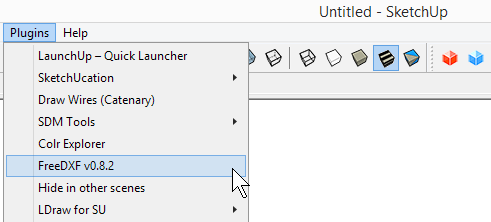
                  2014-04-08_162942.png

                  Is this what you see after installing?

                  Hi

                  1 條回覆 最後回覆 回覆 引用 0
                  • J 離線
                    Jim
                    最後由 編輯

                    @rungek said:

                    Box. Your right of course so here is the error info. SU reports on startup

                    Error: #<SyntaxError: C:/Users/Laptop/AppData/Roaming/SketchUp/SketchUp 2014/SketchUp/Plugins/Dxf_In_v2.2.rb:306: formal argument cannot be an instance variable
                    ramFile.each do |@line| #search for entities @line by @line

                                        ^>
                    

                    Thanks for any help. Maybe just using provious version of Google SU will be easier.

                    This error is not from FreeDXF - it is from a different plugin named Dxf_in.

                    Hi

                    1 條回覆 最後回覆 回覆 引用 0
                    • R 離線
                      rungek
                      最後由 編輯

                      Thanks, still new to this and thought I installed the correct plugin. Works now.

                      1 條回覆 最後回覆 回覆 引用 0
                      • W 離線
                        wootton
                        最後由 編輯

                        I'm also having trouble installing this plugin into Sketchup 2014. I may have the wrong version; I see above that the latest is 0.8.7, but in the filename I downloaded it's 0.8.2, which appears to have been created 2 months ago, and I can't find a more current version. Is "0.8.7" a typo? If not, is there a link to the newer version? I got it from the following link at the Sketchucation download store:

                        Link Preview Image
                        SketchUp Plugins | PluginStore | SketchUcation

                        SketchUp Plugin and Extension Store by SketchUcation provides free downloads of hundreds of SketchUp extensions and plugins

                        favicon

                        (sketchucation.com)

                        The filename is freedfx_v0.8.2.rbz

                        I pasted the file to the following folder on my computer, and restarted SketchUp:

                        C:\Users\tom\AppData\Roaming\SketchUp\SketchUp 2014\SketchUp\Plugins

                        When I try to find it in SketchUp, I don't see a "plugins" icon anywhere, and when I open Ruby console, nothing appears. Have I left out a step?

                        Thanks in advance,
                        Tom

                        Tom Wootton

                        1 條回覆 最後回覆 回覆 引用 0
                        • W 離線
                          wootton
                          最後由 編輯

                          Never mind, I figured it out.

                          Tom Wootton

                          1 條回覆 最後回覆 回覆 引用 0
                          • TIGT 離線
                            TIG Moderator
                            最後由 編輯

                            @wootton said:

                            Never mind, I figured it out.
                            The latest is v0.8.2.
                            You need to install the RBZ archive's contents, using Preferences > Extensions > Install... button...
                            No need to mess on accessing your Plugins folder at all, for this kind of Plugin... Just 'AutoInstall' it...

                            TIG

                            1 條回覆 最後回覆 回覆 引用 0
                            • S 離線
                              SGC
                              最後由 編輯

                              SU 14.1.1282
                              FreeDXF 0.8.2
                              Win7 Pro

                              Jim - when I open the plug-in I'm getting this empty dialog box. I tried reinstalling both the plug-in and SU14, no changes. Any suggestions?
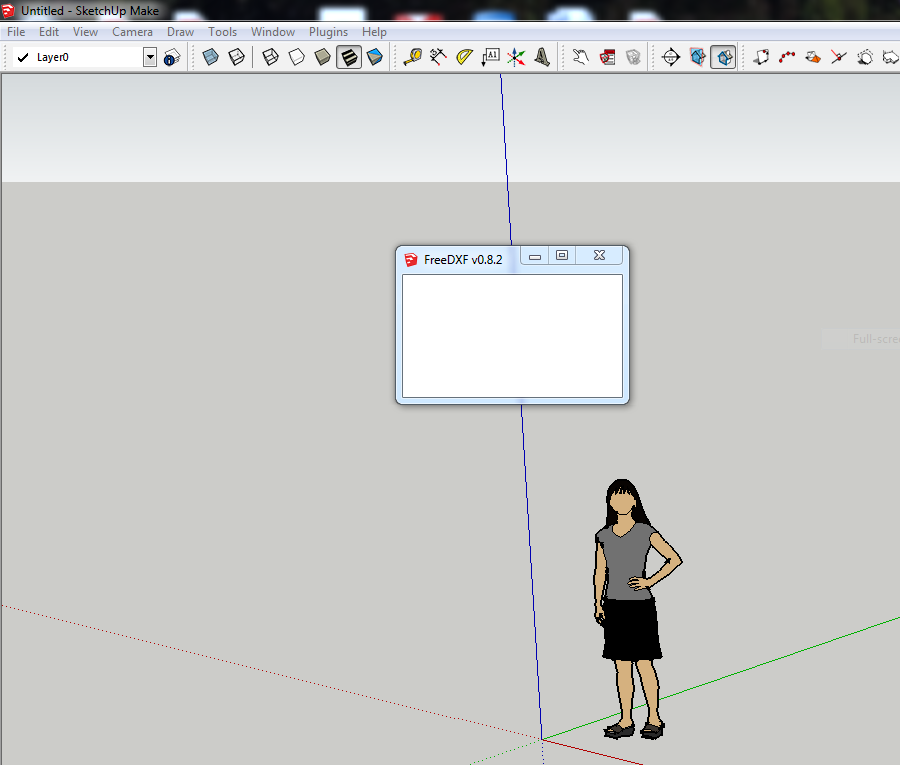

                              Screenshot of dialog box

                              1 條回覆 最後回覆 回覆 引用 0
                              • TIGT 離線
                                TIG Moderator
                                最後由 編輯

                                Open Internet Explorer > Safety > Delete Browsing History and empty the cache...
                                SketchUp uses IE for its web-dialogs, irrespective of your default browser.
                                Sometimes the cache is messed up and needs clearing...
                                Report back...

                                TIG

                                1 條回覆 最後回覆 回覆 引用 0
                                • S 離線
                                  SGC
                                  最後由 編輯

                                  @tig said:

                                  Open Internet Explorer > Safety > Delete Browsing History and empty the cache...
                                  SketchUp uses IE for its web-dialogs, irrespective of your default browser.
                                  Sometimes the cache is messed up and needs clearing...
                                  Report back...

                                  That wasn't it. I deleted temp downloads, cookies, history, and tracking protection from IE, no changes. Did the same in Chrome (my default browser) just to be sure. Restarted SU and still have an empty dialog box when I call up the plugin.

                                  1 條回覆 最後回覆 回覆 引用 0
                                  • J 離線
                                    Jim
                                    最後由 編輯

                                    Hi Stephen - I've not experienced this myself, and don't know why it is happening.

                                    The dialog is made using thomthom's SKUI framework.

                                    Could it be an IE security setting?

                                    Hi

                                    1 條回覆 最後回覆 回覆 引用 0
                                    • TIGT 離線
                                      TIG Moderator
                                      最後由 編輯

                                      Yes, make sure that your IE Internet Options settings for Javascript etc are not overly strict...
                                      Can you get other web-dialogs to work OK ?

                                      TIG

                                      1 條回覆 最後回覆 回覆 引用 0
                                      • D 離線
                                        dpatrickryan
                                        最後由 編輯

                                        Very promising plugin, but it's not 100% for my application. I'm looking for something to allow me to import planar DXF exports of lasercut plans for 3D printer parts (for extrusion and export as STLs). The built-in DXF importer in SketchUp 2014 worked fine, but that Pro-only feature has now expired in my free version. I tried installing the 0.8.2 revision, and everything came in more or less OK, except some of the curve fits to SPLINE elements are pretty chunky. Is there any way to improve the resolution of those curve fits? (I've got no control over the DXF itself - it's what I'm being given by the printer maker.)

                                        1 條回覆 最後回覆 回覆 引用 0
                                        • J 離線
                                          Jim
                                          最後由 編輯

                                          Yeah sorry. Splines are added incorrectly as straight lines between points. I just have not figured out how to handle splines in the dxf yet.

                                          It may help to convert the .dxf to an older version using this: http://www.opendesign.com/guestfiles/TeighaFileConverter

                                          Hi

                                          1 條回覆 最後回覆 回覆 引用 0
                                          • D 離線
                                            dpatrickryan
                                            最後由 編輯

                                            Thanks for that - converting to R12 or R10 DXF seems to do the job.

                                            1 條回覆 最後回覆 回覆 引用 0
                                            • 1
                                            • 2
                                            • 3
                                            • 4
                                            • 5
                                            • 6
                                            • 7
                                            • 8
                                            • 2 / 8
                                            • 第一個貼文
                                              最後的貼文
                                            Buy SketchPlus
                                            Buy SUbD
                                            Buy WrapR
                                            Buy eBook
                                            Buy Modelur
                                            Buy Vertex Tools
                                            Buy SketchCuisine
                                            Buy FormFonts

                                            Advertisement
