sketchucation logo sketchucation
    • 登入
    Oops, your profile's looking a bit empty! To help us tailor your experience, please fill in key details like your SketchUp version, skill level, operating system, and more. Update and save your info on your profile page today!
    🔌 Smart Spline | Fluid way to handle splines for furniture design and complex structures. Download

    [Plugin] FreeDXF Importer

    已排程 已置頂 已鎖定 已移動 Plugins
    148 貼文 41 Posters 185.0k 瀏覽 41 Watching
    正在載入更多貼文
    • 從舊到新
    • 從新到舊
    • 最多點贊
    回覆
    • 在新貼文中回覆
    登入後回覆
    此主題已被刪除。只有擁有主題管理權限的使用者可以查看。
    • J 離線
      Jim
      最後由 編輯

      Sorry 'bout that, Dekker. I am haphazard with my plugins - but I'm glad you found inputbox.rb

      Any thoughts on the importer?

      Hi

      1 條回覆 最後回覆 回覆 引用 0
      • thomthomT 離線
        thomthom
        最後由 編輯

        The link to inputbox.rb is dead.

        Thomas Thomassen — SketchUp Monkey & Coding addict
        List of my plugins and link to the CookieWare fund

        1 條回覆 最後回覆 回覆 引用 0
        • thomthomT 離線
          thomthom
          最後由 編輯

          Does it handle materials in any way?

          Thomas Thomassen — SketchUp Monkey & Coding addict
          List of my plugins and link to the CookieWare fund

          1 條回覆 最後回覆 回覆 引用 0
          • J 離線
            Jim
            最後由 編輯

            @thomthom said:

            Does it handle materials in any way?

            No. I don't remember seeing a "material" or "color" property for dxf entities. Isn't the color based on an entities' layer?

            Hi

            1 條回覆 最後回覆 回覆 引用 0
            • TIGT 離線
              TIG Moderator
              最後由 編輯

              You are right.
              A DXF file gives objects layers, and those layers have colors.
              If you take the SKP layers the colors export as random colors.
              Even with similar SKPs newly made layers get unconnected colors.
              It's possible to rationalize a DXF by post processing it's text - I have a commercial tool I've written which uses the native DXF exporter, but where the client wanted all DXF layers to be consistently colored; so it has a 'lookup table' and ensures consistency by 'stream-editing' the DXF's text after it's made.
              Another way to have materials==colors is to export a custom made DXF but ignore the SKP's layers and using each material as if it were a DXF-layer... that way objects in the DXF are then grouped by each DXF 'layer' which is really made from the SKP's material-color rather than the proper SKP-layer...

              TIG

              1 條回覆 最後回覆 回覆 引用 0
              • J 離線
                Jim
                最後由 編輯

                Dec 2011 - I have removed the external dependency on my inputbox.rb - it is no longer required as a separate download. Also, I attached the download to the first post of this topic rather than linking to an external site. Hopefully, these changes will make it easier for folks to try.

                Hi

                1 條回覆 最後回覆 回覆 引用 0
                • thomthomT 離線
                  thomthom
                  最後由 編輯

                  Is DXF extendable? I wonder if AutoDesk writes DXF with extra material info..?

                  Thomas Thomassen — SketchUp Monkey & Coding addict
                  List of my plugins and link to the CookieWare fund

                  1 條回覆 最後回覆 回覆 引用 0
                  • TIGT 離線
                    TIG Moderator
                    最後由 編輯

                    A DXF can include all the types of data that you get in a DWG file itself.
                    However, as objects have layers and layers have colors, that's it.
                    You can assign attributes to objects containing additional info, so you can pass [otherwise-unused] data... but how that's useful later on is questionable.

                    TIG

                    1 條回覆 最後回覆 回覆 引用 0
                    • thomthomT 離線
                      thomthom
                      最後由 編輯

                      I'm trying to find a good way to export a Revit model to SketchUp.

                      I have tried exporting to FBX and then use Autodesk's converter utility to convert to DAE - but that fails on import every time on any model in SU. Fail in Blender as well.

                      DWG and DXF import in SU - but uses layer material, as you describe. However, if I import the same DXF into another Autodesk application like 3DS - the materials are like how they where defined in Revit. And that is why I'm exploring this topic.

                      Thomas Thomassen — SketchUp Monkey & Coding addict
                      List of my plugins and link to the CookieWare fund

                      1 條回覆 最後回覆 回覆 引用 0
                      • J 離線
                        Jim
                        最後由 編輯

                        FreeDXF imports acad layers as SketchUp Groups, so it may be possible to color the Groups according to their acad layer color number.

                        Hi

                        1 條回覆 最後回覆 回覆 引用 0
                        • S 離線
                          syfyguy
                          最後由 編輯

                          It doesn't seem to work for me. I have Sketchup 8, with the new maintenance pack. It shows up in the plugins menu, then when executed it asks for arc segments, etc. When I click ok, nothing shows up. I'm using DWGeditor 2007 to create dxfs in ASCii 2007 format.

                          1 條回覆 最後回覆 回覆 引用 0
                          • J 離線
                            Jim
                            最後由 編輯

                            @syfyguy said:

                            It doesn't seem to work for me. I have Sketchup 8, with the new maintenance pack. It shows up in the plugins menu, then when executed it asks for arc segments, etc. When I click ok, nothing shows up. I'm using DWGeditor 2007 to create dxfs in ASCii 2007 format.

                            Can you post or send the file?

                            Hi

                            1 條回覆 最後回覆 回覆 引用 0
                            • T 離線
                              Tenere
                              最後由 編輯

                              😢 %(#4000FF)[I've got a script not loading error on start with free version 8.0.4811.
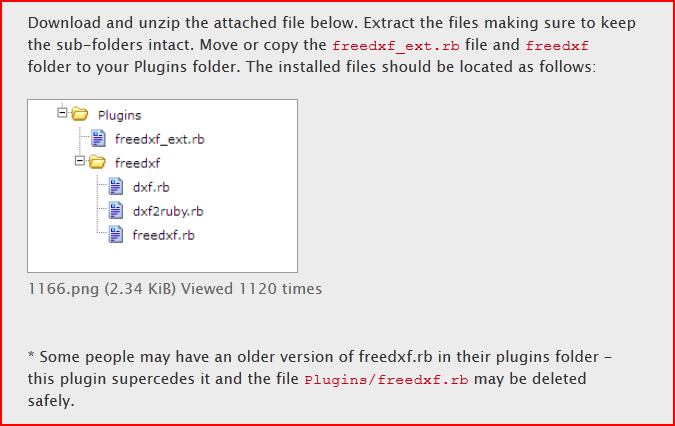
                              I would assume I had the files in the right places although I can't see the folder layout image in the script posting - just an image name.
                              Bound to be missing the obvious, be grateful if someone could nudge me in the right direction......cheers.

                              Ooh one other question......Can I load the SU pro trial in tandem with my free version without bu#@ering it up or compromising the trial?....would quite like to see what I'm missing.] 👍

                              1 條回覆 最後回覆 回覆 引用 0
                              • TIGT 離線
                                TIG Moderator
                                最後由 編輯

                                Capture.PNG Does you Sketchup Plugins folder look like this ?

                                TIG

                                1 條回覆 最後回覆 回覆 引用 0
                                • T 離線
                                  Tenere
                                  最後由 編輯

                                  %(#0000FF)[👍 Hi Tig
                                  Thanks for responding. My directory looks correct, are there any dependencies I may be missing?
                                  I did read something in an earlier incarnation about the file naming system having to be basic without spaces ('joliet' stuff!!), it looks a bit more like an issue in that direction perhaps, paths & stuff....he says clutching at straws!!
                                  Error:]

                                  Error Loading File C:/Program Files/Google/Google SketchUp 8/Plugins/freedxf/freedxf.rb
                                  no such file to load -- inputboxError Loading File freedxf_ext.rb
                                  no such file to load -- inputbox

                                  %(#0000FF)[.......The file is definitely there!
                                  Being skint takes up a lot of my time! Just can't justify the Pro version though so your help is much appreciated!]

                                  1 條回覆 最後回覆 回覆 引用 0
                                  • J 離線
                                    JMdesigns
                                    最後由 編輯

                                    I am having the same problem? but it does not let me inmport

                                    1 條回覆 最後回覆 回覆 引用 0
                                    • TIGT 離線
                                      TIG Moderator
                                      最後由 編輯

                                      The download page's image is wrong !
                                      There should also be the file
                                      inputbox.rb
                                      in the subfolder.Capture.PNG
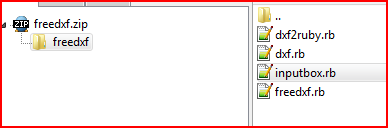
                                      IF you get the latest zipped version of the tool it should include that file !

                                      TIG

                                      1 條回覆 最後回覆 回覆 引用 0
                                      • T 離線
                                        Tenere
                                        最後由 編輯

                                        Bingo....your a star Tig
                                        That sorted it, many thanks for your expertise. I'm raising a beer to you right now!....Hic!....well it is Friday!

                                        1 條回覆 最後回覆 回覆 引用 0
                                        • J 離線
                                          juergen
                                          最後由 編輯

                                          Handling metric units would realy be a plus. It is easily possible to scale from metric to imperial but the reverse is no as easy as it requires to scale by a fractional number.
                                          As all my DXFs are in cm I can not use FreeDXF.

                                          Please consider supporting metric drawings.

                                          PS: If somebody knows a way, please reply!

                                          1 條回覆 最後回覆 回覆 引用 0
                                          • TIGT 離線
                                            TIG Moderator
                                            最後由 編輯

                                            1" is 2.54cm
                                            therefore
                                            1cm is 0.393700787401574803" [1/2.54]
                                            However, Sketchup's in-built accuracy regards 0.3937007" as being 'exactly' 1cm... so you can use that [or even 0.3937] as your scaling factor. After all we are talking about modeling 'buildings' here, not 'swiss-watches'...


                                            TIG

                                            1 條回覆 最後回覆 回覆 引用 0
                                            • 1
                                            • 2
                                            • 3
                                            • 4
                                            • 5
                                            • 6
                                            • 7
                                            • 8
                                            • 3 / 8
                                            • 第一個貼文
                                              最後的貼文
                                            Buy SketchPlus
                                            Buy SUbD
                                            Buy WrapR
                                            Buy eBook
                                            Buy Modelur
                                            Buy Vertex Tools
                                            Buy SketchCuisine
                                            Buy FormFonts

                                            Advertisement