sketchucation logo sketchucation
    • 登入
    Oops, your profile's looking a bit empty! To help us tailor your experience, please fill in key details like your SketchUp version, skill level, operating system, and more. Update and save your info on your profile page today!
    🔌 Smart Spline | Fluid way to handle splines for furniture design and complex structures. Download

    [Plugin] 2D Tools

    已排程 已置頂 已鎖定 已移動 Plugins
    791 貼文 178 Posters 523.0k 瀏覽 177 Watching
    正在載入更多貼文
    • 從舊到新
    • 從新到舊
    • 最多點贊
    回覆
    • 在新貼文中回覆
    登入後回覆
    此主題已被刪除。只有擁有主題管理權限的使用者可以查看。
    • TIGT 離線
      TIG Moderator
      最後由 編輯

      The very fact that LayerWatcher adds an EntitiesObserver onto the model.entities seems to make the Fillet tool crash when there's an Undo [in a chain of more than one fillet operation] either within the tool's operation or later on, even if the undo is not in the model.entities context!

      If I have an 'empty' EntitiesObserver that does zilch, the Fillet's Undo will still crash, so it's not because it's doing anything - it just needs to exist to cause the issue !

      This is weird. 😲
      I made a simple other tools with a similar 'empty' entities observer and this also causes this issue with the Fillet's Undo.
      So it's not LayerWatcher's fault per se, but how Fillet's Undo reacts to it !

      I can't see an immediate fix...
      I might have to sleep on it...
      😕

      PS: Many other tools do similar things to the Fillet, and they will Undo without an issue.
      The Fillet tool is slightly unusual in that it makes its arc inside a group and then inserts that into another group of geometry and explodes it, to force a merging of geometry while maintain the arc's curve properties. The original group's definition is deleted. Perhaps this methodology can be reassessed...
      💭

      TIG

      1 條回覆 最後回覆 回覆 引用 0
      • josephkim626J 離線
        josephkim626
        最後由 編輯

        I can't possible understand everything that you described, but there is no urgency in this. So, I wouldn't mind letting your genius brain do its magic.

        I've also noticed upon undo with fillet tool, it adds extra undos in case of fillet radius value change. I do not know if that was an intended behavior, but I find it a bit odd. Maybe that's something that ties with your methodology?

        Thank you TIG. 👍

        1 條回覆 最後回覆 回覆 引用 0
        • TIGT 離線
          TIG Moderator
          最後由 編輯

          Here's v7.0 http://sketchucation.com/pluginstore?pln=2Dtools
          It's made into an extension.
          The Fillet tool now sidesteps the issues from some 3rd-party plugins EntitiesObservers.
          Also general future-proofing.

          TIG

          1 條回覆 最後回覆 回覆 引用 0
          • josephkim626J 離線
            josephkim626
            最後由 編輯

            Beautiful TIG!

            I will try it out as soon as I can!
            I thought you were gonna sleep on it 😉

            1 條回覆 最後回覆 回覆 引用 0
            • TIGT 離線
              TIG Moderator
              最後由 編輯

              Going to sleep now !
              😉

              TIG

              1 條回覆 最後回覆 回覆 引用 0
              • TIGT 離線
                TIG Moderator
                最後由 編輯

                Here's v7.1 http://sketchucation.com/pluginstore?pln=2Dtools There are several minor coding tweaks to try and work around a reported MAC issue [with my LayerWatcher!]...
                Feedback appreciated...

                TIG

                1 條回覆 最後回覆 回覆 引用 0
                • TIGT 離線
                  TIG Moderator
                  最後由 編輯

                  Here's v7.2 http://sketchucation.com/pluginstore?pln=2Dtools There are several more coding typo fixes to try and work around a reported MAC issue [with my LayerWatcher!]...
                  Feedback appreciated...

                  TIG

                  1 條回覆 最後回覆 回覆 引用 0
                  • TIGT 離線
                    TIG Moderator
                    最後由 編輯

                    Here's v7.3 http://sketchucation.com/pluginstore?pln=2Dtools The tool that used to set up the main tools' commands has been recast as a simple class instance, to avoid issues with MACs caused by having a tool activated as SketchUp initially loads...

                    TIG

                    1 條回覆 最後回覆 回覆 引用 0
                    • I 離線
                      ivreich
                      最後由 編輯

                      Hi TIG

                      I've found a new bug with v7.3 of this plugin when running SU 2016...

                      When creating 2D fillets , the resultant geometry no longer shows as pure arcs, but exploded edges. Have attached a screenshot.

                      There are no ruby console error messages, and it works fine in SU 2015.

                      Cheers!

                      Joel
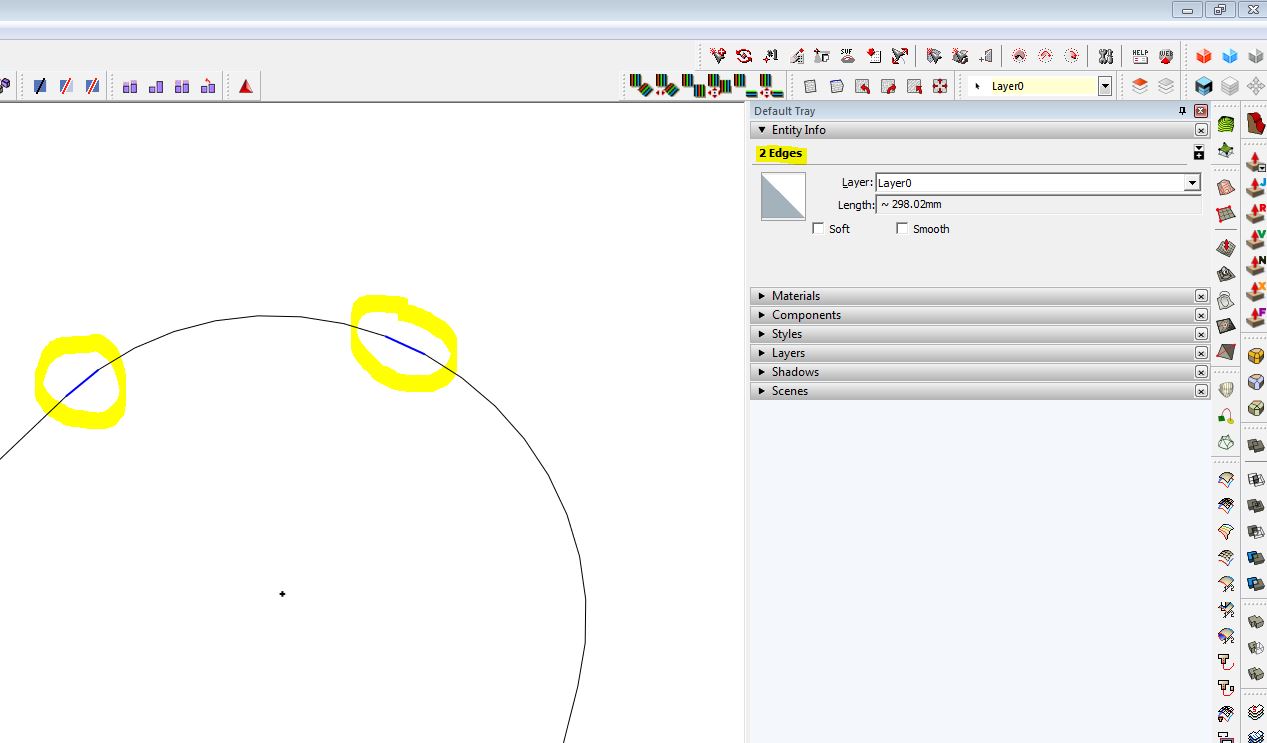

                      Exploded edges, with some strange selection behaviour (2 selected at the same time with a single click)

                      1 條回覆 最後回覆 回覆 引用 0
                      • TIGT 離線
                        TIG Moderator
                        最後由 編輯

                        The 2d fillet's creation was changed to avoid problems with the new Observer regime in v2016.
                        This is the first reported issue.
                        I just retested it [v7.3 with v2016] very extensively and I got a perfect arc for the fillet every time...
                        But obviously that change looks like the probable cause of your glitch...
                        Does it occur every time for you ?
                        Do you have many other plugins loaded which might have skewed entities observers etc ?
                        Can you please post a simple SKP, with before and after examples of what you are seeing...

                        TIG

                        1 條回覆 最後回覆 回覆 引用 0
                        • I 離線
                          ivreich
                          最後由 編輯

                          Hi TIG

                          I'm not sure how to check if my other plugins conflict with 2D tools, but I've attached a SU 2016 file showing what I get when I try to fillet 2 edges with the plugin. It occurs every time with SU 2016, but works fine with SU 2015 (for me).

                          Hope this helps!

                          Cheers,
                          Joel


                          SU 2016 file

                          1 條回覆 最後回覆 回覆 引用 0
                          • Dave RD 離線
                            Dave R
                            最後由 編輯

                            Very weird. I just opened your SKP file and selected the fillet. It's not exploded and reports as an arc with a radius which it wouldn't do if it was or had been exploded.
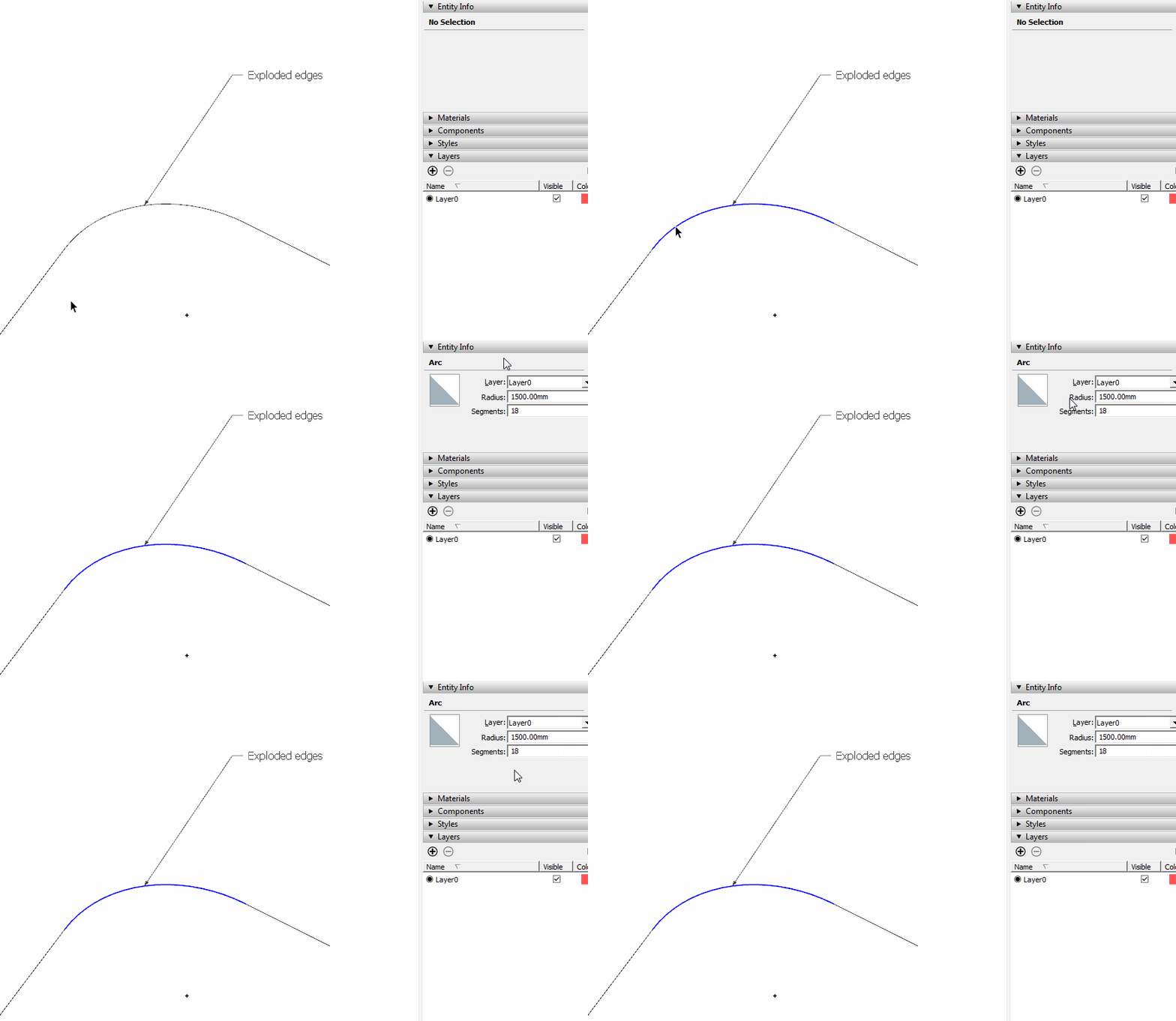
                            Fillet.gif
                            Click on the picture.

                            Edit: Even weirder is that I get the same exploded arc when I run the 2D Fillet tool on the other corner. And notice one segment remains highlighted when I click on the others with Select. No modifier key was being held. Entity Info reports edges selected not an arc.
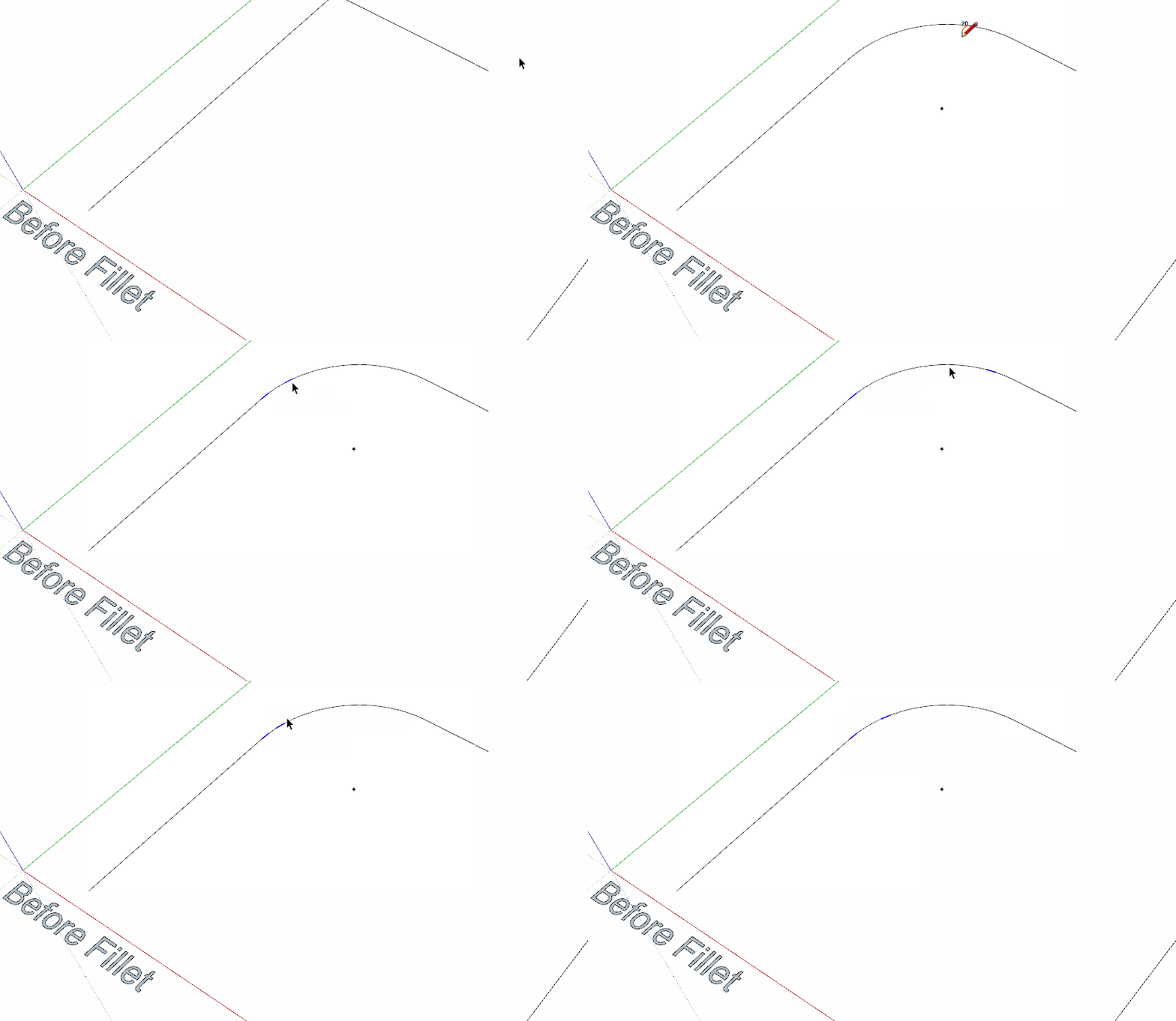
                            Fillet2.gif
                            Click.

                            Etaoin Shrdlu

                            %

                            (THERE'S NO PLACE LIKE)

                            G28 X0.0 Y0.0 Z0.0

                            M30

                            %

                            1 條回覆 最後回覆 回覆 引用 0
                            • I 離線
                              ivreich
                              最後由 編輯

                              Yup that is very weird. But the second image you described is exactly what happens whenever I try to run the fillet tool on SU 2016...one edge remains consistently highlighted and the curve reports as a series of edges...not an arc.

                              Cheers
                              J

                              1 條回覆 最後回覆 回覆 引用 0
                              • TIGT 離線
                                TIG Moderator
                                最後由 編輯

                                OK

                                I can see it happening too 😲

                                It the two picked Edges form a Face, then the Fillet is an Arc.
                                It those Edges have no Face then the Arc is getting exploded into weird bits !
                                All my tests were on faced-edges - which is supposedly the more awkward process !

                                I'll investigate - I'll announce the update as soon as I find the problem - and fix it...

                                TIG

                                1 條回覆 最後回覆 回覆 引用 0
                                • TIGT 離線
                                  TIG Moderator
                                  最後由 編輯

                                  Here's v7.4 http://sketchucation.com/pluginstore?pln=2Dtools
                                  The Fillet tool is changed for compatibility with all + >= v2016
                                  [important when its fillets are NOT applied onto a faced area]
                                  Also the Fillet tool now helpfully highlights selected lines etc.

                                  TIG

                                  1 條回覆 最後回覆 回覆 引用 0
                                  • I 離線
                                    ivreich
                                    最後由 編輯

                                    Brilliant, Thanks TIG

                                    Cheers,
                                    J

                                    1 條回覆 最後回覆 回覆 引用 0
                                    • JQLJ 離線
                                      JQL
                                      最後由 編輯

                                      I noticed I cannot change linetype. It says right click for options but right click shows a context menu without any 2D tool entries.

                                      www.casca.pt
                                      Visit us on facebook!

                                      1 條回覆 最後回覆 回覆 引用 0
                                      • TIGT 離線
                                        TIG Moderator
                                        最後由 編輯

                                        @jql said:

                                        I noticed I cannot change linetype. It says right click for options but right click shows a context menu without any 2D tool entries.
                                        To [re]set the Line-Style you have to right-click in 'open space', otherwise the right-click activates the default context-menu...

                                        TIG

                                        1 條回覆 最後回覆 回覆 引用 0
                                        • JQLJ 離線
                                          JQL
                                          最後由 編輯

                                          Does it count if you are inside a group/component, with hide rest of model turned on and click on empty space there.

                                          The first entry actually says "close group" and then I have some context menu options as you say.

                                          www.casca.pt
                                          Visit us on facebook!

                                          1 條回覆 最後回覆 回覆 引用 0
                                          • TIGT 離線
                                            TIG Moderator
                                            最後由 編輯

                                            @JQL

                                            You're right - after all of these years !
                                            There is no context-menu when right-clicking in empty space in the model entities context, but there is when inside an edit mode...
                                            You can of course set the 2dLineStyle when in the model entities context and that will be used in the edit context.
                                            Or use the default 2dLineStyle on one piece and then select it and edit its 2dLineStyle, resetting the selected's 2dLineStyle that way...

                                            It also occurs in the '2dHatch' tool, when trying to reset the 'PATT' !

                                            This is clearly quite unsatisfactory - so I'll look at how I might fix it...

                                            TIG

                                            1 條回覆 最後回覆 回覆 引用 0
                                            • 1
                                            • 2
                                            • 3
                                            • 4
                                            • 5
                                            • 6
                                            • 7
                                            • 39
                                            • 40
                                            • 5 / 40
                                            • 第一個貼文
                                              最後的貼文
                                            Buy SketchPlus
                                            Buy SUbD
                                            Buy WrapR
                                            Buy eBook
                                            Buy Modelur
                                            Buy Vertex Tools
                                            Buy SketchCuisine
                                            Buy FormFonts

                                            Advertisement