sketchucation logo sketchucation
    • 登入
    Oops, your profile's looking a bit empty! To help us tailor your experience, please fill in key details like your SketchUp version, skill level, operating system, and more. Update and save your info on your profile page today!
    🔌 Smart Spline | Fluid way to handle splines for furniture design and complex structures. Download

    [Plugin] 2D Tools

    已排程 已置頂 已鎖定 已移動 Plugins
    791 貼文 178 Posters 522.8k 瀏覽 177 Watching
    正在載入更多貼文
    • 從舊到新
    • 從新到舊
    • 最多點贊
    回覆
    • 在新貼文中回覆
    登入後回覆
    此主題已被刪除。只有擁有主題管理權限的使用者可以查看。
    • Dave RD 離線
      Dave R
      最後由 編輯

      Howard, you may have hit the nail on the head. You might try to find out by removing other plugins temporarily and trying the fillets.

      Etaoin Shrdlu

      %

      (THERE'S NO PLACE LIKE)

      G28 X0.0 Y0.0 Z0.0

      M30

      %

      1 條回覆 最後回覆 回覆 引用 0
      • TIGT 離線
        TIG Moderator
        最後由 編輯

        As the title-bar says "v5.2" you could also try upgrading to the latest version...
        @unknownuser said:

        v5.1 20111201 Newly reported glitch fixed with 2dLine, so that now pressing the keyboard '0' when typing in a number on a PC it doesn't mistake for TAB >> Z-height!
        v5.2 20120228 2dFillet segment range adjusted to >=2 <=999.
        ??? I don't think any of these changes are important BUT you never know 😕

        TIG

        1 條回覆 最後回覆 回覆 引用 0
        • H 離線
          Howard leslie
          最後由 編輯

          TIG,
          The version of 2D Tools that I have installed is from 2D_Tools52.zip.
          When I got the bug splats I made sure I had the latest version before reporting any possible bugs.
          ...........
          The text I quoted above was from the notes inside the #2d.rb file.
          I shouldn't have quoted this - its a bit misleading - as I see now that there are many *.rb files inside the zip file that you may have updated on the last release - not just the one.
          ............
          If its tricky to track the bug down / reproduce the fault - don't worry about it as I can work round it.
          However, if I notice anything else, or any other possible leads I'll report it.
          .............
          Brilliant plugin by the way
          ..............
          Thanks once again

          Howard L'

          1 條回覆 最後回覆 回覆 引用 0
          • Dave RD 離線
            Dave R
            最後由 編輯

            Did you try removing the other plugins in the Plugins folder and running just 2D Tools? It doesn't appear to be a bug in the 2D Tools set. If it was, there'd be a large number of complaints and that doesn't seem to be the case.

            Etaoin Shrdlu

            %

            (THERE'S NO PLACE LIKE)

            G28 X0.0 Y0.0 Z0.0

            M30

            %

            1 條回覆 最後回覆 回覆 引用 0
            • ninomaydaN 離線
              ninomayda
              最後由 編輯

              Superb Tool. A "must" to all SKPrs. Attached please find Xcel sheet to assist calculating text size dependant on final presentation (Layout) drawing scales.


              Text Height Scale Factor

              1 條回覆 最後回覆 回覆 引用 0
              • M 離線
                Milo
                最後由 編輯

                Fantastic tools thank you very much !!!

                FaceBook

                1 條回覆 最後回覆 回覆 引用 0
                • HelmiH 離線
                  Helmi
                  最後由 編輯

                  Thanks for that great tool.

                  Still one question left: I can't seem to decode NNs/NNx/Rad with the 2D polygon and NNs or Rad with the circle. No matter what i enter there it doesn't seem to affect anything. I tried to rise the segments of the circle but can't seem to get it and couldn't find any docs for that?

                  Any help would be highly appreciated.

                  Thanks!

                  1 條回覆 最後回覆 回覆 引用 0
                  • TIGT 離線
                    TIG Moderator
                    最後由 編輯

                    @helmi said:

                    Thanks for that great tool.

                    Still one question left: I can't seem to decode NNs/NNx/Rad with the 2D polygon and NNs or Rad with the circle. No matter what i enter there it doesn't seem to affect anything. I tried to rise the segments of the circle but can't seem to get it and couldn't find any docs for that?

                    Any help would be highly appreciated.

                    Thanks!
                    Please look at the installed toolset there's a help menu/toolbar item... this opens the file inside the ../Plugins/2Dtools/ folder called '2DtoolsHelp.htm'...
                    There's detailed explanations about using each tool.
                    If you want to change the number of sides in a Polygon or Circle [in 2Dtools OR the native-tools] typing 99s changes to 99 segments..., typing in a number e.g. 99 sets the radius to that in 'current units' - you could also type 99mm to set it to that, even if the current units weren't 'mm'...
                    With 2d Polygons the extra option of typing 99x sets the 'width' across edges rather than across vertices...

                    TIG

                    1 條回覆 最後回覆 回覆 引用 0
                    • HelmiH 離線
                      Helmi
                      最後由 編輯

                      Thanks, TIG. Didn't notice that help menu item. Great work, thanks a lot!

                      1 條回覆 最後回覆 回覆 引用 0
                      • B 離線
                        Ben Ritter
                        最後由 編輯

                        TIG,

                        I'm having some bug splat issues while using the fillet tool. I did a clean reinstall of SU8 Pro and slowly started adding in plugins. Well I add your 2D Tools and can only create one fillet to say, a rectangular surface. Once I try filleting a second corner of the rectangle, it bumps me out of SU. Any suggestions?

                        Thanks. Ben

                        1 條回覆 最後回覆 回覆 引用 0
                        • TIGT 離線
                          TIG Moderator
                          最後由 編輯

                          Works OK for me - very similar setup.
                          There might be a clash with another tool making ill-advised changes to base-classes.
                          Many tools, like fillet, need to make a group etc and manipulate it, so 3rd party tools mess with the Sketchup::Group class and break legit operations...
                          Possible culprits are SketchyPhysics, DrivingDimensions, Matchbox, SolarPosition, possibly earlier versions of Podium etc... do you have any of these, or other esoteric files loading ?
                          If so, if you disable them does the crash still happen...
                          If you have installed one of the older compilation 'toolbar' sets these too can add old Sketchup.rb, extensions.rb files etc into Plugins, when the equivalent new system files are automatically installed by Sketchup in the correct location in the Tools folder ! This can also have subtle effects that mess up unexpectedly... remove those and leave the proper ones in Tools...

                          Assuming it's still failing...
                          If you run fillet with the Ruby Console open before doing any filleting do you get any messages; is a 'Bugsplat crash' or a 'hang' etc ?

                          Are your fillets very large or very small ?
                          Can you post an example SKP that fails for you, with instructs on the two edges to pick, the radius to use etc... It should work effortlessly.

                          TIG

                          1 條回覆 最後回覆 回覆 引用 0
                          • B 離線
                            Ben Ritter
                            最後由 編輯

                            TIG,

                            I don't have any of the plugins you mention except for the latest Podium version.

                            The sample skp file is attached along with the plugins I have installed.

                            The ruby console did not display anything prior to the crash.

                            Thanks.
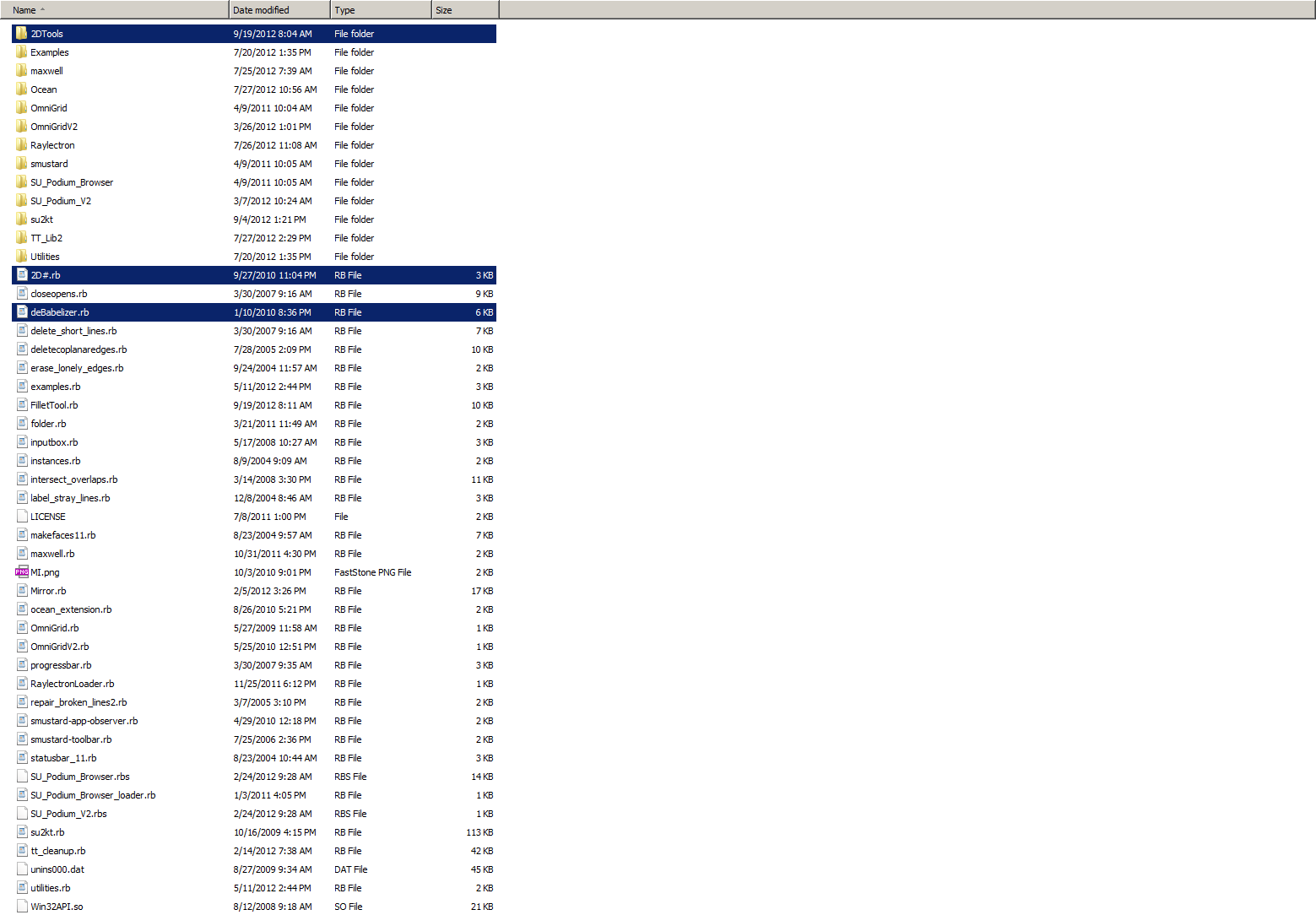

                            test.skp


                            plugins.png

                            1 條回覆 最後回覆 回覆 引用 0
                            • TIGT 離線
                              TIG Moderator
                              最後由 編輯

                              It works fine for me. 😕
                              Have you tried disabling Podium and retrying ?
                              I don't have these two either:
                              Raylectron
                              and
                              Omnigrid
                              [you seem to have TWO versions loading - surely you only need the one ?]
                              If you disable those what happens ?

                              TIG

                              1 條回覆 最後回覆 回覆 引用 0
                              • B 離線
                                Ben Ritter
                                最後由 編輯

                                TIG, thanks for your reply, and assistance. I uninstalled Podium, Raylectron and Omnigrid, and the fillet worked great. I then re-installed Podium and SU crashed. It's just strange that it is happening now when I've had both on my machine before and never had a problem.

                                Ben

                                1 條回覆 最後回覆 回覆 引用 0
                                • bagateloB 離線
                                  bagatelo
                                  最後由 編輯

                                  I'm trying to use this plugin at first time.
                                  Why "2D Fillet" erase the entire line?
                                  Chamfer works OK.

                                  My SU is 8.0.15158

                                  While the cat's away, the mice will play

                                  1 條回覆 最後回覆 回覆 引用 0
                                  • Dave RD 離線
                                    Dave R
                                    最後由 編輯

                                    What is the radius of the fillet set to?

                                    Etaoin Shrdlu

                                    %

                                    (THERE'S NO PLACE LIKE)

                                    G28 X0.0 Y0.0 Z0.0

                                    M30

                                    %

                                    1 條回覆 最後回覆 回覆 引用 0
                                    • TIGT 離線
                                      TIG Moderator
                                      最後由 編輯

                                      It shouldn't erase any lines 😕 , except to trim them back to the arc of the radius specified.
                                      The default radius is 0, this effectively makes the tool a trim/extend tool, entering a +ve radius will fillet any two coplanar edges that you click on, adding a guide-point at the new arc's center. Selected edges are trimmed/extended to suit.
                                      The only time it might play up is if you pick two lines that are all-but-parallel and apply a large radius, but even then the lines should get replaced by the arc ?
                                      Can you confirm your entered radius setting for the fillet [remembered with each SKP as the last used value] and perhaps post a simple example SKP of some lines that will fail for you, so we can test what's happening...
                                      Because 'chamfer' is working OK, then I suspect you are misconstruing the fillet radius input option?
                                      To change the number of segments you type Ns (+<enter>) where N might be 24 ... 24s; to enter the radius type a number (+<enter>) e.g. 123 which becomes the radius in the current Model Units, e.g. 123mm.
                                      To enter a radius in units other that the current Model Units - e.g. you are working in 'm' but you want to type the fillet in 'mm' you just need to use a units suffix on the entered value - so typing 123mm (+<enter>) will make the radius 0.123m automatically... You could even model in ft/ins but type in some radii in 'mm' this way ! 😒

                                      TIG

                                      1 條回覆 最後回覆 回覆 引用 0
                                      • bagateloB 離線
                                        bagatelo
                                        最後由 編輯

                                        Here you have my example file who works fine for Chamfer but not for fillet.
                                        Yes, I not use zero cm for chamfer or fillet.


                                        FILLET FAIL.skp

                                        While the cat's away, the mice will play

                                        1 條回覆 最後回覆 回覆 引用 0
                                        • Dave RD 離線
                                          Dave R
                                          最後由 編輯

                                          Fillet success for me. Four times, four different radii.
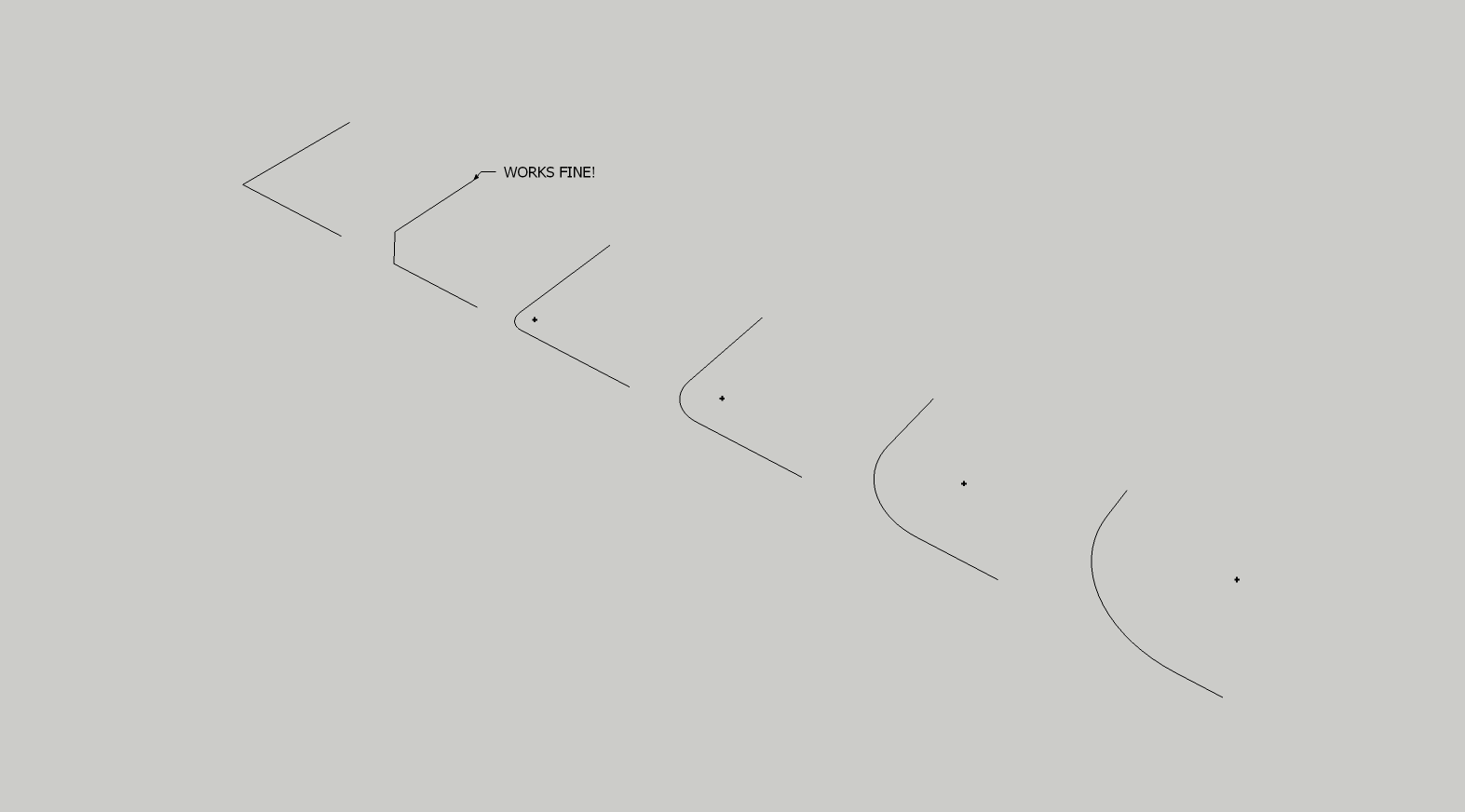
                                          FILLET FAIL.png

                                          Hmmm.....

                                          Is it possible there's a conflict with another plugin? Perhaps one of those known to cause problems?


                                          FILLET FAIL.skp

                                          Etaoin Shrdlu

                                          %

                                          (THERE'S NO PLACE LIKE)

                                          G28 X0.0 Y0.0 Z0.0

                                          M30

                                          %

                                          1 條回覆 最後回覆 回覆 引用 0
                                          • TIGT 離線
                                            TIG Moderator
                                            最後由 編輯

                                            Good point. ☀
                                            If you have SketchyPhysics loading disable it, restart and retry fillet...
                                            The current version of SP messes with some of the native API group manipulation tools [needed by this and many other tools to separate geometry during processing]... and thereby some legit scripts that are innocently expecting the API code to work as it should can fail***. I understand SP is undergoing a long overdue revamp and this issue WILL then hopefully be fixed...
                                            Other 'suspects' include DrivingDimensions, Matchbox, SunPosition, some versions of Podium etc...

                                            However since 'Chamfer' uses similar processes why is that working OK while 'Fillet' fails ??

                                            ***Do you get any Ruby Console error messages ?

                                            TIG

                                            1 條回覆 最後回覆 回覆 引用 0
                                            • 1
                                            • 2
                                            • 30
                                            • 31
                                            • 32
                                            • 33
                                            • 34
                                            • 39
                                            • 40
                                            • 32 / 40
                                            • 第一個貼文
                                              最後的貼文
                                            Buy SketchPlus
                                            Buy SUbD
                                            Buy WrapR
                                            Buy eBook
                                            Buy Modelur
                                            Buy Vertex Tools
                                            Buy SketchCuisine
                                            Buy FormFonts

                                            Advertisement

