[Plugin] 2D Tools
-
@unknownuser said:
A piece of 2dText is actually made ~1mm above the face it glues onto.
Gotcha! I see that now. cool.
@unknownuser said:
Is there another problem ?
Well, there might be Give me a day or two to find one. I'm learning this tool set slowly but surely.
Anyway, thanks Tig. -
TIG
Fantastic job on this set of tools. They are an "essential set" IMHO for any architect using SU.
Thank you so much for sharing this. -
@unknownuser said:
Well, there might be Give me a day or two to find one.
Ok, I admit it took longer than a day or two, but that's due to searching for an answer over the last week, and putting up with the problem until I could find a solution.
So, I beg your indulgence. When I fillet a set of lines, a "tic" mark appears at the center of the chosen radius. I can erase each one, but it's time consuming. Is there a way of either hide them, or erase all at the same time...or a tic "parameter" of some kind I'm not aware of yet? Again, I haven't had time to read the entire thread, but I did a search for a solution but didn't find any.
@unknownuser said:
TIG
Fantastic job on this set of tools. Ditto. Thanks a mill for these tools. Just gotta learn to use them correctly.
TIG
Fantastic job on this set of tools. [/quote] -
@3ddetailer said:
...When I fillet a set of lines, a "tic" mark appears at the center of the chosen radius. I can erase each one, but it's time consuming. Is there a way of either hide them, or erase all at the same time...
I have the "Delete Guides" shortcut command set to "D" on my keyboard...takes a split sec to delete all of 'em when you're done
-
@d12dozr said:
@3ddetailer said:
...When I fillet a set of lines, a "tic" mark appears at the center of the chosen radius. I can erase each one, but it's time consuming. Is there a way of either hide them, or erase all at the same time...
I have the "Delete Guides" shortcut command set to "D" on my keyboard...takes a split sec to delete all of 'em when you're done
And if you don't want to set a keyboard shortcut, go to Edit>Delete Guides. I have a keyboard shortcut set, too and use it frequently.
-
There are even specialist script-tools to erase cpoints, but not clines, and vice versa..
You can also hide [all] guide-geometry too using appropriate settings...
The reason the cpoint appears at the fillet-arc's center is that often you want a reference to it later on.... -
@unknownuser said:
I have the "Delete Guides" shortcut command set to "D" on my keyboard...takes a split sec to delete all of 'em when you're done good grief. I guess I should spend more time exploring the default tools in Sketchup. Never saw that. AND setting up some shortcuts too.
Thanks a mill!
@unknownuser said:
There are even specialist script-tools to erase cpoints
Hmmmm, "cpoints". So that's what you call them huh. Cool. I searched for "tic" marks. Should have known they'd be called something related to Cartesian space ...or something to that effect. Ok, thanks for the info guys. I know all these solutions are probably in the thread, and I hate asking you to spend more of your time to explain something that you've already explained somewhere. So, I mucho appreciate it!
-
In the 'early days' they were always called 'cpoints' and 'clines' [they still are in the API code!] but some Google genius a few versions ago decided to rename then 'guide-points' and 'guide-lines'... so watch for oldies/codies using the old names...

-
Ok, now I get it. And thanks for sharing your knowledge Tig.
fitZ
oh, btw, here's the reason I was looking for a solution. There were so many filets in this group all the cpoints were distracting. And this is only one of many sets of cables.

What's odd..is the cpoints disappear sometimes. Can't figure that one out either.
And btw, I would never done this had it not been for your filet tool, and the "Line into Tube" plugin. They work great together. Thanks again for the info. Every little bit helps.ooops. I completely forgot. Your 2d text works sublime. The only thing I was wondering is editing a copy of a 2d text. They act like components. If I change one..it changes the original. Can you "make unique" them somehow? That would be phenomenal. Then I could drag a copy along an axis..and edit it. Sure would save a bunch of time. Anyway, thanks a million for this one too!!
-
You should be able to copy any 2dText Component Instance and then Select it and right-click context-menu > 'Make-Unique'... Thereafter it should '2dText Edit' as a separate thing...
It can also be useful to have several Instances, because you can Edit one to affect all; it depends on what you want.
The 'Entity Info' window will show the number of Instances of a Selected Component - useful in case you are unsure about its 'uniqueness'... -
@unknownuser said:
You should be able to copy any 2dText Component Instance and then Select it and right-click context-menu > 'Make-Unique'... Thereafter it should '2dText Edit' as a separate thing...
OMG! I could have sworn I tried that. Ok cool, I'll check that out immediately!@unknownuser said:
It can also be useful to have several Instances, because you can Edit one to affect all; it depends on what you want.
I LIKE IT!@unknownuser said:
The 'Entity Info' window will show the number of Instances of a Selected Component - useful in case you are unsure about its 'uniqueness'...
Dang I wish there was a "facepalm" smiley. (note to self: file under.. "more reasons to spend some time looking at default Sketchup tools) 
Ok Tig, you made my day. No more questions for at least a week.

oh, btw
@unknownuser said:
but some Google genius
er...isn't that an oxymoron? -
hi TIG,
forgive me if this question has been asked before but the only problem I have with 2D Tools is the win/mac equivalence (or lack of it) between some keystrokes. to be more precise, what keys should i press on my mac to get the same result as when pressing control and alt in windows?best regards.
-
@edson said:
hi TIG,
forgive me if this question has been asked before but the only problem I have with 2D Tools is the win/mac equivalence (or lack of it) between some keystrokes. to be more precise, what keys should i press on my mac to get the same result as when pressing control and alt in windows?best regards.
There IS a MAC compliant set of tools posted by Michaelv- http://forums.sketchucation.com/viewtopic.php?p=377902#p377902
It's NOT PC friendly... one day I will combine them both, but meanwhile his set is the best for you MAC users... It's currently identical to the PC version, BUT with different key-bindings... -
@tig said:
@edson said:
hi TIG,
forgive me if this question has been asked before but the only problem I have with 2D Tools is the win/mac equivalence (or lack of it) between some keystrokes. to be more precise, what keys should i press on my mac to get the same result as when pressing control and alt in windows?best regards.
There IS a MAC compliant set of tools posted by Michaelv- http://forums.sketchucation.com/viewtopic.php?p=377902#p377902
It's NOT PC friendly... one day I will combine them both, but meanwhile his set is the best for you MAC users... It's currently identical to the PC version, BUT with different key-bindings...tig,
many thanks to you for the tool and michaelv for the mac fix. it works beautifully now!

-
I must around to merging them... one day

-
THANKS TIG,DOWNLOAD IT.
-
Great plugin! I am having trouble with the fillet tool though. Every time I click on the second line, it deletes the 2 lines and any objects connected to them. Can anybody help??
-
@jowers125 said:
Great plugin! I am having trouble with the fillet tool though. Every time I click on the second line, it deletes the 2 lines and any objects connected to them. Can anybody help??
Every time ???
Can you try it with the Ruby Console open and report any errors.
What have you set the fillet radius to ?
Do the lines meet at a corner as an L or a T or have a gap?
Are the lines Coplanar?
Are the lines forming a Face?
etc
Without details it's difficult to say what's up.
Can you post a simple SKP where you are having this issue, and explain exactly the steps you take to get this disastrous result...
It works fine for me - see this rectangular 'donut' - the only extra step I needed to sort this were on the 'hole' - erasing the inner face that was made automatically as those corners were filleted...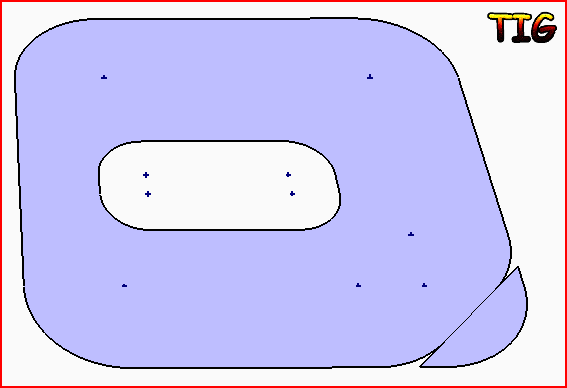
-
I'm not sure, but it seems to me the first time I tried using the plugin, I didn't realize the "radius" input was defaulted to ZERO, and if memory serves me, my lines disappeared too. Might check it out.
-
With a zero radius the lines should trim or extend à la ACAD...
Nothing should disappear [except the unwanted lines parts] !





Advertisement