sketchucation logo sketchucation
    • 登入
    Oops, your profile's looking a bit empty! To help us tailor your experience, please fill in key details like your SketchUp version, skill level, operating system, and more. Update and save your info on your profile page today!
    🔌 Smart Spline | Fluid way to handle splines for furniture design and complex structures. Download

    [Plugin] 2D Tools

    已排程 已置頂 已鎖定 已移動 Plugins
    791 貼文 178 Posters 522.0k 瀏覽 177 Watching
    正在載入更多貼文
    • 從舊到新
    • 從新到舊
    • 最多點贊
    回覆
    • 在新貼文中回覆
    登入後回覆
    此主題已被刪除。只有擁有主題管理權限的使用者可以查看。
    • Didier BurD 離線
      Didier Bur
      最後由 編輯

      Hi TIG,

      I'm always having this error too, even with the latest version. When setting the Z plane altitude for instance:

      C;/Program Files/Google/Google SketchUp 7/Plugins/2Dtools/2DzplaneTool.rb;59;in `onMouseMove'
      C;/Program Files/Google/Google SketchUp 7/Plugins/2Dtools/2DzplaneTool.rb;59
      Error; #<NoMethodError; undefined method `db' for #<Zplane2D;0x1285ba60>>
      

      ❓

      DB

      1 條回覆 最後回覆 回覆 引用 0
      • TIGT 離線
        TIG Moderator
        最後由 編輯

        Thanks Didier...

        I just knew that someone would have another problem!

        It was a stupid typo on my part that hadn't been reported before... 😳
        Here's v4.9 that fixes the 'db' glitch in the 'Set Z-Plane' tool.! 🤓
        http://forums.sketchucation.com/viewtopic.php?p=185760#p185760

        TIG

        1 條回覆 最後回覆 回覆 引用 0
        • Didier BurD 離線
          Didier Bur
          最後由 編輯

          Cool !
          So reactive 😉

          DB

          1 條回覆 最後回覆 回覆 引用 0
          • CadFatherC 離線
            CadFather
            最後由 編輯

            icons updated as well (thanks TIG)

            2dtools.png

            Icons.zip

            1 條回覆 最後回覆 回覆 引用 0
            • TIGT 離線
              TIG Moderator
              最後由 編輯

              Thanks - I'll include them for the next update - meanwhile anyone who wants them now... please replace the original Icons with these...

              TIG

              1 條回覆 最後回覆 回覆 引用 0
              • TIGT 離線
                TIG Moderator
                最後由 編輯

                Here's v5.0 http://forums.sketchucation.com/viewtopic.php?p=185760#p185760
                The db arguments etc are parenthesized in (). Various minor glitches in text etc have been addressed. The ES lingvo & help files have also been updated etc - many thanks to Defisto for his nit-picking that goaded me into the update! CadFather's new toolbar button icon set is also include if you want to swap over to that...

                TIG

                1 條回覆 最後回覆 回覆 引用 0
                • D 離線
                  define
                  最後由 編輯

                  @tig said:

                  Already updated with some minor fixes ! http://forums.sketchucation.com/viewtopic.php?p=185760#p185760
                  🤓

                  hello TIG, thx for your 2d-toolset...I'm using it all the time and would'nt know how to get along without it.
                  But I have to second ThomThom with his question, if one 'sotospeak' could make the 2dtools work with
                  your 'work-planes' too? This would make it into something even more versatile.
                  You answered ThomThom with a link - I can't however figure out what you are pointing at.
                  If there's already a means to switch the 2dtools z-axis to any 'temporarily active one' please
                  give me a hint.

                  thx a lot for the 2dtools and the 'workplane-plug' and all the other plugs as well

                  1 條回覆 最後回覆 回覆 引用 0
                  • B 離線
                    Ben Ritter
                    最後由 編輯

                    I can use the hatching option only once, thereafter, I the hatch selection window doesn't open. Tried it with SU7 and SU8, same issue.

                    Any suggestions?

                    1 條回覆 最後回覆 回覆 引用 0
                    • B 離線
                      Ben Ritter
                      最後由 編輯

                      Sorry for the bother. I'm short on memory and lazy. Just looked at some previous posts and found the answer.

                      1 條回覆 最後回覆 回覆 引用 0
                      • EarthMoverE 離線
                        EarthMover
                        最後由 編輯

                        @define said:

                        if one 'sotospeak' could make the 2dtools work with
                        your 'work-planes' too? This would make it into something even more versatile.

                        This would in fact be quite redundant. The work planes are used in a similar manner to the 2D tools, as they create a "shield" to prevent the inferencing of the native tools to the geometry on the opposite side of the plane. You can draw directly on it as it's a locked group and delete it at will. The 2D tools do much the same except they are restricted to the X,Y axis for 2D drawing, but still allow you set the Z, which creates an invisble 2D work plane on that height. The work plane plugin allows similar restriction, only it's not restricted to X,Y only and it works with the native toolset. You could technically set a work plan on the x,y axis at a Z height and use the native tools to draw in restricted 2D. Using the 2D tools to go the other direction would negate them from being 2D at all.

                        3D Artist at Clearstory 3D Imaging
                        Guide Tool at Winning With Sketchup
                        Content Creator at Skapeup

                        1 條回覆 最後回覆 回覆 引用 0
                        • thomthomT 離線
                          thomthom
                          最後由 編輯

                          I find that the native tools - especially the line tool all to often pick inference in the Z-Axis - so when I think I've drawn a shape on a plane I've in fact drawn a 3d shape.
                          That's why it'd be nice to have a tool that restricted drawing to the arbitrary set plane.

                          Thomas Thomassen — SketchUp Monkey & Coding addict
                          List of my plugins and link to the CookieWare fund

                          1 條回覆 最後回覆 回覆 引用 0
                          • R 離線
                            razer
                            最後由 編輯

                            Hey guys me again. Im looking for something that would lock in my masurement's when I create a 2d rectangle, for instance I want the height and width to be free to move but not my length I want it to stay a certain mesurement I want that to stay the same no matter where my mouse is could 2d tools do this?

                            Thanks!

                            1 條回覆 最後回覆 回覆 引用 0
                            • D 離線
                              DIEGO-RODRIGUEZ
                              最後由 編輯

                              hi tig.
                              a question.
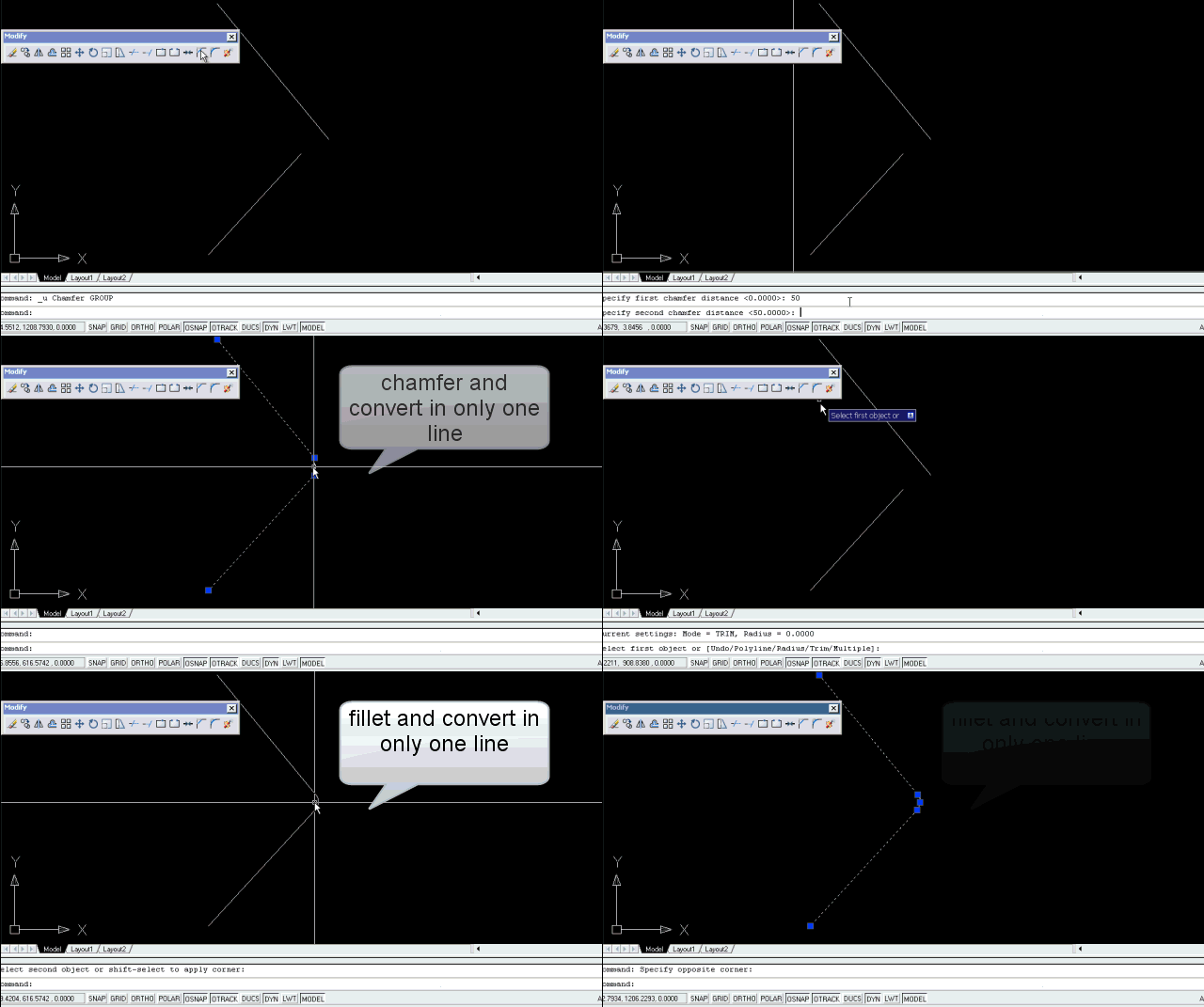
                              You Can add this utility to function chamfer and fillet?
                              The idea Would Be to chamfer or fillet + welding in a single step
                              maybe:
                              if we hold down the Ctrl key> chamfer or fillet + welding
                              if not press the ctrl> single chamfer or fillet.

                              is it possible?
                              Greetings


                              Untitled.gif

                              1 條回覆 最後回覆 回覆 引用 0
                              • TIGT 離線
                                TIG Moderator
                                最後由 編輯

                                Diego
                                Your idea is feasible... however, I feel that with the virtually indispensable 'weld.rb' loaded, with a shortcut to say 'J'oin, you could simply select the three pieces, press 'J' and it'll weld them into a single polyline/curve anyway...

                                TIG

                                1 條回覆 最後回覆 回覆 引用 0
                                • N 離線
                                  NikosID
                                  最後由 編輯

                                  Hi Tig

                                  I am sorry to bother you with something that may sound so simple but I am trying to download your plug-in 2D tools and I always get comets like “time out”....basically i don't manage to download it. Is it because my internet connection speed in Indonesia is too slow, is it that I do something wrong. If you have a suggestion I will be glad to hear from you. Thank you in advance for taking time to answer.

                                  NikosID

                                  1 條回覆 最後回覆 回覆 引用 0
                                  • TIGT 離線
                                    TIG Moderator
                                    最後由 編輯

                                    @nikosid said:

                                    Hi Tig

                                    I am sorry to bother you with something that may sound so simple but I am trying to download your plug-in 2D tools and I always get comets like “time out”....basically i don't manage to download it. Is it because my internet connection speed in Indonesia is too slow, is it that I do something wrong. If you have a suggestion I will be glad to hear from you. Thank you in advance for taking time to answer.

                                    NikosID

                                    I have sent a PM with a cut-down set of files - for example I suspect you won't want the Spanish Help files! You should be able to download these in 'parts'...

                                    TIG

                                    1 條回覆 最後回覆 回覆 引用 0
                                    • M 離線
                                      maxosmedia
                                      最後由 編輯

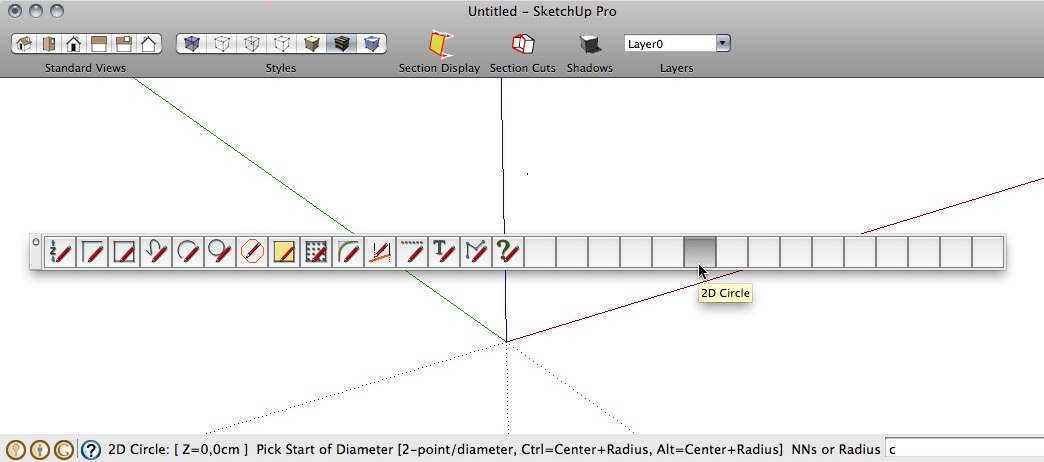
                                      SU7, SU8. MacOSX10.6.5 MacBookPro 15" C2D 2,16

                                      Thanks!

                                      2dToolsBug.jpg

                                      1 條回覆 最後回覆 回覆 引用 0
                                      • Dave RD 離線
                                        Dave R
                                        最後由 編輯

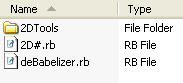
                                        Looks like incorrectly installed to me. I'd delete all files related to 2D Tools from the Plugins directory and reinstall correctly. You should end up with something like this in the Plugins folder.
                                        2D Tools.jpg

                                        Etaoin Shrdlu

                                        %

                                        (THERE'S NO PLACE LIKE)

                                        G28 X0.0 Y0.0 Z0.0

                                        M30

                                        %

                                        1 條回覆 最後回覆 回覆 引用 0
                                        • M 離線
                                          maxosmedia
                                          最後由 編輯

                                          Thank Dave R!
                                          I looked the SU plug-ins directory. The problem was in the strange document, called "2D%23loader.rb". After his removal,
                                          problem has been fixed!
                                          👍

                                          1 條回覆 最後回覆 回覆 引用 0
                                          • Dave RD 離線
                                            Dave R
                                            最後由 編輯

                                            You should have a file in the 2D Tools folder called 2D#Loader. I think the '#' got changed to '%23'.


                                            Etaoin Shrdlu

                                            %

                                            (THERE'S NO PLACE LIKE)

                                            G28 X0.0 Y0.0 Z0.0

                                            M30

                                            %

                                            1 條回覆 最後回覆 回覆 引用 0
                                            • 1
                                            • 2
                                            • 13
                                            • 14
                                            • 15
                                            • 16
                                            • 17
                                            • 39
                                            • 40
                                            • 15 / 40
                                            • 第一個貼文
                                              最後的貼文
                                            Buy SketchPlus
                                            Buy SUbD
                                            Buy WrapR
                                            Buy eBook
                                            Buy Modelur
                                            Buy Vertex Tools
                                            Buy SketchCuisine
                                            Buy FormFonts

                                            Advertisement