sketchucation logo sketchucation
    • 登入
    Oops, your profile's looking a bit empty! To help us tailor your experience, please fill in key details like your SketchUp version, skill level, operating system, and more. Update and save your info on your profile page today!
    ⚠️ Important | Libfredo 15.6b introduces important bugfixes for Fredo's Extensions Update

    [Plugin] Drape Cpoints

    已排程 已置頂 已鎖定 已移動 Plugins
    46 貼文 23 Posters 47.3k 瀏覽 23 Watching
    正在載入更多貼文
    • 從舊到新
    • 從新到舊
    • 最多點贊
    回覆
    • 在新貼文中回覆
    登入後回覆
    此主題已被刪除。只有擁有主題管理權限的使用者可以查看。
    • TIGT 離線
      TIG Moderator
      最後由 TIG 編輯

      drape_cpoints.rb

      [flash=600,400:z71mj573]http://www.youtube.com/v/Tv16DleBc9g[/flash:z71mj573]

      Adds Plugins Menu Item 'Drape Cpoints' which makes a regular grid of
      grouped cpoints over a 'mesh': it works on selected face(s), group(s)
      or component-instance(s) or combinations of these; other types of
      entities in the selection are ignored.
      When the cpoint group is made you can use 'Triangulate Points' on the
      it to re-make the 'mesh' with a regular grid.

      v1.1 First release. 20090824
      🤓
      Put in Plugins Folder...PayPalButton

      TIG

      1 條回覆 最後回覆 回覆 引用 0
      • EarthMoverE 離線
        EarthMover
        最後由 編輯

        Perfect perfect perfect! Exactly what I was looking for. Thank you so much TIG!

        Now I just need a "paint select faces" tool to quickly isolate faces in the triangulated topology. This will be a very useful tool for doing things like adding snow to an irregular shaped object, or adding water to a waterfall.
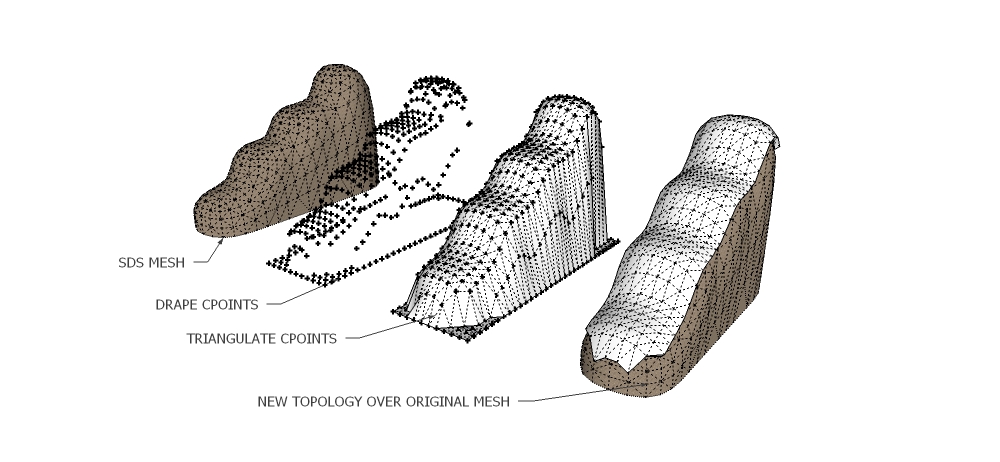
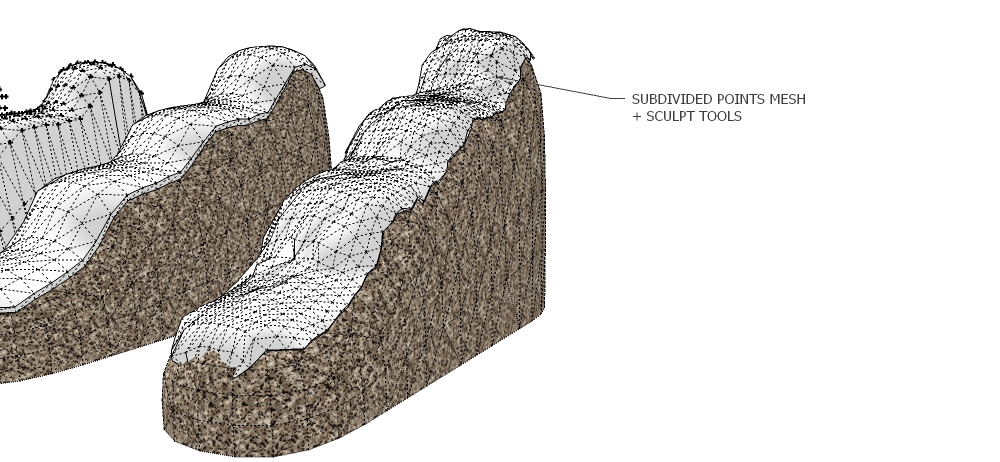
        Drape Cpoint example.jpg


        Drape Cpoint example2.jpg

        3D Artist at Clearstory 3D Imaging
        Guide Tool at Winning With Sketchup
        Content Creator at Skapeup

        1 條回覆 最後回覆 回覆 引用 0
        • TIGT 離線
          TIG Moderator
          最後由 編輯

          To 'paint selected faces' you select the faces as apply the Material with the Paint-bucket - all selected are painted ? What else do you need ??? 😕

          TIG

          1 條回覆 最後回覆 回覆 引用 0
          • EarthMoverE 離線
            EarthMover
            最後由 編輯

            TIG - sorry, poor wording on my part. By "paint select" I mean hover select, not applying a material. Looking for a tool that you can click the mouse down once and drag over the faces you want to select. Similar to Fredo's script for edges, but just a simple one for faces. It would be easier than window selecting or individually clicking on faces to select triangles in a subdivided mesh.

            3D Artist at Clearstory 3D Imaging
            Guide Tool at Winning With Sketchup
            Content Creator at Skapeup

            1 條回覆 最後回覆 回覆 引用 0
            • TIGT 離線
              TIG Moderator
              最後由 編輯

              Fredo ? 5 minutes work ? 🤓

              TIG

              1 條回覆 最後回覆 回覆 引用 0
              • M 離線
                monk77
                最後由 編輯

                Thanks for sharing. Great plugin.

                Cheers
                monk77

                my sketchup-animations

                1 條回覆 最後回覆 回覆 引用 0
                • Chris FullmerC 離線
                  Chris Fullmer
                  最後由 編輯

                  How about Use Fredo's tool to select the edges, then right click on one of the selected edges and use the "Selection - Select connected Faces" option. That should do the trick!

                  Chris

                  Lately you've been tan, suspicious for the winter.
                  All my Plugins I've written

                  1 條回覆 最後回覆 回覆 引用 0
                  • fredo6F 離線
                    fredo6
                    最後由 編輯

                    @tig said:

                    Fredo ? 5 minutes work ? 🤓

                    Yes, sure. I would have to apologize if it takes longer 😍 .
                    I had this in mind, and it is why HoverSelect is not called HoverEdges.

                    1 條回覆 最後回覆 回覆 引用 0
                    • mitcorbM 離線
                      mitcorb
                      最後由 編輯

                      Whoa!
                      I like it already. Can't wait to try it.
                      Thanks

                      I take the slow, deliberate approach in my aimless wandering.

                      1 條回覆 最後回覆 回覆 引用 0
                      • mitcorbM 離線
                        mitcorb
                        最後由 編輯

                        Hmmm
                        Next thing you know, one of these giants is gonna present a floating xyz gizmo for local mesh editing.

                        I take the slow, deliberate approach in my aimless wandering.

                        1 條回覆 最後回覆 回覆 引用 0
                        • EarthMoverE 離線
                          EarthMover
                          最後由 編輯

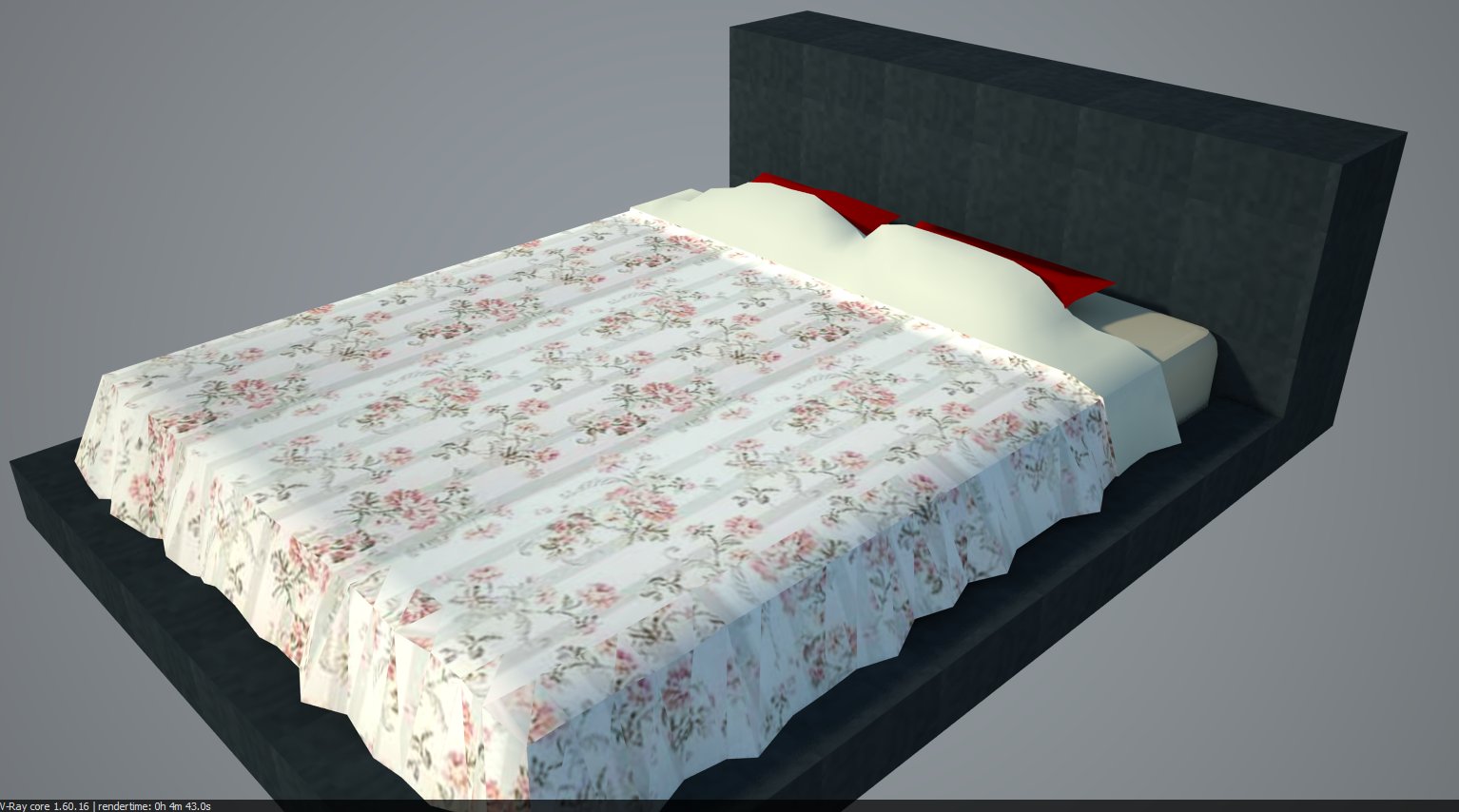
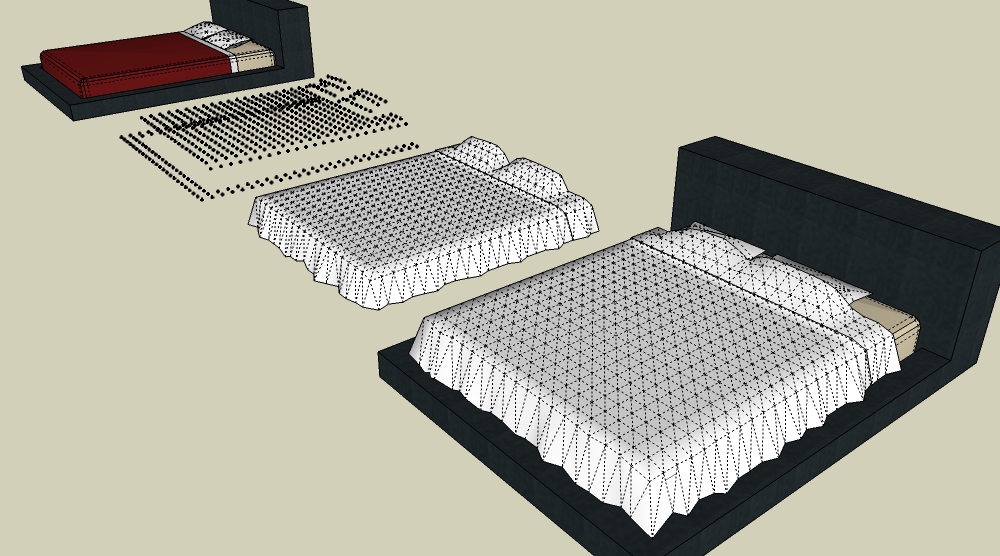
                          Another use for the script.....5 minute bedspread. (Bed model from warehouse)

                          Bed w. cpointdrap.jpg


                          Bed w. cpointdrapvray.jpg

                          3D Artist at Clearstory 3D Imaging
                          Guide Tool at Winning With Sketchup
                          Content Creator at Skapeup

                          1 條回覆 最後回覆 回覆 引用 0
                          • D 離線
                            dedmin
                            最後由 編輯

                            @earthmover said:

                            :berserk: Perfect perfect perfect! Exactly what I was looking for. Thank you so much TIG!

                            Now I just need a "paint select faces" tool to quickly isolate faces in the triangulated topology. This will be a very useful tool for doing things like adding snow to an irregular shaped object, or adding water to a waterfall.

                            Sorry, but how did you made triangulated mesh from the points?

                            1 條回覆 最後回覆 回覆 引用 0
                            • P 離線
                              pibuz
                              最後由 編輯

                              Sorry guys: I can't find the rb to triangulate the CPoints..
                              Could you please head me to?

                              ...btw GREAT RB! I can't wait to test it!

                              WEB (ita) - https://filipposcarso.wixsite.com/ordinentropico

                              1 條回覆 最後回覆 回覆 引用 0
                              • TIGT 離線
                                TIG Moderator
                                最後由 編輯

                                The script 'points_cloud_triangulation.rb' [which shows in the Plugins menu as 'Triangulate Points'] is here...
                                http://www.crai.archi.fr/RubyLibraryDepot/Ruby/points_cloud_triangulation.rb
                                that also requires 'delauney2.rb' - which you can get here...
                                http://forums.sketchucation.com/viewtopic.php?p=117071#p117071
                                🤓

                                TIG

                                1 條回覆 最後回覆 回覆 引用 0
                                • D 離線
                                  dedmin
                                  最後由 編輯

                                  @tig said:

                                  The script 'points_cloud_triangulation.rb' [Shows in the Plugins menu as 'Triangulate Points'] is here...
                                  http://www.crai.archi.fr/RubyLibraryDepot/Ruby/points_cloud_triangulation.rb
                                  that also requires 'delauney2.rb' - which you can get here...
                                  http://forums.sketchucation.com/viewtopic.php?p=117071#p117071
                                  🤓

                                  I tested it - SUPER USEFUL!!!!! BIG THANKS!! 😍

                                  1 條回覆 最後回覆 回覆 引用 0
                                  • B 離線
                                    Ben Ritter
                                    最後由 編輯

                                    Earthmover,

                                    For some reason, by looking at your images, I can't figure out what this script actually does or what happens in each step (e.g. bedspread example).

                                    Can you explain? Thanks.

                                    1 條回覆 最後回覆 回覆 引用 0
                                    • B 離線
                                      Ben Ritter
                                      最後由 編輯

                                      TIG,

                                      Thanks for the explanation. I suppose it sounds more complicated than it really is.

                                      Ben

                                      1 條回覆 最後回覆 回覆 引用 0
                                      • TIGT 離線
                                        TIG Moderator
                                        最後由 編輯

                                        @ben ritter said:

                                        Earthmover,
                                        For some reason, by looking at your images, I can't figure out what this script actually does or what happens in each step (e.g. bedspread example).
                                        Can you explain? Thanks.

                                        You select some faces/groups/components etc [the bed]. You give an XY grid spacing in a dialog and it makes a horizontal grid of Cpoints that's initially put just above the selection: the regular grid extends to the XY bounds of the selection. These Cpoints are then dropped down till they hit something in the selection OR, if not, then down to the minimum bounds of the selection. These Cpoints are grouped. This is all done so quickly you won't see it till the grid appears - there is a counter that shows its progress making the Cpoints and draping [dropping] them - there's also some 'behind the scenes' temporary grouping, erasing and exploding etc but you don't really need to worry about that ! Existing ruby tools can then work on these Cpoints to make a triangulated mesh face.

                                        I surmise what was done with the 'bed' was to make the draped Cpoints, a faced mesh was made with 'Triangulate Points' and then some vertices forming the bottom edge were manually moved randomly to form the 'folds' of the bedspread. Perhaps a few top face vertices were moved a little to give some 'dints'. The sheet part was probably selected and moved up a little to form a change of plane for the different material. It was then all smoothed and the materials applied...

                                        Its general use is if you have a triangulated site mesh made from survey data-points it'll likely be irregular - it's often preferable to make it into a regular XY grid (like those made by the Sandbox Tools). This tool lets you quickly drape a regular XY grid of Cpoints over the form and then reform them into a regular faced mesh using another tool, the original form is left unchanged...

                                        TIG

                                        1 條回覆 最後回覆 回覆 引用 0
                                        • J 離線
                                          jamma-pcb
                                          最後由 編輯

                                          ANy chance you could add gravity physics to this plugin.

                                          The idea is to hover a face over multiple components and any space inbetween curve based on the gravity amount. Like draping a quilt over many pillows. The edges it would follow on Z and any space inbetween to curve out on multiple edges.

                                          ANy chance of such a any tool

                                          1 條回覆 最後回覆 回覆 引用 0
                                          • TIGT 離線
                                            TIG Moderator
                                            最後由 編輯

                                            Sounds pretty complicated ! 😮
                                            Don't you want something inside SketchyPhysics like a 'chain of hinged links' that you anchor at its two ends and it then 'sags' appropriately ?
                                            Each 'chain' would be made representing a 'rib' of a 'mesh' or 'net'...
                                            You'd then swap the links for simple edges and explode stuff and you have the basis of the surface ???
                                            My brain hurts already... 👊
                                            Thomthom is making a Vertex Editor and that might help ?
                                            Remus has also done some work on Catenary Curves...
                                            These things combined might do what you want BUT it'd be at the end of along list for me... others might pick up the gauntlet ? 😄

                                            TIG

                                            1 條回覆 最後回覆 回覆 引用 0
                                            • 1
                                            • 2
                                            • 3
                                            • 1 / 3
                                            • 第一個貼文
                                              最後的貼文
                                            Buy SketchPlus
                                            Buy SUbD
                                            Buy WrapR
                                            Buy eBook
                                            Buy Modelur
                                            Buy Vertex Tools
                                            Buy SketchCuisine
                                            Buy FormFonts

                                            Advertisement