sketchucation logo sketchucation
    • 登入
    Oops, your profile's looking a bit empty! To help us tailor your experience, please fill in key details like your SketchUp version, skill level, operating system, and more. Update and save your info on your profile page today!
    🔌 Smart Spline | Fluid way to handle splines for furniture design and complex structures. Download

    [Plugin] Blend ver 1.12.

    已排程 已置頂 已鎖定 已移動 Plugins
    80 貼文 35 Posters 66.4k 瀏覽 35 Watching
    正在載入更多貼文
    • 從舊到新
    • 從新到舊
    • 最多點贊
    回覆
    • 在新貼文中回覆
    登入後回覆
    此主題已被刪除。只有擁有主題管理權限的使用者可以查看。
    • MALAISEM 離線
      MALAISE
      最後由 編輯

      Hi Kirill
      Thanks you for the job you've done on this second plugin. It's opening a new world of shapes.. 👍 👍

      MALAISE 😄

      La Connaissance n'a de valeur que partagée

      1 條回覆 最後回覆 回覆 引用 0
      • W 離線
        watkins
        最後由 編輯

        Dear Kirill,

        I have just been trying out your plugin and note the following:

        • that the 'undo' doesn't work with your plugin, i.e., I cannot revert back to the drawing before your plugin is used, and

        • your plugin creates lines (steps) which are outside the group which contains the surface. One has to hide the group and then delete the lines. Is this how the plugin is meant to work?

        Looking good.

        Regards,
        Bob

        1 條回覆 最後回覆 回覆 引用 0
        • A 離線
          accabrera
          最後由 編輯

          Great Plugin!!!

          Big Thank you

          1 條回覆 最後回覆 回覆 引用 0
          • JClementsJ 離線
            JClements
            最後由 編輯

            Krill, nice work. If you can get two objects to follow and blend along a third, curve (path) as was suggested above, then we've got a nice, easy-to-use taper tool.

            I am hoping you can do it.

            Thanks, John

            John | Illustrator | Beaverton, Oregon

            1 條回覆 最後回覆 回覆 引用 0
            • K 離線
              kirill2008
              最後由 編輯

              Hi, Bob.
              Thank's a lot for your feedback, it really helps to improve the script. 👍

              @watkins said:

              Dear Kirill,

              • that the 'undo' doesn't work with your plugin, i.e., I cannot revert back to the drawing before your plugin is used, and

              Well, actually 'undo' works, but yes it sometimes (big steps count value and/or big segments count of initial curves) cannot revert back drawing.
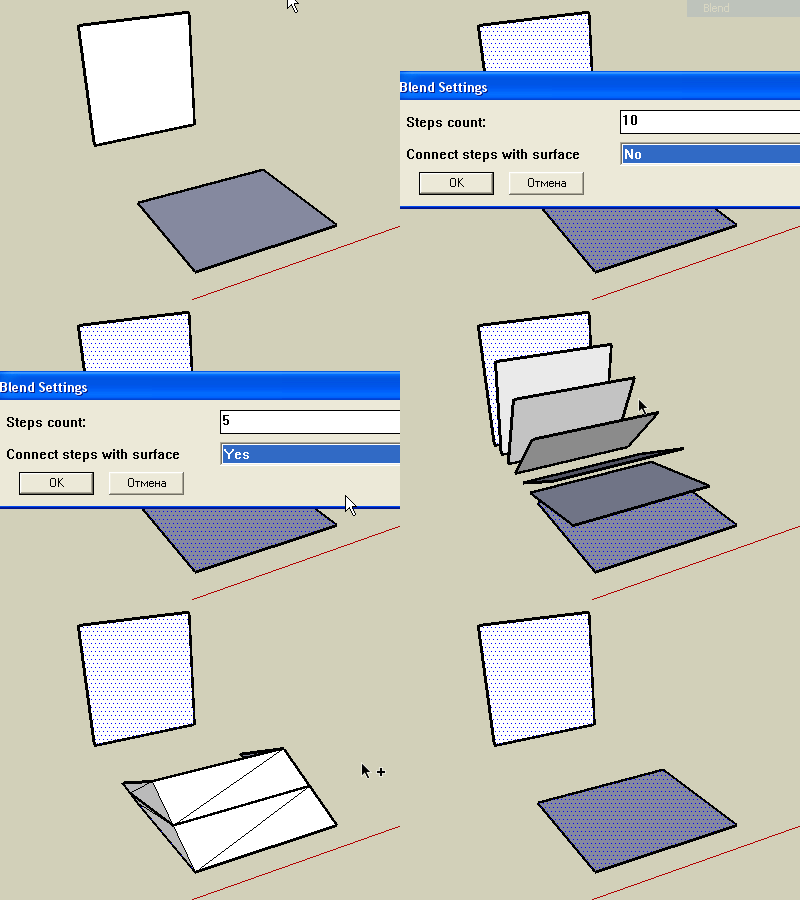
              undodemo.gif
              Animation shows '<Ctrl>+z' combination pressed effect.
              Now (ver 1.3) all steps of Blend command joined to the single command and can be undone as one single action.

              @watkins said:

              • your plugin creates lines (steps) which are outside the group which contains the surface. One has to hide the group and then delete the lines. Is this how the plugin is meant to work?

              Yes, they are supposed to be separated. But now (ver 1.3) I decided to put curves to another separate group.

              @jclements said:

              If you can get two objects to follow and blend along a third, curve (path) as was suggested above, then we've got a nice, easy-to-use taper tool.

              Well, the final destination is an interactive blended object, that consists of 2 initial curves/faces and maybe a path. Interacting with initial curves and/or path has to affect the whole object. Sounds like a kind of challenge for me...

              1 條回覆 最後回覆 回覆 引用 0
              • mitcorbM 離線
                mitcorb
                最後由 編輯

                Very interesting tool, kirill:
                Seems to have qualities of Skin.rb and Simple Loft.rb but on steroids.
                Excellent work!
                mitcorb

                I take the slow, deliberate approach in my aimless wandering.

                1 條回覆 最後回覆 回覆 引用 0
                • K 離線
                  kirill2008
                  最後由 編輯

                  Little bonus video:
                  [flash=480,385:2yb89gf7]http://www.youtube.com/p/910E7CBB59CD05F8&amp;hl=ru&amp;fs=1" type="application/x-shockwave-flash" width="480" height="385" allowscriptaccess="always" allowfullscreen="true"[/flash:2yb89gf7]
                  Ver. 1.4 is able to process more or less complex geometry.

                  1 條回覆 最後回覆 回覆 引用 0
                  • D 離線
                    Daniel S
                    最後由 編輯

                    This plugins looks great!
                    What about blend colors too?
                    Here an example that creates intermediate faces and colors from two existing ones (2 steps).
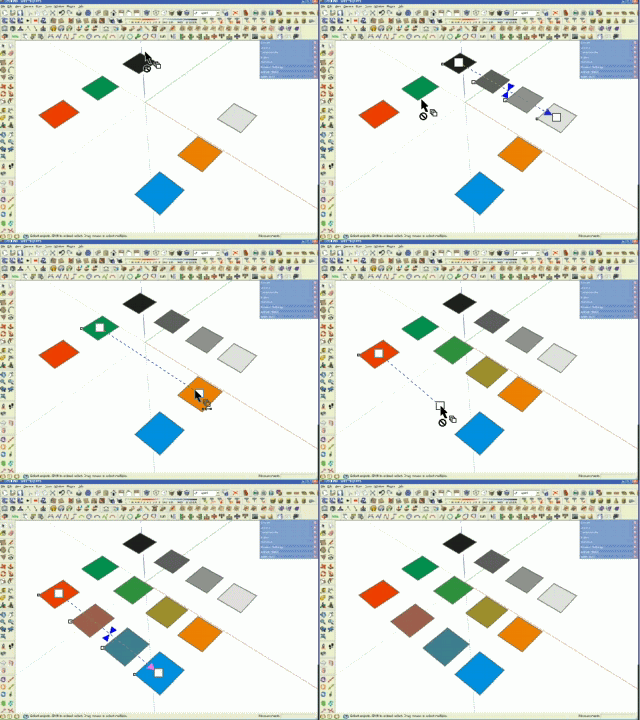
                    colorblend.gif
                    Of course this is not sketchup, is only a simulation.

                    Daniel S

                    1 條回覆 最後回覆 回覆 引用 0
                    • C 離線
                      cosycat
                      最後由 編輯

                      Great script, i've been waiting for something like this for ages. Couple of odd bugs with circles (v1.4)

                      1. seems to miss out a segment when doing a blend
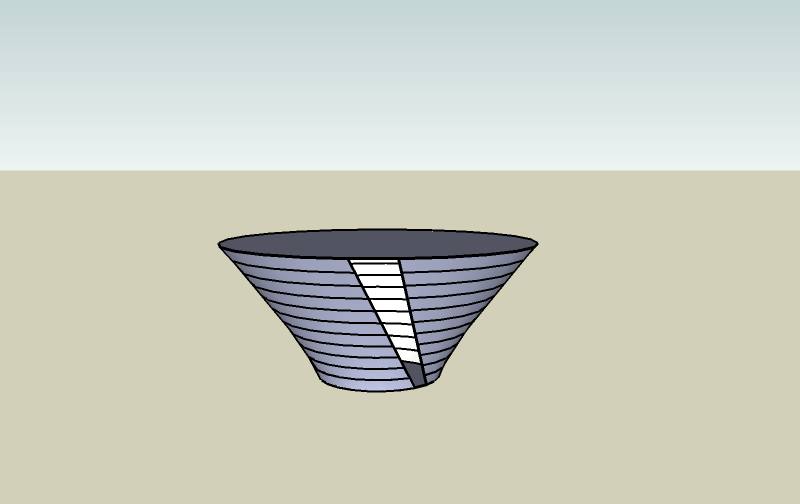
                        circles2.jpg

                      2. if you create the second circle with a move copy, you often get something like this
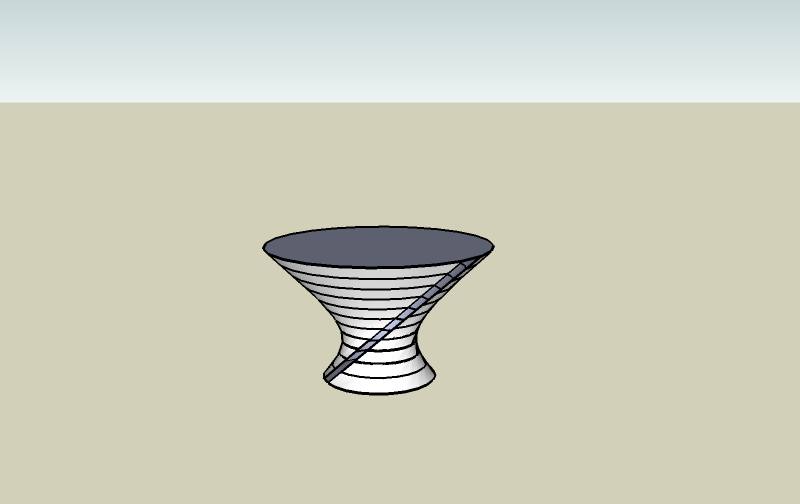
                        circles1.jpg

                      1 條回覆 最後回覆 回覆 引用 0
                      • kenK 離線
                        ken
                        最後由 編輯

                        Note sure if it me or note. But I tried V3 and was pleased with the results, however, V4 does not seem to display the same results. Note, I dont' have V3 any more, as I copied over the script, so this is from memory.

                        I particular like how if blended a square to a circle, now every time the output has folds or is not a straight blend from the square to the circle.

                        Ken

                        Fight like your the third monkey on Noah's Ark gangway.

                        1 條回覆 最後回覆 回覆 引用 0
                        • mitcorbM 離線
                          mitcorb
                          最後由 編輯

                          yeah, I had a gap between the originating curve and the next intervening step toward the destination curve. Easily knitted together with line tool, and so forth, but just mentioning.

                          I take the slow, deliberate approach in my aimless wandering.

                          1 條回覆 最後回覆 回覆 引用 0
                          • utilerU 離線
                            utiler
                            最後由 編輯

                            This is a nice plugin, mate! I'm going to play!!!!

                            Just Curious...

                            1 條回覆 最後回覆 回覆 引用 0
                            • T 離線
                              tomot
                              最後由 編輯

                              Nice plugin! but still needs some tweaking.
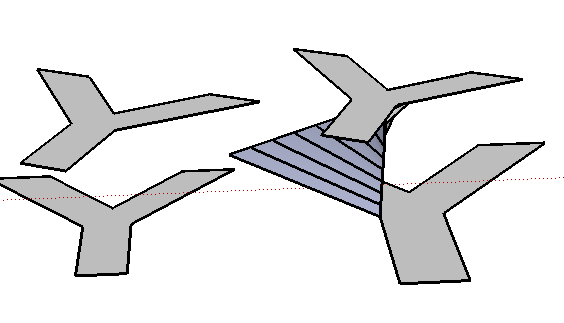
                              I find it first works with a new fresh startup screen. but then the more experimenting I do with Blend the more inconsistant the results become, finally the Bend of the left Y's in the picture did not take place at all.

                              Error; #<NoMethodError; undefined method `vertices' for nil;NilClass>
                              C;/Program Files (x86)/Google/Google SketchUp 7/Plugins/sublend.rb;45;in `blend'
                              C;/Program Files (x86)/Google/Google SketchUp 7/Plugins/sublend.rb;174
                              C;/Program Files (x86)/Google/Google SketchUp 7/Plugins/sublend.rb;153;in `call'


                              please don't give up!


                              y.png

                              my plugins
                              tomot

                              1 條回覆 最後回覆 回覆 引用 0
                              • K 離線
                                kirill2008
                                最後由 編輯

                                Color blending demo video (for Daniel S 😉 😞
                                [flash=425,344:1ki2zgl4]http://www.youtube.com/v/CqqRssCqONk&hl=ru&fs=1&" type="application/x-shockwave-flash" allowscriptaccess="always" allowfullscreen="true" width="425" height="344"[/flash:1ki2zgl4]

                                cosycat, please try ver. 1.5. I tried to solve the problem of missing mesh pieces.

                                tomot, I'll try to find out, what's the problem with rotated Y's...

                                And speaking about the 3'd curve (the path): looks like, it demands a kind of major refactoring 😕 It is more complex task than I thought and it will take a little time...

                                1 條回覆 最後回覆 回覆 引用 0
                                • T 離線
                                  tomot
                                  最後由 編輯

                                  I don't want you to misunderstand. This is not only related to the "y" shape. Other shapes have produced the same inconsistent results in SU 7.
                                  another example:
                                  make 2 identical closed shapes, scale one larger, apply bend, same code error occurs

                                  cheers.

                                  my plugins
                                  tomot

                                  1 條回覆 最後回覆 回覆 引用 0
                                  • K 離線
                                    kirill2008
                                    最後由 編輯

                                    @tomot said:

                                    I don't want you to misunderstand. This is not only related to the "y" shape. Other shapes have produced the same inconsistent results in SU 7.
                                    another example:
                                    make 2 identical closed shapes, scale one larger, apply bend, same code error occurs

                                    Looks like it is SU7 issue... SU6 processes correctly:
                                    [flash=425,344:1p1mvbbo]http://www.youtube.com/v/1D8WUYsS9hw&hl=ru&fs=1" type="application/x-shockwave-flash" allowscriptaccess="always" allowfullscreen="true" width="425" height="344"[/flash:1p1mvbbo]
                                    When processing faces it is necessary to select them by single click (not a fence).

                                    1 條回覆 最後回覆 回覆 引用 0
                                    • majidM 離線
                                      majid
                                      最後由 編輯

                                      woooow...it would be a dreamy plugin if no bugs!!..I gave it a try , but it seems that previous versions were better on freehand lines, while the last version doesn't works fine... also on closed line doesn;t works at all (su 6)..seeing forward to see the improvements mate btw thanks thanx thanx! 👍

                                      My inspiring A, B, Sketches book: https://sketchucation.com/shop/books/intermediate/2612-alphabet-inspired-sketches--inspiring-drills-for-architects--3d-artists-and-designers-

                                      1 條回覆 最後回覆 回覆 引用 0
                                      • Dave RD 離線
                                        Dave R
                                        最後由 編輯

                                        This is a useful plugin. Well, for me it was until I installed the latest version (1.5). Now I get what you see in the attached screen shot. Unfortunately I installed over the previous version. Keep working at it. I'm sure you'll get it all working.

                                        Thank you.
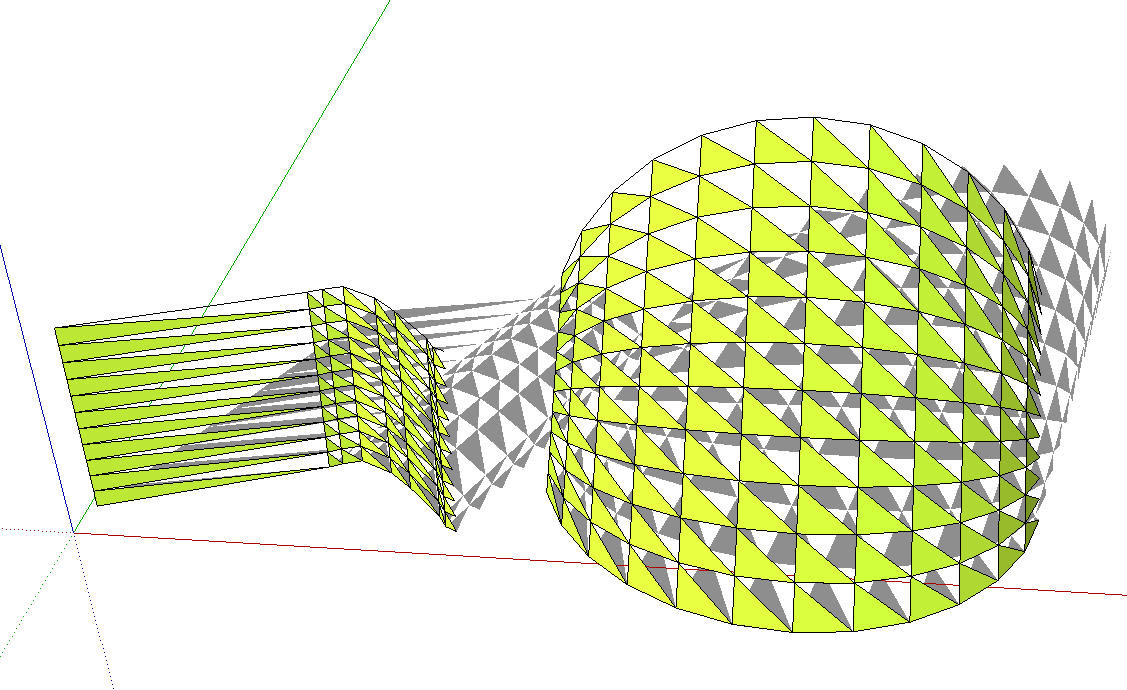
                                        Blend.jpg

                                        Etaoin Shrdlu

                                        %

                                        (THERE'S NO PLACE LIKE)

                                        G28 X0.0 Y0.0 Z0.0

                                        M30

                                        %

                                        1 條回覆 最後回覆 回覆 引用 0
                                        • D 離線
                                          Daniel S
                                          最後由 編輯

                                          Thank you for adding color blending 😍 😍 😍

                                          I have problems with this new version too (I use SU7).

                                          Sometimes work with results like the ones Dave R post above.
                                          In other cases the plugin dosen´t do anything and prints this in the ruby console:

                                          Error: #<NoMethodError: undefined method back_material' for #<Sketchup::Edge:0x67b7f70>> C:/Archivos de programa/Google/Google SketchUp 7/Plugins/sublend.rb:68:in blend'
                                          C:/Archivos de programa/Google/Google SketchUp 7/Plugins/sublend.rb:270
                                          C:/Archivos de programa/Google/Google SketchUp 7/Plugins/sublend.rb:248:in `call'

                                          Daniel S

                                          1 條回覆 最後回覆 回覆 引用 0
                                          • W 離線
                                            watkins
                                            最後由 編輯

                                            Dear Kirill,

                                            It might be a good idea to post versions 1.0 to 1.5 as the later versions seem to be problematic. Version 1.0 seemed to work quite nicely. I too have over-written previous versions and so cannot go back a step or two.

                                            Kind regards,
                                            Bob

                                            1 條回覆 最後回覆 回覆 引用 0
                                            • 1
                                            • 2
                                            • 3
                                            • 4
                                            • 4 / 4
                                            • 第一個貼文
                                              最後的貼文
                                            Buy SketchPlus
                                            Buy SUbD
                                            Buy WrapR
                                            Buy eBook
                                            Buy Modelur
                                            Buy Vertex Tools
                                            Buy SketchCuisine
                                            Buy FormFonts

                                            Advertisement