[Plugin] SectionCutFace
-
A guaranteed way to Splat is to Remake Section when you section is hiding all content.
-
OK - I think I have isolated the issue, am testing now.
If I run the plugin to create a new scene from a scene that uses a style where 'Section Planes' has not been updated or refreshed - SU crashes.
Done this twice now in a row. Will test more.
If I run the plugin in a scene with a style that I have not altered (like turned the section planes on so I can see them, to create the new cut) - then it works consistently.
OK - This appears to be the case - if any change is made to the style of the current scene (like turn section planes on or off) - if you don't refresh the style when SectionCutFace tries to make a new scene it crashes.
I have tested this by altering edges, not refreshing and getting a crash, as well as only toggling the Section Plane on and off (for visibility) - and it crashes if I do not update the style before running the plugin.
-
@rich o brien said:
A guaranteed way to Splat is to Remake Section when you section is hiding all content.
I'm trying to make new...
See below - I think I have isolated what is happening - its related to styles...
-
Can we keep the posts on this in the one place - here...
Having other posts at SketchUp.com is confusing - although their team's comments on your BugSplats might be helpful...Can you provide a simple model with Styles etc that shows this behavior...
ZIP it and PM if you don't want it 'public'...
If it's too big to attach use a file sharing site and PM me a link...
Also some step by step instructions on how to make the splats would be most helpful... -
@tig said:
Can we keep the posts on this in the one place - here...
Having other posts at SketchUp.com is confusing - although their team's comments on your BugSplats might be helpful...Can you provide a simple model with Styles etc that shows this behavior...
ZIP it and PM if you don't want it 'public'...
If it's too big to attach use a file sharing site and PM me a link...
Also some step by step instructions on how to make the splats would be most helpful...I can... later today.
2 issues that I have posted about -
-
- Is the layer behavior a bug or feature?
Video:
https://youtu.be/v9GZJrM7JvoI am getting the layer turned on in the scene I start from, when I believe it should only be on in the new scene that SCF creates.
- the crashes - it crashes just with 2 boxes on the screen, and I believe this is connected to having a new scene created that is using a style that has been altered, but not refreshed.
-
-
Here's v6.1 http://sketchucation.com/pluginstore?pln=SectionCutFace
New FR strings file added [thanks to @mariocha].
Re-signed for full v2017 compatibility.Haven't yet got to the bottom of the @bmike reported issues.
Watch this space... -
TIG.
I upgraded SectionCutFace using extension store, the previous version was working fine and with this upgrade to 6.1 when I want to create a section I don't get the prameters window.
Any clues why this doe not appear.
Thanks
-
I see this too - most perplexing...
COMPO seems to be mistranslated in the strings file...
Bear with me... -
Thanks for the error report...
Here's v6.2 http://sketchucation.com/pluginstore?pln=SectionCutFace
The glitch with the COMP constant - i.e the incrementing SCUT name in all strings has been fixed. -
I just installed SectionCutFace. I get the context menu "Add SectionCut Face" but right-clicking it does nothing, other than closing the context menu. There is no dialog box to specify the paramenters, and no section cut face is generated.
After right-clicking, the following is added to the Ruby console:
Error: #<NameError: uninitialized constant TIG::SectionCutFace::COMPO>
c:/users/dave/appdata/roaming/sketchup/sketchup 2017/sketchup/plugins/sectioncutface/sectioncutface_code.rbs:1030:indialog' c:/users/dave/appdata/roaming/sketchup/sketchup 2017/sketchup/plugins/sectioncutface/sectioncutface_code.rbs:96:innew'
c:/users/dave/appdata/roaming/sketchup/sketchup 2017/sketchup/plugins/sectioncutface/sectioncutface_start.rbs:61:inblock (2 levels) in <module:SectionCutFace>' SketchUp:1:incall'Other info: I am running Pro 17.1.174 64-bit on Windows 7. The plugin was installed using the Sketchucation ExtensionStore interface.
-
@unknownuser said:
I get the context menu "Add SectionCut Face" but right-clicking it does nothing, other than closing the context menu.
You're not supposed to right click on Add SectionCut Face. You're supposed to left click on it.
-
Irrespective of that... did you download/install the latest update v6.2 ?
http://sketchucation.com/forums/viewtopic.php?p=613140#p613140
It fixes this issue...
It was posted in within the last hour or so...
I expect your download and problem overlapped with this update... -
Sorry, Dave R, I worded that poorly. I don't right-click the context menu item. Rather, I right-click the section cut to bring up the context menu, from which I left-click the "Add SectionCut Face" item.
Thank you, TIG. The version is 6.1. I must have just missed 6.2. However, the "Update" button for Add SectionCut Face in Extension Manager is inactive. I will try uninstalling and reinstalling.
-
@mcmillancabinet said:
I must have just missed 6.2. However, the "Update" button for Add SectionCut Face in Extension Manager is inactive. I will try uninstalling and reinstalling.
The Update button in SketchUp's Extension only applies to Extension Warehouse installs. You need to update using our ExtensionStore in SketchUcation Tools v3
-
That did the trick, TIG. Thanks!
Looking back on this thread, I see some discussion about problems dimensioning in Layout. IE, with cut face edges hidden (as is the default), the dimensions have nothing to snap to. The proposed solution was to turn the edges on. But now this can cause problems with the new associative dimension feature, because if/when section cut faces are remade, any dimensions snapped to them "break," and stop keeping up with changes in the geometry like they're supposed to. To keep the dimensions associative, they must be snapped to the actual geometry "below" the cut face. To do this, I think, requires turning the cut faces off during dimensioning.
-
Hey,
So I've tried pretty much every for Section Cut Face and I cannot get it to work or render at all.
- I start simple with a square
- Section plane and get it to a good spot
- Right click Add Section Cut Face
- I don't mess with the setting and keep going
- Render and nothing happens, the render does not cut!
I've seen videos and read the comments when its not working and I don't seem to find the reason why.
I installed it through preference and I've checked my folder and even seeing under both scenes and styles windows!Thank you
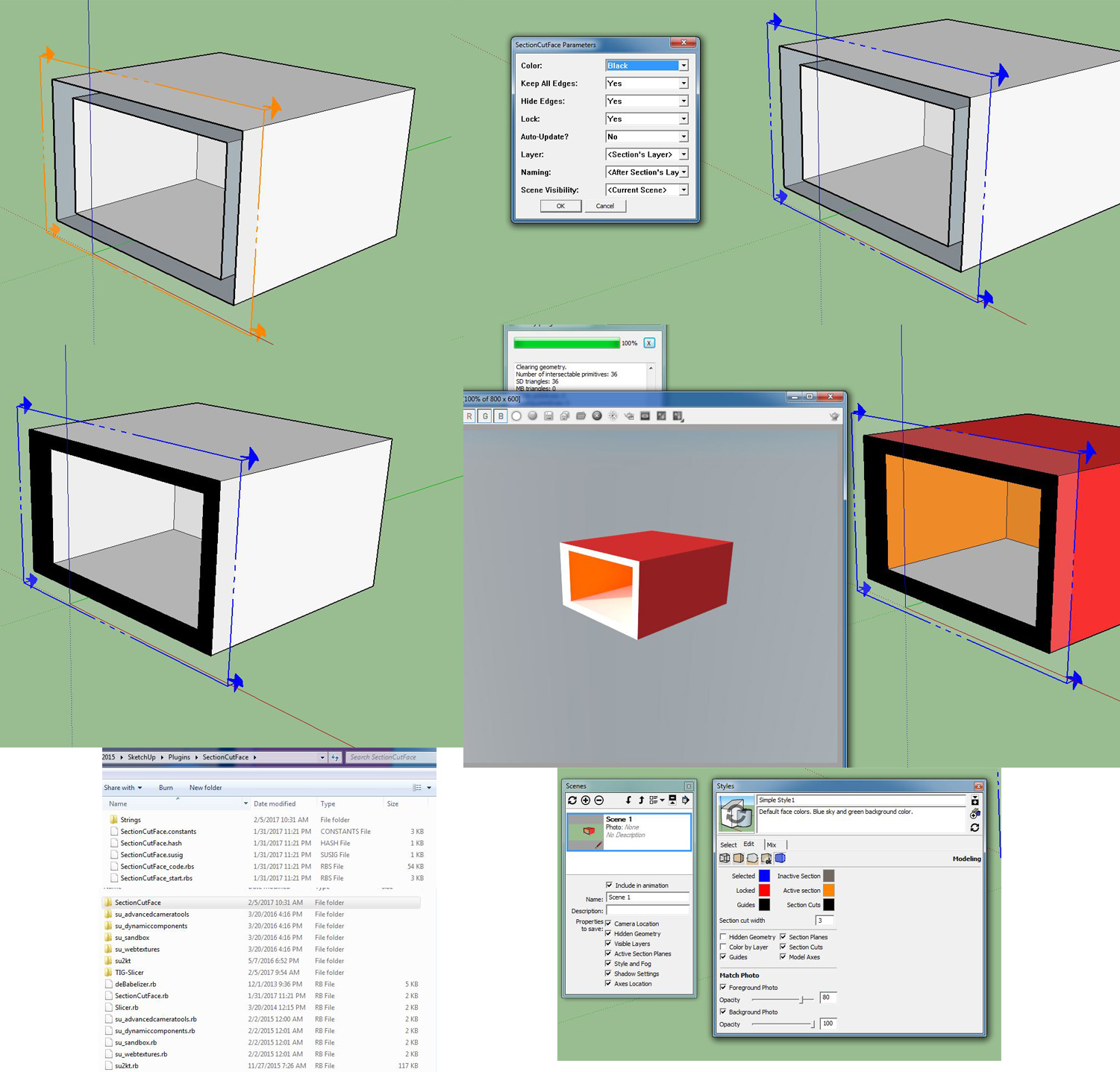
-
It's nothing to do with this tool. Most renderers don't render section cuts. You could use Zorro to make a real cut on a section plane to get it to show in the render.
-
Virtually all renderers don't render SketchUp's section cuts [at least without some forethought and jiggery-pokery], but they should always render the SectionCutFace group's faces...
What is your renderer ?I can't see all of the details in your composite-image.
However, it seems that the SketchUp model's SectionCutFace is working fine.
It's just the rendered image that looks screwed ?
A 'white' section...Can you post an image of the model - but ensure it's View > Monochrome mode and that your current Style has back-faces set to a distinctive color - like blue...
It should not show 'blue' - the visible faces should be the default front-face color [off-white], i.e. the one used by SectionCutFace - e.g. 'Black' when displayed with its material ??You could also attach a simple SKP for us to look at too...
[even better]... -
@tig said:
Virtually all renderers don't render SketchUp's section cuts [at least without some forethought and jiggery-pokery], but they should always render the SectionCutFace group's faces...
What is your renderer ?I can't see all of the details in your composite-image.
However, it seems that the SketchUp model's SectionCutFace is working fine.
It's just the rendered image that looks screwed ?
A 'white' section...Can you post an image of the model - but ensure it's View > Monochrome mode and that your current Style has back-faces set to a distinctive color - like blue...
It should not show 'blue' - the visible faces should be the default front-face color [off-white], i.e. the one used by SectionCutFace - e.g. 'Black' when displayed with its material ??You could also attach a simple SKP for us to look at too...
[even better]...Sure thing! It's been driving me nuts. I use Vray. I decided to try a test run because it was not working on an actual model.
-
SCF cuts and faces fine.
But, there's a but, a big but... there are very few renderers which accept a section-cut from SketchUp and then render it.
Instead the section-cut is ignored and the original uncut form is rendered.
In your case the SCF's section-cut-face-group is slightly within that form so you will no longer see it when it's renderer.I wrote an add-on for Podium which allows that renderer to render section-cuts and their faces.
It makes a copy of the model, cuts the model at the section-plane and deletes the unseen part, it then adds the section-cut-face.
You can then render that to show a true section-cut.
But I don't think there's anything similar for Vray.It can be done manually...
Can copy the model, then use Zorro2 [in the PluginStore] to cut that copy at the chosen section-plane and then use SCF to add the 'solid' face you desire.
Then render it...Revert to the original model to continue working because the copy will now only have the entities 'behind' the section-plane - the reset are deleted.






Advertisement