sketchucation logo sketchucation
    • Login
    Oops, your profile's looking a bit empty! To help us tailor your experience, please fill in key details like your SketchUp version, skill level, operating system, and more. Update and save your info on your profile page today!
    Mac User? | Join the Rayscaper Beta for Mac Learn More

    [Plugin] SectionCutFace

    Scheduled Pinned Locked Moved Plugins
    569 Posts 171 Posters 541.6k Views 170 Watching
    Loading More Posts
    • Oldest to Newest
    • Newest to Oldest
    • Most Votes
    Reply
    • Reply as topic
    Log in to reply
    This topic has been deleted. Only users with topic management privileges can see it.
    • sfto1S
      sfto1
      last edited by

      I do have v3.8 and with your helpful explanation, I now realize that the cut face does not dynamically follow the section cut. It does in fact create the "glued" face when I switch to a different tool. I was not switching to a different tool.

      Thanks for such a creative and useful tool.

      1 Reply Last reply
      Reply Quote 0
      • Z
        z3325206
        last edited by

        Hi Tig,

        I have successfully load the section cut face .rzb plugin into my sku8 via changed the file extension from .rzb to .zip then unzip it, it works fine with my sku8 pro.

        Come to the sketch up vray render stage, i have create a section plane as image 1 shows,
        but every time I render it, it still render it as a whole model as image 2 shows. The section cut face disappeared.
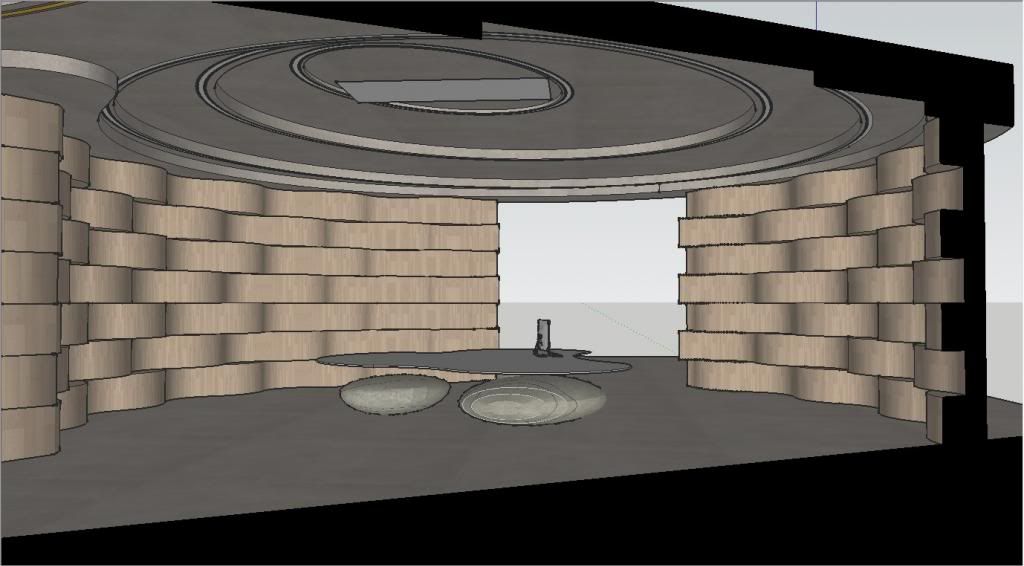
        http://i1305.photobucket.com/albums/s541/frankyzhou/1_zpsae9f08fb.jpg?t=1381736127

        Image1

        http://i1305.photobucket.com/albums/s541/frankyzhou/2_zpsf867190d.jpg

        Image2

        how can I fix this problem?

        Thank you for ur patience to answer my question.

        Best regard,
        Frank

        1 Reply Last reply
        Reply Quote 0
        • cottyC
          cotty
          last edited by

          I think the renderer must support section cuts and it isn't a problem of the plugin. If so, you can save a copy of your model and use the "Slice Model at Section" option from Zorro2 (?) to delete the rest of the model for the render.

          my SketchUp gallery

          1 Reply Last reply
          Reply Quote 0
          • TIGT
            TIG Moderator
            last edited by

            Unless your renderer supports section-cuts [unlikely for many of them] you must, as Cotty says, work on a copy of your model and slice it at the section-plane using Zorro2, then any section-cut-face you have added will show at that cut. Now it will render as expected.

            I believe that the newest version of SUPodium has a tool to do something very much like this for you, automatically saving the model as a copy and then running zorro-like and section-cut-face-like operations on the selected section-plane in the copy...

            TIG

            1 Reply Last reply
            Reply Quote 0
            • cottyC
              cotty
              last edited by

              Indigo Renderer supports section cuts directly (see here).

              my SketchUp gallery

              1 Reply Last reply
              Reply Quote 0
              • Z
                z3325206
                last edited by

                @cotty said:

                I think the renderer must support section cuts and it isn't a problem of the plugin. If so, you can save a copy of your model and use the "Slice Model at Section" option from Zorro2 (?) to delete the rest of the model for the render.

                Thank you Cotty and Tig, It works fine with zorro2 in sku8.

                1 Reply Last reply
                Reply Quote 0
                • J
                  JAD JM
                  last edited by

                  Hi TIG, Does this plugin work for Mac?

                  1 Reply Last reply
                  Reply Quote 0
                  • Dave RD
                    Dave R
                    last edited by

                    @jad jm said:

                    Hi TIG, Does this plugin work for Mac?

                    It works just fine on Mac.

                    Etaoin Shrdlu

                    %

                    (THERE'S NO PLACE LIKE)

                    G28 X0.0 Y0.0 Z0.0

                    M30

                    %

                    1 Reply Last reply
                    Reply Quote 0
                    • danchoD
                      dancho
                      last edited by

                      Hi Tig,
                      thanks for a recent help. Now I have one interesting problem.
                      After reinstalling a sketchup 2013, put on several plugins only.
                      SketchuUV ; AdditionalPluginFolder ; Sketchucation loader and your plugin SectionCut Face.

                      Using this plugin in small scene cca 30Mb interior I have strange delay when I need to
                      orbit a scene. My sketchup slow down on a strange way. After that I was trying with other files 20-120Mb sizes but the same.
                      After removing a plugin everything is fine.
                      Do you know some solution for this?

                      Sketchup 2013, Windows 7 Home P. x64,

                      Thanks
                      Daniel

                      1 Reply Last reply
                      Reply Quote 0
                      • TIGT
                        TIG Moderator
                        last edited by

                        On large models gluing a section-cut to a section-plane can slow things down noticeably, because at each change to the model it has to decide if the section-cut is modified by that...
                        Therefore using the alternative glue-on-demand mode is recommend, or even no-gluing_remake if the section-plane or model being cut by it changes...

                        TIG

                        1 Reply Last reply
                        Reply Quote 0
                        • atelierpaarA
                          atelierpaar
                          last edited by

                          Hello Tig,
                          thanks for this great plugin. Its a tremendous advantage to glue the section plane. I noticed so, that its not possible to change colors or textures once they are applied. ThatΒ΄s to bad, since I usually differentiate my sections. Is there a workaround ?
                          anyway`s, congratulation one more time
                          Uli

                          1 Reply Last reply
                          Reply Quote 0
                          • Dave RD
                            Dave R
                            last edited by

                            You don't need a work around. You need to change Lock from Yes to No before you make the face.
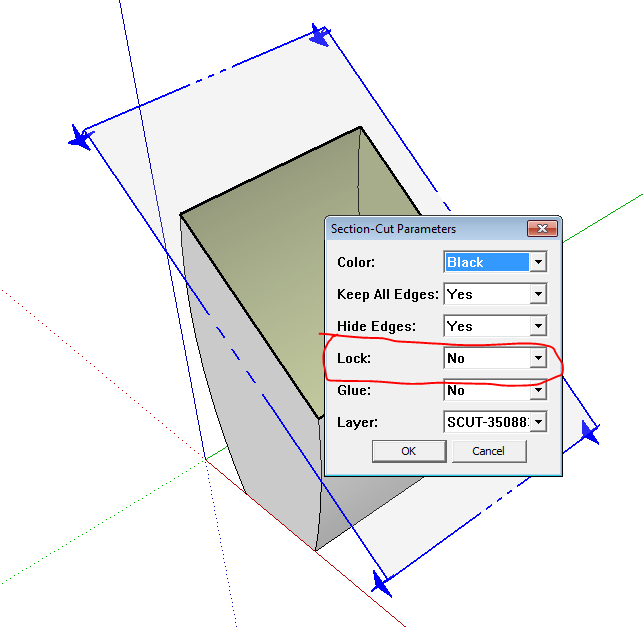
                            Capture.PNG

                            Or unlock the locked group so you can open it for editing.

                            Etaoin Shrdlu

                            %

                            (THERE'S NO PLACE LIKE)

                            G28 X0.0 Y0.0 Z0.0

                            M30

                            %

                            1 Reply Last reply
                            Reply Quote 0
                            • cottyC
                              cotty
                              last edited by

                              If it is glued, you cannot change the color, even if it's not locked.

                              my SketchUp gallery

                              1 Reply Last reply
                              Reply Quote 0
                              • Dave RD
                                Dave R
                                last edited by

                                Capture.PNG
                                Capture2.PNG
                                Capture3.PNG

                                Etaoin Shrdlu

                                %

                                (THERE'S NO PLACE LIKE)

                                G28 X0.0 Y0.0 Z0.0

                                M30

                                %

                                1 Reply Last reply
                                Reply Quote 0
                                • TIGT
                                  TIG Moderator
                                  last edited by

                                  If a SectionCutFace is not 'glued', then you can manually edit its properties, provide you 'unlock' it first.
                                  If a SectionCutFace is set to be 'glued' [or 'glue-on-demand'] you specify its fixed properties when it is created, including its color/material [chosen from a list of basic colors and any existing materials at that time] then later on, whenever it changes it will regenerate and reuse the color/material that was initially assigned to it [all of its settings are remembered as special 'attributes']. So you can't change its material manually by painting the faces in an edit - the act of painting and/or the exit from the edit is regarded as a valid change and it is regenerated using its stored attributes - including its saved color/material. BUT provided that a material is loaded into the model, then you can easily 'remake' the glued SectionCutFace by selecting the same section-plane again and then adding a SectionCutFace choosing another listed color/material [and also whatever other settings you wish to have***]. Each section-plane can only have ONE SectionCutFace, so this new SectionCutFace supersedes the previous one, and so it will now keep its new material etc as specified...
                                  ***This resetting also applies to all its properties, like hidden edges etc...

                                  TIG

                                  1 Reply Last reply
                                  Reply Quote 0
                                  • TIGT
                                    TIG Moderator
                                    last edited by

                                    Here's v3.9 http://sketchucation.com/resources/pluginstore?pln=SectionCutFace
                                    The removal of 'inner hole' faces has been improved again πŸ˜„

                                    TIG

                                    1 Reply Last reply
                                    Reply Quote 0
                                    • A
                                      ArCAD-UK
                                      last edited by

                                      😍 πŸŽ‰ πŸ˜„ THANK YOU! The master weaves his magic again...

                                      1 Reply Last reply
                                      Reply Quote 0
                                      • TIGT
                                        TIG Moderator
                                        last edited by

                                        Here's v4.0 http://sketchucation.com/resources/pluginstore?pln=SectionCutFace
                                        Further improvements in inner hole face removal algorithms. πŸ˜„

                                        TIG

                                        1 Reply Last reply
                                        Reply Quote 0
                                        • TIGT
                                          TIG Moderator
                                          last edited by

                                          Here's v4.1 http://sketchucation.com/resources/pluginstore?pln=SectionCutFace
                                          Convoluted transformations of nested objects no longer affects algorithms.
                                          πŸ˜„

                                          TIG

                                          1 Reply Last reply
                                          Reply Quote 0
                                          • TIGT
                                            TIG Moderator
                                            last edited by

                                            Here's v4.2 http%3A%2F%2Fsketchucation.com%2Fresources%2Fpluginstore%3Fpln%3DSectionCutFace
                                            Remaining convoluted mirrored transformations trapped.
                                            πŸ€“

                                            TIG

                                            1 Reply Last reply
                                            Reply Quote 0

                                            Hello! It looks like you're interested in this conversation, but you don't have an account yet.

                                            Getting fed up of having to scroll through the same posts each visit? When you register for an account, you'll always come back to exactly where you were before, and choose to be notified of new replies (either via email, or push notification). You'll also be able to save bookmarks and upvote posts to show your appreciation to other community members.

                                            With your input, this post could be even better πŸ’—

                                            Register Login
                                            • 1
                                            • 2
                                            • 3
                                            • 4
                                            • 5
                                            • 28
                                            • 29
                                            • 2 / 29
                                            • First post
                                              Last post
                                            Buy SketchPlus
                                            Buy SUbD
                                            Buy WrapR
                                            Buy eBook
                                            Buy Modelur
                                            Buy Vertex Tools
                                            Buy SketchCuisine
                                            Buy FormFonts

                                            Advertisement