sketchucation logo sketchucation
    • Login
    Oops, your profile's looking a bit empty! To help us tailor your experience, please fill in key details like your SketchUp version, skill level, operating system, and more. Update and save your info on your profile page today!
    Mac User? | Join the Rayscaper Beta for Mac Learn More

    [Plugin] SectionCutFace

    Scheduled Pinned Locked Moved Plugins
    569 Posts 171 Posters 541.2k Views 170 Watching
    Loading More Posts
    • Oldest to Newest
    • Newest to Oldest
    • Most Votes
    Reply
    • Reply as topic
    Log in to reply
    This topic has been deleted. Only users with topic management privileges can see it.
    • broomstickB
      broomstick
      last edited by

      I absolutely looooove this plugin ๐Ÿ˜„

      1 Reply Last reply
      Reply Quote 0
      • A
        AcesHigh
        last edited by

        I am sorry, what exactly does this plugin do? Its like a Zorro?

        1 Reply Last reply
        Reply Quote 0
        • TIGT
          TIG Moderator
          last edited by

          @aceshigh said:

          I am sorry, what exactly does this plugin do? Its like a Zorro?

          No.
          To see what most scripts do you can download them and if they don't have a separate readme or pdf then open the .rb file with a plain text editor (NotePad.exe etc) and read the first part which is almost always a description and helpful notes...
          Basically SectionCutFace is a tool that lets you fill in the faces of a section cut, coloured etc as desired...

          SectionCutFace adds a right-click context-menu item 'Add Section-Cut Face' that becomes available if you have selected one (active) section-plane. It opens a dialog and you can then set options - the cut's face colour, the section-cut's colour+width, the cut's layer, if its un-faced edges are kept and if all its edges are finally hidden etc... On 'OK' it adds a group to the model that is placed on* the section-cut plane (*actually it's 0.2mm inside so you still see it !). This group contains faces on what should be the solid parts of the section: it is coloured and setup as you've specified, put on its own layer as you might want it 'switched-off' in other views... It isn't foolproof - you can invent a section with ambiguous areas of solid/void but if it guesses the faced/unfaced areas wrongly then you can simply edit the group and fix them.

          TIG

          1 Reply Last reply
          Reply Quote 0
          • C
            cyan.archnet
            last edited by

            really GREAT plugin, THANKS A LOT!

            1 Reply Last reply
            Reply Quote 0
            • I
              ideas_arte
              last edited by

              Thank you very much....!

              1 Reply Last reply
              Reply Quote 0
              • D
                drewpoeppel
                last edited by

                Thank you so much for this! I just had a project where I spent half the day trying to create what your .rb did in 5 secs. Essential for all architects.

                1 Reply Last reply
                Reply Quote 0
                • utilerU
                  utiler
                  last edited by

                  TIG, I have a request for this great little script.
                  Generally when i as a section cut, I only want it in the current scene; I assume most others would also.

                  Is it possible to edit the script to view the cut layer active only in the current scene?
                  [Just like Jim's [Add hidden Layer" does]
                  ๐Ÿ‘

                  Just Curious...

                  1 Reply Last reply
                  Reply Quote 0
                  • TIGT
                    TIG Moderator
                    last edited by

                    Here's v2.3 28/07/09 CUT-x's layer now only 'on' in current page/scene.
                    http://forums.sketchucation.com/viewtopic.php?p=172583#p172583

                    TIG

                    1 Reply Last reply
                    Reply Quote 0
                    • utilerU
                      utiler
                      last edited by

                      You're the man, TIG!!!!
                      Thank you sooo much....

                      Just Curious...

                      1 Reply Last reply
                      Reply Quote 0
                      • R
                        rhankc
                        last edited by

                        Many thanks Tig. Have a great day!

                        Hank

                        1 Reply Last reply
                        Reply Quote 0
                        • massimoM
                          massimo Moderator
                          last edited by

                          Sorry TIG, I got this error with the 2.3 version with a simple box model
                          Error: #<NoMethodError: undefined methodset_visibility' for nil:NilClass>
                          C:/Programmi/Google/Google SketchUp 6/Plugins/SectionCutFace.rb:383:in face' C:/Programmi/Google/Google SketchUp 6/Plugins/SectionCutFace.rb:451 C:/Programmi/Google/Google SketchUp 6/Plugins/SectionCutFace.rb:451:in call'`
                          and i don't understand how the plug works with the scene/page transition. Draw a cube, add two scenes, in second scene make a section and add "section cut face". Is the below result the expected one?
                          Thanks.
                          Massimo.
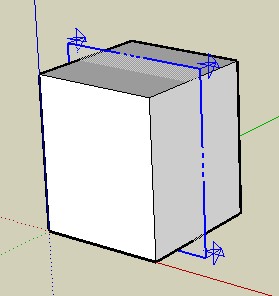

                          scene 1


                          scene 2

                          1 Reply Last reply
                          Reply Quote 0
                          • TIGT
                            TIG Moderator
                            last edited by

                            Here's v2.4

                            404 Not Found

                            favicon

                            (forums.sketchucation.com)

                            Trapped layer visibility setting error if no pages/scenes set...

                            TIG

                            1 Reply Last reply
                            Reply Quote 0
                            • TIGT
                              TIG Moderator
                              last edited by

                              @massimo said:

                              Sorry TIG, I got this error with the 2.3 version with a simple box model
                              Error: #<NoMethodError: undefined methodset_visibility' for nil:NilClass>
                              C:/Programmi/Google/Google SketchUp 6/Plugins/SectionCutFace.rb:383:in face' C:/Programmi/Google/Google SketchUp 6/Plugins/SectionCutFace.rb:451 C:/Programmi/Google/Google SketchUp 6/Plugins/SectionCutFace.rb:451:in call'`
                              and i don't understand how the plug works with the scene/page transition. Draw a cube, add two scenes, in second scene make a section and add "section cut face". Is the below result the expected one?
                              Thanks.
                              Massimo.
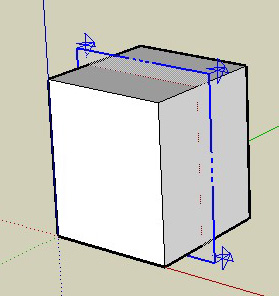
                              Do you have any 'Pages' [Scenes] ?
                              EDIT: see next message for fixing update...

                              TIG

                              1 Reply Last reply
                              Reply Quote 0
                              • massimoM
                                massimo Moderator
                                last edited by

                                No error now, thanks. Real time plugins... ๐Ÿ˜„ But about the result?

                                1 Reply Last reply
                                Reply Quote 0
                                • massimoM
                                  massimo Moderator
                                  last edited by

                                  This is the situation after the cut with no scenes added, but if i add a scene before the cut no error occurs.
                                  EDIT: TIG answered with the 2.4 version before my reply ๐Ÿ˜„
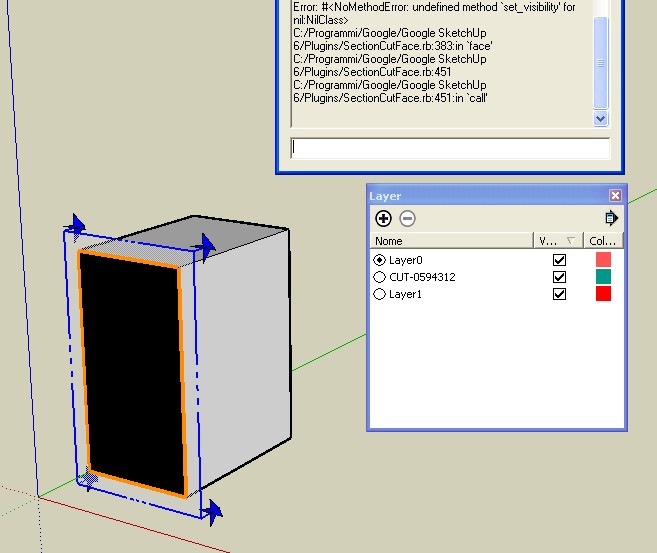

                                  ScreenHunter_03 Aug. 18 13.20.jpg

                                  1 Reply Last reply
                                  Reply Quote 0
                                  • D
                                    dimario
                                    last edited by

                                    this is just a fab plugin.
                                    thank you a lot. very helpful!!! saves a lot of time...

                                    kind regards...

                                    1 Reply Last reply
                                    Reply Quote 0
                                    • GaieusG
                                      Gaieus
                                      last edited by

                                      Works really cool, thanks, TIG! ๐Ÿ‘

                                      (And now... If only the section cut face would also move when I make a section animation/transition between two scenes! But sigh... I know, I know...) ๐Ÿ˜‰

                                      Gai...

                                      1 Reply Last reply
                                      Reply Quote 0
                                      • massimoM
                                        massimo Moderator
                                        last edited by

                                        @unknownuser said:

                                        If only the section cut face would also move when I make a section animation/transition between two scenes! But sigh... I know, I know...

                                        That's exactly the result I was looking for, Gaieus. ๐Ÿ˜„

                                        1 Reply Last reply
                                        Reply Quote 0
                                        • GaieusG
                                          Gaieus
                                          last edited by

                                          ๐Ÿ˜ฎ

                                          I didn't even expect it to be possible at all!
                                          Fingers crossed however (and now all the exporter scripters for external renderers should start thinking about how to export these animated section cuts! ๐Ÿ˜„ )

                                          Gai...

                                          1 Reply Last reply
                                          Reply Quote 0
                                          • TIGT
                                            TIG Moderator
                                            last edited by

                                            @gaieus said:

                                            Works really cool, thanks, TIG! ๐Ÿ‘

                                            (And now... If only the section cut face would also move when I make a section animation/transition between two scenes! But sigh... I know, I know...) ๐Ÿ˜‰

                                            I have a half-baked version that keeps bug-splatting ! It adds observers between the section-plane and the faced-group and remakes/moves them together... Don't expect it to be safe for public consumption soon... ๐Ÿ˜ž

                                            TIG

                                            1 Reply Last reply
                                            Reply Quote 0

                                            Hello! It looks like you're interested in this conversation, but you don't have an account yet.

                                            Getting fed up of having to scroll through the same posts each visit? When you register for an account, you'll always come back to exactly where you were before, and choose to be notified of new replies (either via email, or push notification). You'll also be able to save bookmarks and upvote posts to show your appreciation to other community members.

                                            With your input, this post could be even better ๐Ÿ’—

                                            Register Login
                                            • 1
                                            • 2
                                            • 25
                                            • 26
                                            • 27
                                            • 28
                                            • 29
                                            • 29 / 29
                                            • First post
                                              Last post
                                            Buy SketchPlus
                                            Buy SUbD
                                            Buy WrapR
                                            Buy eBook
                                            Buy Modelur
                                            Buy Vertex Tools
                                            Buy SketchCuisine
                                            Buy FormFonts

                                            Advertisement