sketchucation logo sketchucation
    • 登入
    Oops, your profile's looking a bit empty! To help us tailor your experience, please fill in key details like your SketchUp version, skill level, operating system, and more. Update and save your info on your profile page today!
    🔌 Smart Spline | Fluid way to handle splines for furniture design and complex structures. Download

    [Plugin][$] RoundCorner - v3.4a - 31 Mar 24


    已排程 已置頂 已鎖定 已移動 Plugins
    1.5k 貼文 473 Posters 3.4m 瀏覽 472 Watching
    正在載入更多貼文
    • 從舊到新
    • 從新到舊
    • 最多點贊
    回覆
    • 在新貼文中回覆
    登入後回覆
    此主題已被刪除。只有擁有主題管理權限的使用者可以查看。
    • bagateloB 離線
      bagatelo
      最後由 編輯

      It would be interesting if the Sketchup had a control panel to install / disable / uninstall plugins. Not for just a few plugins, but for all plugins. But this is not Us, but for
      Trimble.

      While the cat's away, the mice will play

      1 條回覆 最後回覆 回覆 引用 0
      • P 離線
        pho0o0
        最後由 編輯

        I removed everything and reinstalled everything;
        I have the red diamond and toolbar roundcorner.
        but I still have this message:

        "Erreur de chargement du fichier bootstrap_RoundCorner.rb
        uninitialized constant RoundCorner::T6"

        1 條回覆 最後回覆 回覆 引用 0
        • H 離線
          Hiro_Bird
          最後由 編輯

          It's Great!

          1 條回覆 最後回覆 回覆 引用 0
          • TIGT 離線
            TIG Moderator
            最後由 編輯

            @pho0o0 said:

            I removed everything and reinstalled everything;
            I have the red diamond and toolbar roundcorner.
            but I still have this message:

            "Erreur de chargement du fichier bootstrap_RoundCorner.rb
            uninitialized constant RoundCorner::T6"
            You have NOT installed everything properly.
            Get the latest Lib folder and install that.
            Pay close attention to the diagrams that Fredo provides showing the Plugins folder's files and their sub-folder arrangements.

            Vous n'avez pas installé tout correctement.
            Obtenez le dernier dossier Lib et l'installer.
            Portez une attention particulière aux schémas que Fredo fournit affichant les fichiers du dossier Plugins et de leurs sous-dossier arrangements.

            TIG

            1 條回覆 最後回覆 回覆 引用 0
            • E 離線
              Elizabeth1604
              最後由 編輯

              Hi everyone! I tried to install round corner tool on sketchup, and I have no idea where to find it exactly on menu. Plz help me!!!!

              1 條回覆 最後回覆 回覆 引用 0
              • fredo6F 離線
                fredo6
                最後由 編輯

                @elizabeth1604 said:

                Hi everyone! I tried to install round corner tool on sketchup, and I have no idea where to find it exactly on menu. Plz help me!!!!

                Normally, you should get a toolbar with 3 'dice-like' icons.
                The menu entries are under Fredo6 Collection > RoundCorner.

                Fredo

                PS: did you install LibFredo6 library?

                1 條回覆 最後回覆 回覆 引用 0
                • P 離線
                  Printabot
                  最後由 編輯

                  @tig said:

                  It's trying to make/use a file called 'Fredo6Trace.txt' in the 'plugins' folder.
                  It's failing with a 'Permission denied' error.
                  It's not in the folder contents you show.
                  The script ought to make it automatically.
                  Therefore I suspect that you must have the 'security permissions' set to be oddly limited for the 'plugins' folder.
                  I'm not sure how you change this on a MAC, but on a PC it's relatively straightforward to change them to 'FULL', so I'd expect on a MAC it'll be easy too.
                  This change to 'FULL' permissions will allow you to add/remove files/folders etc and for scripts to write files into that folder too.
                  Also note that your Materials, Components and Styles folders ought to have the same permissions, as from time to time you will want to add files readily to these too...

                  Thanks so much for the tip, had the same problem, solved now 😄

                  1 條回覆 最後回覆 回覆 引用 0
                  • S 離線
                    skymonkey74
                    最後由 編輯

                    Hello Mac-Users,

                    I am running Mac OS X 10.8.2 Mountain Lion and Sketchup 8 Pro and came across installation problems.
                    I installed LibFredo6_46 and RoundCorner_23 by extracting it with "Forklift" (Replacement/addition to finder) into /Library/Application Support/Google SketchUp 8/SketchUp/plugins (including all the subdirectories).
                    To do this I had to enter my root-credentials.
                    After restarting SU an error dialogue popped up saying that the directory
                    /Library/Application Support/Google SketchUp 8/SketchUp/plugins/DEFPARAM_Dir
                    was still missing. So I touch that empty directory (again with my root credentials).

                    After that SU starts up without error and even the toolbar of Round Corners shows up, but the toolbar (when activating / clicking on the 3 icons) didn't show up. FredoLib didn't come up with errors either -> very annoying since it wasn't working.

                    I OVERCAME the problem by recursively changing the permission of the plugins-directory to 777 on the console.
                    Afterwards it worked perfectly.

                    I hope this helps you guys....

                    Cheers - and thanks to fredo for this cool plugin!!!

                    1 條回覆 最後回覆 回覆 引用 0
                    • TIGT 離線
                      TIG Moderator
                      最後由 編輯

                      You have spotted an issue that many MAC users [and some PC users too] fall over on...
                      You must have FULL access-rights to the 'Plugins' folder to correctly install files and subfolders of files into it - either manually or using the new automated installer tool[s]. Also some scripts need to access the 'Plugins' folder to write log-files, make/access temporary directories etc. If you don't have FULL access-rights you'll get failures when these operations are blocked...
                      The same access-rights apply to the main Components, Materials and Styles folders - where from time to time you will want to add files either directly out of your SKP or adding them manually...

                      TIG

                      1 條回覆 最後回覆 回覆 引用 0
                      • fredo6F 離線
                        fredo6
                        最後由 編輯

                        This problem of permission is a real issue.
                        Sketchup should allow installing plugins in private drives, including network drives (for instance when shared in schools among a group of students). This will avoid a lot of problems when installing, reinstalling or working with several machines.

                        That's what I have tried to address with my utility 000_AdditionalPluginFolders but I hope Trimble will find a more native solution.

                        Fredo

                        1 條回覆 最後回覆 回覆 引用 0
                        • TIGT 離線
                          TIG Moderator
                          最後由 編輯

                          From hints at Basecamp they are considering where Plugins get stored on a per user basis for the next big update... which should then fix these issues... 😒

                          TIG

                          1 條回覆 最後回覆 回覆 引用 0
                          • J 離線
                            jean1979
                            最後由 編輯

                            thx been looking for this plugin

                            1 條回覆 最後回覆 回覆 引用 0
                            • T 離線
                              theibel
                              最後由 編輯

                              Thank you! Incredible plugin. Very powerful and it's so easy to use, I feel like I'm doing something wrong.

                              Tom

                              God gave you a brain, it's what you do with it that counts.

                              1 條回覆 最後回覆 回覆 引用 0
                              • D 離線
                                design54
                                最後由 編輯

                                i did that, the other plugins those need libredo6 work, but the round corner doesnot, only the small tool bar appear when click.; no action
                                also when i install the libfredo and lunch the sketchup; a massage told me that the libfredo cannot create the file
                                (defoaram_dir) and ask me to do it manually
                                (my computer is mac not windows)
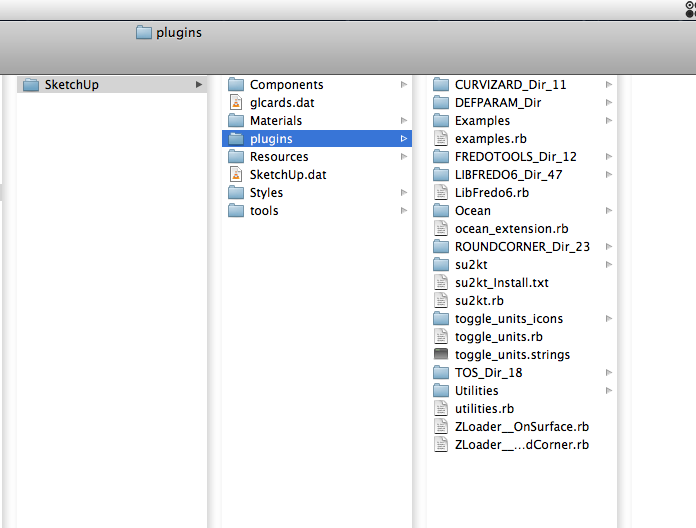

                                Screen shot 2013-01-06 at 5.43.20 PM.png

                                1 條回覆 最後回覆 回覆 引用 0
                                • TIGT 離線
                                  TIG Moderator
                                  最後由 編輯

                                  Now we have an answer. 💭
                                  You have limited permissions to 'read/write' to your Plugins folder.
                                  Change these permissions to FULL for you/ALL.
                                  Do you know how to [re]set a folder's permissions?

                                  Then you and/or the tool can write its temporary folder/files with impunity.

                                  Fixed ! 😄

                                  TIG

                                  1 條回覆 最後回覆 回覆 引用 0
                                  • D 離線
                                    design54
                                    最後由 編輯

                                    thank you very much, its worked 😄

                                    1 條回覆 最後回覆 回覆 引用 0
                                    • S 離線
                                      steve69
                                      最後由 編輯

                                      I installed the plugins into the plugin folder and set the FULL PERMISSION TO THE PLUGIN folder (including the enclosed folders, files).
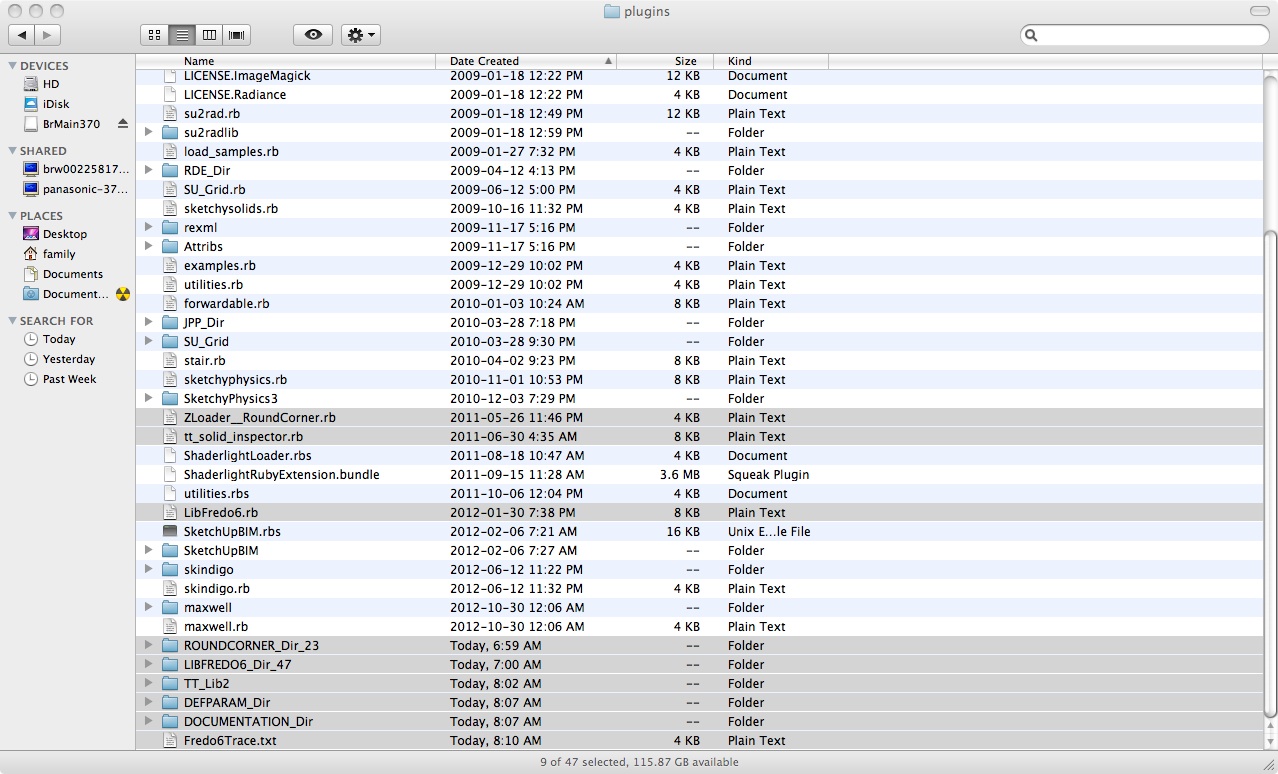
                                      screenshot-roundcorner.jpg

                                      I set up a test case: a simple 12x12x12 inch cube with , after all edges highlighted, and offset set at 1inch, the green check mark appears. Then once I click outsid the object, it processes to 61 then bam! sketchup crashes.
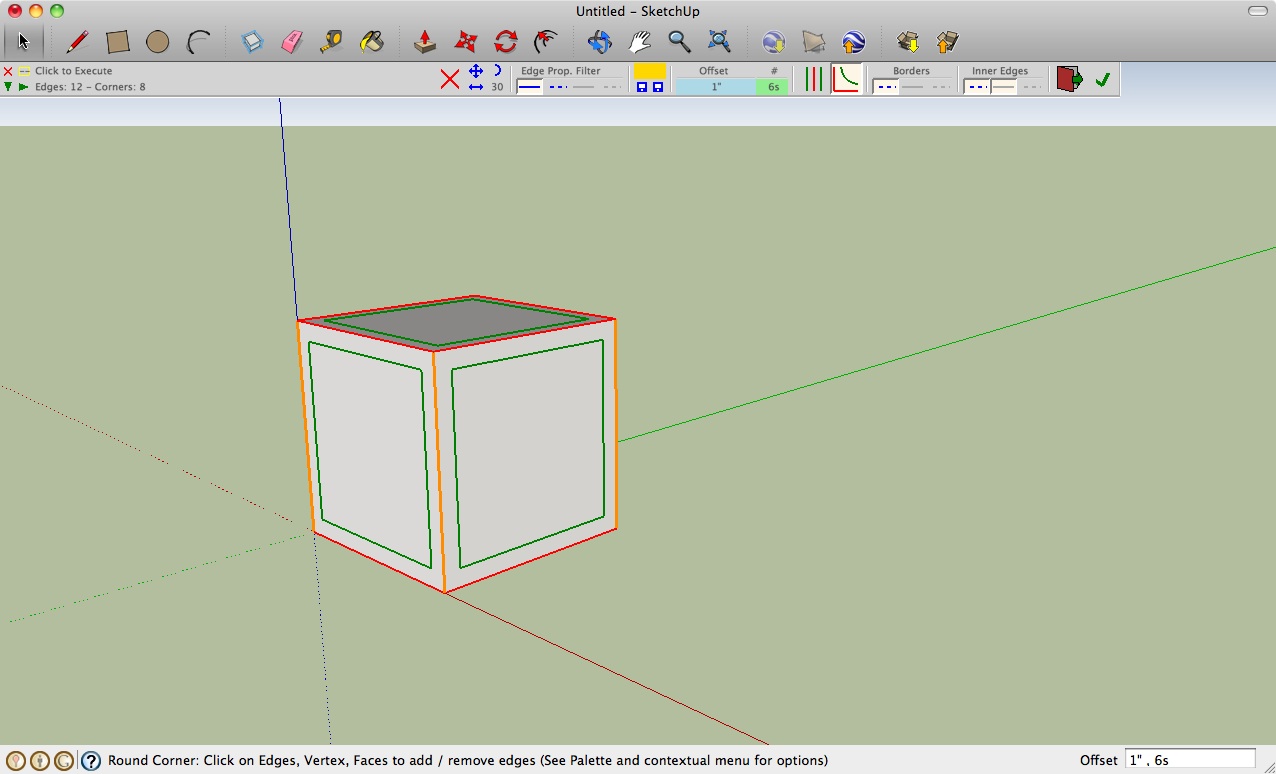
                                      screenshot-roundcorner1.jpg

                                      Any help would be appreciated. Im using SU7.1 on Mac OSX 10.6.8

                                      1 條回覆 最後回覆 回覆 引用 0
                                      • fredo6F 離線
                                        fredo6
                                        最後由 編輯

                                        @steve69 said:

                                        I set up a test case: a simple 12x12x12 inch cube with , after all edges highlighted, and offset set at 1inch, the green check mark appears. Then once I click outsid the object, it processes to 61 then bam! sketchup crashes.

                                        If this is systematic, i.e; whatever the model, simple or complex, then it might come from a conflict with another plugin like Podium (some versions), Matchbox, SketchupBIM (which I see you have installed)

                                        Fredo

                                        1 條回覆 最後回覆 回覆 引用 0
                                        • pilouP 離線
                                          pilou
                                          最後由 編輯

                                          SketchyPhysics makes many uncompatibilities with somes plugins!
                                          rename just SketchyPhysics.rb in SketchyPhysics.rb1 and see what happen 😉
                                          Of course if you want to use it erase the "1" 😉

                                          Frenchy Pilou
                                          Is beautiful that please without concept!
                                          My Little site :)

                                          1 條回覆 最後回覆 回覆 引用 0
                                          • S 離線
                                            steve69
                                            最後由 編輯

                                            Fredo6, Pilou

                                            Thanks for the suggestions: mark this solved. Rather than go through and deactivate my other plugins until I found the incompatibilty, I installed a new copy of Sketchup (version 😎 and the plugin works.

                                            round-corner-success.jpg

                                            1 條回覆 最後回覆 回覆 引用 0
                                            • 1
                                            • 2
                                            • 67
                                            • 68
                                            • 69
                                            • 70
                                            • 71
                                            • 72
                                            • 73
                                            • 74
                                            • 69 / 74
                                            • 第一個貼文
                                              最後的貼文
                                            Buy SketchPlus
                                            Buy SUbD
                                            Buy WrapR
                                            Buy eBook
                                            Buy Modelur
                                            Buy Vertex Tools
                                            Buy SketchCuisine
                                            Buy FormFonts

                                            Advertisement