sketchucation logo sketchucation
    • 登入
    Oops, your profile's looking a bit empty! To help us tailor your experience, please fill in key details like your SketchUp version, skill level, operating system, and more. Update and save your info on your profile page today!
    🔌 Smart Spline | Fluid way to handle splines for furniture design and complex structures. Download

    [Plugin][$] RoundCorner - v3.4a - 31 Mar 24


    已排程 已置頂 已鎖定 已移動 Plugins
    1.5k 貼文 473 Posters 3.4m 瀏覽 472 Watching
    正在載入更多貼文
    • 從舊到新
    • 從新到舊
    • 最多點贊
    回覆
    • 在新貼文中回覆
    登入後回覆
    此主題已被刪除。只有擁有主題管理權限的使用者可以查看。
    • B 離線
      blaze3d
      最後由 編輯

      I can't get the round corner to work no matter what I try. The other stuff like Fredo taper and scale work great. But all this does for me is literally explode (not the ungroup kind)every thing I apply it on. Its installed properly. Sketchup pro 8 here. Any thoughts would be appreciated thanks.

      1 條回覆 最後回覆 回覆 引用 0
      • Dave RD 離線
        Dave R
        最後由 編輯

        Your description doesn't give us much to go on. Could you post an SKP file with before and after examples showing us what you mean by "explode"? Maybe you could tell us what settings you're using for rounding? Give us something useful so we can help you.

        Etaoin Shrdlu

        %

        (THERE'S NO PLACE LIKE)

        G28 X0.0 Y0.0 Z0.0

        M30

        %

        1 條回覆 最後回覆 回覆 引用 0
        • S 離線
          shauko
          最後由 編輯

          Thank you so much, so useful !!

          1 條回覆 最後回覆 回覆 引用 0
          • T 離線
            technogod
            最後由 編輯

            top of the line .thanks alot.

            1 條回覆 最後回覆 回覆 引用 0
            • M 離線
              mmurdock
              最後由 編輯

              I am running windows 7 and using the latest version of sketchup pro. My plugins are all working well, but when I log off as an administrator to my personal user name, the round corner plugin stops working while all the other Fredo6 plugins work fine. I click the icon and nothing happens. Any ideas?

              1 條回覆 最後回覆 回覆 引用 0
              • Dave RD 離線
                Dave R
                最後由 編輯

                Megan, do you have administrator privileges under your own log in to add files to the Plugins folder? Did you install the other plugins while logged in under your user name and Round Corner while logged in as Administrator? What happens if, while logged in as you, you reinstall Round corner?

                Etaoin Shrdlu

                %

                (THERE'S NO PLACE LIKE)

                G28 X0.0 Y0.0 Z0.0

                M30

                %

                1 條回覆 最後回覆 回覆 引用 0
                • R 離線
                  resall
                  最後由 編輯

                  Hi,
                  I'm trying to install the round corner plugin but it just wont work.
                  I've installed LibFredo6 4.6 in the plugins folder, then Round Corner 2.3
                  I even tried unistalling everything (including sketchup and all of its folders) and installing again, and nothing...
                  Then I tried deleting the date that came on the name of the folders available for download at the begining of this post and again, nothing...
                  I'm using Mac OS X 10.6.8 and Sketchup 8 (free version).
                  Can someone please help me.
                  Thanx


                  footprint

                  1 條回覆 最後回覆 回覆 引用 0
                  • TIGT 離線
                    TIG Moderator
                    最後由 編輯

                    You haven't actually installed them. 😲

                    The two subfolders [called 'LibFredo...' and 'RoundCorner...'] that you show are what the extraction of the zipped archive produces - the package - if you will.

                    Inside those folders are the files and subfolders containing other files that auto-load and make the tool available to you when you restart Sketchup.

                    So these need to be in the 'plugins' folder - not left inside the package that they came in.

                    So move these two folders onto your Desktop... then move their contents back into the 'plugins' folder.
                    Ensure that all files in the subfolders stay inside those subfolders, when they are moved - it is another frequent error - to move the items out of subfolders - which will surely break everything - because the .rb 'loaders' files expect to find these files in the subfolders, which are supplied with the tool, and also sometimes extra 'support' files in additional 'libraries' - like in the case of this tool !

                    TIG

                    1 條回覆 最後回覆 回覆 引用 0
                    • R 離線
                      resall
                      最後由 編輯

                      SOOO SIMPLE! Thanks!

                      1 條回覆 最後回覆 回覆 引用 0
                      • A 離線
                        art4smart
                        最後由 編輯

                        Thank YOUUUU

                        1 條回覆 最後回覆 回覆 引用 0
                        • F 離線
                          figgo
                          最後由 編輯

                          Finally got the plugin installed. Now it crashes when I try to use it. First plugin I've got so nothing's conflicting. I'm using vista.

                          1 條回覆 最後回覆 回覆 引用 0
                          • Dave RD 離線
                            Dave R
                            最後由 編輯

                            It's probably not installed correctly. Post a screen shot of your Plugins directory.

                            Etaoin Shrdlu

                            %

                            (THERE'S NO PLACE LIKE)

                            G28 X0.0 Y0.0 Z0.0

                            M30

                            %

                            1 條回覆 最後回覆 回覆 引用 0
                            • F 離線
                              figgo
                              最後由 編輯

                              Ok here it is:
                              http://img3.imageshack.us/img3/710/pluginscreen.png
                              Before I installed this plugin though, Sketchup crashes for me a lot anyway. I have to save every minute or so.

                              1 條回覆 最後回覆 回覆 引用 0
                              • TIGT 離線
                                TIG Moderator
                                最後由 編輯

                                Figgo

                                Don't double post, have patience as a new member...
                                Also learn to attach an image rather than link off to some 3rd party site.
                                Your installation looks OK.
                                How does this 'crash' manifest itself.
                                If you have the Ruby Console open are there any error messages etc...
                                You are not helping us to help you a lot... 😕

                                TIG

                                1 條回覆 最後回覆 回覆 引用 0
                                • F 離線
                                  figgo
                                  最後由 編輯

                                  I didnt double post due to impatience...I didnt know it needed to be approved. And I'm not only new to this forum, I don't use forums period. Just came to ask a question.
                                  Ok nitpicking aside, I can make Sketchup crash myself by clicking and dragging all the way outside of the white area. Everything closes, even Ruby console, and it says there was an error.

                                  1 條回覆 最後回覆 回覆 引用 0
                                  • TIGT 離線
                                    TIG Moderator
                                    最後由 編輯

                                    @figgo said:

                                    I didnt double post due to impatience...I didnt know it needed to be approved. And I'm not only new to this forum, I don't use forums period. Just came to ask a question.
                                    Ok nitpicking aside, I can make Sketchup crash myself by clicking and dragging all the way outside of the white area. Everything closes, even Ruby console, and it says there was an error.
                                    If Sketchup is processing a lot of geometry then it can 'white-out'.
                                    This is temporary and it should complete eventually.
                                    Without an example of what you are trying to do it's hard for us to say whether this is the case or there's another issue - e.g. very small facets failing to form properly [try scaling up x10, round-edges then scale back down...]
                                    The disppearance of the Ruby Console is also common during a white-out... but does Sketchup close-down and a Bugsplat! screen appear ? Or is this 'error' displayed in the Console eventually ? [You are still giving us scant details - the more info you give the more likely we to be able to help solve this].
                                    Many people use this tool without issues, so there's something adrift with either your setup, initial geometry or settings etc...
                                    Have patience... 😉

                                    TIG

                                    1 條回覆 最後回覆 回覆 引用 0
                                    • fredo6F 離線
                                      fredo6
                                      最後由 編輯

                                      @figgo,

                                      Can you check if you have Matchbox, Sunposition or Podium installed. These plugins are known to conflict with RoundCorner, as indicated in the main post.

                                      Otherwise, as TIG recommended, it would be helpful to have an idea of the model you experiment on.

                                      Fredo

                                      1 條回覆 最後回覆 回覆 引用 0
                                      • J 離線
                                        Jspro
                                        最後由 編輯

                                        Resolved

                                        1 條回覆 最後回覆 回覆 引用 0
                                        • J 離線
                                          Jspro
                                          最後由 編輯

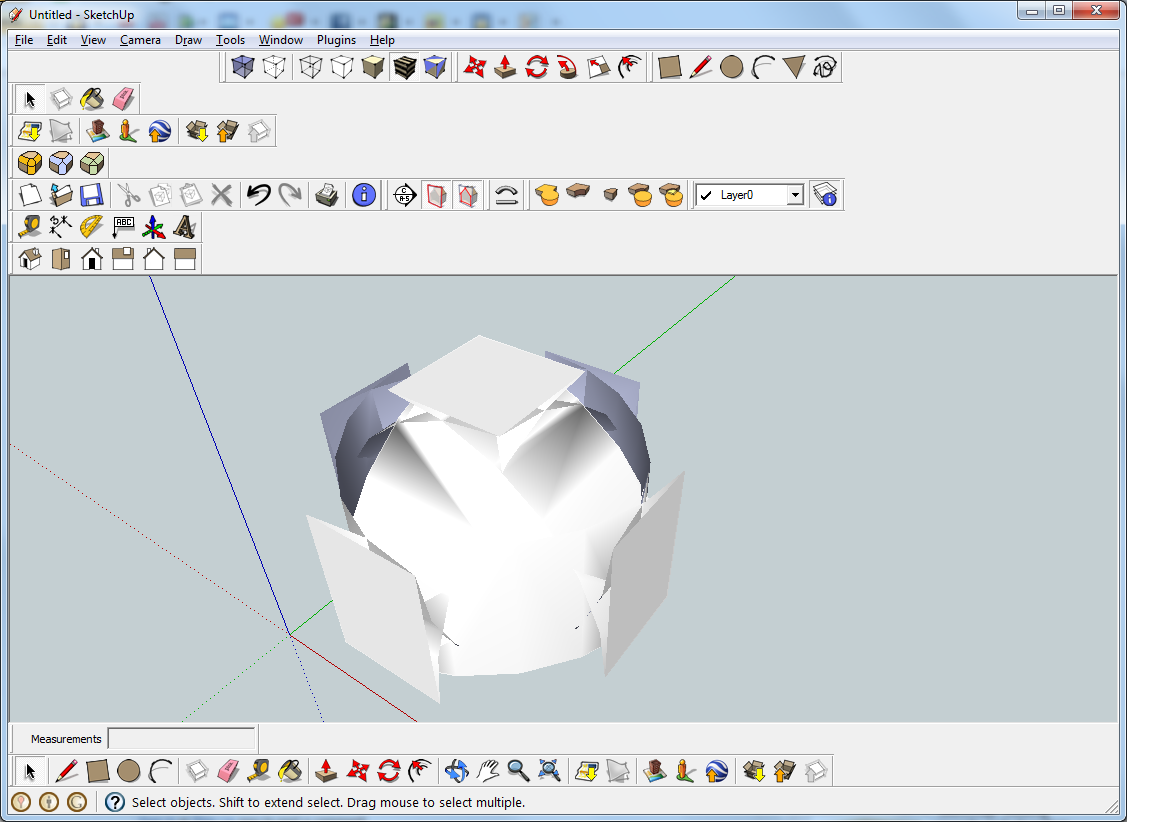
                                          Yes I am a new user to sketch up plugins. I have a loaded Round Corner and it seems to have loaded alright. But when I draw a rectangle it seems to distort as you can see by the picture I have attached. Can you help me find out why it is doing this. Thank you John

                                          Round Corner.png

                                          1 條回覆 最後回覆 回覆 引用 0
                                          • Dave RD 離線
                                            Dave R
                                            最後由 編輯

                                            It looks to me as if you've got a radius setting for the round corners that is larger than your box. I'll bet it would help if you read the instructions. Go back to the first post in the thread and download the documentation.

                                            By the way, why do you have duplicate toolbars displayed. do you need both of those? You could rearrange your toolbars and get some additional drawing space, too.


                                            Etaoin Shrdlu

                                            %

                                            (THERE'S NO PLACE LIKE)

                                            G28 X0.0 Y0.0 Z0.0

                                            M30

                                            %

                                            1 條回覆 最後回覆 回覆 引用 0
                                            • 1
                                            • 2
                                            • 3
                                            • 4
                                            • 5
                                            • 73
                                            • 74
                                            • 2 / 74
                                            • 第一個貼文
                                              最後的貼文
                                            Buy SketchPlus
                                            Buy SUbD
                                            Buy WrapR
                                            Buy eBook
                                            Buy Modelur
                                            Buy Vertex Tools
                                            Buy SketchCuisine
                                            Buy FormFonts

                                            Advertisement


