sketchucation logo sketchucation
    • Login
    Oops, your profile's looking a bit empty! To help us tailor your experience, please fill in key details like your SketchUp version, skill level, operating system, and more. Update and save your info on your profile page today!
    πŸ”Œ Smart Spline | Fluid way to handle splines for furniture design and complex structures. Download

    [Plugin][$] RoundCorner - v3.4a - 31 Mar 24


    Scheduled Pinned Locked Moved Plugins
    1.5k Posts 473 Posters 3.4m Views 472 Watching
    Loading More Posts
    • Oldest to Newest
    • Newest to Oldest
    • Most Votes
    Reply
    • Reply as topic
    Log in to reply
    This topic has been deleted. Only users with topic management privileges can see it.
    • fredo6F Offline
      fredo6
      last edited by fredo6

      NEW RELEASE: RoundCorner v3.4a - 31 Mar 24

      Requirement: LibFredo6 v14.3b or above

      RoundCorner 3.4a is a maintenance release for future compatibility


      Home Page of RoundCorner for information and Download.

      Main post of this thread.

      R K 2 Replies Last reply Reply Quote 0
      • R Offline
        raptorscream @fredo6
        last edited by raptorscream

        @fredo6

        Hello,

        I'm using the free license of RoundCorner and I have an issue I dont understand how to fix.

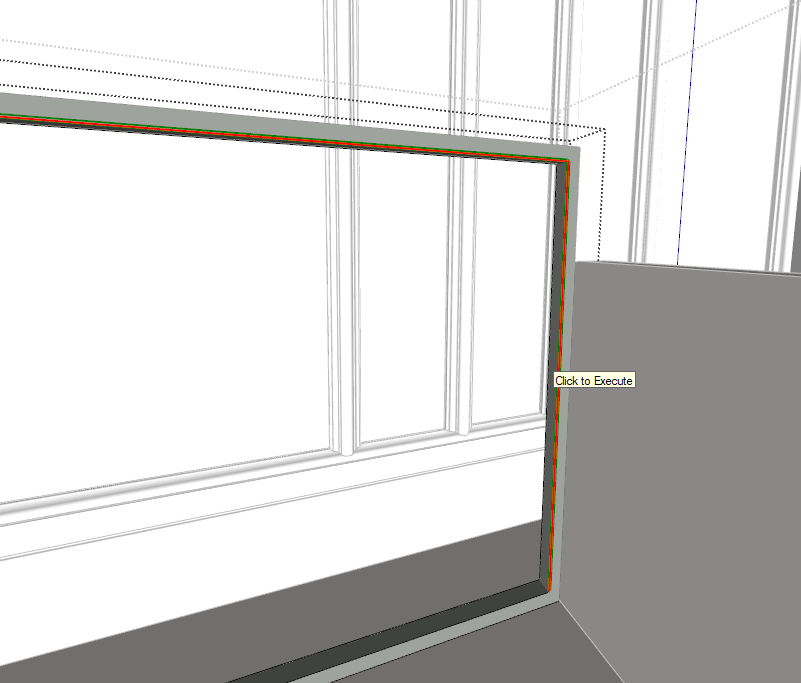
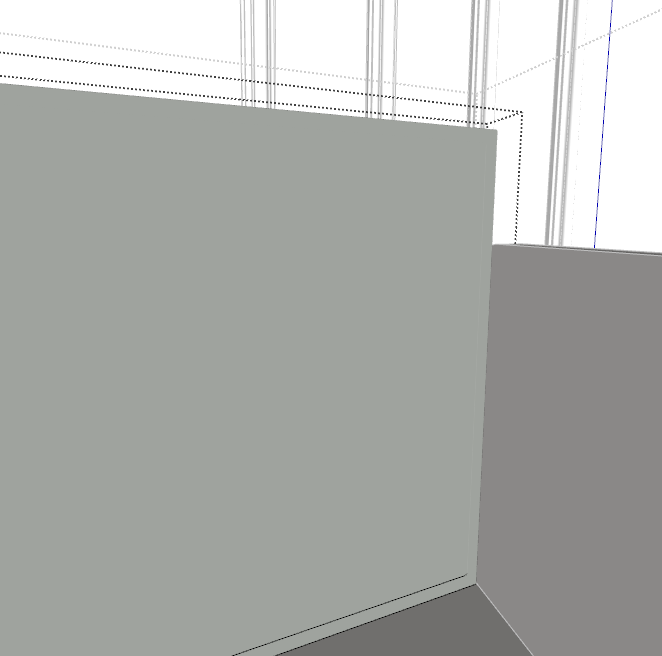
        When I select the inside edges of this object, it just bridges/fills the entire hole even if I try just to round a single edge that's inside the "hole". Why is that?
        4ecc6f19-506a-41c8-9dd7-a1e5a50c06b8-image.png 21b2818b-b7b6-4710-9ac3-5054b1229739-image.png

        massimoM 1 Reply Last reply Reply Quote 0
        • massimoM Offline
          massimo Moderator @raptorscream
          last edited by massimo

          @raptorscream Hi, this is a normal behaviour for RoundCorner in some circumstances. For example when you bevel coplanar edges that are a closed loop or part of it. I guess because the plugin somehow "erases" and then "draws" again some lines in the process. This causes Sketchup to automatically generate a face.
          Just select and delete the unwanted surface.

          1 Reply Last reply Reply Quote 0
          • I Offline
            ianpemb496
            last edited by

            Hi I have and am able to use fredo round corner in ketchup pro2023 however I just upgraded to SketchUp pro 2024 and I am now getting a licence issue. How do I transfer the licence

            Rich O BrienR 1 Reply Last reply Reply Quote 0
            • Rich O BrienR Offline
              Rich O Brien Moderator @ianpemb496
              last edited by

              @ianpemb496 said in [Plugin][$] RoundCorner - v3.4a - 31 Mar 24:

              How do I transfer the licence

              You can release seats by following the guide:
              https://downloads.sketchucation.com/licensing/SCFLicense-Instructions_to_Users.pdf

              Or at https://sketchucation.com/webshop/my-licences.php if you kept Sketchucation Tools and Libfredo updated

              Download the free D'oh Book for SketchUp πŸ“–

              1 Reply Last reply Reply Quote 0
              • D Offline
                dalebailey
                last edited by

                I recently upgraded to lib fredo 15.1 as requested, and skucation tools 4.4.1 and now my Fredo Round Corner 3.4a doesn't work. Like most of my licensed fredo plugins we randomly lose them because we don't know when the " occasional checks" occur for the licensing. The computer we use is an offline cpu. Anyway when we ping every month for updates we usually have to re-activate all the plugins. This time when we did all the plugins activated properly but round corner. It says "sorry - an error occurred in the communication with sketchucation." and wont license. it says i must be connected to the internet, even though i am. All the others worked properly. This is a new development.

                1 Reply Last reply Reply Quote 0
                • fredo6F Offline
                  fredo6
                  last edited by

                  What is the exact error message?

                  1 Reply Last reply Reply Quote 0
                  • E Offline
                    ediarbi
                    last edited by TIG

                    it very nice plugin

                    1 Reply Last reply Reply Quote 0
                    • I Offline
                      isidrodaniel
                      last edited by

                      I have the Perpetual licence (3 seats).
                      I had to reinstall sketchup and now I receive a message saying licence seats exceeded.
                      How can I fix this?

                      1 Reply Last reply Reply Quote 0
                      • Rich O BrienR Offline
                        Rich O Brien Moderator
                        last edited by

                        Release seats at https://sketchucation.com/webshop/my-licences.php

                        If seat releasing is unavailabe at https://sketchucation.com/webshop/my-licences.php please update Sketchucation Tools

                        Download the free D'oh Book for SketchUp πŸ“–

                        1 Reply Last reply Reply Quote 0
                        • B Offline
                          buzniak
                          last edited by

                          How do you get it to stop filling in your holes?

                          Dave RD 1 Reply Last reply Reply Quote 0
                          • Dave RD Offline
                            Dave R @buzniak
                            last edited by

                            @buzniak In many cases that's just the way Round Corner works. It's simple enough to delete the faces over the holes. FredoCorner, on the other hand doesn't seem to do that. I find it useful to have both extensions because one sometimes works better than the other depending on the situation.

                            Etaoin Shrdlu

                            %

                            (THERE'S NO PLACE LIKE)

                            G28 X0.0 Y0.0 Z0.0

                            M30

                            %

                            1 Reply Last reply Reply Quote 0
                            • K Offline
                              khanhafeez @fredo6
                              last edited by

                              @fredo6 i purchase round corner license there are some issue in skethcup 2025 when i use it to genrate skethcup shutdown automatically,
                              one more issue is i have 3 license in that two i used in same pc as message appear that trial finish when is upload license key my prviouse license is wasted, do somthing for this issue we loosing money

                              1 Reply Last reply Reply Quote 1
                              • Rich O BrienR Offline
                                Rich O Brien Moderator
                                last edited by

                                @khanhafeez

                                Please release seats online or by following guide: https://downloads.sketchucation.com/licensing/SCFLicense-Instructions_to_Users.pdf

                                Download the free D'oh Book for SketchUp πŸ“–

                                1 Reply Last reply Reply Quote 0
                                • M Offline
                                  MarkDuncan1966
                                  last edited by

                                  attempted to purchase using my only payment method i dont (AND WILL NOT USE PAYPAL) your system advises my VALID credit card cannot be used, please advise how i can make a purchase (and no i dont know anyone with paypal)

                                  1 Reply Last reply Reply Quote 0
                                  • W Offline
                                    wpns
                                    last edited by

                                    This tool is the one I use the most, and it's wonderful! In fact, I bought another 3-seat license though I'm only using two, because I never want to run low!

                                    However, I've been coping with a long-term problem:
                                    The UI is upside down and backwards, some kind of mirror image.

                                    Screenshot 2026-02-22 at 7.11.50β€―AM.png

                                    Is there an easy fix for this?

                                    2023 Mac Mini M2 Pro 32G
                                    macOS Tahoe 26.3
                                    Sketchup Make 2017

                                    Thanks again!

                                    Dave RD 1 Reply Last reply Reply Quote 0
                                    • fredo6F Offline
                                      fredo6
                                      last edited by

                                      Probably not. I remember there were known issues with the mirroring of texts in some versions of Mac with old versions of Sketchup.

                                      I guess you get this efect with my other plugins (or plugins from other authors) using text drawing in the viewport

                                      1 Reply Last reply Reply Quote 0
                                      • Dave RD Offline
                                        Dave R @wpns
                                        last edited by

                                        @wpns that looks similar to an issue related to certain Mac GPUs in which dimensions were inverted with older versions of SketchUp. In that case it was found that if a fix was to come it had to come from Apple. I don't know if it ever did.

                                        Effectively the Mac OS has evolved out from under that old version of SketchUp. As long as you continue with SketchUp 2017 you'll probably have to live with weird stuff. Many users have reported repeated crashes and other unwanted behaviors with old versions of SketchUp. My guess is it won't get better.

                                        Etaoin Shrdlu

                                        %

                                        (THERE'S NO PLACE LIKE)

                                        G28 X0.0 Y0.0 Z0.0

                                        M30

                                        %

                                        1 Reply Last reply Reply Quote 0
                                        • B Offline
                                          butteryngregory
                                          last edited by

                                          Hello, im trying to pay for this plug in via subscription but there's a problem with the credit card payments and i dont think it's a problem on my end because i was able to pay for OTHER plugins. Im so desperate.

                                          1 Reply Last reply Reply Quote 0
                                          • Rich O BrienR Offline
                                            Rich O Brien Moderator
                                            last edited by

                                            @butteryngregory
                                            We use PayPal and Stripe for payment processing. We have no control over whether cards are accepted or not. That is solely between your bank and the payment processor you are using.


                                            Download the free D'oh Book for SketchUp πŸ“–

                                            1 Reply Last reply Reply Quote 0
                                            • 1
                                            • 2
                                            • 65
                                            • 66
                                            • 67
                                            • 68
                                            • 69
                                            • 73
                                            • 74
                                            • 67 / 74
                                            • First post
                                              Last post
                                            Buy SketchPlus
                                            Buy SUbD
                                            Buy WrapR
                                            Buy eBook
                                            Buy Modelur
                                            Buy Vertex Tools
                                            Buy SketchCuisine
                                            Buy FormFonts

                                            Advertisement



